
The Complete Guide to Non-ASCII Characters: How to Detect, Remove, and Transliterate Hidden Unicode for Clean Data
Have you ever encountered a fatal database insertion error, corrupted terminal shell output, broken email delivery, or mysterious syntax failure in a script only to discover the culprit was an invisible zero-width space or a curly quote copied from Microsoft Word? In modern software development, data science, and system administration, non-ASCII characters are one of the most frequent yet overlooked sources of data corruption.
What is ASCII and What Makes a Character “Non-ASCII”?
To understand what non-ASCII characters are, we first need to look at the history of computer character encoding:
1. Standard 7-Bit ASCII (Codes 0 to 127)
Created in the 1960s, ASCII (American Standard Code for Information Interchange) is a 7-bit character encoding system representing 128 unique characters (decimal values 0 to 127, or hexadecimal 0x00 to 0x7F). It includes:
- Standard English Letters: Uppercase
A–Z(65–90) and Lowercasea–z(97–122). - Arabic Numerals:
0–9(48–57). - Standard Keyboard Punctuation: Straight quotes (
",'), hyphens (-), commas, periods, slashes, brackets, and math symbols. - Whitespace & Control Characters: Space (32), Line Feed (
\n, 10), Carriage Return (\r, 13), and Horizontal Tab (\t, 9).
2. Extended ASCII (Codes 128 to 255)
As computers became global, 8-bit systems introduced “Extended ASCII” (ISO-8859-1 / Windows-1252) to support accented characters (e.g., é, ü, ñ), mathematical symbols (±, ×, ÷), and currency signs (£, ¥, €). However, because different operating systems used different code pages, sharing extended ASCII files often led to garbled text known as mojibake.
3. Multi-Byte Unicode & UTF-8 (Codes 128 to 1,114,111+)
Unicode was created to standardize every writing system on Earth. In UTF-8 encoding, standard ASCII characters take up exactly 1 byte (maintaining backward compatibility), while all non-ASCII characters take between 2 and 4 bytes. Any character with a code point of 128 or greater (\x80 and above) is classified as non-ASCII.
Common Types of Non-ASCII Characters That Break Systems
Non-ASCII characters do not just come from foreign language alphabets. They frequently sneak into documents through word processors, rich text editors, and copy-pasting:
| Category | Examples | Unicode Range | Common Sources / Risks |
|---|---|---|---|
| Smart / Typographic Quotes | “ ” ‘ ’ ‚ „ |
U+2018 – U+201F |
MS Word, Google Docs, Apple Smart Punctuation. Breaks SQL queries and JSON parsers. |
| Typographic Dashes & Ellipses | – (En Dash), — (Em Dash), … |
U+2013 – U+2026 |
Auto-formatting editors. Replaces standard hyphens (-) and causes CLI flag errors. |
| Invisible & Zero-Width Characters | ZWSP (U+200B), ZWNJ (U+200C), BOM (U+FEFF), Soft Hyphen |
U+200B – U+FEFF |
Web scraping, translation tools, security watermarks. 100% invisible to human eyes! |
| Accented Latin Characters | é, è, ê, ü, ö, ä, ñ, ç, ø, å |
U+00C0 – U+024F |
European names, addresses, and loanwords (e.g., café, résumé). |
| Foreign Scripts | Arabic (العربية), Urdu (اردو), Chinese (中文), Cyrillic (Русский) |
U+0600+, U+4E00+ |
Multi-language content causing encoding mismatch in single-byte databases. |
| Emojis & Pictographs | 🚀, ⚡, 🔥, 🛡️, 😊 |
U+1F300 – U+1FAFF |
4-byte UTF-8 characters that crash older 3-byte MySQL utf8 columns. |
5 Real-World Scenarios Where Non-ASCII Characters Cause Critical Failures
1. Legacy Database Crashes & Data Truncation (MySQL latin1 / utf8mb3)
Many enterprise databases and legacy schemas are still configured with latin1, ASCII, or MySQL’s legacy 3-byte utf8 charset (rather than utf8mb4). When an application attempts to insert a 4-byte emoji or an unsupported Unicode glyph into these columns, the database engine either throws a fatal error (Incorrect string value: '\xF0\x9F\x9A\x80') or silently truncates the remainder of the text, causing permanent data loss. Before feeding raw strings into such databases, using a Unicode sanitizer tool ensures complete compatibility.
2. Broken Command-Line Scripts & Terminal Arguments
In command-line environments (Bash, PowerShell, Windows CMD), copying commands containing smart quotes (“ ”) or em-dashes (—) instead of straight quotes (") and hyphens (--) causes syntax parsing failures:
# Fails: The em-dash is not recognized as a CLI flag parameter
curl —header “Content-Type: application/json” https://api.example.com

# Succeeds: Sanitized 7-bit ASCII
curl --header "Content-Type: application/json" https://api.example.com
3. SMTP Email Headers & Protocol Compliance
Internet mail protocols (RFC 822 and RFC 5322) mandate that email envelope headers (such as From:, To:, Subject:, and message IDs) contain only printable 7-bit ASCII characters. Non-ASCII characters in raw email headers must be MIME-encoded (e.g., =?UTF-8?B?...?=). Unencoded non-ASCII characters often result in spam filtering, bounce-backs, or mail transfer agent (MTA) rejections.
4. Hidden Security Risks: Zero-Width Characters & Homograph Attacks
Invisible zero-width characters (like U+200B and U+FEFF) render completely invisible in standard text editors, yet they exist in the underlying byte stream. Malicious actors use invisible characters to:
- Bypass Web Application Firewalls (WAF): Inserting invisible zero-width spaces into SQL injection or XSS payloads (e.g.,
UN\u200BION SEL\u200BECT) to bypass keyword filters while still executing in vulnerable parsers. - Corrupt API Keys & Passwords: Trailing or embedded zero-width characters in authentication tokens cause mysterious authentication errors that are nearly impossible to detect visually.
- Invisible Fingerprinting / Watermarking: Embedding unique binary patterns of zero-width spaces into proprietary documents to track leaks.
5. Electronic Data Interchange (EDI), CSV Exports & Banking Feeds
Financial institutions, payment gateways (like NACHA or SWIFT MT103), healthcare EDI formats (X12, HL7), and automated accounting software often enforce strict ASCII character limits on payee names, invoice references, and memo fields. Submitting accented names (e.g., François instead of Francois) can cause automatic transaction rejection or manual review delays.
How to Sanitize Text: Strip vs. Transliterate vs. Encode
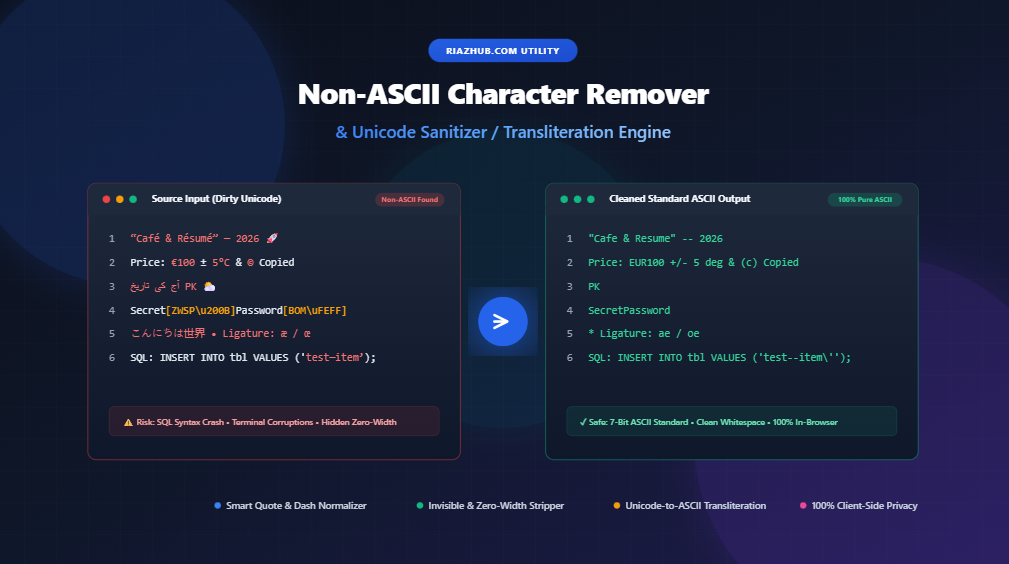
When sanitizing non-ASCII text, different use cases require different handling strategies. The RiazHub Non-ASCII Character Remover provides 4 specialized processing strategies:
Strategy 1: Strip / Delete Completely
This strategy removes every non-ASCII character entirely (/[^\x00-\x7F]/g). It is ideal when you strictly need English text, alphanumeric numbers, or standard ASCII code, and wish to drop foreign symbols, emojis, and unprintable glyphs.
Strategy 2: Transliterate to Closest ASCII Equivalent (Recommended)
Rather than discarding characters and losing meaning, transliteration converts foreign and typographic glyphs to their closest ASCII phonetic or semantic equivalent:
- Accented letters:
résumé➔resume,über➔uber,señor➔senor. - Smart quotes & dashes:
“quotes”➔"quotes",1990–2026➔1990-2026,word — separator➔word -- separator. - Currency & symbols:
€100➔EUR100,©➔(c),™➔(tm),25°C➔25 deg C. - Ligatures:
æ➔ae,œ➔oe,ß➔ss.
Strategy 3: Replace with Custom Placeholder
Substitutes every non-ASCII character with a designated placeholder character of your choice, such as a question mark (?), underscore (_), or space. This is helpful when you need to maintain visual notice of where non-ASCII characters originally occurred in fixed-width legacy files.
Strategy 4: Encode to ASCII Escape Sequences
Converts Unicode characters into ASCII-safe textual escape codes without losing the original underlying character:
- Unicode Hex (JavaScript/JSON):
\u00e9,\u201c - HTML Decimal Entity:
é - HTML Hexadecimal Entity:
é - URL Percent Encoding:
%C3%A9
Step-by-Step: Cleaning Text with RiazHub’s In-Browser Tool
You can sanitize unlimited text and documents in seconds with the online Non-ASCII Character Remover & Unicode Sanitizer utility:
- Paste or Upload Your Text:
Paste your source text directly into the left editor box, or drag and drop any plain text file (such as.txt, .md, .csv, .sql, .log, .json). - Choose Your Strategy:
Select whether to Strip completely, Transliterate to ASCII, Replace with a placeholder, or Encode into escape sequences. - Configure Fine-Grained Options:
Toggle options such as:- Normalize Smart Quotes & Apostrophes
- Normalize Dashes & Ellipses
- Remove Zero-Width & Invisible Characters
- Normalize Latin Accented Diacritics (NFD decomposition)
- Strip Control Characters (ASCII 0–31)
- Post-Sanitization Whitespace & Layout Cleanup:
Check options to Collapse Multiple Consecutive Spaces, Trim Leading/Trailing Line Spaces, Remove Empty Lines, or Clean Orphan Punctuation Lines to ensure the final output is neatly formatted. - Inspect Detected Characters:
Open the built-in Character Inspector Drawer to see a complete tag-cloud breakdown of every detected non-ASCII glyph, its hex code point (e.g.,U+201C), official Unicode name, and frequency count. - Copy or Download Cleaned ASCII:
Click Copy Output to copy the sanitized text to your clipboard, or click Download to save it as a clean.txtfile.
Why Privacy-First Client-Side Processing Matters
When sanitizing proprietary codebases, confidential customer lists, database backups, or API keys, security is paramount. Sending sensitive text to third-party web servers introduces severe data leakage and compliance risks (GDPR, HIPAA, SOC 2).
The RiazHub Unicode Sanitizer tool executes 100% inside your web browser using native JavaScript ES6+. No text, files, or data ever leave your computer or travel over the internet, guaranteeing complete data privacy.
Frequently Asked Questions (FAQ)
What is the difference between ASCII and UTF-8?
ASCII is a 7-bit standard that defines 128 specific English characters and control codes. UTF-8 is a variable-length character encoding system that encompasses over 1.1 million characters across all world languages, emojis, and symbols. The first 128 characters of UTF-8 are 100% identical to 7-bit ASCII.
Why are smart quotes and em-dashes considered non-ASCII?
Standard ASCII only includes straight quotes (", ') and simple hyphens (-). Word processors replace these with curly quotes (“ ”, ‘ ’) and em-dashes (—), which exist in the higher Unicode range (U+2018 to U+201F) and require multi-byte UTF-8 encoding.
Can I remove non-ASCII characters without losing accented letter sounds?
Yes! By using the Transliterate option in the Non-ASCII Character Remover on RiazHub, characters like é, ü, ñ are normalized into their base Latin equivalents e, u, n rather than being deleted.
How do I detect invisible zero-width spaces in my code?
Invisible characters (such as U+200B Zero-Width Space or U+FEFF Byte Order Mark) do not show up in regular text editors. Pasting your text into the online Non-ASCII Character Remover immediately flags these characters in the Invisible / Control Characters metric card and strips them automatically.