
The Ultimate Guide to Browser-Based Scratchpads: Fast, Distraction-Free Offline Note-Taking with Markdown and Zero Cloud Leakage
In an era dominated by heavy cloud-synced applications, intrusive sign-ups, and subscription models, a simple need often gets overcomplicated: jotting down a quick thought, drafting a code snippet, or organizing a daily to-do list without waiting for an app to boot or worrying about who owns your data. Discover why browser-based offline scratchpads are becoming the essential tool for developers, writers, and productivity enthusiasts.
Why Modern Note-Taking Needs a “Scratchpad” Approach
Modern productivity suites like Notion, Evernote, and Microsoft OneNote offer vast ecosystems with relational databases, team collaboration, and cloud sync. However, this power comes at a steep cost:
- Heavy Overhead & Latency: Opening a heavy desktop app or web portal just to paste a temporary API key or draft a quick thought causes unnecessary context switching.
- Privacy & Data Ownership Concerns: Storing sensitive credentials, confidential meeting transcripts, or proprietary code on third-party cloud servers introduces security risks and vendor lock-in.
- Distracting Clutter: Complex sidebars, endless nested folders, and sluggish rich-text editors break flow state and induce cognitive fatigue.
- Mandatory Logins & Paywalls: Needing to authenticate or renew subscriptions just to access your personal scratchpad interrupts urgent workflows.
A browser-based scratchpad solves these pain points by offering an immediate, lightweight canvas that launches in milliseconds, works completely offline, and stores data directly in your browser’s sandboxed storage. You can try it right now with the RiazHub Quick Notes & Scratchpad.
Core Advantages of Client-Side Web Storage (LocalStorage)
Unlike traditional web apps that transmit every keystroke to external APIs and databases, a privacy-first scratchpad leverages the browser’s built-in Web Storage API (localStorage):
| Feature | Cloud-Based Note Apps | Browser Offline Scratchpad (RiazHub) |
|---|---|---|
| Privacy & Telemetry | Data is indexed on remote servers; susceptible to data breaches and tracking. | 100% Client-Side: Zero data ever leaves your computer. |
| Startup Speed | Requires network handshakes, OAuth logins, and server sync (3–10 seconds). | Instantaneous (< 50ms): Ready before your next keystroke. |
| Offline Functionality | Frequently degrades or fails when network connection drops. | Native Offline: Functions fully without internet access. |
| Account Requirements | Mandatory email registration, passwords, and two-factor prompts. | Zero Friction: No account, no email, no subscription. |
| Export & Portability | Proprietary formats, complex exports, or paywalled bulk download. | Open Standards: Instant .txt, .md, and .json backups. |
Supercharge Your Workflow with Live Markdown & Interactive Checklists
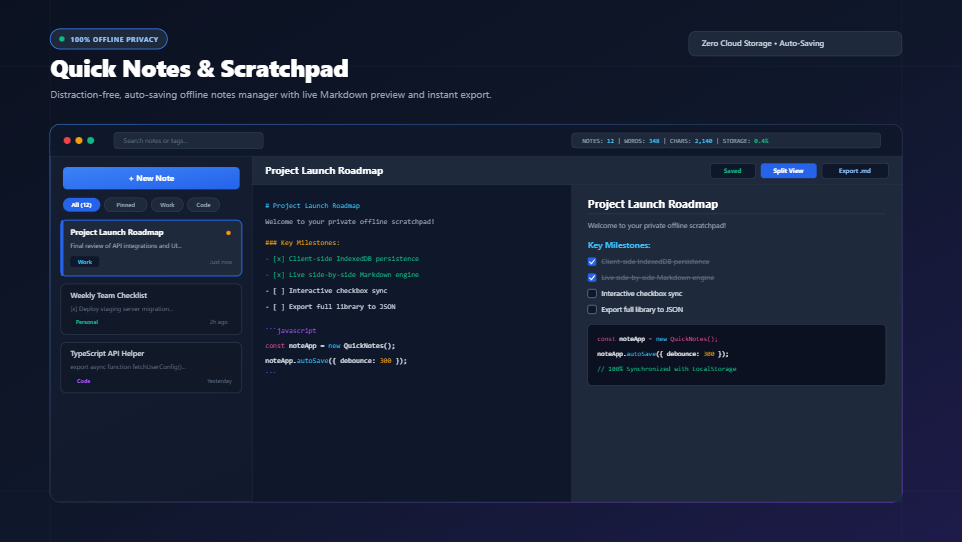
Plain text is lightweight, but Markdown makes it expressive. The Quick Notes & Scratchpad on RiazHub.com incorporates a real-time Markdown engine that converts simple punctuation into structured documents:
1. Live Split-View & Full Preview Modes
Switch effortlessly between Editor Only, Split View (Side-by-Side), and Live Markdown Preview. You can write raw markdown syntax on the left while monitoring formatted typography, styled code blocks, and blockquotes on the right.
2. Interactive Checklists (Bidirectional Sync)
Managing tasks is simple. Typing - [ ] Task name creates a to-do item. When switched to Preview or Split View, clicking on the interactive checkbox automatically updates the underlying markdown source text from - [ ] to - [x] in real-time, syncing your completed items instantly.
3. Code Blocks with Syntax Highlighting
Developers can wrap snippets in triple backticks (e.g., ```javascript or ```python) to preserve monospace indentation, special characters, and code formatting without fear of accidental auto-correct mangling.
Essential Keyboard Shortcuts for Power Users
Speed up your workflow with native hotkey integration built right into the editor:
Ctrl + S/Cmd + S: Instantly commits and flushes all changes to local storage with visual status feedback.Ctrl + N/Cmd + N: Creates a fresh, untitled note and focuses the title bar immediately.TabKey: Inserts clean 2-space code indentation instead of jumping focus outside the textarea.Enteron Lists & Checklists: Automatically continues the bullet point (-) or checklist (- [ ]) on the next line. PressingEntertwice cleanly terminates the list.
Organizing, Backing Up, and Migrating Your Notes
Local persistence gives you total autonomy over your data, which is why having rock-solid export and backup options is vital. The RiazHub Quick Notes tool provides multiple backup pathways:
1. Single Note Downloads (.txt and .md)
Need to attach your draft to an email or push documentation to a Git repository? Click Download .md or Download .txt to generate standalone files with proper headings and category metadata.
2. Full Library JSON Backups
Export your entire notes archive, custom category tags, color flags, and pinned states into a portable .json file with a single click. You can keep periodic backups in your local drive or cloud storage of choice.
3. Seamless JSON Restore & Text File Drag-and-Drop
Migrating to a new computer or switching browsers? Click Restore JSON to merge your backup archive seamlessly without losing existing notes. You can also drag and drop any .txt or .md file from your desktop directly onto the workspace canvas to import it into a new note instantly.
Frequently Asked Questions (FAQ)
Can anyone else read the notes I write on RiazHub?
No. The Quick Notes & Scratchpad operates 100% on client-side JavaScript. Your text never leaves your device and is never transmitted to or logged on any server.
Will I lose my notes if I close the browser tab or restart my computer?
No. All notes are saved automatically to your browser’s persistent localStorage cache. As long as you do not explicitly clear your browser’s site cookies and storage data, your notes will remain intact whenever you return.
How much storage space do I have available?
Modern web browsers allocate between 5MB and 10MB of local storage per domain. Because plain text is extremely compact, 5MB is enough to store hundreds of detailed articles, code snippets, and thousands of checklist tasks. The real-time storage meter in the header keeps you updated on your current utilization percentage.
Does the tool support Right-to-Left (RTL) languages like Arabic and Urdu?
Yes! Both the note title input and the main editor textarea include dynamic bidirectional text detection (dir="auto"), allowing seamless writing in English, Urdu, Arabic, Persian, Hebrew, or any mixed multilingual format.