
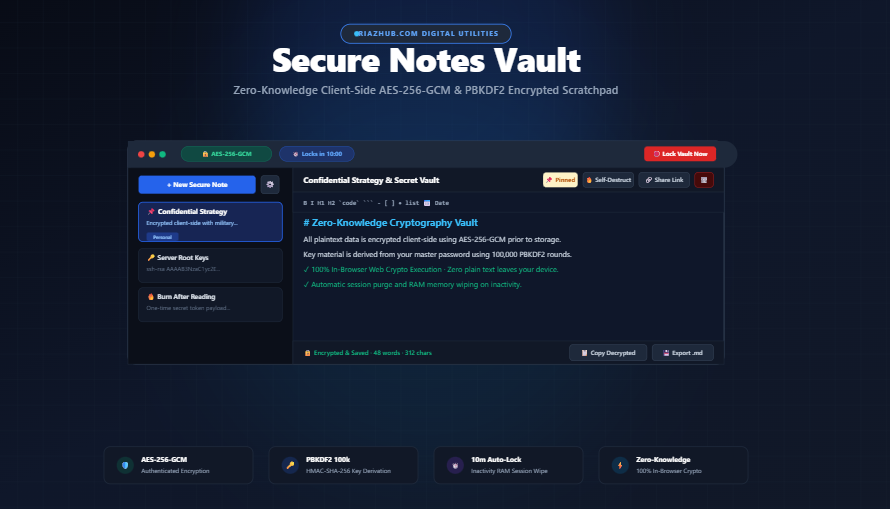
Zero-Knowledge Secure Notes: How Client-Side AES-256-GCM & PBKDF2 Protect Your Private Data
In an era of relentless data leaks, corporate surveillance, and database breaches, conventional cloud notes present a serious security liability. Traditional note-taking platforms often store your private credentials, recovery phrases, personal journals, and confidential drafts on remote servers where platform admins or compromised databases can inspect them. The permanent solution is true zero-knowledge cryptography implemented through the Secure Notes Vault on RiazHub.
🔒
Open Your Confidential Vault
Looking for a private, zero-knowledge workspace to store encrypted passwords, personal thoughts, and private keys directly inside your browser?
👉 Launch the Free Secure Notes Vault on RiazHub.com 100% in-browser Web Crypto API execution with zero server tracking and complete offline support.
What is a Zero-Knowledge Encrypted Notes Vault?
“Zero-Knowledge” architecture means that only you hold the master key to your confidential data. Neither the hosting provider, network eavesdroppers, nor malicious third parties can inspect, decrypt, or tamper with your records.
When using the Secure Notes Vault, your plain text data never travels over the internet. Instead, all cryptographic transformations happen entirely within your local browser thread using hardware-accelerated window.crypto.subtle primitives before being saved into local storage.
Cryptographic Architecture: How Your Data is Shielded
1. PBKDF2 Key Derivation (100,000 HMAC-SHA-256 Iterations)
Human passwords rarely provide enough raw entropy to serve directly as 256-bit encryption keys. To protect against brute-force attacks and GPU rainbow table lookups, the vault passes your master password through Password-Based Key Derivation Function 2 (PBKDF2):
- Cryptographic Salt: A unique 128-bit cryptographically secure pseudorandom salt is generated via
crypto.getRandomValues()during vault initialization. - 100,000 Iterations: The salt and password are processed through 100,000 computational rounds of HMAC-SHA-256, introducing a mathematical barrier that makes offline brute-force cracking prohibitively difficult.
2. Military-Grade AES-256-GCM Authenticated Encryption
The derived master key encrypts note payloads using Advanced Encryption Standard in Galois/Counter Mode (AES-GCM 256-bit):
- Confidentiality: Plaintext notes are transformed into undecipherable ciphertext.
- Integrity & Authenticity: AES-GCM generates a 128-bit authentication tag. If even a single bit of ciphertext is modified, decryption fails immediately to prevent malicious tampering.
- Unique 96-bit IVs: Every save operation generates a fresh Initialization Vector (IV) to eliminate pattern recognition across saved records.
Core Security Features of Secure Notes Vault
⏱️
Inactivity Auto-Lock
If your device is left unattended, an activity watcher automatically triggers a session wipe after 10 minutes (configurable to 1, 5, 15, 30 min, or off).
🛑
Panic Lock & RAM Purge
Clicking “Lock Vault Now” immediately purges all plaintext notes, buffers, and active cryptographic keys from browser memory (RAM).
🔥
Self-Destruct Notes
Mark confidential notes for self-destruction. Once exported or reviewed, the record is permanently deleted and scrubbed from storage.
🔗
One-Time Share Links
Generate standalone encrypted URLs where the decryption key lives strictly in the URL hash fragment (#secret=...), keeping keys private.
Experience these features directly in your browser with the RiazHub Secure Notes Vault.
Step-by-Step: How to Use Secure Notes Vault
Step 1: Set Your Master Password
Visit https://riazhub.com/secure-notes-vault. Create a strong Master Password. The built-in entropy meter calculates password complexity in real time.
Note: Because this is a true zero-knowledge utility, there is no password reset email or server recovery back-door. Make sure you remember your master password.
Step 2: Create & Organize Encrypted Notes
Click “New Secure Note” to create confidential notes. Tag records under categories like Passwords, Finance, Personal, or Code. You can also pin critical notes to the top of your sidebar.
Step 3: Write with Live Markdown & Split-View
Format notes effortlessly using standard Markdown syntax, interactive task checklists (- [ ]), code snippets, and headers. Switch between Edit, Split, and Preview modes at any time.
Step 4: Encrypted Backups & Device Portability
To transfer your encrypted notes to another browser or device, open Vault Settings (⚙️) and click “Export Encrypted Vault (.json)”. The encrypted backup can be safely moved across devices and restored with your original master password.
Frequently Asked Questions (FAQ)
Are my notes sent to any database or external server?
No. The tool operates 100% client-side within your browser sandbox. All encryption utilizes native Web Crypto API primitives, and no plaintext or ciphertext is transmitted to any server.
What happens if I lose my Master Password?
Under zero-knowledge AES-256-GCM encryption, lost passwords cannot be recovered by anyone. Setting a local password hint during vault creation is recommended to help remember your passphrase.
Does the vault work offline?
Yes. Once loaded, all encryption and note management features work completely offline without requiring an active internet connection.
Take Control of Your Privacy Today
Stop leaving sensitive credentials, API keys, and personal thoughts exposed in plain text. Experience instant, zero-knowledge security inside your browser.
Create Your Master Password
Choose a Master Password for your vault. Your notes are encrypted client-side using AES-256-GCM before saving.
🛡️ Zero-Knowledge Cryptography Standards & Privacy Architecture
window.crypto.subtle standard. Plaintext notes, passwords, and encryption keys never touch any server, database, or API.