
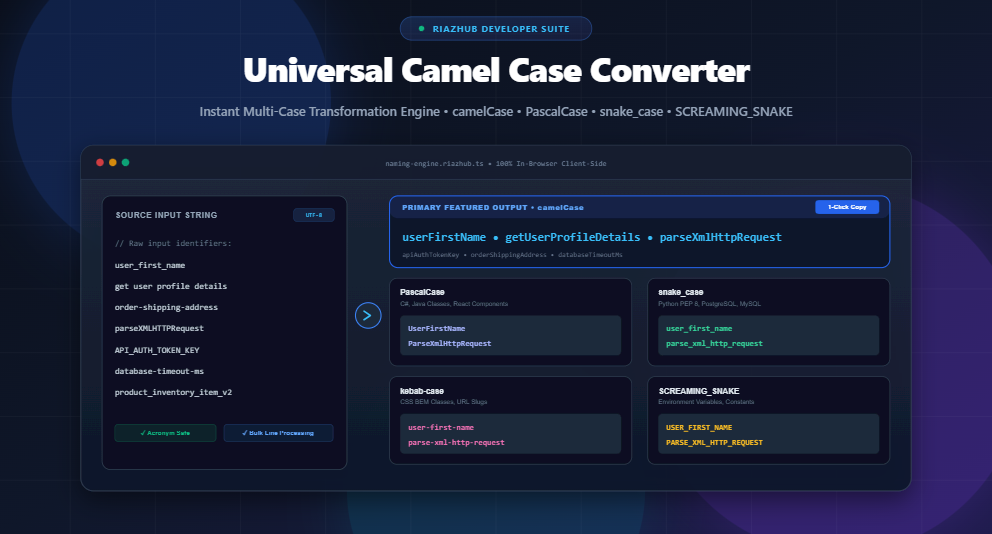
Universal Camel Case Converter & Developer Variable Naming Suite: The Complete Guide to Programming Casing Conventions, Identifier Tokenization, and Code Refactoring
1. Introduction: Why Variable Naming Conventions Matter in Software Engineering
In software development, source code is read far more often than it is written. Clean, predictable, and standardized naming conventions are the foundation of readable, maintainable, and self-documenting codebases. When code complies with clear stylistic rules, engineers can instantly deduce whether an identifier represents a local variable, a private function, a React component, a database column, or a globally immutable constant without navigating to its declaration.
However, cross-stack software development frequently requires bridging disparate naming ecosystems. A PostgreSQL database column written in user_billing_address must be mapped to a TypeScript ORM model as userBillingAddress, declared in a C# microservice as UserBillingAddress, exposed in a REST API query parameter as user-billing-address, and injected into an environment config as USER_BILLING_ADDRESS.
Manually rewriting, re-casing, and fixing delimiter errors across dozens or hundreds of variable names is slow, repetitive, and prone to costly runtime bugs. The Universal Camel Case Converter & Developer Variable Naming Suite eliminates this friction by instantly tokenizing strings and providing multi-case conversions in real time.
2. The Complete Taxonomy of Programming Casing Conventions
Different programming languages, frameworks, and database engines enforce distinct casing styles based on community idioms, syntax parsers, and historical precedent. Here is an overview of the primary casing formats supported by the tool:
| Naming Convention | Example Identifier | Delimiter / Rule | Primary Ecosystems & Use Cases |
|---|---|---|---|
| lowerCamelCase | userProfileData |
First word lowercase, subsequent words capitalized, no delimiters | JavaScript, TypeScript, Java variables/methods, Swift, Go, Kotlin |
| PascalCase (UpperCamelCase) | UserProfileData |
Every word capitalized, no delimiters | C#, .NET, Java classes, React JSX components, TypeScript types/interfaces |
| snake_case | user_profile_data |
All lowercase words separated by underscores (_) |
Python (PEP 8), Rust, Ruby, PostgreSQL, MySQL database schemas |
| kebab-case (lisp-case) | user-profile-data |
All lowercase words separated by hyphens (-) |
CSS selectors (BEM), HTML custom elements, REST URL slugs, Clojure |
| SCREAMING_SNAKE_CASE | USER_PROFILE_DATA |
All uppercase words separated by underscores (_) |
Environment variables (.env), Global constants, C/C++ macros |
| dot.case | user.profile.data |
All lowercase words separated by periods (.) |
Configuration keys, YAML paths, Java packages, i18n translation keys |
| path/case | user/profile/data |
All lowercase words separated by forward slashes (/) |
File system paths, REST API endpoint routes, Redux action types |
2.1 lowerCamelCase (JavaScript, TypeScript, Java, Swift)
camelCase (specifically lower camel case) starts with a lowercase letter for the initial word, followed by uppercase initial letters for each subsequent word without spaces or delimiters. It is the gold standard for variable names, object properties, function definitions, and class methods across JavaScript, TypeScript, Swift, and Java.
2.2 PascalCase / UpperCamelCase (C#, React Components, Java Classes)
PascalCase capitalizes the first letter of every single word, including the first word. In modern web development, PascalCase is mandatory for React component declarations (e.g., UserProfileCard) so JSX parsers can distinguish custom components from native HTML elements (e.g., <div>). It is also standard for class declarations in C#, Java, PHP, and Python.
2.3 snake_case (Python PEP 8, Rust, PostgreSQL, MySQL)
snake_case combines words using lowercase letters separated by underscores. It is enforced by Python’s official PEP 8 Style Guide for functions and variables, and is the universal standard for relational database tables and columns in PostgreSQL, MySQL, and SQLite.
2.4 kebab-case / lisp-case (CSS Selectors, HTML, REST Slugs)
Because CSS is case-insensitive and hyphens are valid identifier characters in stylesheets and HTML attributes, kebab-case is the dominant convention for CSS class names, BEM modifiers, URL slugs, and web component tags.
2.5 SCREAMING_SNAKE_CASE (Environment Variables, Constants)
SCREAMING_SNAKE_CASE uses capitalized characters separated by underscores. It serves as an immediate visual signal that a value is immutable, globally scoped, or sourced from system environment configurations such as API_SECRET_KEY or MAX_RETRY_COUNT.
2.6 dot.case & path/case (Object Configs, API Routing)
dot.case and path/case are specialized conventions used in hierarchical namespace definitions, Spring Boot property files, i18n translation lookup maps (e.g., dashboard.user.welcome_message), and modular file routing.
3. The Mechanics of Intelligent String Tokenization & Boundary Detection
Converting strings between different casings sounds simple on the surface, but naive splitters (like splitting only on spaces or hyphens) fail miserably when encountering real-world code strings. The RiazHub Camel Case Engine implements a deep tokenization pipeline designed to handle complex edge cases:
3.1 The Acronym Boundary Trap (XMLHttp, getUserID, URLParser)
A classic failure point in string converters is mangling compound acronyms. Consider the identifier parseXMLHTTPRequest:
- Naive Regex Split: Splits every capital letter, yielding
['parse', 'X', 'M', 'L', 'H', 'T', 'T', 'P', 'Request']→parse-x-m-l-h-t-t-p-request(Broken). - Intelligent Lookahead Tokenizer: Identifies consecutive capital letters followed by a lowercase word, yielding
['parse', 'XML', 'HTTP', 'Request']→parseXmlHttpRequest(Clean and readable).
3.2 Normalizing Multi-Delimiter Input Strings
Developers frequently deal with chaotic legacy strings mixing underscores, hyphens, periods, and forward slashes (e.g., api_v1-user.profile/avatar_url). The tokenizer normalizes all delimiter variations into uniform word tokens before applying formatting rules.
3.3 Unicode Character Safety & Special Symbol Stripping
Modern software supports internationalized strings. The converter uses Unicode-aware character matching (\p{L} and \p{N}) to ensure non-Latin characters are parsed safely while stripping invalid programming symbols (such as @, $, #, %, and !).
4. Industry Style Guides: How Major Languages Enforce Identifier Rules
Adhering to community-standard style guides prevents bikeshedding during code reviews and ensures consistency across large engineering teams.
| Language / Platform | Classes / Types | Variables / Properties | Functions / Methods | Constants |
|---|---|---|---|---|
| JavaScript / TypeScript | PascalCase |
camelCase |
camelCase |
SCREAMING_SNAKE |
| Python (PEP 8) | PascalCase |
snake_case |
snake_case |
SCREAMING_SNAKE |
| C# / .NET | PascalCase |
camelCase |
PascalCase |
PascalCase |
| Go (Golang) | PascalCase (Exported) |
camelCase (Unexported) |
PascalCase / camelCase |
camelCase / PascalCase |
| Rust | PascalCase |
snake_case |
snake_case |
SCREAMING_SNAKE |
5. 6 Real-World Developer Workflows for the Naming Suite
Here are six practical development scenarios where using the Universal Camel Case Converter saves hours of manual refactoring:
5.1 Refactoring Database Columns to TypeScript / GraphQL Interfaces
When generating TypeScript interfaces or GraphQL schemas from PostgreSQL table definitions, paste your list of snake_case columns directly into the converter to obtain clean camelCase model properties instantly.
5.2 Converting Prose Strings & Mockups into React Component Props
Copy feature requirements or Figma layer names (e.g., “User Profile Avatar Image”, “Is Billing Address Active”) and convert them into clean React props like userProfileAvatarImage and isBillingAddressActive.
5.3 Generating .env Configurations & Global Constants
Quickly convert camelCase application settings into standardized SCREAMING_SNAKE_CASE keys for Docker compose files, Kubernetes ConfigMaps, and .env.production files.
5.4 Transforming UI Design Tokens into CSS BEM Classes
Convert descriptive design tokens into kebab-case class names to maintain pristine CSS architectures and avoid capitalization mismatches.
5.5 Serializing and Normalizing API JSON Keys
Normalize mixed-case JSON payloads between backend microservices and frontend clients with one-click multi-format outputs.
5.6 Bulk SQL & CSV Migration Tokenization
Drop plain-text .sql, .csv, or .txt schema files directly into the converter’s drag-and-drop zone to process thousands of identifiers in parallel.
6. Step-by-Step Guide: How to Use the RiazHub Variable Naming Suite
Follow these simple steps to transform your identifiers:
- Open the Tool: Navigate to the Universal Camel Case Converter.
- Input Your Text: Type or paste your strings into the monospace input box, or click “Load Sample” to test predefined variable names. You can also drag and drop
.txtor.sqlfiles. - Select Quick Presets (Optional): Click any preset button (e.g., JS/TS, React/C#, Py/SQL, .ENV, CSS) to auto-configure optimal tokenizer flags.
- Configure Tokenizer Rules: Toggle options such as “Bulk Line Processing”, “Preserve Acronyms”, “Remove Special Characters”, or “Trim Leading Digits”.
- Copy or Export: Click the primary “Copy camelCase” button or select the individual copy icon next to PascalCase, snake_case, kebab-case, or SCREAMING_SNAKE_CASE. You can also export the results as a
.txtfile.
7. Zero-Server Privacy: 100% In-Browser Client-Side Execution
Engineering teams frequently handle proprietary source code, internal database schema definitions, API keys, and sensitive business logic. Sending code identifiers to third-party web servers creates severe data security and intellectual property risks.
The Universal Camel Case Converter operates with a strict zero-server privacy architecture. All regular expression parsing, word boundary tokenization, and casing transformations execute entirely inside your local web browser using native client-side JavaScript. No user data, strings, or file contents are ever transmitted over the network or stored on any server.
8. Frequently Asked Questions (FAQ)
What is the difference between camelCase and PascalCase?
In camelCase (lowerCamelCase), the first letter of the first word is lowercase (e.g., getUserName). In PascalCase (UpperCamelCase), the first letter of every word is capitalized (e.g., GetUserName). camelCase is typically used for variables and functions, while PascalCase is used for classes, types, and components.
How does the tool handle acronyms like API, JSON, and URL?
When the “Preserve Acronyms” toggle is enabled, acronyms retain their uppercase formatting (e.g., fetchAPIResponse). When disabled, acronyms are normalized to standard camelCase (e.g., fetchApiResponse), matching the Google JavaScript Style Guide.
Can I convert thousands of lines at once?
Yes. The tool includes a high-performance Bulk Processing Mode that iterates through multi-line lists, database dumps, or CSV columns independently while preserving line order.
Is my source code secure when using this tool?
Yes, 100%. All processing is executed locally in your browser via client-side JavaScript. Zero bytes of your text or files are transmitted to any remote server.
9. Conclusion & Try the Converter Online
Consistent identifier naming is critical for maintainable, professional software architecture. Stop wasting time manually formatting variable names across different programming languages and frameworks.
Experience fast, accurate, and completely private variable transformations with the free Universal Camel Case Converter & Developer Variable Naming Suite on RiazHub.
Universal Camel Case Converter
Convert strings, sentences, and multi-line lists into clean camelCase, PascalCase, snake_case, and other programming naming conventions in real time.
Source Input
UTF-8 ReadycamelCase Output
Programming languages adhere to strict identifier styling conventions to ensure codebase readability and maintainability:
| Casing Style | Example | Common Language & Ecosystem Usage |
|---|---|---|
| camelCase | userProfileData | JavaScript, TypeScript, Java/Kotlin methods, Swift, Go variables |
| PascalCase | UserProfileData | C#, .NET, Java classes, React Components, TypeScript Types/Interfaces |
| snake_case | user_profile_data | Python (PEP 8), Ruby, Rust, PostgreSQL, MySQL database columns |
| kebab-case | user-profile-data | CSS class selectors, HTML attributes, REST URL slugs, Lisp/Clojure |
| SCREAMING_SNAKE | USER_PROFILE_DATA | Environment variables (.env), Global Constants, C/C++ Macros |
Standard regular expression splitters often mangle compound acronyms (e.g., converting parseXMLHTTPRequest into parse-x-m-l-h-t-t-p-request). The RiazHub Universal Tokenizer uses Unicode-aware lookahead and lookbehind regex rules:
- Boundary Split:
parseXMLHTTPRequest→['parse', 'XML', 'HTTP', 'Request']→parseXmlHttpRequestorparseXMLHTTPRequest(when Acronym Preservation is active). - Delimiter Normalization: Handles mixed underscores, hyphens, periods, and forward/backward slashes automatically.
All tokenization, regex normalization, casing conversion, and text export operations execute 100% client-side inside your browser via native Web APIs. Zero text, database schemas, or proprietary code variables are ever transmitted to any remote server or third-party cloud analytics.