
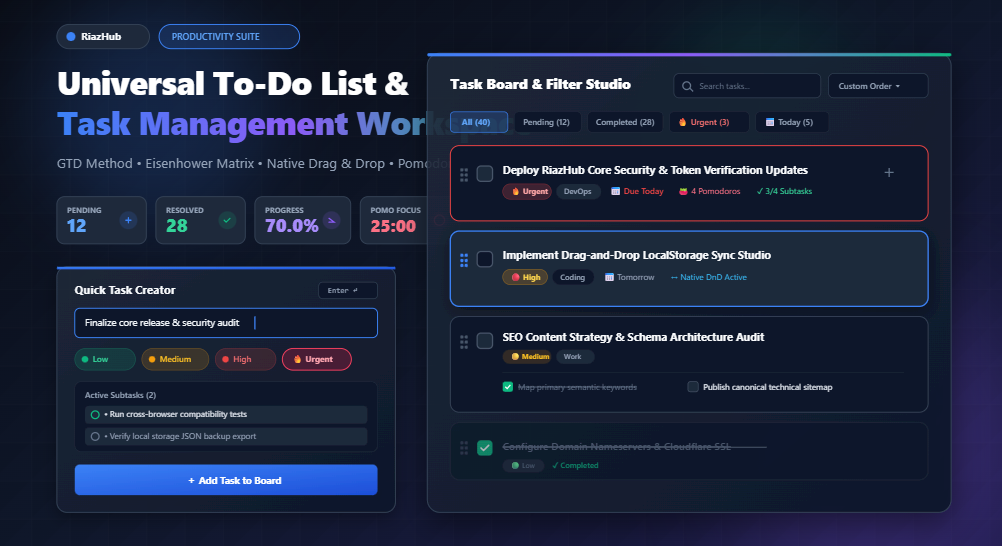
Master Daily Productivity: The Complete Guide to the Universal To-Do List & Task Management Workspace
Discover how combining the Eisenhower Priority Matrix, David Allen’s GTD methodology, native drag-and-drop reordering, and deep-focus Pomodoro intervals inside a 100% private, client-side browser environment can dramatically accelerate your daily throughput.
The Modern Productivity Trap: Why Most To-Do Apps Fail
Every professional has experienced the digital fatigue of modern software. You sign up for a project management SaaS promising effortless organization, only to be greeted by mandatory two-factor authentications, heavy page loads, confusing team-permission matrices, paywalled subtasks, and relentless subscription billing. Instead of getting work done, you spend twenty minutes managing the tool that was supposed to manage your work.
Worse yet, cloud-based task platforms store your most intimate thoughts, confidential corporate roadmap ideas, client deliverables, and personal routines on remote third-party databases subject to tracking, outages, and data breaches.
That is exactly why we created the Universal To-Do List & Task Management Workspace on RiazHub.com. Built from the ground up as an offline-first, zero-dependency browser utility, it pairs the raw speed of your local computer with time-tested productivity frameworks.
No registration forms, no cloud synchronizations, and no paywalls. You can launch the RiazHub To-Do List & Productivity Planner instantly in any desktop or mobile browser and start structuring your workflow in under ten seconds.
Core Architectural Pillars of the RiazHub Workspace
The Universal To-Do List App is divided into two harmonized panels designed to minimize context switching while maximizing execution clarity:
🎯 4-Tier Eisenhower Prioritization
Assign tasks to Low (🟢), Medium (🟡), High (🔴), or Urgent (🔥) badges to separate existential deadlines from trivial busywork instantly.
📋 Granular Subtask Checklists
Deconstruct intimidating projects into digestible milestones. Track real-time completion ratios (e.g. 3/5 subtasks completed) per card.
🖐️ Native Drag & Drop Reordering
Re-sequence your priorities dynamically using native HTML5 drag-and-drop. No bulky third-party scripts, lag, or layout jitter.
🍅 Embedded Pomodoro Focus Studio
Stay immersed in deep work with integrated 25-minute focus intervals, restorative 5-minute and 15-minute breaks, and harmonic audio chimes.
Furthermore, the header workspace features a live **Productivity KPI Grid** that calculates your active pending items, resolved tasks, percentage progress bar, and overdue deadlines in real time as you complete assignments throughout the day.
Proven Methodologies Built Right In
A task list is only as effective as the philosophy directing it. The online productivity planner at RiazHub natively empowers three of the world’s most celebrated productivity frameworks:
1. David Allen’s Getting Things Done (GTD®)
The human brain is optimized for thinking and problem-solving, not for storing reminders. The GTD methodology centers on capturing ideas external to your mind so cognitive bandwidth is preserved:
- Capture: When an email, chore, or project idea surfaces, type it into the quick task input and press
Enter. - Clarify: Define the physical next action. If a task requires multiple steps, click “+ Add Subtask” to outline the sub-actions.
- Organize: Assign tags like Work, Coding, Health, or Personal, along with target due dates.
- Reflect: Review your board each morning using the filter tabs (Due Today, High Priority).
- Engage: Work down the queue with zero ambiguity.
2. The Eisenhower Decision Matrix
Popularized by Dwight D. Eisenhower and Stephen Covey, this matrix categorizes obligations by urgency and importance:
- Urgent & Important (🔥 Urgent): Crises, immediate client blockers, server downtimes. Execute these immediately.
- Important, Not Urgent (🔴 High): Strategic initiatives, fitness, skill acquisition. Schedule these with calendar dates.
- Urgent, Not Important (🟡 Medium): Administrative emails, status inquiries, notifications. Batch them during designated time slots.
- Neither Urgent nor Important (🟢 Low): Low-value distractions. Defer or eliminate.
3. The Pomodoro Technique for Burnout Prevention
Multitasking is a myth that fragments attention and induces mental fatigue. Using the embedded Pomodoro timer inside the RiazHub To-Do List Workspace, you lock into 25 minutes of single-task execution. When the soft synthesized chime rings, take a 5-minute break. After completing a 4-cycle sprint, enjoy a 15-minute restorative recharge.
Why Browser LocalStorage Trumps Cloud Subscriptions for Daily Focus
Many users ask why we chose HTML5 LocalStorage persistence (riazhub_todo_tasks_v1) instead of a mandatory user login database. Here is how the client-side architecture stacks up against conventional cloud platforms:
| Feature Dimension | RiazHub Universal To-Do List | Conventional Cloud SaaS (Todoist, Notion) |
|---|---|---|
| Data Privacy | 100% Sandbox. Data never leaves your device. | Stored on external third-party cloud servers. |
| Offline Functionality | Works completely without an active internet connection. | Often degrades, loses sync, or locks out users. |
| Speed & Latency | Instant local memory reads (0 ms roundtrip). | Dependent on remote API latency & server health. |
| Cost & Access | Completely free forever. No paywalls or tiers. | Monthly recurring fee for subtasks, tags, and timers. |
| Data Portability | 1-Click JSON and CSV full-fidelity exports. | Proprietary exports, often locked behind premium plans. |
With the RiazHub Task Planner, you maintain absolute sovereignty over your workflow data. You can download a structured .json or .csv backup snapshot before clearing your browser cache, then restore your entire board on another laptop in a split second.
Step-by-Step: Crafting Your Perfect Daily Standup Routine
To get the highest return from the Universal To-Do List Workspace, follow this streamlined 5-minute morning routine:
- Load a Preset Template or Create Anew: If you are beginning a standard work day, click the 💼 Daily Work Routine chip on the preset bar. It automatically pre-populates standup syncs, inbox triage, and feature coding tasks.
- Add Your High-Stakes Task: Type your primary objective for the day into the input box. Select 🔥 Urgent or 🔴 High priority, set today’s due date, and estimate the required Pomodoros (e.g. 3 sessions = 75 minutes).
- Deconstruct with Subtasks: Add 2 to 4 bullet points under the subtask builder (e.g. “Draft outline”, “Write draft”, “Review citations”). Breaking the task into bite-sized actions eliminates procrastination.
- Trigger the Pomodoro Clock: Select your top card and click ▶ Start Focus on the Pomodoro module. Turn off browser notifications and work exclusively on that single task until the bell rings.
- Batch Operations & Markdown Export: At the end of the day, select your completed tasks with the batch selector to review your progress, or click 📋 Copy as Markdown to paste a beautifully formatted standup summary directly into Slack, Discord, or your personal journal.
Frequently Asked Questions (FAQ)
▼
▼
▼
▼
dir="auto"). When you type task titles in Arabic, Urdu, Hebrew, or Persian, text alignment adjusts smoothly without breaking card layouts or button alignment.Take Control of Your Time Today
Effective task management is not about working harder or packing more hours into your calendar—it is about establishing clarity, eliminating cognitive friction, and honoring deep focus.
Whether you are an engineer managing pull request reviews, a student preparing for comprehensive exams, a digital creator launching an online business, or simply managing a busy household, the Universal To-Do List & Productivity Planner at RiazHub.com gives you all the power of premium task suites with none of the bloat or privacy compromises.
Universal To-Do List & Productivity Planner
Organize daily tasks, manage subtasks, assign priorities, track deadlines, and monitor your completion rate in real time.
Add New Task Press Enter ↵
Productivity Frameworks & Time Management Guide
Master your daily flow using battle-tested productivity methodologies and privacy-conscious task tracking.
- Capture: Offload every thought, chore, or assignment into your to-do workspace immediately so your mind is freed from remembering.
- Clarify: Break large goals into concrete, actionable steps with granular subtasks.
- Organize: Categorize tasks by context (e.g., Work, Coding, Health) and assign priorities.
- Reflect: Review your pending tasks daily and adjust due dates during planning periods.
- Engage: Execute with uninterrupted focus on one single task at a time.
- Urgent & Important (🔥 Urgent): Crises, immediate deadlines, and blockers. Tackle these first.
- Important, Not Urgent (🔴 High): Strategic planning, skill development, and health. Schedule these with target due dates.
- Urgent, Not Important (🟡 Medium): Routine requests, interruptions, and administrative items. Automate or batch them.
- Neither Urgent nor Important (🟢 Low): Low-impact busywork. Review and delete or defer.
- Work uninterrupted for 25 minutes on a single priority task.
- Take a restorative 5-minute short break to stretch, hydrate, and relax your eyes.
- After 4 consecutive focus sessions (one full cycle), reward yourself with a restorative 15 to 30-minute long break.
- Use our integrated Pomodoro timer with soft audio chimes to stay in flow without external stopwatch apps.
riazhub_todo_tasks_v1). No tasks or confidential personal notes are ever transmitted to or stored on RiazHub servers. You can export complete JSON or CSV backups anytime to move your tasks between devices safely.