
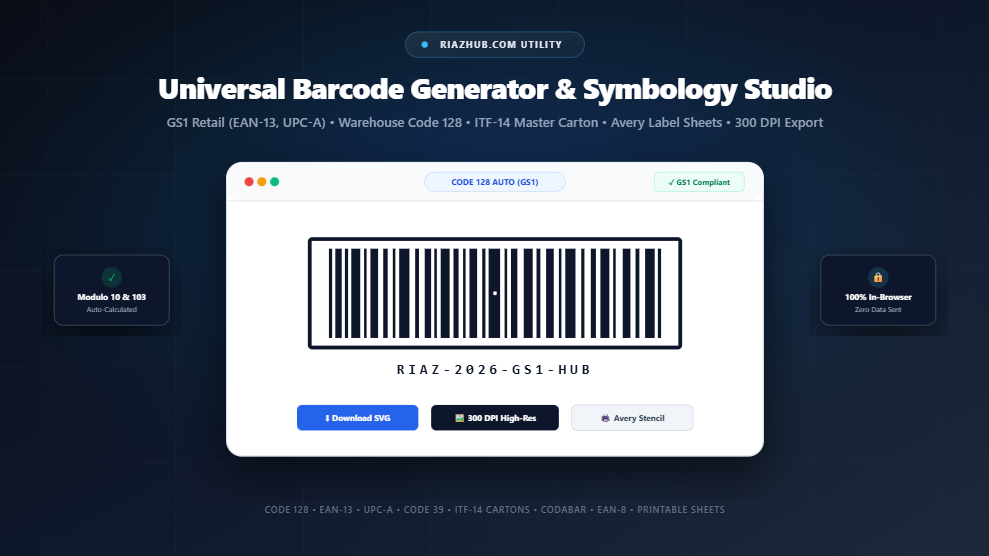
Universal Barcode Generator & Symbology Studio: The Complete Guide to Retail, Logistics, and Inventory Barcoding
In modern supply chain management, retail commerce, and automated warehousing, the linear barcode remains the undisputed backbone of product tracking and inventory control. Every day, tens of billions of barcodes are scanned across checkout counters, distribution centers, medical laboratories, and international freight shipping hubs worldwide.
Yet, generating barcodes that consistently scan without optical failures, compliance fines, or misreads requires a precise understanding of symbology architectures, checksum algorithms, quiet zone parameters, and print resolutions. To simplify this workflow for businesses, manufacturers, and developers, you can use the free online Barcode Image Generator & Symbology Studio to create GS1-compliant vector SVGs, 300 DPI print-ready stickers, and multi-label stencils directly inside your web browser.
Ready to generate custom barcode labels?
Generate Code 128, EAN-13, UPC-A, and ITF-14 labels with instant checksum calculation.
1. Understanding Barcode Symbologies: Choosing the Right Format
Not all barcodes are created equal. Different industries and scanning environments rely on specific mathematical symbologies designed for density, numeric efficiency, or optical fault tolerance:
Code 128 (Universal Alphanumeric)
The global standard for logistics, shipping labels (GS1-128), serial numbers, and internal warehouse bin tags. Automatically compresses consecutive digits to save up to 50% physical label width.
EAN-13 & EAN-8 (International Retail)
The mandatory point-of-sale retail standard across Europe, Asia, South America, and Africa. Features a built-in Modulo-10 checksum digit to prevent cashier checkout errors.
UPC-A (North American Retail)
The 12-digit standard product code for retail merchandise in the United States and Canada. Mathematically compatible with EAN-13 systems with seamless zero-padded recognition.
ITF-14 (Interleaved 2 of 5)
Engineered for corrugated cardboard packaging, master shipping containers, and pallet logistics. Includes heavy bearer bar frames to prevent partial or skewed scanner reads.
Code 39 (Industrial & Defense)
The historic workhorse of the automotive industry, aerospace, and the U.S. Department of Defense (MIL-STD-1189). Encodes uppercase letters, numbers, and punctuation.
Codabar (NW-7)
Standardized format for blood banks, healthcare specimen test tubes, FedEx airbills, and public library asset circulation tracking.
Whether you need a high-density warehouse label or an official supermarket SKU, the Barcode Image Generator & Symbology Studio allows you to toggle between all major formats with a single click and preview them live.
2. Deep Dive: How Code 128 Auto Subsets A, B, and C Work
Code 128 is defined under international standard ISO/IEC 15417. Its defining advantage over older formats like Code 39 is its ability to adapt dynamically to the characters you enter through three internal character sets:
- Subset A: Encodes ASCII control characters (such as Tab, Return, NUL), uppercase letters, numbers, and standard punctuation.
- Subset B: Encodes standard human-readable ASCII text, including lowercase letters (
a-z), uppercase letters (A-Z), numbers, and symbols. - Subset C: The high-efficiency dual-digit numeric mode. In Subset C, a single 11-module barcode symbol represents two consecutive numeric digits (
00through99).
When you input a SKU such as RH-20268842 into our universal barcode generation utility, the engine encodes RH- in Subset B, identifies the 8-digit sequence 20268842, switches into Subset C via code symbol 99, and encodes the digits as pairs: 20, 26, 88, and 42. This compaction reduces the physical barcode length significantly, making it ideal for compact medicine vials, electronic components, and product packaging.
3. The Mathematics of Check Digit Validation (Modulo-10 and Modulo-103)
A barcode that scans incorrectly is worse than having no barcode at all. To protect against scan errors caused by packaging smudges or printer head failures, modern symbologies embed mathematical check digits.
The GS1 Modulo-10 Checksum Algorithm (EAN-13, UPC-A, ITF-14)
The final digit of an EAN-13 or UPC-A barcode is never arbitrary it is calculated through a weighted sum formula:
- Write down the base digits from right to left (excluding the check digit).
- Multiply digits in odd positions by 3, and digits in even positions by 1.
- Sum all the products together.
- Calculate the check digit:
(10 - (sum % 10)) % 10.
Example: For the base 12-digit EAN
590123412345, calculating the weighted sum gives 73. To reach the next multiple of 10 (80), we need 7. The complete, scannable EAN-13 barcode is therefore5901234123457.
If you enter an incomplete or incorrect check digit, the built-in validator in our Barcode Image Generator tool flags the error instantly and offers a 1-click Auto-Fix Checksum button to ensure GS1 compliance.
4. Symbology Comparison Matrix
To help you select the exact format for your project, refer to the following symbology comparison table:
| Symbology | Supported Characters | Check Digit | Primary Industry Use Case |
|---|---|---|---|
| Code 128 | Full 128 ASCII (Letters, Numbers, Symbols) | Modulo 103 (Internal) | Logistics, GS1-128 Cartons, Asset Tracking |
| EAN-13 | Exactly 13 Numeric Digits | Modulo 10 (Required) | Global Retail Point of Sale (POS) |
| UPC-A | Exactly 12 Numeric Digits | Modulo 10 (Required) | US & Canadian Supermarket Retail |
| ITF-14 | Exactly 14 Numeric Digits | Modulo 10 (Required) | Corrugated Outer Shipping Containers |
| Code 39 | Uppercase A-Z, 0-9, Symbols (- . $ / + %) |
Modulo 43 (Optional) | Defense (DoD), Automotive Parts, Manufacturing |
| Codabar | Digits 0-9, Symbols, Start/Stop A-D | Self-Checking | Blood Banks, Libraries, Air Freight Waybills |
5. Critical Scannability Rules: Quiet Zones and Thermal Printer DPI
Even with valid data, poor physical design can prevent an optical CCD or laser scanner from decoding a barcode. Pay close attention to these two critical rules:
1. The 10× Module Quiet Zone Rule
The Quiet Zone is the blank white space on the left and right sides of the barcode. Optical scanners require this margin to detect where the background ends and the barcode starts. The GS1 standard requires a quiet zone of at least 10 times the narrow bar width (or a minimum of 2.5 mm / 0.1 inches). Never place text, borders, or company logos inside this quiet zone margin.
2. High-DPI Output for Thermal Label Printers
Direct thermal and thermal transfer printers (such as Zebra, Rollo, Brother, and Dymo) print through microscopic heating pins. If you print an anti-aliased, blurry JPEG, the fuzzy grey edges confuse the scanner. When printing labels, always export via Vector SVG or use the 300 DPI High-Res PNG download feature on the Barcode Studio utility on RiazHub.
6. How to Generate and Print Barcode Label Sheets (Step-by-Step)
Follow this simple walkthrough to generate individual or bulk barcode label sheets ready for Avery sticker paper:
- Open the Studio: Navigate to the RiazHub Barcode Image Generator & Symbology Studio.
- Choose a Preset or Symbology: Select from pre-configured presets (Retail Product, Warehouse Inventory, Master Carton, Compact Serial) or pick a custom symbology from the dropdown menu.
- Input Your SKU Data: Type your serial number, product SKU, or numbers. For multiple codes, switch to Batch Multi-Line / CSV mode and drop your inventory spreadsheet file directly into the browser.
- Customize Dimensions and Colors: Adjust narrow bar width (1px to 5px), barcode height, quiet zone margins, foreground bars color, and background transparency.
- Preview the Label Sheet: Click the Printable Label Sheet Stencil tab. Select your standard sheet layout (e.g., Avery 5160 30-up, Avery 5163 10-up, or European 24-up), adjust your repeat copy count, and inspect the live layout.
- Export or Print: Click Print Label Sheet Now to trigger the browser print dialog with pre-configured print CSS, or download crisp vector SVG and 300 DPI PNG assets for your graphic designer.
Start Creating Your Custom Barcodes Today
100% free, private, client-side processing with zero server tracking.
7. Privacy & Security: 100% In-Browser Client-Side Processing
Many online barcode generators upload your private product serial numbers, client tracking IDs, or confidential warehouse inventory codes to third-party web servers. This introduces data privacy risks and security liabilities for manufacturing businesses.
The Universal Barcode Generator at RiazHub.com executes all bit-pattern transformations, Modulo-10 checksum calculations, SVG vector markup generation, and canvas rendering entirely inside your browser using pure client-side JavaScript. No product codes or personal data ever leave your machine, guaranteeing total confidentiality.
8. Frequently Asked Questions (FAQ)
Can I use barcodes generated here for official retail supermarket sales?
Yes. The tool produces 100% GS1-compliant EAN-13 and UPC-A vector barcodes with accurate parity tables and Modulo-10 checksums. However, to sell products in major retail stores (such as Walmart, Amazon, or Carrefour), your company must first license official company prefix numbers through GS1.
What is the best barcode format for internal warehouse inventory?
Code 128 is the industry standard for internal warehouse asset tracking, parts inventory, and bin locations. It supports alphanumeric characters and compacts numbers automatically to save label space.
What are ITF-14 Bearer Bars and why are they needed?
Bearer bars are the thick black frame borders surrounding an ITF-14 barcode. They equalize printhead plate pressure when printing on rough corrugated shipping cartons and prevent optical scanners from reading partial codes when scanned at an angle.
How do I print barcodes on standard Avery sticky label sheets?
Switch to the Printable Label Sheet Stencil tab in the Barcode Generator Tool, choose Avery 5160 (30 labels per sheet) or Avery 5163 (10 labels per sheet), set your copy count, and click Print Label Sheet Now.
Universal Barcode Generator & Symbology Studio
Create GS1-compliant retail, logistics, and inventory barcodes with real-time checksum calculation, vector SVG rendering, and printable label sheets for RiazHub.com.
Barcode Input & Specs
Barcode Symbology Specifications & Scannability Guide
Code 128 is a high-density, variable-length linear barcode standard defined in ISO/IEC 15417. It supports all 128 standard ASCII characters across three internal sets:
- Subset A: High-priority control characters (NUL to US), uppercase letters, punctuation, and digits.
- Subset B: Complete standard alphanumeric ASCII including uppercase, lowercase letters, symbols, and numbers.
- Subset C: High-density dual-digit numeric compaction where two numeric digits (00-99) are packed into a single 11-module barcode symbol, cutting barcode label width by up to 50%.
Our client-side engine automatically analyzes your input payload and seamlessly switches between Subsets B and C to guarantee minimum physical footprint and maximum optical scanning speed.
Retail point-of-sale optical scanners rely on the GS1 standard Modulo-10 Check Digit to prevent misreads caused by smudges, scratches, or damaged packaging. The check digit is the final digit calculated as follows:
- Count digit positions from right to left (excluding the check digit itself), starting with weight 3, then alternating weight 1 and weight 3.
- Multiply each payload digit by its assigned weight and sum the products.
- The check digit is the smallest integer needed to round this sum up to the nearest multiple of 10: (10 - (sum % 10)) % 10.
If you enter 12 digits for an EAN-13, our tool computes and appends the 13th digit automatically.
A barcode's Quiet Zone is the blank, unprinted margin on the left and right sides of the symbol. Optical laser and CCD imaging barcode scanners need this high-contrast blank space to calibrate their optical baseline sensitivity before reading the first start bar.
According to GS1 standards, the minimum required quiet zone is 10 times the narrow bar width (or at least 2.5 mm). Always ensure high contrast (dark black bars against a bright white background) without any text, graphics, or borders encroaching on the quiet zones.
Direct thermal and thermal transfer printers (such as Zebra, Brother, Rollo, and Dymo) print using discrete thermal printhead pins. Printing low-resolution images with anti-aliasing can cause sub-pixel grey blurring, leading to fuzzy bar edges and scanner decode failures.
For best results:
- Use our Download SVG Vector button for infinite resolution rendering on standard vector desktop publishing software (Illustrator, InDesign, Word).
- Use our Download PNG (300 DPI) button, which uses crisp nearest-neighbor rasterization with zero anti-aliasing blur.
- Keep the narrow bar module width at integer multiples (2px, 3px) to match physical thermal printer dots.
All barcode bit-pattern calculations, checksum validations, SVG DOM generation, and PNG rasterizations occur entirely inside your browser using pure client-side JavaScript. Zero serial numbers, inventory SKUs, customer tracking IDs, or confidential product data are ever sent over the internet to any external server.