
How to Batch Crop & Smart Frame Images to Any Aspect Ratio in Your Browser (Fast, Free & 100% Private)
Cropping one image for Instagram is easy. Cropping fifty photos to a unified 1:1 square, 4:5 portrait, or 9:16 vertical video cover
while keeping every subject’s face centered used to require hours in Photoshop. Discover how the browser-based
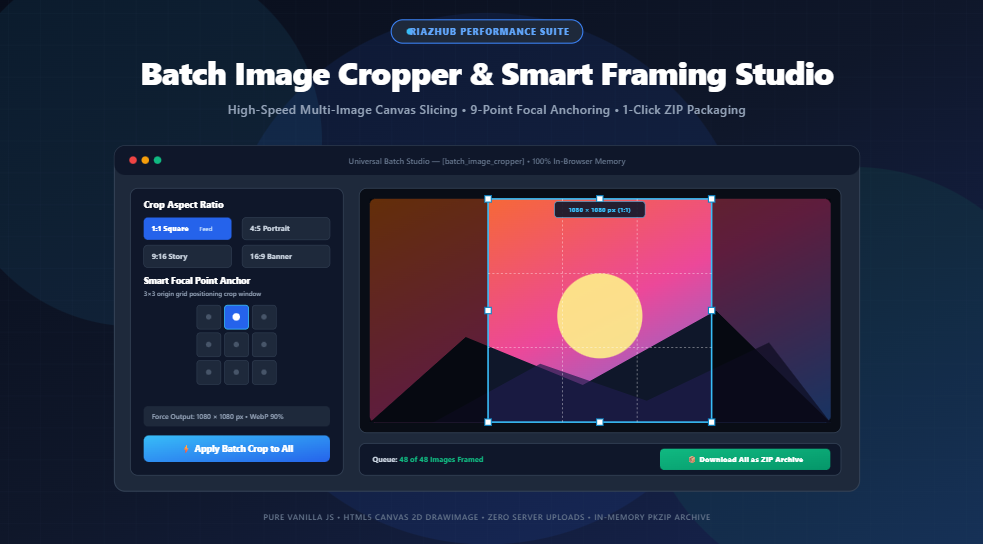
Universal Batch Image Cropper & Smart Framing Studio
on RiazHub unlocks simultaneous multi-image framing, focal anchoring, and 1-click ZIP export with 100% client-side privacy.
Upload up to 50+ photos to RiazHub’s instant browser studio and export high-res crops in seconds.
The Modern Multi-Platform Aspect Ratio Challenge
Digital marketing in 2026 is an aspect ratio labyrinth. The identical product photo or photoshoot master must be formatted
across multiple competing viewports before it can be published:
- Instagram Feed: Demands a 1:1 Square (1080 × 1080 px) or a taller 4:5 Portrait (1080 × 1350 px) to maximize vertical screen real estate.
- TikTok, Reels & YouTube Shorts: Require a full vertical 9:16 (1080 × 1920 px) frame with careful headroom compensation.
- YouTube & Web Headers: Require standard 16:9 Landscape (1280 × 720 px or 1920 × 1080 px).
- E-Commerce Stores (Shopify/WooCommerce): Mandate strict 1:1 square uniform canvases to keep catalog product grids aligned.
- Team Pages & Profiles: Require circular avatar masks with transparent backgrounds.
When creators attempt to resize these photos using basic converters, they encounter two severe pitfalls: either the image gets
squished and distorted, or automated center-crops decapitate heads and cut off product edges. With the
Batch Image Cropper & Smart Framing Studio,
smart focal point anchoring and synchronous batch templates eliminate this frustration forever.
Comprehensive Social Media & Web Aspect Ratio Cheat Sheet
Here is a quick reference guide matching standard digital media formats to their optimal canvas dimensions and focal anchors:
| Channel / Placement | Aspect Ratio | Target Resolution | Recommended Focal Anchor |
|---|---|---|---|
| Instagram Feed (Square) | 1:1 Square | 1080 × 1080 px | Center Alignment (50%, 50%) |
| Instagram Feed (Portrait) | 4:5 Portrait | 1080 × 1350 px | Top-Center (Preserves Faces & Headroom) |
| TikTok, Reels & Stories | 9:16 Vertical | 1080 × 1920 px | Top-Center or Center |
| YouTube Video Thumbnail | 16:9 Landscape | 1280 × 720 px | Center or Center-Right |
| Standard Blog Display | 4:3 Display | 1200 × 900 px | Center Alignment |
| Classic Photography | 3:2 35mm Frame | 1500 × 1000 px | Center Alignment |
| Profile Avatar Badge | 1:1 Circle Mask | 800 × 800 px | Top-Center to Center |
The RiazHub Batch Cropper
comes pre-configured with 1-click pills for all these standard ratios, plus full custom width-to-height ratio support.
Smart Focal Point Anchoring: How the 9-Box Grid Works
Why do traditional batch crop utilities fail? Because they assume the subject is always in the absolute dead center of the photo.
In fashion photography, portraiture, and commercial shoots, the subject’s face is almost always positioned in the upper third of the frame.
A generic center crop will inevitably sever foreheads or eliminate models’ eyes.
The 9-Point Origin Matrix
The Smart Framing Studio
introduces an interactive 3×3 anchor grid:
- Top-Center Anchors the crop window to the upper margin—essential for portrait photography, full-body outfit shots, and product bottles.
- Center Anchors the crop window symmetrically around both axes—ideal for logos, graphics, and centered product catalog photography.
- Bottom-Center Anchors the crop window to the ground baseline—ideal for footwear, automotive wheels, and architectural photos.
- Top-Left / Top-Right Anchors to off-center editorial compositions adhering to the photographic Rule of Thirds.
When you select an anchor point, the underlying mathematical routine dynamically computes the crop origin coordinates
(cropX, cropY) for every photo in your batch, irrespective of whether the original source files are wide panoramas or tall phone snaps.
Viewport Canvas Cropping vs. Superficial CSS Clipping
Many basic web tools claim to “crop” photos, but behind the scenes they merely apply a CSS rule like
overflow: hidden; object-fit: cover; inside a small thumbnail container. The entire 8MB photo still exists in memory,
and downloading the image produces the exact uncropped original file.
In contrast, RiazHub’s Universal Batch Cropper
executes genuine sub-pixel raster coordinate slicing using the native HTML5 Canvas 2D engine:
ctx.drawImage(sourceImage, sx, sy, sWidth, sHeight, 0, 0, targetWidth, targetHeight);
Every pixel outside your defined bounding box is permanently discarded before binary compression occurs.
This results in dramatic file size reductions, lightning-fast web performance, and the absolute guarantee that no uncropped
or sensitive background details remain embedded in the exported file.
Step-by-Step: How to Crop 50+ Images in Under 30 Seconds
- Load Your Images: Drag and drop multiple JPG, PNG, WEBP, AVIF, GIF, or BMP files into the dropzone on the
Batch Image Cropper.
(You can also click “Load Sample Batch” to test the tool instantly with rich demo graphics). - Choose Your Aspect Ratio: Select a preset pill such as
1:1 Square,4:5 Portrait,9:16 Story, or clickCustom Ratioto type your exact proportion. - Position Your Focal Anchor: Click the 9-box anchor grid to establish your crop origin (e.g., Top-Center for portraits or Center for products).
- Select Masking & Scaling (Optional): Want circular avatar badges for user profiles? Click
Circular Avatar. Want to force every output file to exactly 1080 × 1080 pixels? EnableForce Exact Output Dimensions. - Fine-Tune Individual Outliers: If one photo in your 50-image batch has an unusual composition, click “Edit Crop” on its thumbnail. This opens the Interactive Studio Modal, allowing you to drag the bounding box with 8 resize handles, align with Rule-of-Thirds grid lines, and rotate or flip the photo.
- 1-Click Batch Export: Click “Download All as ZIP Archive”. The in-memory PKZIP compiler packages all cropped images into a clean archive ready for instant download.
Zero-Dependency In-Memory PKZIP Packaging: Speed Meets Convenience
Downloading 40 cropped images one by one through browser prompt popups is tedious and triggers browser spam blocks.
To solve this, RiazHub’s engineering team
embedded a native, zero-dependency PKZIP binary generator directly inside the client-side JavaScript engine.
As each canvas finishes its sub-pixel crop, its binary Blob is converted into a Uint8Array byte stream.
The packager calculates the CRC-32 checksum, builds standard 30-byte local file headers and 46-byte central directory records,
and compiles a fully compliant .zip file right in your computer’s RAM. You get a single, organized archive with
zero external software required.
100% Client-Side Privacy: Why Zero Server Uploads Matter
In an era of cloud surveillance and automated web scraping, uploading sensitive personal photos, unreleased client creative assets,
or proprietary e-commerce merchandise to random web converters represents an unacceptable security risk.
The Universal Batch Image Cropper on RiazHub
operates on a strict zero-upload architectural mandate:
- Zero Server Transmission: Images are decoded exclusively by your browser’s local V8 JavaScript sandbox via
FileReader. - Zero Remote Storage: No photos, thumbnails, or metadata ever hit external servers or cloud buckets.
- Instant Cache Purge: When you close or refresh your browser tab, all allocated canvas memory is immediately reclaimed by your operating system.
You can even disconnect your Wi-Fi or turn on Airplane Mode after loading the page, and the cropping, framing, and ZIP download
routines will continue working at full speed.
Batch crop, frame, and export high-res images in seconds with zero uploads and complete privacy.
Universal Batch Image Cropper
Crop, frame, and resize multiple images simultaneously to standard social aspect ratios or custom pixel dimensions with live focal anchoring, interactive fine-tune editing, avatar masking, and 1-click ZIP export.
Your Batch Queue is Empty
Drag & drop photos above or click below to load high-resolution demo images to test aspect ratios and focal cropping immediately.
Cropping Optics, Social Dimensions & Focal Anchoring Reference
Choosing the correct aspect ratio ensures your photos are displayed cleanly across feeds without awkward platform letterboxing or unexpected automated center-crops:
| Platform & Media Type | Aspect Ratio | Recommended Resolution | Recommended Focal Anchor |
|---|---|---|---|
| Instagram Feed Post (Square) | 1:1 Square | 1080 × 1080 px | Center (50%, 50%) |
| Instagram Portrait Post | 4:5 Portrait | 1080 × 1350 px | Top-Center (Eyes & Faces) |
| TikTok, Reels & Stories | 9:16 Vertical | 1080 × 1920 px | Center-Top (Subject Headroom) |
| YouTube Video Thumbnail | 16:9 Landscape | 1280 × 720 px (or 1920 × 1080) | Center or Center-Right |
| Facebook & LinkedIn Link Post | 1.91:1 Banner | 1200 × 628 px | Center Alignment |
| Circular Profile Avatar | 1:1 Circle Mask | 800 × 800 px | Top-Center to Center |
The Rule of Thirds breaks an image into a 3×3 grid of 9 equal rectangles with four intersecting grid points. Psychological studies in visual perception show that a viewer’s gaze naturally gravitates to these intersection points rather than the dead center of a frame.
When using the Fine-Tune Studio, position your subject’s key focal points (such as eyes in a portrait, horizon in a landscape, or product highlights in ecommerce shots) along these golden intersection lines to create dynamic tension, balance, and professional photographic interest.
Unlike basic CSS cropping that merely hides pixels behind an overflow: hidden container while forcing visitors to download massive payloads,
Universal Batch Image Cropper executes genuine sub-pixel raster extraction using the 9-parameter HTML5 Canvas
drawImage(source, sx, sy, sWidth, sHeight, dx, dy, dWidth, dHeight) pipeline.
Extraneous pixel data outside your bounding box is completely discarded from the binary data stream, dramatically minimizing output file size, accelerating page load times, and ensuring that no uncropped background content is ever leaked.
Your privacy and media security are fully guaranteed. All operations—including image decoding via FileReader,
canvas coordinate slicing, shape masking, WebP/PNG compression, and multi-file PKZIP package compilation—are executed entirely
within your browser's local sandbox memory.
No images, metadata, product shots, or customer profile pictures are ever uploaded to, processed on, or cached by our servers or any third-party cloud.