
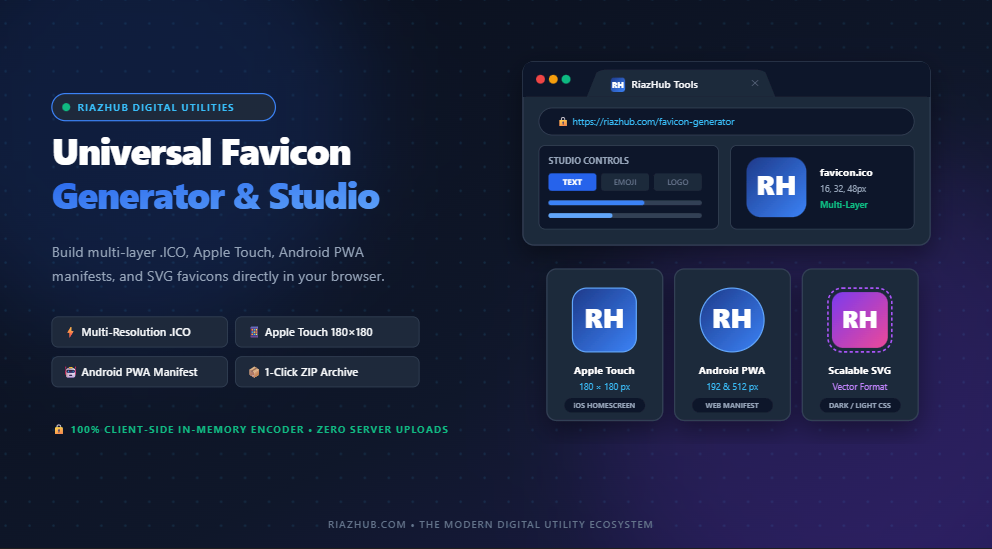
The Complete Modern Favicon Architecture Guide: From Multi-Resolution .ICO to Vector SVGs & PWAs
A website’s favicon is the single most frequently rendered branding asset on the internet. It sits inside the browser tab of every visitor, serves as the desktop bookmark anchor, identifies your domain in mobile Google Search Engine Results Pages (SERPs), and becomes the springboard application icon on iOS and Android devices. Yet, millions of websites still serve a single blurry 16×16 pixel bitmap or encounter 404 errors due to incomplete icon packages.
With modern cross-platform requirements spanning desktop browsers, high-density Retina displays, mobile home screen bookmarks, and Progressive Web Apps, creating a bulletproof icon suite requires more than just an image resizer. In this detailed guide, we will explore the complete favicon specification matrix, dissect multi-resolution binary ICO files, examine SVG favicons with dark mode support, and demonstrate how you can generate your entire web icon package in seconds using the free, in-browser Universal Favicon Generator & Creative Brand Icon Studio on RiazHub.
1. The Modern Cross-Platform Favicon Specification Matrix
Historically, webmasters uploaded a single favicon.ico file to the root of their web server and considered the job done. Today, operating systems, search engines, and web browsers look for specific icon resolutions depending on the user’s device and screen pixel density:
| File Name | Dimensions | Format | Primary Purpose |
|---|---|---|---|
favicon.ico |
16×16, 32×32, 48×48 | Binary ICO (Multi-layer) | Desktop browser tab strips, Windows shortcuts, legacy fallbacks |
favicon-16x16.png |
16×16 px | PNG-24 | Standard desktop browser tabs & bookmarks bar |
favicon-32x32.png |
32×32 px | PNG-24 | High-DPI / Retina desktop browser tabs & Safari pinned tabs |
apple-touch-icon.png |
180×180 px | PNG-24 | Apple iOS & iPadOS Home Screen bookmark icon |
android-chrome-192x192.png |
192×192 px | PNG-24 | Android Chrome web app shortcut & mobile PWA standard |
android-chrome-512x512.png |
512×512 px | PNG-24 | PWA splash screens, WordPress Site Icon Customizer standard |
favicon.svg |
Scalable Vector | SVG (XML) | Modern browser vector favicon with auto light/dark CSS switching |
When you build your brand icons with the Universal Favicon Generator tool on RiazHub, all seven of these resolution standards are calculated and synthesized simultaneously in memory, ensuring 100% compliance across every device.
2. Anatomy of a Multi-Resolution .ICO File
Many developers make the mistake of simply renaming a .png file to favicon.ico. While some forgiving browsers might still parse the file, legacy engines, command-line utilities, and Windows shortcuts will reject it as corrupt. A true .ico file is a compound binary container defined by Microsoft’s Icon Resource format.
The binary container begins with a 6-byte ICONDIR header specifying the image type (1 for ICO) and the count of embedded images. Following the header is a series of 16-byte ICONDIRENTRY structures detailing each icon’s width, height, bit depth (32-bit RGBA), exact byte size, and byte offset in the file. The RiazHub Favicon Generator uses JavaScript ES6 ArrayBuffer and DataView to assemble these exact binary headers on the fly without any server-side libraries.
By embedding 16×16 (for standard tabs), 32×32 (for Retina tabs), and 48×48 (for Windows taskbar shortcuts) inside a single file, the browser dynamically extracts the exact resolution required for the user’s display without fuzzy anti-aliasing or distortion.
3. Four Ways to Design Your Brand Icon in RiazHub Studio
Whether you are launching a SaaS startup, creating a personal blog, or refreshing an e-commerce storefront, the Favicon Generator and Brand Icon Studio provides four distinct design workflows:
Mode A: Text & Monogram Generator
Perfect for modern brands with two or three distinct initials (such as “RH”, “NY”, “AI”, or “99”). You can pick from premium typography including Inter, Montserrat, Poppins, Space Grotesk, and Playfair Display. Controls for font weight, scaling percentage, letter rotation, vertical alignment offset, and drop shadows give you total creative control.
Mode B: Emoji & Symbol Studio
Emojis provide instant visual familiarity. The studio includes a categorized emoji picker (Popular, Tech & Dev, Commerce, Creative, Nature, Symbols) and a live search filter. Whether you need a rocket (🚀), lightning bolt (⚡), gem (💎), or shield (🛡️), you can scale and center your emoji onto any custom background.
Mode C: Logo & Image Uploader
If your brand already has an established vector logo or high-resolution PNG/SVG/WEBP graphic, simply drag and drop it into the dropzone. You can zoom in/out (from 30% to 250%) and adjust horizontal/vertical pan sliders to frame your logo within the favicon boundaries.
Mode D: Geometric Badges & Emblems
For tech, security, or fintech projects, geometric badges provide a sharp, authoritative feel. Select from Hexagon, Shield, Diamond, Octagon, or Starburst shapes, customize the border thickness and color, and embed an inner icon or monogram.
4. Testing Before Deployment: Live Multi-Device Simulators
One of the most frustrating aspects of favicon development is deploying an icon only to discover that it looks unreadable or clipped inside a small browser tab. The Creative Brand Icon Studio solves this with live, real-time viewports:
- Google Chrome Desktop Tab Bar: Test your 16×16px icon inside an authentic browser window mockup, complete with light mode and dark mode toggles to verify contrast.
- Desktop Bookmarks Bar: See how your site’s favicon sits alongside other bookmarks in a horizontal browser bar.
- Google Search Engine Results Page (SERP): Preview how your favicon appears on mobile Google Search next to your URL breadcrumbs and page title.
- iPhone Home Screen Bookmark: Preview your 180×180px Apple Touch Icon displayed inside an authentic iOS squircle frame on a phone wallpaper mockup.
- Android Chrome New Tab Shortcut: Inspect your circular 192×192px shortcut icon for mobile Chrome.
5. Implementing the Favicon Code in Your Website <head>
Once you generate and download your package from the Universal Favicon Generator, extract the files and upload them to your website’s root directory. Then, copy and paste the following snippet directly before the closing </head> tag of your HTML or WordPress header.php:
<!-- Universal Favicon & App Icons (Generated via RiazHub.com) -->
<link rel="icon" type="image/svg+xml" href="/favicon.svg">
<link rel="icon" type="image/png" sizes="32x32" href="/favicon-32x32.png">
<link rel="icon" type="image/png" sizes="16x16" href="/favicon-16x16.png">
<link rel="shortcut icon" href="/favicon.ico">
<link rel="apple-touch-icon" sizes="180x180" href="/apple-touch-icon.png">
<link rel="manifest" href="/site.webmanifest">
<meta name="theme-color" content="#1e3a8a">
<meta name="apple-mobile-web-app-title" content="Your Website Name">
<meta name="application-name" content="Your Website Name">
Why the Order of Tags Matters
Web browsers evaluate <link rel="icon"> tags sequentially. By placing the modern scalable vector favicon.svg at the top, modern browsers render a razor-sharp vector icon that automatically inherits dark mode preferences via CSS. Next, the 32×32 and 16×16 PNG tags serve high-resolution displays. Finally, the legacy favicon.ico sits as a fallback for older desktop browsers.
6. How to Bust Aggressive Browser Favicon Caching
Web browsers cache favicons more aggressively than almost any other asset on the web. Chrome and Safari often retain a cached favicon for weeks, even after you have cleared your browser history. If you update your website’s favicon and don’t see the new icon appear immediately, follow these three proven troubleshooting techniques:
- Append a Query Parameter: Update the links in your
<head>with a version string, for example:href="/favicon-32x32.png?v=2". This forces the browser to bypass its local cache and fetch the new file. - Direct URL Hard Refresh: In Chrome, open a new tab and navigate directly to your favicon URL (e.g.,
https://yourdomain.com/favicon.ico) and press Ctrl + F5 (or Cmd + Shift + R on Mac). - Clear the Chrome Favicons Database: Advanced developers can navigate to
chrome://settings/clearBrowserData, check “Cached images and files”, and clear data from the past hour.
7. Total Privacy Guarantee: 100% In-Browser Icon Synthesis
Most legacy favicon tools upload your brand graphics, logos, and monograms to their cloud servers to generate resized files. This introduces unnecessary security and confidentiality risks for unreleased logos and proprietary brand assets.
The Universal Favicon Generator at RiazHub.com executes 100% within your client browser. Using HTML5 Canvas 2D rasterization, custom typed array binary encoders, and an in-memory PKZIP packager, your graphics never leave your computer. You get instant, zero-latency icon synthesis with complete confidentiality.
Frequently Asked Questions (FAQ)
/favicon.ico at your site root. Supplying a multi-resolution .ICO prevents 404 errors in your server logs.@media (prefers-color-scheme: dark). This allows the icon to automatically shift its stroke or background fill from dark to bright when the visitor toggles their operating system theme.Universal Favicon Generator & Icon Studio
Create custom website favicons from initials, emojis, or logos with multi-resolution .ICO binary packaging, PWA manifests, and live browser tab preview.
🎨 Creative Studio
Generate crisp browser favicons, Apple touch icons, and Android PWA manifests directly in your web browser with multi-resolution .ico packaging.
💡 Installation Guide: Paste these tags into your WordPress child theme's header.php right before the closing </head> tag, or use a header injection plugin. Place the generated icon files in your site root directory.
Favicon Specifications & Implementation Guide
Essential technical knowledge for webmasters, developers, and designers on browser standards, Progressive Web Apps, and caching rules.
favicon.ico binary container remains the bedrock of internet compatibility. Desktop browsers, legacy Windows taskbar shortcuts, bookmarks, and RSS readers expect a root /favicon.ico file. By bundling three distinct resolutions (16×16 for standard tab strips, 32×32 for high-DPI Retina screens, and 48×48 for desktop shortcuts) inside a single ICONDIR binary stream, your website displays sharp icons without fuzzy scaling or browser 404 console errors.
apple-touch-icon.png (the iOS SpringBoard automatically applies its iconic squircle curvature). Android PWA engines utilize the site.webmanifest file to discover 192×192px and 512×512px icons with purpose: "any maskable" for adaptive Android icon shapes.
<link> tags in the order they appear in the HTML <head>. To ensure modern browsers prioritize crisp vector SVGs and high-resolution PNGs over lower-resolution legacy ICO files, place your scalable vector icon first (type="image/svg+xml"), followed by your 32×32 and 16×16 PNG icons, and terminate with the fallback favicon.ico. Additionally, when updating an existing favicon, append a version query string (e.g. favicon-32x32.png?v=2) to immediately break aggressive browser cache retention.
ArrayBuffer/DataView binary spec, and an embedded native PKZIP packager. None of your image files, text inputs, or generated icon archives ever touch an external server or database.