
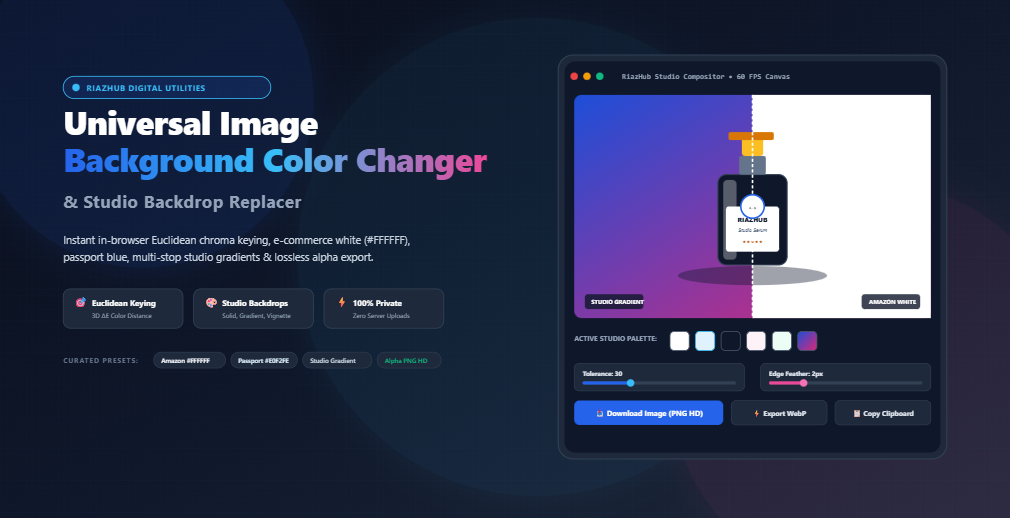
Universal Image Background Color Changer: Replace Photo Backdrops with Studio Colors, Gradients & Transparent Alpha in Your Browser
#FFFFFF), an official passport sky blue (#E0F2FE), or a vibrant studio gradien instantly elevates visual appeal and perceived credibility.
Historically, replacing a photo background required expensive desktop software licenses (such as Adobe Photoshop), complex pen tool clipping paths, or cloud-based AI subscription platforms that upload your private photos and proprietary product prototypes to third-party servers. Today, modern client-side web technologies enable instant, privacy-first backdrop replacement directly inside your web browser.
To provide creators, e-commerce sellers, and developers with a frictionless workflow, we built the Universal Image Background Color Changer & Studio Backdrop Replacer. In this detailed guide, we explore the mathematics of Euclidean color segmentation, examine how alpha feathering eliminates jagged halos, review marketplace background compliance standards, and walk through how you can achieve studio-grade composites in sub-millisecond speeds without uploading a single byte to an external server.
Why Backdrop Color Matters: Marketplace Standards & Identity Requirements
Background color is not merely an aesthetic choice; in many industries, it is an enforced operational standard. Let’s look at the primary use cases where backdrop replacement is indispensable:
- Amazon & Shopify Product Photography: Amazon’s product image guidelines strictly mandate that main hero listings must have a pure, uncompressed white background (RGB
255, 255, 255/ Hex#FFFFFF) with the product filling at least 85% of the frame. Off-white, yellowish room lighting, or textured walls can trigger immediate listing suppression. Sellers frequently use our online background color changer to turn raw product captures into compliant 1-click Amazon White images. - Passport, Visa & Government ID Headshots: Consulates and identity agencies have non-negotiable backdrop rules. United States passports require pure white or off-white, while numerous European, Asian, and Commonwealth jurisdictions mandate a calibrated light blue backdrop (such as Hex
#E0F2FE). Replacing busy domestic backgrounds with uniform tones saves applicants time and costly rejections. - Social Media & Brand Avatars: High-impact creator avatars (for YouTube, LinkedIn, X, and Instagram) stand out in crowded feeds when set against vibrant 2-tone gradients, high-contrast neon backdrops, or subtle studio vignettes.
- Catalog Consistency: Multi-vendor retail stores need uniform backdrops across hundreds of product SKUs shot under differing ambient studio conditions.
The Mathematics of Chroma Keying: Euclidean RGB Color Distance (ΔE)
How does a web browser distinguish between a subject (such as a shoe, a cosmetic bottle, or a person) and its surrounding studio backdrop? Rather than simple string-based color matching, the engine operates inside the 3-dimensional Cartesian coordinate system of the standard sRGB color cube.
The 3D Color Distance Formula
Every pixel $P$ in an uploaded photograph has an intensity value for Red, Green, and Blue, ranging from 0 to 255: $(R_p, G_p, B_p)$. When you select a target background color using the interactive eyedropper $(R_t, G_t, B_t)$, the compositor calculates the Euclidean distance between the two 3D vectors:
In this space, the theoretical maximum possible distance between opposite corners (pure black 0,0,0 and pure white 255,255,255) is:
When you adjust the Color Tolerance Slider on the RiazHub Background Replacer from 1 to 100, you are dynamically tuning the spherical acceptance radius around the target color. Any pixel whose distance falls within this radius is segmented out as background.
Solving Edge Halos: Alpha Feathering and Color Spill Suppression
One of the most common flaws in amateur background removal is the presence of harsh, pixelated “cookie-cutter” edges or colored halo fringes. Let’s look at how our client-side compositor solves both issues:
1. Alpha Feathering Falloff
Real-world cameras capture subjects with anti-aliasing—a subtle transition zone of intermediate pixels along the subject’s silhouette. If you apply a binary cutoff (either 100% opaque or 100% transparent), fine hair strands, fabric textures, and curved edges become jagged.
The Edge Feathering Slider creates a continuous transition ramp. For pixels lying between the strict tolerance threshold $T$ and the feathered boundary $T + F$, the alpha channel is calculated proportionally:
This generates buttery-smooth, anti-aliased contours that blend seamlessly into whatever new backdrop color or gradient you choose.
2. Ambient Light Bounce & Spill Halo Suppression
When a physical product is photographed against a solid studio backdrop (e.g., bright green, studio grey, or white), light rays bounce off the background and reflect onto the subject’s edges. This physical phenomenon is known as chroma spill.
When you enable Clean Edge Halos (Spill Suppression) inside the tool, the algorithm inspects transitional boundary pixels and replaces lingering keyed tint reflections with neutral luminance values. This completely eliminates ugly greenish or whitish fringes, producing an authentic studio-quality composite.
Exploring the 4 Studio Backdrop Fill Modes
Depending on your project requirements, the Universal Image Background Color Changer offers four distinct compositing modes:
| Fill Mode | Features & Controls | Primary Application |
|---|---|---|
| 🎨 Solid Studio Color | Full Hex color picker, RGB/HSL controls, and 1-click curated studio swatches (E-Commerce White #FFFFFF, Off-White #F8FAFC, Amazon Grey #F1F5F9, Passport Blue #E0F2FE, Studio Dark #0F172A, Pastel Pink #FDF2F8). |
Amazon marketplace listings, official visa photos, Shopify catalogs, and clean corporate headshots. |
| 🌈 2-Tone Linear Gradient | Color 1 & Color 2 pickers, 360° directional angle slider, color swap button, and 1-click curated gradients (Sunset Glow, Ocean Wave, Neon Aura, Soft Lavender, Golden Hour). | SaaS marketing banners, social media thumbnails, product hero shots, and creative posters. |
| 💡 Studio Radial Spotlight | Center core light color, outer vignette edge color, and spotlight radius control (20% to 120%) creating genuine photographic falloff. | High-end luxury cosmetic bottles, tech gadgets, automotive captures, and editorial portraits. |
| 🏁 Transparent Alpha (Checkerboard) | Clears all keyed pixels down to 0 alpha for pure cutout transparency, supporting lossless PNG HD export. | Sticker creation, UI graphic assets, overlaying products onto website layouts, and video overlays. |
Interactive Comparison Studio: 4 Inspection Views
Fine-tuning edge tolerance requires detailed visual feedback. The tool provides four dedicated viewport modes on its interactive stage:
- Interactive Stage & Live Render: High-resolution canvas rendering the transformed image with real-time backdrop changes. When using the interactive eyedropper, a 96px magnification loupe zooms in to sample individual raw pixel coordinates.
- Split-Screen Before/After Slider: An interactive vertical divider that you can drag left and right to inspect the raw original photograph on the left versus the new background composite on the right.
- Side-by-Side Dual View: Places the original source image and the final composite next to each other for side-by-side marketing audits.
- Isolated Subject Mask: A high-contrast binary silhouette view (white subject over solid black) that reveals edge imperfections, clipping gaps, or missed background regions.
In-Browser Client-Side Processing vs. Cloud AI Removers
Why do thousands of privacy-conscious creators prefer the RiazHub Image Background Color Changer over commercial cloud services? Here is how the two paradigms compare:
| Feature / Metric | RiazHub In-Browser Compositor | Third-Party Cloud AI Services |
|---|---|---|
| Data Privacy & Confidentiality | 100% Private: Zero bytes leave your browser. Processing runs entirely in local RAM. | High Risk: Photos are uploaded and stored on remote third-party cloud servers. |
| Processing Latency | Sub-Millisecond: Real-time 60 FPS slider adjustments on HTML5 Canvas. | Slow: 5 to 15 seconds per image for network upload, queueing, and download. |
| Cost & Paywalls | 100% Free Forever: No subscription, no watermarks, no credit deductions. | Paid credits, monthly recurring subscriptions, or resolution caps. |
| Export Resolution | Original Native Resolution: Exports at the exact width and height of the uploaded file. | Often downsizes free exports to 0.25 megapixels (e.g. 500×500 px) unless paid. |
| Output Formats | Lossless PNG, modern WebP (with quality slider), and photo JPEG. | Typically limited to single compressed format. |
Step-by-Step Guide: How to Change Your Image Background Color
Follow this quick 4-step workflow to achieve flawless studio composites in seconds:
- Step 1: Ingest Your Source Image: Open the Universal Image Background Color Changer. Drag and drop any PNG, JPG, WEBP, AVIF, BMP, or SVG photo into the upload dropzone. You can also click “Select Image”, paste an image from your clipboard (
Ctrl+V), or click “Load Sample” to test with our high-resolution cosmetic bottle demo photo. - Step 2: Key Out the Existing Backdrop: If your image is already a transparent PNG, the tool automatically disables chroma keying. For flat studio photos, click “🎯 Pick Color to Replace” and click any background area on the canvas. Adjust the Tolerance slider (typically between 20 and 35) until the background vanishes cleanly.
- Step 3: Choose Your New Studio Backdrop: Click between Solid, Gradient, Spotlight, or Transparent Alpha tabs. Choose an Amazon `#FFFFFF` white, an ID `#E0F2FE` blue swatch, or customize your own multi-stop gradient with dynamic lighting angles.
- Step 4: Export in High Definition: Select your preferred export format (Lossless PNG HD, modern WebP, or JPEG), fine-tune the optional site branding watermark or filename prefix, and click “Download Image” or “Copy to Clipboard” for instant pasting into Photoshop, Figma, or your CMS.
Frequently Asked Questions (FAQ)
Can I export images with a 100% transparent background?
Yes! Simply switch the backdrop mode tab to “🏁 Alpha” and choose PNG (Lossless) as your target export format. The keyed background color will be cleared to zero alpha, producing a crisp transparent cutout ideal for graphic design and web assets.
Does this tool reduce or compress the resolution of my photo?
No. Unlike cloud-based background removers that downsample high-resolution photos to low-res previews, the RiazHub Background Color Changer renders and exports at the exact native dimensions ($W \times H$) of your original input file.
How does the tool ensure my private photos remain secure?
The tool uses HTML5 Canvas, the JavaScript File API, and client-side memory buffers. Zero image data is ever transmitted across the internet to any server, guaranteeing complete privacy for sensitive identity documents, private headshots, and unreleased commercial products.
What is the best background color for Amazon marketplace listings?
Amazon’s official seller requirements mandate pure white with Hex code #FFFFFF (RGB: 255, 255, 255). You can apply this with a single click using the “📦 Amazon & Shopify White” preset profile.