
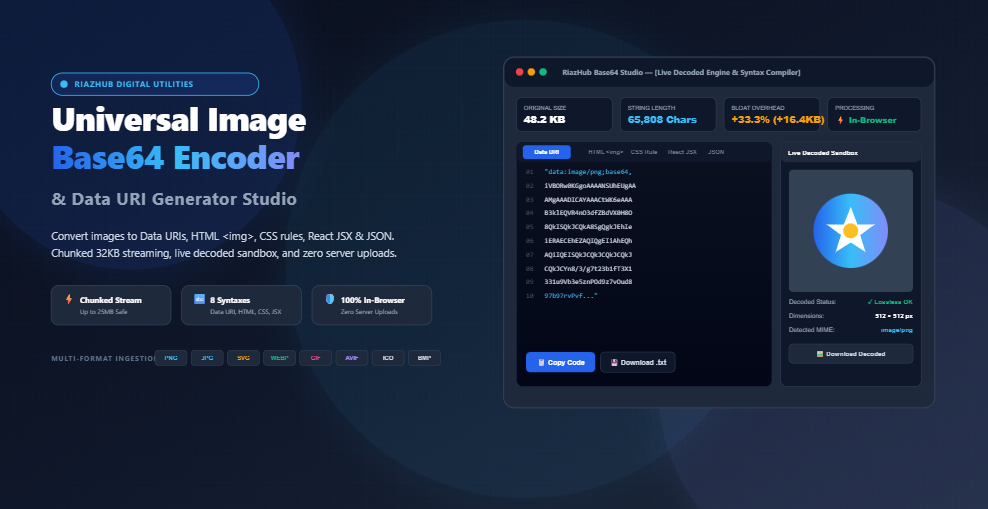
Universal Image Base64 Encoder: Convert Images to Data URIs, HTML & CSS In-Browser
The solution? Base64 Data URIs. By translating raw image binary bytes into ASCII text strings, developers can embed graphics directly inside HTML markup, CSS rules, React components, and JSON payloads. This eliminates HTTP round-trips and guarantees that crucial visual assets render instantaneously the second your markup or stylesheet arrives.
However, generating clean, syntactically correct Data URIs manually is cumbersome, and legacy web tools often upload your confidential files to remote servers or crash when handling high-resolution images. To provide engineers, designers, and web creators with an ultra-fast, secure workflow, we built the Universal Image Base64 Encoder & Data URI Generator Studio. In this comprehensive guide, we examine the mathematics behind radix-64 binary encoding, evaluate when inlining assets outperforms external files, break down 8 ready-to-copy code syntaxes, and demonstrate how you can convert images to Base64 completely in-browser with zero server uploads.
What is Base64 Encoding and How Do Data URIs Work?
Base64 is a binary-to-text encoding scheme designed to represent arbitrary binary data such as image pixels, vector paths, or compiled executables using a restricted set of 64 ASCII printable characters. Traditional communication protocols (including SMTP for email, HTTP headers, and early HTML parsers) were designed primarily for 7-bit or 8-bit text. When raw binary data containing non-printable or control characters is transmitted through text channels, characters can be corrupted or stripped by protocol proxies.
A Data URI (Uniform Resource Identifier) is a standardized scheme defined in RFC 2397 that allows resource files to be embedded inline into web documents using the following uniform syntax:
For instance, a tiny 16×16 transparent PNG icon embedded as a Data URI looks like this:
When the browser engine encounters this string inside an <img src="..."> attribute or a CSS background-image: url(...) property, it does not send an outbound network packet. Instead, its internal rendering engine decodes the ASCII payload directly from memory and paints the bitmap onto the viewport without delay. You can generate these strings instantly using the online image to Base64 converter.
The Mathematics of Base64: Why Does File Size Increase by +33.3%?
One of the most frequent questions developers ask is: “Why is my Base64 string larger than the original image file?” The answer lies in the fundamental arithmetic of digital information storage:
1. The 8-Bit to 6-Bit Translation
Standard computer files are composed of 8-bit bytes ($2^8 = 256$ possible values per byte). Base64, however, restricts its alphabet to only 64 safe characters:
- 26 Uppercase letters:
A–Z(Indices 0–25) - 26 Lowercase letters:
a–z(Indices 26–51) - 10 Numerical digits:
0–9(Indices 52–61) - 2 Special symbols:
+(Index 62) and/(Index 63) - 1 Padding character:
=(Used to pad incomplete 24-bit chunks)
Because $2^6 = 64$, each Base64 character can store exactly 6 bits of information. To translate 8-bit bytes into 6-bit characters, the algorithm bundles three consecutive 8-bit binary bytes ($3 \times 8 = 24\text{ bits}$) and partitions them into four 6-bit chunks ($4 \times 6 = 24\text{ bits}$):
| Metric | Original Binary Image | Base64 Encoded Output |
|---|---|---|
| Bit Width per Unit | 8 bits per byte | 6 bits per character |
| Quantum Group Size | 3 bytes (24 bits) | 4 characters (24 bits) |
| Mathematical Size Ratio | $1.0\times$ ($100\%$) | $4/3\times \approx 1.3333\times$ ($133.3\%$) |
| Inherent Overhead Bloat | Baseline | +33.33% file size inflation |
Because every 3 bytes of raw image binary turn into 4 characters of text, the payload size mathematically increases by exactly one-third (+33.33%). When you paste an image into the RiazHub Base64 Studio, the integrated KPI calculator automatically displays the exact original binary byte count, the resulting Base64 string length, and the precise bloat percentage in real time.
Multi-Syntax Output Engine: 8 Formats for Every Development Stack
Copying a raw Base64 string is rarely enough; developers need immediate, copy-paste-ready code tailored to their specific programming language or framework. The universal image encoder provides 8 instant syntax generators:
| Syntax Format | Code Structure | Primary Use-Case |
|---|---|---|
| 1. Standard Data URI | "data:image/png;base64,iVBOR..." |
Direct HTML attribute binding, CSS variables, web workers, and canvas image source assignments. |
| 2. Raw Base64 Payload | iVBORw0KGgoAAAANSUhEUg... |
Database BLOB text storage, AWS S3 / Cloudflare worker API payloads, and raw cryptographic hashing. |
| 3. HTML <img> Element | <img src="data:image/png;base64,..." alt="..." width="64" height="64" /> |
HTML email newsletters, standalone documentation pages, and static portfolio prototypes. |
| 4. CSS Background Rule | background-image: url('data:image/svg+xml;base64,...'); |
Inlined UI icons, custom dropdown arrows, input validation indicators, and button textures inside CSS stylesheets. |
| 5. React / JSX Image | <img src="data:image/webp;base64,..." alt="Icon" width={32} height={32} /> |
Next.js, Vite, and Gatsby frontend components requiring self-contained zero-dependency icon rendering. |
| 6. SVG <image> Embed | <image href="data:image/png;base64,..." width="100" height="100" /> |
Embedding bitmap raster logos or watermarks directly inside vector SVG illustrations. |
| 7. Markdown Image |  |
GitHub README files, Notion exports, Jira documentation, and standalone technical research notes. |
| 8. JSON Data Object | { "filename": "...", "mimeType": "image/png", "dataUri": "..." } |
RESTful API image uploads, GraphQL mutations, and client-to-server microservice data transfer. |
Each format includes customizable options, such as single versus double quote wrapping, automatic natural dimension extraction (width & height), custom alt text injection, and line-break minification.
When to Use Base64 Data URIs vs. External Files: Architectural Decision Matrix
Because Base64 strings carry a +33.3% size penalty and cannot be cached independently from their parent document, engineering teams must know when to inline and when to link external files. Use this strategic decision matrix when designing your web asset pipeline:
| Asset Category | Recommended Strategy | Technical Rationale |
|---|---|---|
| Micro-Icons & Chevrons (< 4 KB) | Inline Data URI in CSS | Eliminates HTTP roundtrips for above-the-fold interface chrome. Prevents icon “flicker” while stylesheets load. |
| HTML Email Newsletters | Inline Data URI in HTML | Ensures logos and headers display immediately, bypassing strict spam filters and disabled external image fetching in email clients. |
| Website Favicons (< 2 KB) | Inline Data URI in <link> | Injecting <link rel="icon" href="data:..."> guarantees instant browser tab icon display without requesting /favicon.ico. |
| Hero Banners & Product Photos (> 50 KB) | External File (WebP / AVIF) | Large Base64 strings bloat HTML/CSS files, delay DOM parsing, increase memory consumption, and cannot be cached by CDN edge nodes. |
| Multi-Page Shared Icons | External SVG Sprite | If an icon appears across 50 different site pages, linking an external cached SVG file allows visitors to download it once and reuse it everywhere. |
To optimize payload sizes before encoding, the RiazHub Base64 Studio includes an optional Pre-Compression & Downscaling Engine. You can downscale dimensions to maximum pixel thresholds (such as 1280px, 800px, or 128px) and convert uncompressed PNGs to modern WebP with adjustable quality sliders before generating your string.
Overcoming Large File Limits: 32KB Chunked ArrayBuffer Streaming
In standard JavaScript, naive binary conversion routines often rely on btoa(String.fromCharCode.apply(null, uint8Array)). While this approach works fine for tiny 2KB icons, attempting to encode a 5MB, 10MB, or 25MB photograph will instantly throw a fatal error:
This crash occurs because JavaScript engines limit the number of arguments that can be passed to a function call stack (typically around 65,536 elements in V8). When an array of 5,000,000 bytes is unpacked as arguments, the browser call stack overflows.
Our Data URI generator solves this using chunked byte streaming. By slicing the Uint8Array buffer into safe 32KB (0x8000 byte) slices, the engine processes high-resolution images smoothly without freezing the browser thread:
function bufferToBase64Chunked(buffer) {
const bytes = new Uint8Array(buffer);
const chunkSize = 0x8000; // 32,768 bytes per slice
let binary = ”;
for (let i = 0; i < bytes.length; i += chunkSize) {
const chunk = bytes.subarray(i, i + chunkSize);
binary += String.fromCharCode.apply(null, chunk);
}
return window.btoa(binary);
}
This architecture guarantees rock-solid reliability whether you are encoding a 500-byte favicon or a 25-megabyte high-resolution DSLR photograph.
Step-by-Step Walkthrough: How to Encode Images in Seconds
Here is how you can use the RiazHub Base64 Studio to convert your graphics:
- Ingest Your Image: Drag and drop your image file (PNG, JPG, SVG, WEBP, GIF, ICO, AVIF, BMP) onto the dropzone, click “Select Image File(s)” to upload from disk, press
Ctrl+Vanywhere on the page to paste a screenshot directly from clipboard memory, or click “Sample SVG” to test instant conversion. - Select Your Export Syntax: Choose your target syntax pill tab (Data URI, Raw Base64, HTML <img>, CSS Rule, React JSX, SVG <image>, Markdown, or JSON), or select a 1-click preset profile (such as Inline CSS Icon or HTML Email Asset).
- Inspect Diagnostics & Bloat: Review the 4-card analytics KPI grid to verify original binary size, generated character count, and the exact byte bloat inflation.
- Verify in Decoded Sandbox: Switch to the Live Decoded Preview Stage to verify rendering fidelity against a transparent checkerboard canvas with interactive zoom controls (50%, 100%, 200%, Fit).
- Copy or Download: Click Copy Code for instant clipboard export with animated confirmation, download the string as a standalone
.txtfile, or use Download All as ZIP when processing multiple batch files at once.
Privacy First: Why 100% Client-Side In-Browser Processing Matters
Most free online utilities send your uploaded files to external PHP servers, cloud buckets, or analytics platforms. When converting proprietary brand logos, confidential screenshots, corporate presentation graphics, or sensitive identity documents, uploading files to remote servers introduces serious security and GDPR compliance risks.
The Universal Image Base64 Encoder on RiazHub.com executes 100% inside your local browser memory. Using native HTML5 FileReader, ArrayBuffer, and Blob APIs, zero bytes leave your machine. It operates completely offline, protects your intellectual property, and delivers instant execution with zero server latency.
Frequently Asked Questions (FAQ)
Can I convert SVG vector files to Base64 Data URIs?
Yes. The tool natively supports SVG vector ingestion. It sniffs the image/svg+xml MIME type, encodes the vector XML markup into Base64, and compiles valid CSS background rules or HTML image tags. For SVGs, you can also use raw URL-encoded strings, but Base64 guarantees safe cross-browser character compatibility inside CSS stylesheets.
Does Gzip or Brotli compression reduce Base64 bloat?
Yes. When Base64 strings are embedded inside HTML or CSS files served with Gzip or Brotli compression over HTTP/2 or HTTP/3, the compression algorithm recognizes repetitive character patterns and reduces the transfer size significantly. However, once the browser decompresses the text into memory, the full decoded byte size is restored in the DOM tree.
Can I convert multiple images simultaneously?
Absolutely. You can drag and drop multiple image files at once into the Base64 Batch Queue. The tool processes every file concurrently, displays thumbnails with individual copy and download actions, and features a pure JavaScript ZIP generator to download all encoded text files in a single archive without external libraries.
What is the maximum file size supported?
Because the conversion runs locally in browser memory with chunked 32KB buffer slicing, the tool effortlessly handles files up to 25MB. For optimal web performance, however, we recommend inlining assets under 10KB and using external files for larger photography.
Universal Image Base64 Encoder
Convert images to Data URI strings, HTML embed tags, CSS backgrounds, and JSON objects with instant syntax formatting and live decoded preview in real time. 100% private client-side binary processing.
// Upload or drop an image to generate Base64 formatted code...
Base64 Encoding Mathematics, Data URIs & Web Performance Guide
A–Z, lowercase a–z, numbers 0–9, plus + and /, with = for padding).
Because 4 characters are required to represent every 3 original bytes, the ASCII payload mathematically increases in size by exactly 4/3 = 133.33% (+33.3% bloat). Adding the MIME header prefix (data:image/png;base64,) adds an extra 20–35 bytes.
- Micro-icons and Critical Above-the-Fold UI: Embedding small icons (< 2KB to 8KB) directly inside your critical CSS stylesheet eliminates additional HTTP network roundtrips, speeding up First Contentful Paint (FCP).
- Single-File HTML & Email Templates: HTML newsletters and standalone offline reporting dashboards benefit from self-contained image data that renders without external asset hosting or broken image links.
- Favicons: Direct injection into
<link rel="icon" href="data:...">without requiring a separate web server request. - JSON API Payloads: Seamlessly uploading or exchanging avatars, digital signatures, and thumbnails via REST or GraphQL JSON payloads without multipart form data.
FileReader, Uint8Array chunking, and modern web APIs.
Zero user photos, proprietary vector trademarks, identity documents, or encoded payloads are ever uploaded to RiazHub or external third parties.