
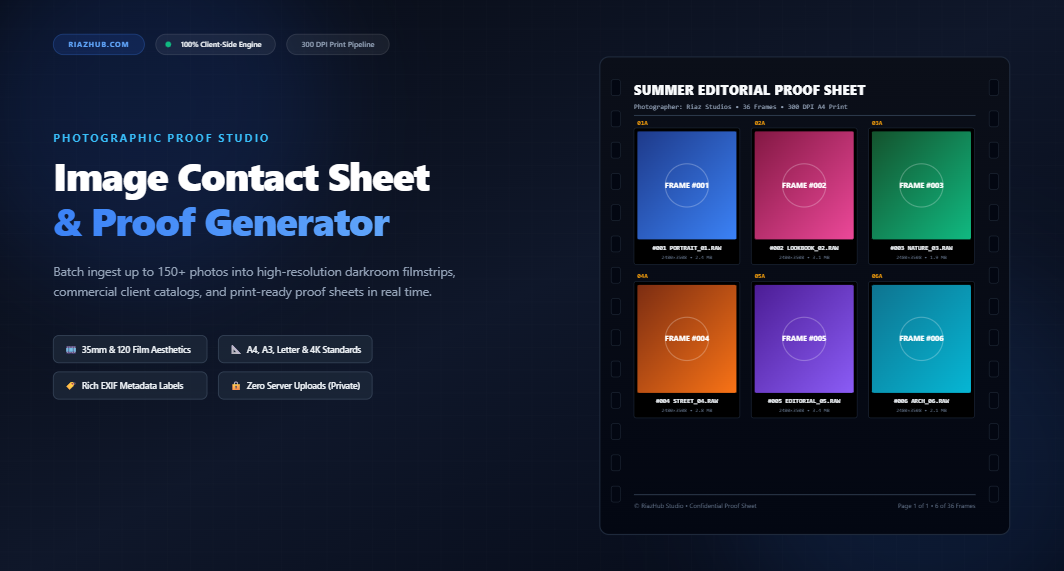
Mastering Image Contact Sheets: The Complete Guide to High-Resolution Proof Sheets for Photographers & Creators
Whether you are curating a 500-shot commercial fashion campaign, archiving rolls of scanned 35mm film, or delivering select proofs to a wedding client, presenting photography in an organized, bird’s-eye format is an indispensable skill. In the film era, darkroom masters laid physical negative strips directly onto photographic paper to inspect an entire roll in a single glance. Today, that analog workflow has been revolutionized in your browser.
With the new Image Contact Sheet & Proof Sheet Studio on RiazHub, you can compile up to 150+ raw or export photos into immaculate, print-ready 300 DPI proof sheets, complete with camera metadata, analog film sprockets, and client approval checkboxes—entirely client-side with zero cloud uploads.
What Exactly Is an Image Contact Sheet?
In photographic terminology, a contact sheet (often referred to as a proof sheet or thumbnail catalog) is a structured matrix of miniature photographic frames arranged in orderly rows and columns across a single page or canvas.
Historically, the term originated because negative strips were placed in direct physical contact with photographic printing paper under an enlarger light inside a darkroom. A single exposure produced 1:1 scale positive proofs of every negative on a 36-frame roll of 35mm film or a 12-frame roll of 120 medium format film. Legendary photojournalists at Magnum Photos and world-renowned studio portraitists used grease pencils to mark their chosen “selects”, highlight crops, and rate exposures.
In the digital age, creating these sheets traditionally required firing up heavyweight desktop applications like Adobe Bridge, Lightroom, or Photoshop, wading through complex PDF export dialogs, and waiting for heavy rendering queues. With our dedicated Universal Image Contact Sheet Generator, this entire pipeline runs instantaneously inside your web browser at zero cost.
Why Modern Photographers & Art Directors Still Rely on Proof Sheets
In a world of infinite cloud storage and rapid-fire social feeds, you might ask: why do modern visual creators still need contact sheets? Here are five decisive industry reasons:
1. Faster Curation & Sequence Selection
Viewing photos one by one in a fullscreen slideshow causes “visual fatigue”—you quickly lose the visual memory of how frame #014 compares to frame #022. Seeing all frames simultaneously on a grid lets your eyes scan across subtle differences in model gaze, lighting shifts, and micro-expressions across bursts.
2. Frictionless Client Approvals & Proofing
Clients are frequently overwhelmed when handed a cloud folder containing hundreds of full-resolution loose files. A single A4 or US Letter contact sheet—exported with sequence indexes (#001, #002) and filenames—gives clients a professional, easily shareable reference document where they can mark their preferred selects without downloading gigabytes of data.
3. Commercial Archive & Print Documentation
Design agencies, photo archives, and art galleries print physical proof sheets to insert into job jackets and negative sleeves. Having physical 300 DPI sheets on archival paper creates a permanent, tangible offline catalog that outlives hard drive crashes and defunct file formats.
4. Aesthetic Darkroom & Portfolio Presentation
There is an undeniable romantic aesthetic to traditional 35mm film edge rebates, sprocket perforations, and frame numberings like 01A, 02A. Editorial magazines and Instagram lookbooks frequently incorporate vintage contact sheet layouts as stylish behind-the-scenes portfolio spreads.
Understanding Print Resolution: The Crucial 300 DPI Standard
One of the most common pitfalls when creating proof sheets using casual online collage tools is resolution collapse. A web collage rendered at 1080p will look fuzzy and unreadable when printed on an office laser or commercial inkjet printer.
The RiazHub Contact Sheet Studio calculates pixel dimensions adhering strictly to international 300 DPI (Dots Per Inch) standards:
- A4 International Print (300 DPI):
2480 × 3508 pixels(approx. 8.7 Megapixels). Ideal for worldwide studio prints, European portfolio books, and standard office binders. - US Letter (300 DPI):
2550 × 3300 pixels(approx. 8.4 Megapixels). The standard document size across North America. - A3 Large Portfolio Proof (300 DPI):
3508 × 4960 pixels(approx. 17.4 Megapixels). Perfect for agency review boards, exhibition planning, and dense 36-frame rolls. - US Tabloid 11×17 (300 DPI):
3300 × 5100 pixels. Designed for large-format agency pitches and spreads. - 4K UHD Digital Proof (16:9):
3840 × 2160 pixels. Optimized for digital presentations, retina client displays, and client video meetings. - Continuous Auto-Fit Canvas: Automatically calculates exact canvas height based on your total photo count and column configuration, preventing clipped images or wasted space.
At 300 DPI, even miniature metadata labels—such as camera shutter speeds, filenames, and sequence badges—render with razor-sharp vector clarity on physical paper.
Exploring the 4 Distinct Photographic Aesthetic Themes
Different photography genres require different proofing presentations. The online contact sheet utility offers four distinct aesthetic themes:
🎞️ 1. 35mm Analog Darkroom Filmstrip
Inspired by classic black-and-white film stocks like Kodak Tri-X 400 and Ilford HP5 Plus. It features a deep dark slate backdrop (#0B0F19), simulated edge sprocket holes, frame numbers (01, 01A, 02), and authentic analog film rebate markings (KODAK SAFETY FILM, DX CODE 400/27°). Perfect for street photography, film scans, and vintage editorial projects.
📷 2. Medium Format 120 Proof
Emulates Hasselblad and Mamiya 6×6 and 6×7 medium format roll film proofs. Framed in deep black borders with minimalist inspection badges and red grease-pencil select indicators, this theme delivers an unmistakable art-director studio feel.
⚪ 3. Modern Studio Clean
A crisp, high-key white aesthetic (#FFFFFF) with razor-thin frame borders and contemporary sans-serif typography. Recommended for commercial product photography, e-commerce lookbooks, corporate headshots, and high-end fashion shoots where neutral color evaluation is critical.
📰 4. Editorial Portfolio Catalog
Designed for wedding photographers, fine-art showcases, and magazine pitch decks. Features generous outer margins, elegant serif header typography (Playfair / Georgia style), and interactive client approval checkboxes ([ ] Approve) under every frame.
Fit Aspect Ratio vs. Uniform Crop: Which Should You Choose?
When compiling photos shot in mixed orientations (vertical portraits mixed with horizontal landscapes), grid alignment requires deliberate geometric consideration:
Fit Aspect Ratio (Letterbox)
This strategy scales each image so that 100% of the photograph fits inside the designated grid cell without cropping away any pixels. If an image has a different ratio than the cell box, subtle background letterboxing appears. Recommended for technical proofing, composition evaluation, and archival records.
Cover / Uniform Crop
This strategy scales each photo to completely fill the rectangular cell box, evenly clipping edges when aspect ratios differ. This produces an impeccably uniform, magazine-style mosaic grid. Recommended for client summary decks and lookbooks where visual rhythm matters most.
Square Crop (1:1 Center Cut)
Centers every photo into a perfect 1:1 square. Outstanding for Instagram curation, profile grids, and thumbnail galleries.
Step-by-Step Tutorial: How to Generate a Contact Sheet in Under 60 Seconds
Ready to compile your shoot? You can test the studio immediately using the RiazHub Image Contact Sheet Generator:
- Ingest Your Photos: Drag and drop your image files into the upload box (supporting JPG, PNG, WEBP, AVIF, BMP, TIFF, SVG, GIF), click “Select Images” to choose up to 150 photos, or hit “Sample Shoot” to populate 12 high-resolution demo frames instantly.
- Reorder Your Frames: Use the interactive tray list to drag-and-drop frames into your desired chronological or aesthetic order, or hit “A-Z” to sort alphabetically.
- Select Theme & Page Geometry: Choose between 35mm Film, Medium 120, Clean, or Editorial. Select your page format (A4, Letter, A3, 4K, or Continuous) and adjust column and row sliders (e.g., 4 columns by 6 rows).
- Configure Metadata & Branding Banners: Toggle the Shoot Header banner to input your Project Name, Photographer Credits, and Shoot Date. Customize per-cell labels (filename, sequence index, pixel dimensions, file size).
- Export or Print: Click “Download Sheet” to save a lossless high-resolution PNG or WebP, click “Copy Image” to paste directly into Slack or WhatsApp, or hit “Print Sheet” to launch the browser’s native print pipeline formatted for physical paper.
Privacy-First Architecture: 100% Client-Side In-Browser Processing
In modern commercial photography, non-disclosure agreements (NDAs) and privacy standards are paramount. Handing over client campaigns, unreleased product prototypes, or personal portrait sessions to third-party cloud converters creates serious security liabilities.
The Image Proof Sheet Studio on RiazHub.com was architected with a strict privacy-first foundation:
- Zero Server Uploads: Every single image decoding, aspect ratio calculation, downsampling matrix, and canvas composite is executed locally in your browser using native HTML5 Canvas 2DContext.
- Zero Cloud Footprint: Your photos never leave your device’s RAM. Even when you disconnect your internet connection, the tool functions at 100% full capacity.
- Sub-Millisecond Processing: Because files do not travel across the network, processing 50+ photos takes mere fractions of a second.
Frequently Asked Questions (FAQ)
How many photos can I put on a single contact sheet?
The studio supports up to 150+ loaded photos with matrix configurations ranging from 2×2 (4 photos) up to 12×12 (144 photos per sheet). If you have more photos than fit on a single page, you can choose “Continuous Auto-Fit Canvas” to produce an uninterrupted catalog of your entire shoot.
Will my original photo files be altered or compressed?
Not at all. Your source files on your computer remain completely untouched. The generator merely reads the images into your browser’s temporary memory to assemble the contact sheet composite.
Can I print directly from my web browser?
Yes. Clicking the “Print Sheet” button invokes the browser’s native print dialog. The tool includes specialized @media print CSS that hides all navigation bars, sidebars, and control panels, sending only the high-resolution contact sheet directly to your physical printer.
Is this tool completely free to use?
Yes, 100% free with no registration, no watermarks, and no usage caps. Visit the Universal Image Contact Sheet & Proof Sheet Studio on RiazHub.com anytime to streamline your photographic workflow.
Universal Image Contact Sheet & Proof Studio
Create high-resolution contact sheets, 35mm darkroom filmstrip proofs, and commercial thumbnail catalogs with customizable grid geometry and metadata in real time.
Contact Sheet History, Darkroom Proofing & Print DPI Guide
Learn how master photographers curate work and why 300 DPI calculations matter for physical print proofs.