
The Definitive Guide to Image Flipping, Geometric Mirror Symmetry, and Smartphone EXIF Orientation Normalization
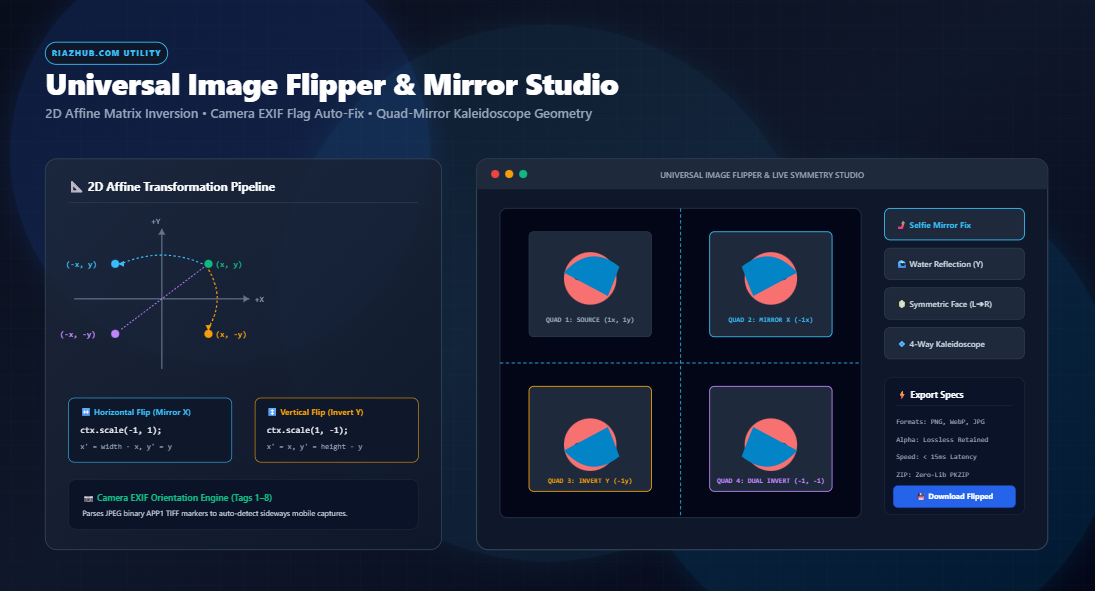
Whether you are correcting an inverted smartphone selfie, creating artistic facial symmetry portraits, preparing reflective water baselines for digital art, or generating seamless 4-way kaleidoscopic textures for 3D environments, image flipping and mirror geometry represent some of the most fundamental operations in graphic computing. Yet, behind what appears to be a trivial single-click action lies a rich matrix of 2D Cartesian transformations, raster buffer re-allocations, and subtle camera metadata standards.
In this engineering deep dive, we examine how 2D affine transformation matrices manipulate raster bitmaps at the hardware level, why basic CSS visual flips fail to produce downloadable files, how smartphone EXIF orientation flags (values 1 through 8) dictate photo angles, and how you can perform zero-loss batch mirroring instantly in your browser using the free Universal Image Flipper & Mirror Symmetry Studio on RiazHub.com.
Need to Flip or Mirror an Image Right Now?
Invert photos along the X or Y axis, generate perfect half-face mirror portraits, auto-correct sideways smartphone EXIF tags, and export lossless PNG, WebP, or ZIP bundles with zero server uploads.
1. The Common Challenges: Why We Need Image Flipping
Flipping an image involves reflecting pixel values across a defined Cartesian axis. While simple in concept, real-world digital graphics workflows encounter several specific scenarios where precise geometric reflection is required:
- Inverted Front-Facing Camera Selfies: Most smartphone operating systems (such as Apple iOS Camera and Android MIUI/OneUI) display a mirrored preview on screen while framing, but save the un-mirrored real-world perspective to disk. Text on t-shirts or background signs appears reversed, leading users to seek a reliable horizontal flip tool.
- Graphic & UI Directional Alignment: Graphic designers frequently need character illustrations, icons, directional arrows, and visual accents to point left or right to guide the viewer’s eye toward Call-to-Action (CTA) elements.
- Drone & Overhead Capture Rectification: Inverted drone mounts or ceiling security cameras often record footage upside-down, necessitating a clean 180° vertical inversion.
- Facial Symmetry & Psychological Studies: The human face is inherently asymmetric. By mirroring either the left half or right half across the central nasal axis, photographers, plastic surgeons, and psychologists analyze facial balance and proportion.
- Seamless 3D Tile & Kaleidoscope Generation: Game developers and textile artists mirror texture tiles across both X and Y axes to produce seamless repeating patterns without visible edge seams.
2. CSS Display Mirroring vs. True Canvas 2D Re-Rasterization
Many quick online tutorials suggest mirroring an image by applying a simple CSS stylesheet rule:
img.mirrored {
transform: scaleX(-1);
}
While this renders the photo flipped on your computer or mobile screen, the underlying file bytes remain 100% unaltered. If you right-click the image to save it, copy it to your clipboard, or share it to social media, the original un-mirrored orientation is saved. Furthermore, CSS transforms cannot be exported to Photoshop, Figma, or print drivers.
To produce a genuine, permanent flipped image file, the software must perform Canvas 2D Re-Rasterization. The browser loads the raw bitmap into an un-rendered HTML5 <canvas> element, applies an affine matrix transformation to the graphic context, and re-encodes the transposed pixel array into a fresh PNG, WebP, or JPEG binary buffer. This is the exact lossless architecture powering the RiazHub Image Flipper Studio.
3. The Mathematics of 2D Affine Matrix Transformations
In 2D computer graphics, every pixel coordinate is represented by a homogeneous column vector $[x, y, 1]^T$. Geometric operations (scaling, reflection, rotation, and translation) are calculated via 3×3 matrix multiplication:
[ y’ ] = [ 0 s_y t_y ] × [ y ]
[ 1 ] [ 0 0 1 ] [ 1 ]
A. Horizontal Flip (Reflection Across Vertical Axis)
To reflect an image horizontally, the coordinate system is scaled along the horizontal axis by $s_x = -1$, while keeping $s_y = 1$. Because scaling by $-1$ moves the pixels into negative coordinate space $[-W, 0]$, an origin translation $t_x = W$ (where $W$ is the image width) restores the image into the visible canvas viewport:
y’ = y
Canvas Context: ctx.translate(W, 0); ctx.scale(-1, 1);
B. Vertical Flip (Reflection Across Horizontal Axis)
Similarly, for a vertical inversion (upside-down flip), $s_x = 1$, $s_y = -1$, and a translation offset $t_y = H$ (where $H$ is the image height) is applied:
y’ = H – y
Canvas Context: ctx.translate(0, H); ctx.scale(1, -1);
C. Dual Flip (180° Point Inversion)
When both horizontal and vertical flips are activated simultaneously, both axes invert ($s_x = -1, s_y = -1$) with translations $t_x = W$ and $t_y = H$. This corresponds geometrically to a 180° point reflection through the center of the coordinate space.
Lossless Integer Mapping: Because $s_x \in \{-1, 1\}$ and $s_y \in \{-1, 1\}$, every integer coordinate $(x, y)$ maps directly to an exact target integer coordinate $(x’, y’)$. Unlike fractional image scaling or non-orthogonal rotation, coordinate inversion involves zero sub-pixel interpolation, preserving 100% of the original photo’s sharpness and alpha channel transparency.
4. The Mystery of Sideways Photos: Demystifying Camera EXIF Orientation Flags
Have you ever taken a portrait photo on your iPhone or Android device, only to find that it displays sideways (or upside-down) when uploaded to an email, website, or desktop editor? This issue stems from the EXIF (Exchangeable Image File Format) Orientation Metadata Flag.
To conserve battery and optimize camera burst capture speeds, modern smartphone sensors do not physically rearrange millions of sensor pixels in memory when shooting in portrait mode. Instead, an internal hardware gyroscope detects device angle and embeds a single integer tag (Tag 0x0112) inside the JPEG APP1 binary header. The EXIF specification defines 8 standard orientation values:
| EXIF Flag | Physical Sensor Orientation | Visual Appearance in Non-Exif Viewers | Corrective Normalization |
|---|---|---|---|
| 1 | 0° (Landscape Normal) | Correct (Upright) | None (Identity matrix) |
| 2 | 0° (Mirrored Horizontal) | Flipped Left-to-Right | Flip Horizontal (scaleX -1) |
| 3 | 180° (Upside-Down) | Rotated 180° | Rotate 180° |
| 4 | 180° (Mirrored Vertical) | Upside-down & Mirrored | Flip Vertical (scaleY -1) |
| 5 | 90° CCW (Mirrored Horizontal) | Sideways & Transposed | Rotate 90° CW + Flip Horizontal |
| 6 | 90° CW (Standard Portrait Mode) | Sideways (Rotated 90° Clockwise) | Rotate 90° CW (or 270° CCW) |
| 7 | 90° CW (Mirrored Horizontal) | Sideways & Transverse | Rotate 270° CW + Flip Horizontal |
| 8 | 270° CW (Inverted Portrait Mode) | Sideways (Rotated 270° Clockwise) | Rotate 270° CW (90° CCW) |
When you load a photo into the RiazHub Image Flipper & Mirror Studio, our client-side binary parser scans the JPEG byte stream, reads the TIFF header endianness, locates tag 0x0112, and enables the ✨ Auto-Fix EXIF button. In one click, the tool normalizes the orientation so you can flip or mirror your photo from a perfectly upright baseline.
5. Studio Capabilities & Advanced Symmetry Modes
Beyond traditional horizontal and vertical flips, modern creative workflows demand expressive symmetry tools. The RiazHub studio integrates four distinct geometric pipelines:
↔️ Standard Horizontal & Vertical FlipsFull 2D affine matrix reflection along the X or Y axis. Reverses selfie angles, flips graphic character vectors, and creates baseline reflections without quality loss.
🪞 Facial Symmetry Mirroring (L➔R & R➔L)Duplicates the left half of the face across the central vertical line to create a perfectly symmetric portrait, or mirrors the right half to examine facial proportion differences.
💠 Quad-Reflect Kaleidoscope MatrixGenerates a 4-way symmetrical tile matrix (Original, Mirrored X, Mirrored Y, and Dual Inversion) expanding the canvas to create intricate mandalas and seamless wallpaper textures.
🌓 Interactive Split-Screen SliderSwipe a responsive 60 FPS divider across your image to compare the original capture against the transformed result in real time before exporting.
Explore Your Facial Symmetry Online
Curious what your face would look like if both sides were identical? Upload a portrait to the Half-Mirror studio and generate both Left-Left and Right-Right symmetric twins in seconds.
6. Step-by-Step Guide: How to Flip and Mirror Images Online
Follow these quick steps to flip, rotate, and export your digital images using the Universal Image Flipper & Mirror Symmetry Studio:
- Import Your Media: Drag and drop your image files onto the upload dropzone, click “Select Image(s)” to browse your local drives, paste directly from your clipboard using Ctrl+V, or click “Load Sample” to experiment with a pre-configured test portrait.
- Configure Axis Flips & Orthogonal Rotation: Click
[ Flip Horizontal (Mirror X) ]or[ Flip Vertical (Invert Y) ]to toggle reflections. Use the 90° CW, 90° CCW, or 180° rotation buttons if your photo requires angular realignment. - Check Camera EXIF Orientation: If your photo was captured sideways on an iPhone or Android camera, click the
✨ Auto-Fix EXIFbutton to normalize orientation immediately. - Select Symmetry Mode (Optional): For creative portrait analysis or textile designs, switch between Standard Flip, Half-Mirror (L➔R), Half-Mirror (R➔L), or 4-Way Quad Kaleidoscope.
- Review via Split-Screen Slider: Click the “Split-Screen Comparison” tab to drag the divider handle left and right, confirming that all details, text reversals, and facial symmetries look flawless.
- Choose Output Format & Export: Select your desired format (Preserve Original, PNG Lossless, WebP Modern, or JPEG Photo Quality). Click 💾 Download Flipped Image for immediate single export, or click 📦 Download Batch ZIP to download all processed queue files in an uncompressed in-memory archive.
7. The 100% In-Browser Privacy Guarantee
Many online file converters upload your private images to cloud-hosted servers where they are queued in remote temporary directories. This introduces security risks when handling personal camera selfies, identity documents, medical scans, or proprietary graphic design assets.
The RiazHub Universal Image Flipper operates on a strict client-side architecture. Every matrix computation, pixel coordinate inversion, canvas re-rasterization, and ZIP compression step executes directly inside your browser’s V8 JavaScript engine via HTML5 Canvas 2DContext and the native FileReader API. Zero bytes of your original files or flipped outputs are ever transmitted over the network.
Frequently Asked Questions (FAQ)
No. When you flip an image horizontally or vertically, pixel coordinates are reflected across integer boundaries ($x’ = W – x$). Because there is no fractional resampling or interpolative blurring, the operation is mathematically lossless. If exported as PNG or lossless WebP, every pixel retains 100% of its original clarity and color depth.
A horizontal flip mirrors the image along the vertical Y-axis (left becomes right, but top stays top). A vertical flip inverts it along the horizontal X-axis (top becomes bottom, but left stays left). Rotating an image 180° performs a circular point inversion, which is mathematically identical to applying both a horizontal flip and a vertical flip simultaneously.
Yes. Our Canvas 2D engine handles 32-bit RGBA pixel buffers directly. When flipping transparent graphics, logos, stickers, or cutout assets, the alpha channel masks are inverted in exact sync with the color channels, preserving full transparency without generating black or white matte backgrounds.
Yes. You can select or drag dozens of images into the queue simultaneously. Use the “Apply Transformation to All Batch” button to synchronize your flip and rotation settings across the entire queue, and click “Download Batch ZIP” to package all transformed images into a clean, downloadable .zip file in seconds.
Experience Fast, Private Image Mirroring Today
Enhance your visual assets, fix inverted camera selfies, and experiment with artistic mirror symmetry with zero software installation and complete privacy.
Universal Image Flipper & Mirror Studio
Flip photos horizontally or vertically, generate symmetric mirror portraits, auto-correct EXIF rotation, and batch process images in real time with lossless alpha transparency.
Image Matrix Mathematics, Affine Transforms & EXIF Guide
Deep dive into how 2D Cartesian transformation matrices invert pixel coordinate vectors losslessly, how camera orientation metadata works, and why in-browser processing protects your privacy.
📐 2D Affine Transformation Matrices & Coordinate Inversion
In digital graphics and the HTML5 Canvas 2D specification, geometric flipping is executed via 3×3 Affine Transformation Matrices. Every source pixel coordinate vector $(x, y, 1)^T$ is mapped to a transformed target coordinate $(x', y', 1)^T$ through matrix multiplication:
[y'] = [ 0 s_y t_y ] [y]
[ 1] [ 0 0 1 ] [1]
When executing a Horizontal Flip (Mirror X), the scaling factor along the horizontal axis is set to $s_x = -1$ with an origin translation $t_x = \text{width}$, effectively computing $x' = \text{width} - x$. For a Vertical Flip (Invert Y), $s_y = -1$ with $t_y = \text{height}$, calculating $y' = \text{height} - y$. Because coordinate integer steps remain 1:1, this transformation is entirely lossless and introduces zero interpolative blur or resampling artifacts.
🖥️ CSS Display Mirroring vs. True Canvas Pixel Re-Rasterization
Many basic web scripts merely apply a CSS stylesheet rule such as transform: scaleX(-1); to an HTML <img> element. While this visually mirrors the image on your computer screen inside the web browser, the underlying file remains completely untouched. When a user right-clicks to save or uploads the file elsewhere, the image reverts to its un-flipped original state.
The RiazHub Universal Image Flipper uses hardware-accelerated HTML5 Canvas 2DContext rendering pipelines. When you flip, rotate, or mirror a portrait, the actual underlying RGB/RGBA byte array is transposed and re-rasterized at full native resolution. The resulting downloadable file (PNG, WebP, or JPEG) is genuinely inverted on disk and compatible with all operating systems, photo viewers, and print hardware.
📱 Camera EXIF Orientation Metadata (Values 1 Through 8)
Modern digital cameras, iPhones, and Android smartphones often do not rotate raw sensor pixels when shooting photos in portrait or inverted positions. Instead, the camera sensor writes an integer flag into the JPEG APP1 EXIF metadata block (Tag 0x0112 Orientation). The standard TIFF/EXIF specification defines 8 standard orientations:
| Flag | Camera Sensor State | Visual Orientation | Required Normalization |
|---|---|---|---|
| 1 | 0° (Normal) | Top at Top, Left at Left | None (Standard 1:1) |
| 2 | Flipped Horizontally | Top at Top, Left at Right | Horizontal Flip (scaleX -1) |
| 3 | Rotated 180° | Top at Bottom, Left at Right | Rotate 180° |
| 4 | Flipped Vertically | Top at Bottom, Left at Left | Vertical Flip (scaleY -1) |
| 5 | Transposed | Left at Top, Top at Left | Rotate 90° CW + Flip H |
| 6 | Rotated 90° CW | Left at Bottom, Top at Right | Rotate 90° CW (Sideways iPhone) |
| 7 | Transverse | Right at Bottom, Top at Left | Rotate 270° CW + Flip H |
| 8 | Rotated 270° CW (90° CCW) | Right at Top, Top at Left | Rotate 270° CW (90° CCW) |
Our Auto-Fix EXIF tool reads the raw binary byte stream of your JPEG image, identifies the APP1 marker, parses the TIFF header endianness, and automatically configures the appropriate orthogonal rotation and axis inversion to make your photo upright in one single click.
🔒 100% Client-Side Privacy Guarantee
Your photos, personal portraits, selfies, medical scans, graphic design assets, and sensitive documents are never sent to our servers or any cloud service. Every byte decoding step, 2D matrix transformation, symmetry reflection, and ZIP compression runs entirely in your local browser sandbox via native JavaScript and Web APIs.
Even if you disconnect your computer or smartphone from the internet after loading this webpage, the entire suite of flipper, rotator, and export tools continues to function with 100% speed and fidelity.