
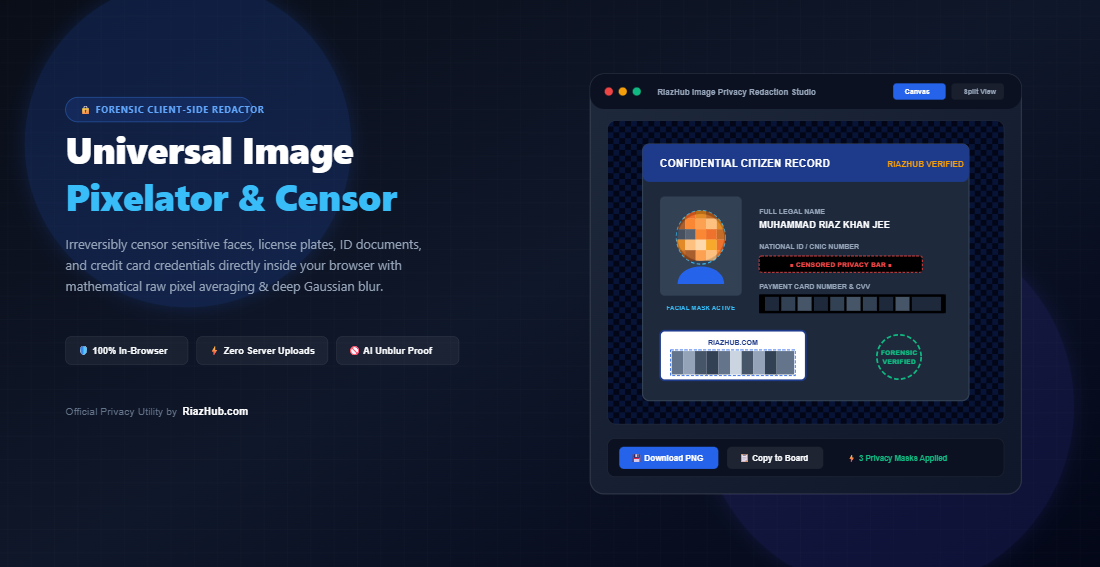
Universal Image Pixelator & Privacy Censorship Studio: The Definitive Guide to Irreversible Client-Side Redaction
Too often, users make the critical mistake of covering a credit card number or face using a basic smartphone drawing tool, a semi-transparent black highlighter, or a superficial browser extension. What they don’t realize is that these cosmetic edits can frequently be reversed in seconds using tonal adjustment curves, layer separation, or modern neural de-pixelation scripts.
To provide a cryptographically sound, zero-compromise solution, RiazHub developed the Universal Image Pixelator & Privacy Censorship Studio. In this comprehensive guide, we unpack the mathematical mechanics of forensic raw-buffer redaction, examine why client-side execution is mandatory for compliance, and demonstrate how you can protect your confidential media in seconds.
Need to Censor an Image Right Now?
Launch the free, zero-upload privacy studio directly in your browser. Erase faces, license plates, and ID numbers with forensic pixel blocks.
The Fatal Flaw in Modern Image “Redaction”: Why Visual Filters Fail
Before examining how true pixel averaging functions, it is vital to understand why standard photo editing techniques fail forensic audits:
1. Reversible CSS Filters & DOM Manipulation
Many web-based photo tools boast “Instant Blur” features that merely render a CSS style tag such as filter: blur(15px); or backdrop-filter: blur(10px); over an HTML5 canvas or image tag. When the file is saved or inspected via developer tools, the underlying raw image bytes remain 100% unadulterated. Anyone can right-click the image, inspect element, delete the CSS style, or download the original source from browser cache.
2. Translucent Digital Highlighters
Default smartphone markup pens (especially on iOS and Android screenshot editors) frequently have an opacity value between 85% and 95%. Even if a black bar appears completely dark on an OLED phone display, brightening the exposure and increasing contrast in Adobe Photoshop or GIMP immediately recovers the stark numeric characters beneath the stroke.
3. AI De-Pixelation & Contrast Recovery (The Depix Threat)
Even when images are mildly pixelated, tools such as Depix exploit predictable mathematical linear filters. If an editor uses simple interpolation (bilinear or bicubic downscaling), the color bleed across adjacent pixel borders preserves gradient clues. Artificial intelligence models compare these edge artifacts against lookup tables of pre-rendered fonts to reconstruct passwords, PIN numbers, and letters with astonishing accuracy.
Under the Hood: How Mathematical Pixel Averaging Destroys Sub-Pixel Biometrics
The RiazHub Image Pixelator relies on an uncompromising mathematical pipeline executed directly on the visitor’s hardware via HTML5 Canvas 2DContext and raw ImageData buffers.
When you define an $N \times N$ pixel block size (ranging from a subtle $4\text{px}$ micro-pixel to a heavy $64\text{px}$ censorship tile), the engine divides the selected region into non-overlapping discrete grid cells. For every individual cell, it calculates the true arithmetic mean across all four color channels:
// Two-Pass Arithmetic Mean Pixel Averaging Algorithm
R_avg = Math.round(Sum(R_i) / (N * N));
G_avg = Math.round(Sum(G_i) / (N * N));
B_avg = Math.round(Sum(B_i) / (N * N));
A_avg = Math.round(Sum(A_i) / (N * N));

// Physical Overwrite of Uint8ClampedArray
for (let p = 0; p < (N * N); p++) {
    data[pixelIndex + 0] = R_avg; // Overwrites Red
    data[pixelIndex + 1] = G_avg; // Overwrites Green
    data[pixelIndex + 2] = B_avg; // Overwrites Blue
    data[pixelIndex + 3] = A_avg; // Overwrites Alpha
}
Because this two-pass operation computes a single scalar value and physically writes it into every memory slot of that tile, the original biometric gradients, sub-pixel curves, and character contours cease to exist in memory. No neural network, inverse Fourier transform, or contrast stretching algorithm can extract information that has been reduced to a flat arithmetic average.
Comparison Matrix: Visual Masking vs. Forensic Redaction
Here is how the RiazHub Privacy Censorship Studio measures up against standard consumer editing methods:
| Security Feature | Smartphone Markup Pens | Basic Web Filters | RiazHub Privacy Studio |
|---|---|---|---|
| Data Transmission | Local (Device) | Cloud Server Upload | 100% Client-Side In-Memory |
| Buffer Overwrite | Translucent Overlap | CSS Filter Only | Raw Uint8Array Byte Overwrite |
| AI Depix Reversal Resistance | Poor (High Bleed) | Zero (Easily Stripped) | Total (Flat Arithmetic Mean) |
| Selection Geometries | Rough Freehand | Fixed Rectangles | Rect, Oval, Brush & Whole Pic |
| Automated Detection | None | Third-Party Server API | In-Browser AI Face Cluster Detector |
| Batch ZIP Packaging | Manual Export | Server Archiving | Native Browser PKZIP Stream |
The Golden Rule of Privacy: Zero Server Uploads
When redacting sensitive credentials such as your National Identity Card, Passport, driver’s license, utility bills, or bank cards the last thing you should ever do is upload those unredacted documents to a remote third-party cloud server.
Many “free” online image redactors silently store uncompressed source files on AWS S3 buckets or process them through remote machine-learning servers. If that company experiences a data breach or retains server logs, your raw personal identification is permanently exposed.
How to Redact Sensitive Images in 4 Simple Steps
Follow this quick workflow to censor any photo, identity card, or vehicle plate using the free RiazHub Pixelator tool:
Drag and drop your photos into the dropzone, click “Browse Files”, or press Ctrl+V to paste directly from your clipboard. You can also test the tool instantly by clicking “Load Sample ID Card” to experiment on a realistic mock identity card.
Select your preferred geometry from the pill bar:
- ⬛ Rectangle: Ideal for license plates, credit card numbers, and addresses.
- ⭕ Oval / Face: Perfect for human heads, avatar icons, and profile portraits.
- 🖌️ Freehand Brush: Paint fluid censorship trails over signatures or complex logos.
- 🌐 Whole Pic: Convert entire photos into retro 8-bit / 16-bit pixel art.
Then choose your obfuscation mode: Mosaic Pixelation, Deep Gaussian Blur, Solid Blackout, Clean Whiteout, or Frosted Privacy Glass.
Adjust the Block Size slider ($4\text{px}$ to $64\text{px}$) to tune censorship strength. Want instant results? Click “👤 Auto-Detect & Censor Faces” to have the tool’s computer-vision heuristics automatically locate and mask human faces with oval privacy barriers.
Switch to the “Before / After” tab to swipe the interactive vertical comparison slider. Once satisfied, click “Download Censored Image” (available in Lossless PNG, modern WebP, or JPEG), click “Copy to Clipboard” to paste directly into WhatsApp or Slack, or download all queued files in a single zero-dependency ZIP archive.
Try RiazHub’s Privacy Redaction Studio Today
Protect your identity, financial documents, and sensitive photographs before uploading them anywhere online.
Common Privacy Scenarios & Recommended Presets
Different types of sensitive data demand different censorship techniques. The RiazHub Censorship Studio includes 1-click presets optimized for these scenarios:
1. National IDs, Passports & Credit Cards
Recommended Mode: Solid Blackout Bars (Preset 1)
Financial and government identity data (Social Security Numbers, CVVs, IBANs) should never be disguised with aesthetic pixelation. Solid blackout strips completely replace every single bit with flat #000000, ensuring zero-tolerance compliance for banking and legal disclosures.
2. Automotive License Plates & Street Names
Recommended Mode: 20px Rectangular Mosaic Block (Preset 2)
For automotive marketplaces or dashboard camera footage, a $20\text{px}$ mosaic block neatly obliterates alphanumeric digits while retaining the authentic vehicle aesthetic.
3. Minor Faces, Bystanders & Witnesses
Recommended Mode: Oval Mask with Heavy Gaussian Blur (Preset 3)
When photographing public crowds or school events, an elliptical mask combined with high-radius Gaussian blur provides soft facial anonymization that protects identity without creating harsh geometric black boxes.
4. Artistic Retro 8-Bit Game Art
Recommended Mode: Whole-Image 12px Mosaic (Preset 4)
Beyond security, creative designers can downscale avatars and concept artwork to create nostalgic 8-bit and 16-bit arcade aesthetics with full control over tile dimensions.
Frequently Asked Questions (FAQ)
Can someone “un-pixelate” my image using AI or Photoshop?
No. Because our engine performs true arithmetic averaging across the entire pixel block and flattens the underlying array in memory, the sub-pixel variations required by artificial intelligence models to guess the underlying characters are physically destroyed.
Does RiazHub see or store my uploaded documents?
Never. The RiazHub Image Pixelator is engineered as a 100% client-side utility. No data leaves your computer, smartphone, or tablet. Processing occurs within your browser’s private sandbox.
What file formats are supported?
You can import JPG, PNG, WebP, AVIF, SVG, BMP, and TIFF files. Redacted outputs can be exported in lossless PNG (preserving alpha transparency), lightweight modern WebP, or standard high-definition JPEG.
Is there a file size limit or fee?
The tool is 100% free with no subscriptions, watermarks, or account registration requirements. Because processing utilizes your local device’s memory, you can edit high-resolution 4K or 8K photographs without artificial file limits.
Final Thoughts: Take Control of Your Digital Footprint
In a digital world where data leaks are permanent and automated surveillance is pervasive, proactive privacy sanitization is no longer optional. Never rely on superficial filters, translucent pens, or shady cloud convertors to protect your sensitive documents.
Bookmark the Universal Image Pixelator & Privacy Censorship Studio on RiazHub.com today and ensure your confidential media remains truly confidential.
Start Protecting Your Photos Today
Experience fast, irreversible, in-browser privacy redaction on RiazHub.com.
🚀 Launch Image Pixelator
Universal Image Pixelator & Privacy Redactor
Irreversibly censor sensitive faces, license plates, ID documents, credit card numbers, and confidential data with forensic mosaic pixelation, deep Gaussian blur, and solid blackout bars.
| # | Shape | Style | Parameters | Coordinates | Actions |
|---|---|---|---|---|---|
| No active redaction masks yet. Click and drag on the image canvas to create your first privacy mask! | |||||
| File Name | Resolution | Size | Masks | Status | Download |
|---|---|---|---|---|---|
| No batch items loaded. Drop multiple files to process them together. | |||||
🛡️ Digital Redaction Forensics & Privacy Security Guide
filter: blur() or transparent black overlays do not alter image data. Anyone can open browser developer tools, remove the CSS style tag, or adjust tonal levels in Photoshop to reveal the full unredacted identity, credit card digits, or passport information underneath. True privacy redaction requires physical pixel buffer reconstruction.