
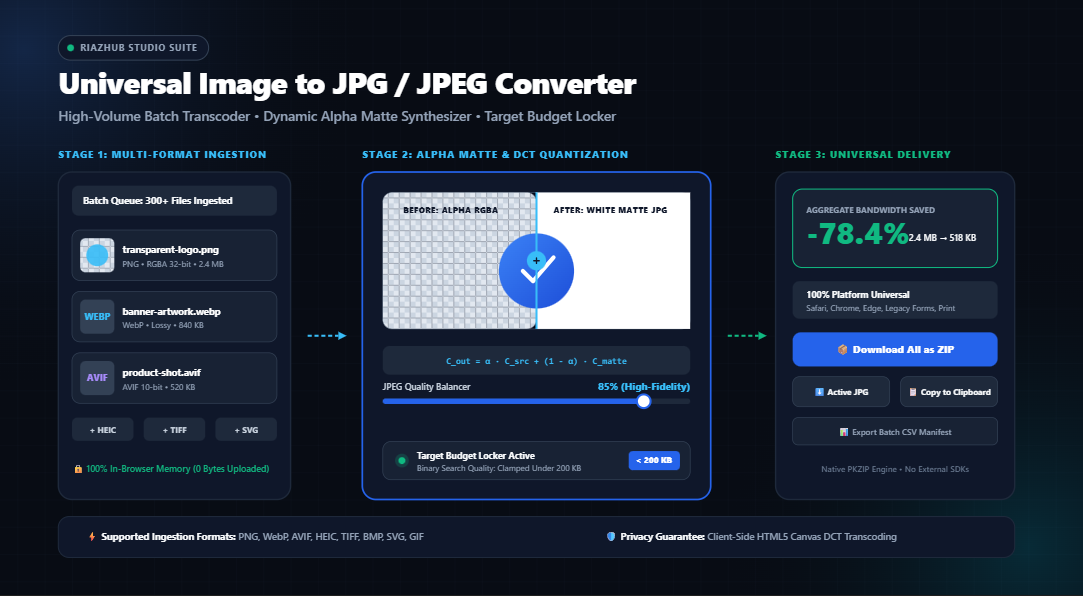
Universal Image to JPG Converter & Compression Studio: The Definitive Technical Deep Dive
In modern web development, photography, and digital publishing, the proliferation of next-gen image formats such as WebP, AVIF, HEIC, TIFF, and transparent PNG has introduced severe compatibility roadblocks. While modern browsers support these formats, countless legacy CMS platforms, print bureaus, passport portals, university admissions servers, and enterprise systems strictly demand standard JPEG/JPG files.
1. The Format Fragmentation Crisis: Why JPEG Remains the Undisputed Universal Standard
Every day, millions of digital creators and internet users encounter upload failures. A user exports a screenshot from an iPhone in high-efficiency .heic, downloads a transparent logo asset as a .png, or grabs a modern graphic encoded in Google’s .webp or the Alliance for Open Media’s .avif.
However, when submitting that file to a corporate HR portal, tax platform, visa application, or legacy print workflow, an error abruptly appears: “Invalid file type. Only .JPG or .JPEG permitted.”
Despite being introduced in 1992, the Joint Photographic Experts Group (JPEG) standard remains the only true lingua franca of digital computing. From vintage Windows XP workstations to smart TVs, industrial billboard printers, medical record archives, and modern smartphones, virtually every computing chip on Earth features dedicated hardware decompression for JPEG.
Access the Universal Image to JPG Converter Studio on RiazHub to instantly bridge this gap without risking file privacy or installing bulky desktop software.
2. The “Black Background” Disaster: Alpha Channel Flattening & Matte Compositing Physics
One of the most persistent bugs encountered with naive, poorly engineered online image converters is the dreaded Black Box Artifact.
Formats like PNG, SVG, WebP, and AVIF feature an Alpha Channel (RGBA), which defines transparency per pixel from 0 (fully clear) to 255 (fully opaque). In contrast, the JPEG format specification does not possess an alpha channel it operates strictly in the three-channel RGB or YCbCr color spaces.
To eliminate this flaw, the RiazHub Image to JPG Transcoder implements an explicit Linear Alpha Blending Matte Engine governed by digital compositing physics:
• C_out represents the resultant RGB pixel value.
• α (alpha) is the normalized opacity coefficient of the source pixel [0.0 to 1.0].
• C_src is the incoming color component from the original transparent image.
• C_matte is the selected synthesis background color (e.g., Pure White #FFFFFF, Dark Slate #0F172A, or a custom brand hex swatch).
Before the source graphic is painted into the canvas transcoding buffer, a solid plane of the chosen matte color is synthesized. Semi-transparent pixels (such as anti-aliased text edges and soft drop shadows) cleanly blend into the matte without ugly fringing, halos, or jagged borders.
3. Under the Hood: Discrete Cosine Transform (DCT) & Rate Distortion
How does a 12 MB raw photograph compress down to a crisp 350 KB JPEG without noticeable degradation? The magic lies in the Discrete Cosine Transform (DCT) and human psychovisual perception modeling:
The image is segmented into 8×8 pixel matrices and converted from spatial domain values into spatial frequency coefficients using DCT cosine wave bases.
The human eye is significantly more sensitive to subtle variations in luminance (brightness) than to high-frequency chrominance (color). Quantization tables discard imperceptible frequencies.
Quantized coefficients are scanned in a zig-zag sequence and compressed via run-length and Huffman entropy encoding, maximizing byte density.
In the RiazHub Compression Studio, users can dynamically adjust quality from 1% to 100% with real-time feedback:
- 95% Quality (Maximum Archival): Produces near-lossless visual fidelity with minimal quantization, ideal for fine-art prints and high-DPI displays.
- 85% Quality (Web Publishing Sweet Spot): Yields an optimal perceptual balance typically cutting file sizes by 70% to 85% with zero perceptible degradation.
- 75% Quality (Balanced Efficiency): Excellent for high-volume content blogs, documentation graphics, and email newsletters.
- 60% Quality (Ultra Compact): Aggressive quantization suitable for mobile-first bandwidth constraints and fast-loading thumbnails.
4. The Target File Size Budget Locker: Ending the Trial-and-Error Loop
Have you ever tried uploading a document or image to a government job application, university portal, or e-commerce marketplace only to be greeted by this infuriating requirement?
Traditionally, users open an image editor, export at 80% quality, check the resulting size, find it’s 215 KB, re-export at 72%, check again, and repeat this tedious dance.
The RiazHub Target Budget Locker completely automates this process using a client-side Binary Search Convergence Algorithm:
// Pseudocode of the RiazHub In-Browser Budget Locker Algorithm
async function solveTargetBudget(canvas, targetBudgetKb) {
    const maxBytes = targetBudgetKb * 1024;
    let low = 0.05, high = 1.0, optimalBlob = null;

    for (let iteration = 0; iteration < 6; iteration++) {
        const mid = (low + high) / 2;
        const testBlob = await canvasToJpegBlob(canvas, mid);

        if (testBlob.size <= maxBytes) {
            optimalBlob = testBlob;
            low = mid; // Try searching for higher visual fidelity within budget
        } else {
            high = mid; // Surpassed budget; increase compression
        }
    }
    return optimalBlob;
}
Within 6 rapid iterations (executing in under 80 milliseconds inside browser memory), the engine automatically locks into the highest possible visual fidelity that safely stays beneath your specified kilobyte threshold.
5. Step-by-Step Guide: How to Transcode & Compress Images on RiazHub
Converting hundreds of images to universally compatible JPEG format takes less than 30 seconds. Follow these simple steps:
- Launch the Studio & Ingest Images
Open the RiazHub Image to JPG Converter. Drag and drop up to 300+ images (PNG, WebP, AVIF, HEIC, TIFF, SVG, or GIF), use the folder selector (webkitdirectory), or simply pressCtrl+Vto paste directly from your clipboard. - Configure Transparency Matte Synthesizer
If converting graphics with transparent backgrounds, choose your preferred matte fill: Pure White (#FFFFFF), Dark Slate (#0F172A), or any custom brand hex code via the integrated color picker. - Select Quality Preset or Lock Target Budget
Choose one of the 1-click presets (e.g., Web Publishing Standard 85% or Print Master 98%). If you must meet a strict upload limit, tick the Target Exact Size Limit checkbox and type your limit (e.g.,200 KB). - Inspect in the Interactive Split-Screen Studio
Switch between the Live Conversion Stage, Split-Screen Before/After Slider, and the 200%/400% Zoom Loupe to verify edge sharpness and color fidelity at 60 FPS before downloading. - Download Individually or as Batch ZIP
Click Download All as ZIP to package your entire converted library into a clean, uncorrupted ZIP archive directly from browser memory, or copy the active image straight to your operating system clipboard with one click.
6. Zero Server Uploads: Why In-Browser Canvas Processing Trumps Cloud Converters
Most free online file conversion websites operate on an outdated client-server architecture: you upload your private photo to their remote server, their server runs a background script (such as ImageMagick or FFmpeg), and you download the converted file back.
7. Comprehensive Image Format Comparison Matrix
| Format | Standard Extension | Alpha Transparency | Compression Type | Global Device Compatibility | Primary Use Case |
|---|---|---|---|---|---|
| JPEG / JPG | .jpg, .jpeg |
❌ No (Requires Matte) | Lossy (DCT) | 100% Universal | Photography, Web Publishing, Universal Compatibility |
| PNG | .png |
✅ Full 8-bit Alpha | Lossless (Deflate) | 99% Universal | Logos, Icons, Screenshots, Text Graphics |
| WebP | .webp |
✅ Full Alpha | Lossy & Lossless | 96% (Modern Browsers) | Web Performance Optimization |
| AVIF | .avif |
✅ Full Alpha | Lossy & Lossless (AV1) | 88% (Modern Browsers) | Next-Gen High-Compression Delivery |
| HEIC / HEIF | .heic, .heif |
✅ Full Alpha | Lossy (HEVC) | Apple Ecosystem Only | iOS Camera Storage |
| SVG | .svg |
✅ Vector Alpha | Vector XML | 98% (Browsers Only) | Scalable UI Icons, Logos, Infographics |
8. Frequently Asked Questions (FAQ)
.jpg extension originated in the era of MS-DOS and FAT16 filesystems, which strictly enforced an 8.3 filename constraint (8 characters for the name, 3 for the extension). Modern Unix and POSIX operating systems always supported .jpeg. Both extensions represent the exact same binary format. On the RiazHub Converter, you can select your preferred extension with a single click.canvas.toBlob('image/jpeg'), all extraneous EXIF metadata, camera serial numbers, and GPS tracking coordinates are automatically scrubbed, protecting your privacy when sharing photos online.#FFFFFF) background. You can also pick solid dark slate or any custom brand color to match your design requirements.Universal Image to JPG / JPEG Converter & Studio
Convert PNG, WebP, AVIF, HEIC, TIFF, BMP, SVG, and GIF to universally compatible, web-optimized JPEG. Synthesize transparent alpha channels with clean matte backgrounds and balance DCT compression with zero server upload.
| Image | Source Size | Output JPG | Savings | Action |
|---|---|---|---|---|
| No converted images yet. Click "Convert All to JPG". | ||||
(0, 0, 0), creating ugly black rectangular halos around cutout logos, icons, and product photos.
Our studio implements exact mathematical matte compositing on an HTML5 Canvas:
C_out = α × C_src + (1 - α) × C_matte
Every semi-transparent pixel is smoothly blended with your chosen matte background (pure white #FFFFFF, solid dark slate #0F172A, or custom brand hex), ensuring crystal-clear edges without halo artifacts.
.jpg and .jpeg. Both refer to the exact same Joint Photographic Experts Group raster standard.
The .jpg format originated due to the strict 8.3 character filename limitation of older MS-DOS operating systems (e.g., FILENAME.JPG). Unix and Macintosh systems have always supported the full four-letter extension .jpeg. Both are universally supported worldwide.