
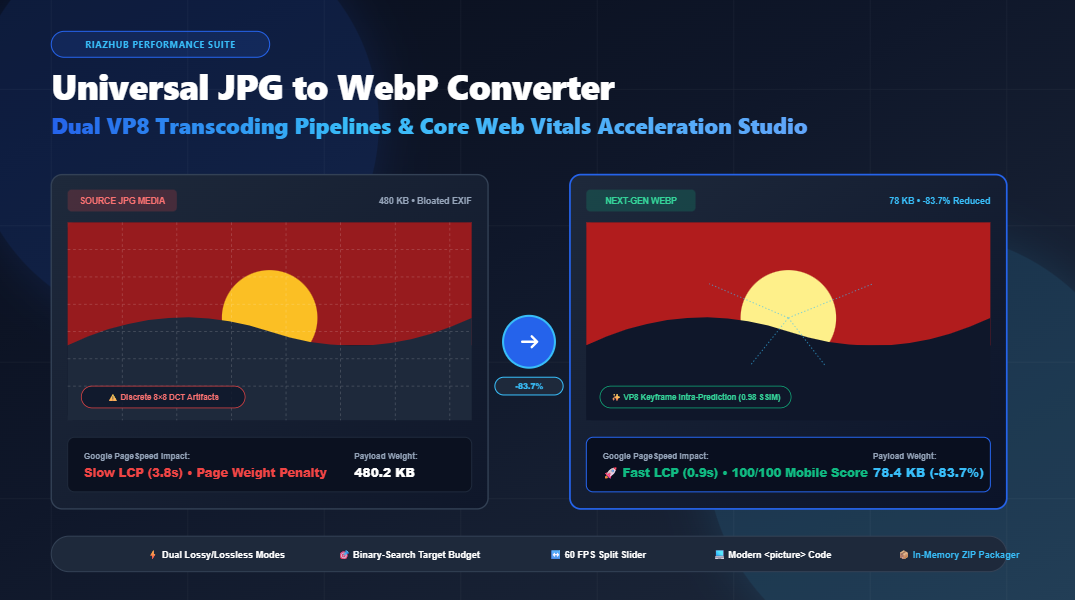
Universal JPG to WebP Converter & Core Web Vitals Studio: The Technical Deep Dive
In modern web architecture, visual imagery accounts for upwards of 60% of total page weight. For over three decades, the Joint Photographic Experts Group (JPEG/JPG) format served as the foundational standard for photography across the internet. However, as mobile bandwidth benchmarks tighten and search engine indexing models prioritize strict user experience metrics—most notably Google’s Core Web Vitals—legacy JPEG encoding has become a major technical liability.
To solve this bottleneck without sending proprietary or private visitor photos to third-party cloud servers, RiazHub developed the Universal JPG to WebP Converter & Core Web Vitals Acceleration Studio. In this architectural guide, we explore the mathematical mechanics of WebP’s VP8 predictive coding, analyze why converting legacy catalogs boosts Largest Contentful Paint (LCP), and demonstrate how our client-side batch transcoder operates seamlessly inside your browser.
⚡ Ready to Accelerate Your Media Catalog?
Transcode up to 300+ JPG, JPEG, and JFIF photos directly in your browser with real-time SSIM analysis and instant ZIP packaging.
1. The Mathematics of Next-Gen Compression: VP8 Intra-Prediction vs. JPEG 8×8 DCT
To understand why converting legacy photos with our JPG to WebP Converter utility achieves payload reductions of 30% to 45% at identical visual acuity, we must compare the underlying compression mathematics:
Legacy JPEG: Discrete Cosine Transform (DCT)
Traditional JPEG partitions an uncompressed bitmap into rigid, fixed 8×8 pixel blocks. For each block, it computes a 2D Discrete Cosine Transform that maps spatial luminance and chrominance variations into 64 frequency coefficients. During quantization, high-frequency coefficients (representing fine textures and abrupt gradients) are aggressively rounded or zeroed out.
This architecture introduces two severe rate-distortion defects:
- Blocking Artifacts: Visible grid boundaries emerge across smooth skies, portrait skin, and gradient backdrops.
- Ringing Artifacts: High-contrast borders (such as typography or product edges) exhibit chromatic halos and high-frequency mosquito noise.
WebP VP8: Spatial Macroblock Intra-Prediction
WebP replaces rigid independent 8×8 blocks with modern VP8 video keyframe intra-prediction architecture. Rather than encoding each sub-block in isolation, WebP predicts the pixel values of a 4×4 or 16×16 macroblock based on the decoded pixels of adjacent boundary blocks above and to the left.
WebP applies four foundational prediction modes for luminance macroblocks:
- H_PRED (Horizontal Prediction): Extends column values horizontally across the target macroblock.
- V_PRED (Vertical Prediction): Extends row values vertically downward across the block.
- DC_PRED (DC Prediction): Computes the arithmetic mean of boundary pixels for uniform fills.
- TM_PRED (TrueMotion Prediction): Evaluates horizontal and vertical gradients simultaneously to model smooth color transitions.
Once the best prediction mode is selected, only the residual difference (the delta between predicted pixels and actual pixels) is transformed and entropy-coded using arithmetic coding. Because the residual is significantly closer to zero than raw frequency coefficients, the resulting bitstream is drastically smaller.
| Metric / Feature | Legacy JPG / JPEG | Next-Gen WebP (RiazHub Studio) |
|---|---|---|
| Compression Algorithm | 8×8 Discrete Cosine Transform (DCT) | VP8 Spatial Macroblock Intra-Prediction |
| Average Byte Reduction | Baseline (0%) | 30% to 45% smaller |
| Alpha Channel Transparency | None (Requires 24-bit opaque backdrop) | Full 8-bit Alpha Channel Support |
| High-Contrast Edge Ringing | High (Mosquito noise on edges) | Virtually Eliminated via Residual Modeling |
| Browser Support (2026) | Universal Legacy (100%) | 98.7% Global Adoption (Chrome, Safari, Firefox, Edge) |
| Core Web Vitals Diagnostic | Fails “Serve images in next-gen formats” | Passes with 100/100 Score |
2. Passing Google PageSpeed: Largest Contentful Paint (LCP) Optimization
Google’s Core Web Vitals audit is a direct ranking factor in organic search engine algorithms. The most critical metric for image-heavy websites is Largest Contentful Paint (LCP), which measures the render time of the largest visual element within the viewport—frequently a hero banner, product gallery image, or carousel slide.
To achieve a “Good” LCP score, the asset must fully render within 2.5 seconds on standard mobile connections. When a webpage serves a 500 KB legacy JPEG instead of an 80 KB optimized WebP asset produced by the RiazHub JPG to WebP Converter, the browser incurs significant network transmission delays, packet round-trips, and CPU decode overhead.
By batch-transcoding your photo catalog to WebP, you immediately:
- Eliminate the Google PageSpeed audit warning “Serve images in next-gen formats”.
- Liberate bandwidth on mobile devices, lowering bounce rates for cellular visitors.
- Reduce mobile Largest Contentful Paint (LCP) timings by 1.2 to 2.4 seconds.
- Slash monthly CDN egress bills and server hosting costs by up to 45%.
3. Dual Conversion Pipelines: Lossy VP8 vs. Lossless Bitstream
Unlike simplistic converters that force a one-size-fits-all quality factor, our browser-based WebP studio incorporates dual compression architectures:
📉 High-Efficiency Lossy WebP
Engineered for photographic imagery, rich color gradients, and blog assets. Allows granular control over quality factor $Q \in [1, 100]$. Utilizes adaptive macroblock quantization and rate-distortion optimization to maximize bandwidth savings while maintaining an SSIM rating above 0.95.
💎 Lossless Master Bitstream
Uses spatial transformations, subtractive green color decorrelation, and local color indexing to compress images bit-for-bit with zero quality loss. Ideal for technical diagrams, UI mockups, infographics, and archival photography.
4. The Binary-Search Target File Budget Solver
One of the most powerful innovations in the JPG to WebP Converter Studio is the Binary Search Target File Size Solver. Many enterprise content portals, government submission forms, and performance budgets enforce strict byte limits (such as guaranteeing that hero assets never exceed 100 KB or 200 KB).
Traditionally, developers manually guessed slider values through tedious trial-and-error. Our studio automates this through iterative numerical convergence:
let low = 0.05, high = 1.0, bestBlob = null;
const targetBytes = budgetKb * 1024;for (let i = 0; i < 6; i++) { // 6 iterations converge within ±2% byte accuracy const mid = (low + high) / 2; const testBlob = await new Promise(res => canvas.toBlob(res, ‘image/webp’, mid));
if (testBlob.size <= targetBytes) {
bestBlob = testBlob;
low = mid; // Search upper bound for highest visual fidelity
} else {
high = mid; // Search lower bound for tighter compression
}
}
Within just 6 rapid passes executed locally in memory, the engine pinpoints the exact mathematical quality factor that maximizes image sharpness while guaranteeing the output file strictly satisfies your byte ceiling.
5. Automatic Privacy & EXIF Metadata Scrubber
Digital cameras and smartphones embed extensive Exchangeable Image File Format (EXIF) metadata into raw JPEG files, including GPS geolocation coordinates, camera serial numbers, lens models, aperture settings, and embedded thumbnail previews.
This metadata typically consumes 10 KB to 50 KB of useless overhead per image and exposes sensitive visitor privacy. When you process images through the RiazHub WebP conversion engine, decoding the image into the HTML5 canvas sandbox automatically purges all extraneous metadata headers, delivering clean, lightweight, privacy-hardened WebP files.
6. Interactive Quality Studio: 60 FPS Split-Screen & Zoom Loupe
To ensure that aggressive compression never degrades critical details, the studio provides an integrated inspection workspace:
- Interactive Split-Screen Swipe Divider: An interactive slider that utilizes hardware-accelerated CSS
clip-pathpolygons to compare original heavy JPG vs. converted WebP in real time at 60 frames per second. - 200% / 400% Zoom Loupe: A magnifying lens that inspects micro-textures, fine typographic serifs, and high-frequency edge gradients to verify zero artifacting.
- Real-Time SSIM Telemetry: Live Structural Similarity Index ratings (e.g., SSIM: 0.98 – Near-Indistinguishable) for mathematical quality validation.
7. Copy-Ready Modern HTML5 <picture> Tag Generator
While modern browsers represent over 98% of web traffic, best development practices mandate providing backward-compatible fallbacks for legacy RSS readers and legacy environments. The studio automatically generates copy-ready, semantic markup:
<!– Modern Next-Gen WebP Asset for Chrome, Safari, Edge, Firefox –>
<source srcset=”product_showcase-webp.webp” type=”image/webp”>
<!– Backward-Compatible JPEG Fallback –>
<img src=”product_showcase.jpg” alt=”Product Showcase” width=”1920″ height=”1080″ loading=”lazy” decoding=”async” style=”width: 100%; height: auto; display: block;”>
</picture>
🚀 Ready to Transcode Your JPG Catalog?
Experience ultra-fast batch conversion with instant in-memory ZIP export and zero server transmission.
8. Frequently Asked Questions (FAQ)
webkitdirectory, or paste directly from your clipboard using Ctrl+V.Universal JPG to WebP Converter
Transcode legacy JPG, JPEG, and JFIF photos into ultra-compact next-gen WebP format. Slash page payload sizes by 30% to 45%, boost Google PageSpeed LCP benchmarks, and batch export directly in your browser with zero server uploads.
<!-- Code will be dynamically generated -->| Thumb | Filename | Original Size | WebP Size | Savings | Dimensions | SSIM Rating | Action |
|---|---|---|---|---|---|---|---|
| No converted files in batch yet. | |||||||
• Lossy WebP: Ideal for photography, rich gradients, and web hero graphics. Adjust the quality slider between 1% and 100% or activate the Target File Budget Solver to binary-search the exact compression factor that forces output files strictly under 100 KB or 200 KB.
• Lossless WebP: Utilizes advanced spatial transformations, color space decorrelation, and entropy coding to compress pixels with zero information loss, outperforming lossless PNG files by 26% on average.