
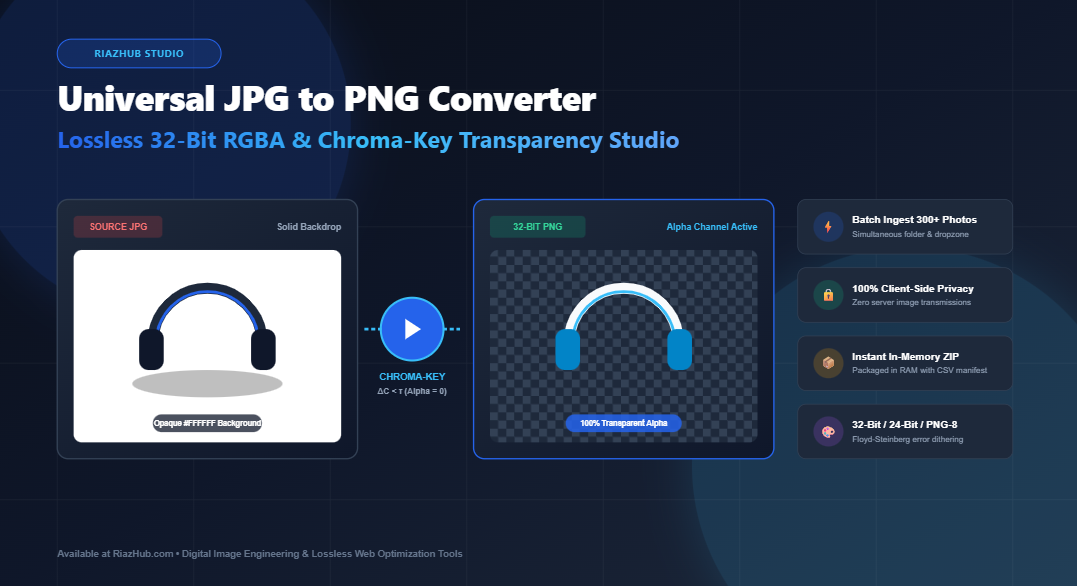
Universal JPG to PNG Converter & Transparency Extraction Studio: High-Capacity Batch Transcoding and Chroma-Key Alpha Synthesis
For digital graphic designers, web developers, e-commerce catalog managers, and content creators, converting lossy raster formats into high-fidelity web assets has traditionally involved clunky desktop software or risky third-party cloud upload portals. To eliminate these bottlenecks, the JPG to PNG Converter & Transparency Studio on RiazHub.com introduces an all-in-one browser-native transcoding engine.
This utility not only decodes and repackages standard JPEG, JPG, and JFIF files into clean, artifact-free 32-bit RGBA PNG files, but also synthesizes true transparent alpha channels via an integrated Euclidean distance chroma-key isolator. Whether you need to isolate solid studio white backdrops, remove dark silhouette backgrounds, or compress graphics down to 8-bit indexed palettes with Floyd-Steinberg dithering, you can run everything inside your web browser with zero server latency and total client-side privacy.
Launch the Universal JPG to PNG Studio
Batch convert hundreds of JPEG photos into crisp 32-bit transparent PNGs directly in your browser without uploading a single file to external servers.
Why Convert Lossy JPEG to Lossless PNG?
JPEG has been the dominant format for digital photography since the early 1990s due to its Discrete Cosine Transform (DCT) lossy compression algorithm. However, this compression comes at a permanent mathematical cost: fine high-frequency pixel data is permanently discarded.
When you modify, crop, or redistribute a JPEG repeatedly, generational loss compounds, introducing blocky $8\times8$ pixel artifacts and blurry halo rings around high-contrast edges. By running your assets through the Universal JPG to PNG Converter, you encapsulate your imagery into a truly lossless container defined by RFC 2083 and powered by RFC 1951 Deflate/ZLIB compression.
🛡️ Generational Preservation
Freezes your bitmap matrix in a bit-for-bit lossless container, halting any further JPEG degradation during ongoing graphic modifications.
💎 True 32-Bit RGBA Channels
Synthesizes an 8-bit alpha channel giving 256 distinct levels of smooth, anti-aliased transparency without harsh cutout boundaries.
🎯 Chroma-Key Isolation
Instantly strips pure white (#FFF), solid black (#000), or custom studio backdrop colors into transparent alpha using Euclidean color distance mathematics.
📦 In-Memory PKZIP Packaging
Bundles up to 300+ converted PNG files and a CSV manifest directly inside client-side RAM into a downloadable .zip archive in seconds.
The Mathematics of Chroma-Key Alpha Extraction
A classic frustration when building websites or digital catalogs is dealing with product photos shot against plain studio backdrops (such as seamless white #FFFFFF paper or black velvet). JPEGs lack an alpha channel, meaning the background remains an opaque block that clashes with colored or dark web page templates.
The RiazHub JPG to PNG Studio solves this by evaluating each pixel $(R, G, B)$ against your target backdrop color $(R_{\text{target}}, G_{\text{target}}, B_{\text{target}})$ using the 3-dimensional Euclidean RGB distance formula:
ΔC = √((R – Rtarget)² + (G – Gtarget)² + (B – Btarget)²)
When the distance ΔC falls within your specified color tolerance (τ), the alpha channel is set to 0 (completely transparent). Furthermore, to prevent the sharp, jagged “cookie-cutter” edges common in basic conversion tools, the engine applies a configurable soft-edge feather transition zone:
If τ < ΔC < τ + feather ⇒ Alpha = Round(255 × (ΔC – τ) / feather)
This formula creates a smooth, photographic anti-aliased contour that blends naturally over any light, dark, or patterned web background.
Bit-Depth Architecture Comparison
Depending on whether you are preparing product hero banners, branding logotypes, or compact UI badges, choosing the appropriate bit-depth is critical for balancing visual quality and page weight. The RiazHub Transparency Studio provides 3 distinct output quantization modes:
| Format Mode | Color Depth | Alpha Channel | Best For | File Size Profile |
|---|---|---|---|---|
| 32-bit RGBA | 16.7M Colors (8-bit R, G, B) | 256 Gradations (8-bit Alpha) | Product photography, soft shadows, transparent cutouts | Standard lossless payload |
| 24-bit RGB | 16.7M Colors (8-bit R, G, B) | None (Opaque Solid) | Archival photos, lossless solid backdrops | Slightly lighter than 32-bit |
| PNG-8 (Indexed) | 256 Quantized Palette | 1-bit Binary Mask / Dithered | Web icons, badges, UI elements, mobile web | Up to 70% smaller than 32-bit |
How to Batch Convert JPG to PNG with Transparency (Step-by-Step)
- Ingest Your JPG or JPEG Files
Drag and drop your photos into the dropzone on the JPG to PNG Converter. You can also select multiple individual files, ingest an entire folder viawebkitdirectory, paste directly from your clipboard (Ctrl+V), or click “Load Sample Studio Photo” to experiment immediately. - Select Your Target Bit-Depth Mode
Choose between 32-bit RGBA (for smooth anti-aliased transparency), 24-bit RGB (for solid lossless photos), or PNG-8 (for lightweight 256-color web badges). - Activate Chroma-Key Background Isolation (Optional)
Check “Convert Solid Background to Transparent Alpha”. Select your target color using the White, Black, or Green presets, or use the interactive Eyedropper to sample any pixel directly from the preview stage. Adjust the Tolerance and Feather sliders until the backdrop disappears cleanly. - Inspect Using Split-Screen and 300% Zoom Loupe
Switch to the “Split Slider” tab to swipe between the source compressed JPEG and the converted transparent PNG. Click “300% Loupe” to inspect edge anti-aliasing over the checkerboard, dark slate, or pure white backdrop. - Export Single PNGs or Download the Batch ZIP
Click “Download PNG” for the active image, copy it directly to your operating system clipboard with 1 click, or click “Download All (ZIP)” to receive an organized archive containing all converted PNGs and a CSV conversion manifest.
Ready to Transcode Your Imagery?
Experience zero-latency, private, client-side batch JPG to PNG conversion with real-time backdrop removal today on RiazHub.
100% In-Browser Privacy & Client-Side Execution
In an era of rising digital privacy concerns, sending proprietary brand assets, confidential document scans, or unreleased product prototypes to mysterious cloud processing servers poses serious security risks.
The RiazHub JPG to PNG Converter & Transparency Studio operates strictly inside your browser sandbox. HTML5 Canvas 2D contexts, FileReader streams, Typed Arrays (Uint8ClampedArray), and pure client-side binary PKZIP generation guarantee that zero bytes of your imagery ever leave your computer. You can even disconnect your internet connection entirely after loading the page and the tool will continue to convert hundreds of files seamlessly.
Frequently Asked Questions (FAQ)
Will converting a JPG to a PNG increase the image quality?
Converting a JPEG into a PNG cannot restore data that was already permanently discarded during the original lossy compression. However, converting to PNG prevents further generational degradation when saving edits, and enables 32-bit transparent alpha channels that JPEGs cannot support.
How many photos can I convert simultaneously?
The batch engine in the RiazHub JPG to PNG Studio can handle up to 300+ images in a single session, with memory garbage collection and non-blocking asynchronous processing designed to keep your browser responsive.
What is the difference between Euclidean Tolerance and Feathering?
Tolerance dictates how closely a pixel’s color must match your selected backdrop (e.g. pure white) to be marked as transparent. Feathering defines the transition width around that threshold, creating a gentle opacity gradient so your cutout edges look natural rather than pixelated.
Does this tool work on mobile phones and tablets?
Yes. The studio interface is fully responsive and supports touch gestures for drag handles, file pickers, and view inspection on iOS and Android browsers.
Universal JPG to PNG Converter & Transparency Studio
Batch convert JPG, JPEG, and JFIF photos into crystal-clear 32-bit lossless PNGs. Isolate studio backdrops (white, black, or custom chroma-key) into transparent alpha channels with soft-edge feathering, zero server uploads, and in-memory ZIP exporting.
| Thumb | Filename | Original Dims | Source Size | PNG Size | Format | Action |
|---|---|---|---|---|---|---|
| No items converted yet. Load images and click "Convert All to PNG". | ||||||