
In modern web performance engineering, images account for over 60% to 75% of total page weight on average websites. Among all digital raster graphics, the Joint Photographic Experts Group format (JPEG / JPG) remains the undisputed backbone of hero banners, product photography, editorial thumbnails, and lifestyle imagery. Yet, despite its universal ubiquity across every web browser on Earth, unoptimized JPEGs continue to sabotage mobile page load speeds, inflate mobile cellular bandwidth costs, and degrade Google Core Web Vitals specifically Largest Contentful Paint (LCP) and Interaction to Next Paint (INP).
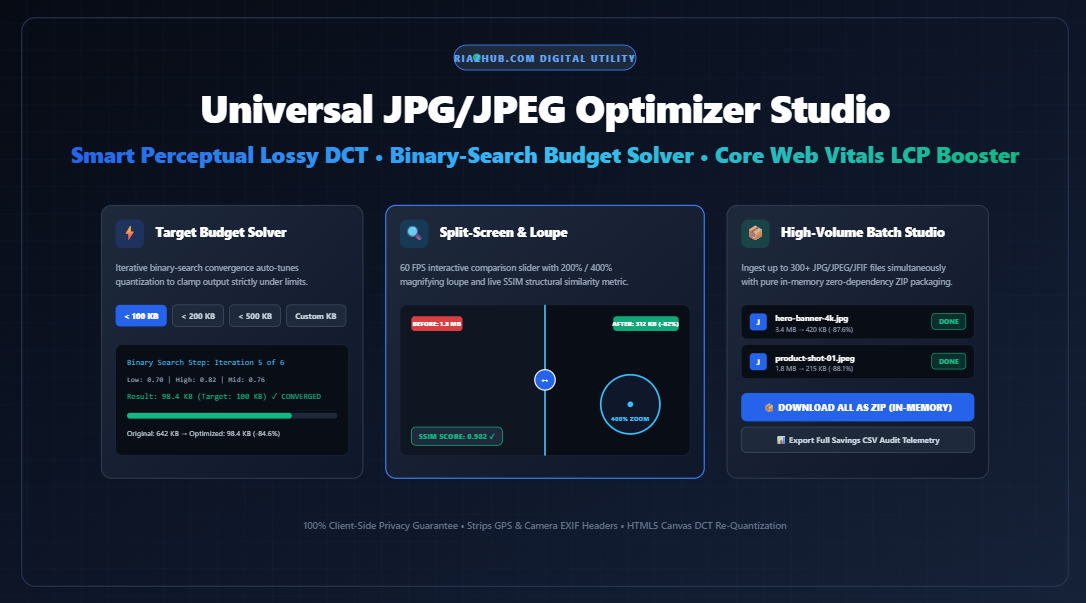
To eliminate these bottlenecks without sacrificing photographic crispness, developers and content publishers can now leverage the browser’s native client-side rendering pipeline. Using the free RiazHub Universal JPG/JPEG Optimizer & Web Vitals Compression Studio, you can compress up to 300+ images simultaneously directly in your browser with zero server uploads, complete privacy, real-time Structural Similarity (SSIM) telemetry, and an automated binary-search budget solver.
1. The Under-The-Hood Physics of JPEG Compression
To truly understand how to optimize JPEG images without turning fine text into blurry mud or introducing blocky digital noise, one must examine how the JPEG standard encodes visual information. JPEG is fundamentally a lossy frequency-domain compression pipeline designed around the psychoacoustic and psychovisual limits of the human eye.
A. YCbCr Color Space Transformation & Chroma Subsampling
Digital camera sensors capture photons in raw RGB (Red, Green, Blue). However, the Human Visual System (HVS) possesses far greater sensitivity to spatial luminance (perceived brightness) than to subtle variations in chrominance (color hue and saturation). The JPEG encoder exploits this physiological trait by converting RGB into the YCbCr color space:
- Y (Luminance): The high-contrast black-and-white brightness channel.
- Cb (Blue-difference Chroma): The blue color displacement channel.
- Cr (Red-difference Chroma): The red color displacement channel.
Once separated, encoders can safely downsample the chroma channels (e.g., using 4:2:0 subsampling, which halves both horizontal and vertical color resolution) while preserving full 1:1 luminance fidelity. For rich photographic portraits and outdoor landscapes, 4:2:0 subsampling achieves an immediate 50% data reduction before mathematical compression even commences.
B. 8×8 Block Discrete Cosine Transform (DCT)
Next, the image is divided into small $8 \times 8$ pixel tiles. Each $8 \times 8$ spatial matrix is transformed into frequency space using the 2D Discrete Cosine Transform:
F(u, v) = 1/4 * C(u) * C(v) * Σ Σ [ f(x, y) * cos((2x+1)uπ / 16) * cos((2y+1)vπ / 16) ]The output is an $8 \times 8$ table of 64 frequency coefficients. The top-left value ($u=0, v=0$) represents the DC coefficient—the average baseline luminance of the entire tile. The remaining 63 values are AC coefficients, representing progressively higher spatial frequencies (rapid transitions, sharp edges, and subtle surface grain).
C. Quantization: Where the Magic (and Distortion) Happens
Quantization is the sole step in the JPEG pipeline where loss occurs. Each frequency coefficient is divided by a corresponding value from a psycho-visually weighted Quantization Matrix (Q-Table) and rounded to the nearest integer:
Quantized(u, v) = round( F(u, v) / Q(u, v) )Because high-frequency visual data is largely imperceptible to human observers at standard reading distances, the Q-Table applies severe divisors to the bottom-right corner of the matrix. As a result, high-frequency coefficients collapse to zero ($0$). The subsequent zigzag entropy scanning and Huffman coding condense long sequences of consecutive zeros into mere bits of compressed payload.
2. The Problem with Unoptimized JPGs on Core Web Vitals
Google’s search ranking algorithm incorporates Core Web Vitals as a primary mobile ranking signal. Among these metrics, Largest Contentful Paint (LCP) measures the duration required for the largest visual block (most commonly a hero header, featured image, or carousel slide) to render inside the mobile viewport. Google recommends an LCP score under 2.5 seconds.
When an uncompressed 3.8 MB camera JPEG is served on a page:
- Network Bandwidth Saturation: Mobile 4G/5G connections experience packet fragmentation and latency spikes, stalling the browser’s download queue.
- Main-Thread Decompression Delay: The browser engine must allocate substantial memory to decode millions of DCT blocks into uncompressed RGBA pixel buffers, temporarily blocking UI responsiveness.
- LCP Degradation: A 3 MB hero image frequently pushes the LCP timing past 4.5 seconds, triggering an “SEO Poor” penalty in Google Search Console.
By processing images through the RiazHub JPG Optimizer, an identical visual asset can be compressed from 3.8 MB down to 280 KB—a 92.6% payload reduction—instantly slashing LCP times by over 1.8 seconds.
3. Key Architecture & Features of RiazHub JPG Optimizer
⚡ 300+ Simultaneous Batch
Multi-threaded client-side pipeline processes up to 300+ JPG, JPEG, and JFIF files with interactive progress tracking.
🎯 Binary Budget Solver
Automatically calculates exact DCT quantization to enforce hard file budgets (e.g. < 100 KB or 200 KB) for government/job portals.
🔬 Split-Screen & Zoom Loupe
Compare raw vs. optimized files at 60 FPS with an interactive slider and inspect fine edge ringing with a 200%/400% magnifying loupe.
🛡️ Privacy & EXIF Scrubber
Strips bloated camera markers, GPS coordinates, and embedded thumbnail previews directly on the canvas buffer.
📊 Real-Time SSIM Telemetry
Live Structural Similarity Index (SSIM) score estimator provides mathematical verification of perceptual visual fidelity.
📦 Native In-Memory ZIP Packager
Bundles all optimized JPEGs and a telemetry CSV audit manifest into a valid .zip file in memory with zero external libraries.
4. The Binary-Search Target File Budget Solver
One of the most frustrating bottlenecks faced by job applicants, civil service candidates, students, and e-commerce sellers is the strict upload ceiling enforced by digital portals (e.g., “Image must be strictly under 100 KB” or “Profile photo cannot exceed 200 KB”).
Manually adjusting quality sliders back and forth to hit a target byte limit is tedious and error-prone. The RiazHub Web Vitals Compression Studio solves this mathematically using a binary search convergence algorithm:
async function solveTargetBudget(canvas, targetBytes, maxIterations = 6) {
    let low = 0.05;
    let high = 1.0;
    let bestBlob = null;
    let bestQuality = 0.82;

    for (let i = 0; i < maxIterations; i++) { const mid = (low + high) / 2; const testBlob = await new Promise(res => canvas.toBlob(res, 'image/jpeg', mid));

        if (testBlob.size <= targetBytes) {
            // Satisfies budget constraint, attempt higher visual quality
            bestBlob = testBlob;
            bestQuality = mid;
            low = mid;
        } else {
            // Exceeds ceiling constraint, must compress more aggressively
            high = mid;
        }
    }
    return { blob: bestBlob, qualityUsed: Math.round(bestQuality * 100) };
}
In just 6 algorithmic iterations, this solver guarantees that your file achieves the absolute highest possible visual clarity while remaining guaranteed below the designated byte ceiling.
5. Perceptual Quality Benchmarks: PSNR vs. SSIM
Historically, engineers relied on Peak Signal-to-Noise Ratio (PSNR) to measure image compression error. However, PSNR only computes mean squared error (MSE) across raw pixel intensity values. It fails to reflect human perception: a small shift in global brightness ruins a PSNR score even when the image looks completely indistinguishable to human eyes.
The modern standard is the Structural Similarity Index (SSIM), which compares luminance ($l$), contrast ($c$), and structural correlation ($s$) across localized windows:
SSIM(x, y) = [ (2μxμy + c1)(2σxy + c2) ] / [ (μx² + μy² + c1)(σx² + σy² + c2) ]| Quality Preset | Typical Compression % | Estimated SSIM Score | Visual Perception (HVS) | Recommended Use Case |
|---|---|---|---|---|
| Maximum (92%) | -45% to -60% | 0.985 – 0.995 | Mathematically lossless to the eye | Photography portfolios, print mockups |
| Web Standard (82%) | -65% to -80% | 0.955 – 0.975 | Near-imperceptible DCT variance | WordPress featured heroes, blog posts |
| High Savings (70%) | -78% to -88% | 0.915 – 0.940 | Very minor high-frequency smoothing | E-commerce thumbnails, category pages |
| Aggressive (50%) | -85% to -94% | 0.840 – 0.880 | Visible DCT block ringing on fine text | Mobile emergency data saver, archives |
6. Privacy & Security: Why In-Browser Canvas Processing Matters
Traditional cloud-based compression utilities require you to upload personal photographs, employee IDs, financial documents, or intellectual property to remote third-party cloud servers. Once transmitted, you have zero control over how long your files persist on overseas storage buckets or whether they are ingested into generative AI training datasets.
Furthermore, raw photographs captured by smartphones and DSLR cameras embed extensive EXIF metadata:
- Precise GPS latitude and longitude (revealing your home or office address).
- Camera serial numbers and unique smartphone hardware identifiers.
- Embedded low-resolution thumbnail previews.
- Exact date, timestamp, and exposure parameters.
The RiazHub Universal JPG/JPEG Optimizer operates 100% inside your browser’s local sandbox using the HTML5 Canvas 2D rendering pipeline. When an image is rendered onto the canvas buffer, all metadata segments (APP1, APP2, EXIF, GPS) are discarded. Your original data never leaves your device.
7. Step-by-Step Optimization Workflow
- Add Your Images: Drag and drop up to 300+ JPG, JPEG, or JFIF files into the upload zone, select a local folder, or paste directly from your clipboard (Ctrl+V). Alternatively, click Load Sample Heavy JPEG for instant testing.
- Select a Compression Preset: Choose from Maximum (92%), Web Standard (82%), High Savings (70%), or Small (50%).
- Enforce Byte Ceilings (Optional): Check Target Exact Size Limit and specify a budget (e.g., 100 KB) if submitting to a restricted portal.
- Inspect Visual Fidelity: Use the Split-Screen Slider to swipe between original and optimized files, or switch to the 200%/400% Zoom Loupe to inspect fine line contours.
- Export Batch: Click Download All as ZIP to package all optimized files and a CSV savings audit in memory, or copy individual images directly to your clipboard.
8. Frequently Asked Questions (FAQ)
Does compressing a JPG through the browser degrade colors?
No. The HTML5 Canvas re-quantization maintains the standard sRGB color gamut. By keeping the quality factor at or above 82%, perceptual color fidelity remains indistinguishable from the original source.
What is the difference between JPG and JPEG?
There is no technical difference. Early versions of MS-DOS and Windows enforced a strict three-letter file extension limit (.JPG), whereas Unix/Mac systems used .JPEG. Both denote identical bitstream formats specified by ISO/IEC 10918-1.
Can I compress images over 20 MB or 4K resolution?
Yes. The tool utilizes the visitor’s local system RAM and GPU-accelerated canvas decoding. Modern mobile and desktop browsers easily process 4K (3840×2160) and 8K images without server timeouts.
Why should I strip EXIF metadata before publishing online?
Camera EXIF data can account for 15 KB to 80 KB of useless byte overhead per photo. Stripping this metadata boosts download speeds and prevents the public disclosure of private GPS geolocation tags.
Published by RiazHub Digital Utilities • Free In-Browser Tools for Web Performance & Privacy
Universal JPG/JPEG Optimizer & Web Vitals Compression Studio
Shrink heavy JPEG files by up to 80%, strip hidden camera metadata, satisfy rigid governmental upload targets, and slash Largest Contentful Paint (LCP) directly in your browser.
| File | Original | Optimized | Savings | Dimensions | SSIM | Actions |
|---|---|---|---|---|---|---|
| No images in batch queue. | ||||||