
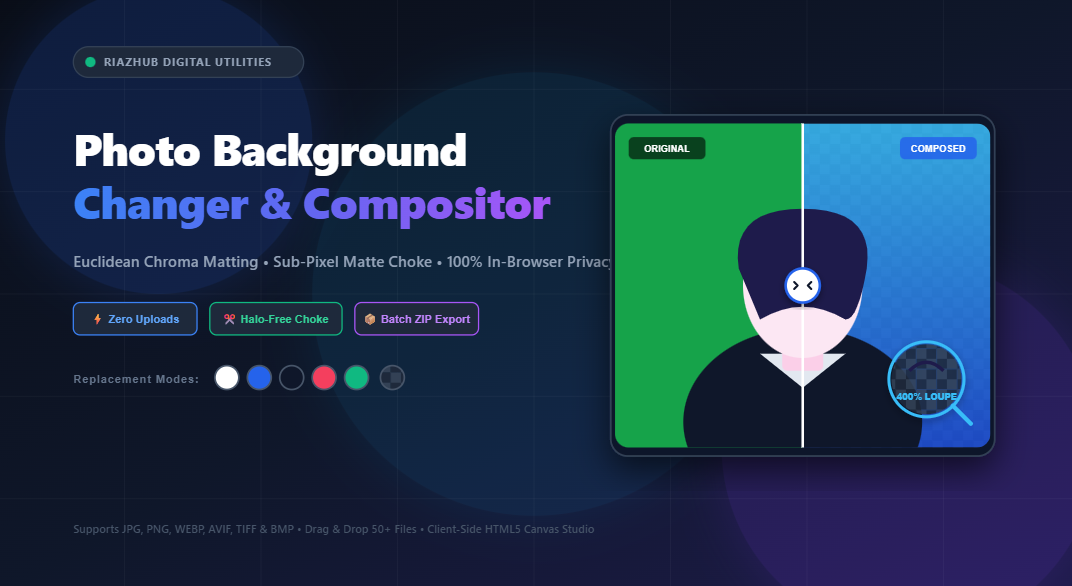
Mastering In-Browser Photo Background Removal & Chroma Compositing: The Zero-Cloud Architecture
In modern digital workflows, whether you are preparing high-resolution product cutouts for an e-commerce catalog, shooting official passport portraits, or crafting YouTube thumbnails, changing or isolating a photo’s background is one of the most frequent graphic design tasks. For years, creators were faced with two sub-optimal choices: installing bloated desktop software suites with expensive monthly subscriptions or uploading private, confidential photos to third-party cloud servers that monetize user data.
Today, modern browser architectures equipped with HTML5 Canvas, high-performance typed arrays, and offscreen rendering have rendered server-side photo processing obsolete. The Universal Photo Background Changer & Chroma Compositing Studio developed by RiazHub brings industrial-grade chroma isolation, boundary choke morphological filters, and scenic backdrop replacement straight into your web browser without a single byte leaving your machine.
Try the Free Studio in Your Browser Now
No account required, zero uploads to external servers, and batch export up to 50+ photos directly into a ZIP file with 100% private client-side processing.
1. The Mathematics of Client-Side Chroma Keying & Alpha Matting
Traditional chroma keying was pioneered in television broadcasting and cinema to replace solid green or blue cyclorama screens. However, translating this to arbitrary photography such as portraits shot against white walls, gray backdrops, or outdoor settings requires a mathematical model that can smoothly evaluate color variance without posterizing soft edges.
The RiazHub Photo Background Changer achieves this through 3D Euclidean Color-Distance Keying across linear RGB space. For every pixel in the source image with color coordinates $(R, G, B)$ and a sampled background key color $(R_k, G_k, B_k)$, the chromatic distance $\Delta C$ is calculated:
// Euclidean Chromatic Distance Formula:ΔC = √((R – Rk)² + (G – Gk)² + (B – Bk)²)
// Smooth Continuous Alpha Matting Factor:
if (ΔC ≤ τinner) {
α = 0; // Completely removed backdrop
} else if (ΔC < τinner + τfeather) {
α = clamp((ΔC – τinner) / τfeather, 0, 1); // Soft falloff transition
} else {
α = 1; // Pure foreground subject
}
By mapping tolerance sensitivity from 0 to 100 against the theoretical maximum Euclidean distance ($\approx 441.67$), users gain microscopic precision over how aggressively the backdrop is stripped away.
2. Eradicating Halos: The Power of Morphological Matte Choking
The most common flaw in amateur background replacement is the dreaded “halo fringe” a 1-pixel to 2-pixel colored border wrapping the subject. This happens because light from the original background naturally bounces and bleeds onto the perimeter of clothing and hair. If you simply replace a dark backdrop with a pure white canvas, this fringe looks unnatural and jarring.
To eliminate this, the RiazHub Compositing Engine incorporates a sub-pixel Matte Choke (Boundary Erosion / Dilation) pipeline operating from $-10\text{px}$ to $+10\text{px}$:
- Negative Choke (−1px to −10px): Executes a morphological erosion filter on the 8-bit alpha mask buffer. By setting each boundary pixel’s alpha to the minimum value of its neighboring kernel, the edge contracts inwards, instantly peeling away light-colored halo fringes.
- Positive Choke (+1px to +10px): Executes a dilation filter, expanding the alpha boundary outwards to safeguard delicate, semi-translucent wisps of flyaway hair or intricate lace fabrics.
3. Neutralizing Color Cast with Spill Suppression
When subjects are photographed in front of bright green screens, blue papers, or intensely saturated walls, reflected ambient light creates an unwanted tint known as “chromatic spill”. Even after the background is keyed out, the edges of the hair and shoulders retain this tint.
When you toggle on Enable Spill Suppression inside the Photo Background Changer Studio, the active pixel shader inspects each boundary pixel and clamps the dominant color channel to the maximum of the adjacent channels:
// Green Screen De-Spill:Gclean = Math.min(G, Math.max(R, B));
// Blue Screen De-Spill:
Bclean = Math.min(B, Math.max(R, G));
This cleanses hair fringes in real time, making composites look as though the subject was originally photographed in a multi-million-dollar professional studio.
Experience Live Studio Compositing
Use the live eyedropper to sample any backdrop color directly from your photo and adjust tolerance, feathering, and matte choke in real time.
4. Five Versatile Backdrop Replacement Modes
Once your subject is isolated with clean, halo-free contours, the online tool gives you five dedicated background replacement engines:
- 🏁 Transparent Alpha (PNG/WebP): Creates a clean, 32-bit transparent cutout with zero background pixels, ideal for e-commerce store listings, product stickers, or game asset design.
- 🎨 Solid Studio Colors: One-click swatches for Pure White (#FFFFFF), Off-White (#F8FAFC), Passport Blue (#2563EB), Dark Slate (#1E293B), or any custom color chosen via the native picker.
- 🌈 Multi-Stop Linear & Radial Gradients: Build smooth vertical linear (90°), horizontal linear (180°), or center radial glow backdrops to give portrait shots a dramatic modern look.
- 🌫️ Procedural Bokeh Blur: Takes your original background and applies a tunable Gaussian depth-of-field blur ($5\text{px}$ to $50\text{px}$), simulating high-end f/1.4 prime camera lenses.
- 🖼️ Custom Scenery Upload: Upload an entirely new scenic background (an office interior, tropical beach, or textured studio paper) and the engine will automatically scale and center-crop it to fit your photo.
5. Real-Time Inspection: Loupe, Split-Screen & Alpha Mask
To ensure production-grade accuracy, you need visual confirmation before exporting. The Chroma Compositing Studio includes an interactive 5-mode viewport:
- ↔️ 60 FPS Split-Screen Comparison: Swipe the vertical divider back and forth across the canvas to compare original unedited pixels with the newly composed photo.
- 🔍 2.5x Zoom Loupe: Hover a floating magnifying circular lens over hair follicles, ears, and collar contours to scrutinize edge fidelity.
- 🎭 High-Contrast Alpha Mask: View the binary black-and-white mask to spot transparent holes or residual artifacts that are invisible against white backdrops.
- 🖌️ Manual Touch-Up Brush: Manually restore accidental cutouts or erase stubborn background objects with adjustable radius.
6. Comparison: In-Browser Studio vs. Cloud SaaS Tools
| Feature | RiazHub Background Changer | Traditional Cloud SaaS APIs |
|---|---|---|
| Privacy & Data Security | 100% In-Browser (Zero Server Uploads) | Photos Sent to Remote Cloud Servers |
| Cost & Limits | 100% Free, Unlimited Photos | Per-Credit Pricing or Monthly Subscriptions |
| Export Quality | Full Native Resolution (No Downscaling) | Often Downscaled to 0.25 MP on Free Tiers |
| Batch Capabilities | 50+ Photos with Native In-Memory PKZIP | Restricted or Queued Behind Paywalls |
| Offline Support | Works completely offline once loaded | Requires constant high-bandwidth internet |
Frequently Asked Questions (FAQ)
Are my uploaded photos sent to RiazHub or any third-party server?
No. All image decoding, chromatic keying, canvas matrix transformations, and ZIP packaging are performed locally within your web browser’s memory using HTML5 Canvas and typed arrays. Your pictures never leave your device.
What should I do if the background color also removes parts of the subject?
Lower the Color Tolerance slider from the default 22 down to 12–16, or switch to the Manual Touch-Up Brush and choose Restore Subject to paint original pixels back onto the canvas.
Can I download all processed photos at once?
Yes. When multiple photos are dropped into the queue, you can click Download All as ZIP. The tool uses a native in-memory PKZIP encoder to compress every file into a convenient archive without server delay.
Ready to Transform Your Photos in Seconds?
Visit the free web app now and experience professional-grade chroma isolation and background scenery replacement right on your device.
Universal Photo Background Changer & Compositing Studio
Isolate subjects, remove backdrops, replace with solid studio colors, procedural gradients, or custom scenery photos with sub-pixel matte choke edge refinement in real time.
🎯 Euclidean Distance Keying
Calculates vector chromatic divergence $\Delta C = \sqrt{(R - R_k)^2 + (G - G_k)^2 + (B - B_k)^2}$ in linear RGB color space to separate subjects cleanly without sending private photos to cloud servers.
✂️ Morphological Matte Choking
Boundary erosion contracts alpha borders by 1px–2px to eradicate the persistent background halos and light fringing caused by backdrop ambient bounce.
🛡️ Chromatic Spill Suppression
Dynamic color de-spill equations evaluate hair and shoulder pixels, clamping reflected green/blue tones to the maximum of adjacent non-key color channels.
🔒 100% In-Browser Privacy
All pixel buffer transformations, canvas alpha compositing, and PKZIP archiving occur exclusively in your device's memory using HTML5 Canvas APIs. Zero server uploads.