
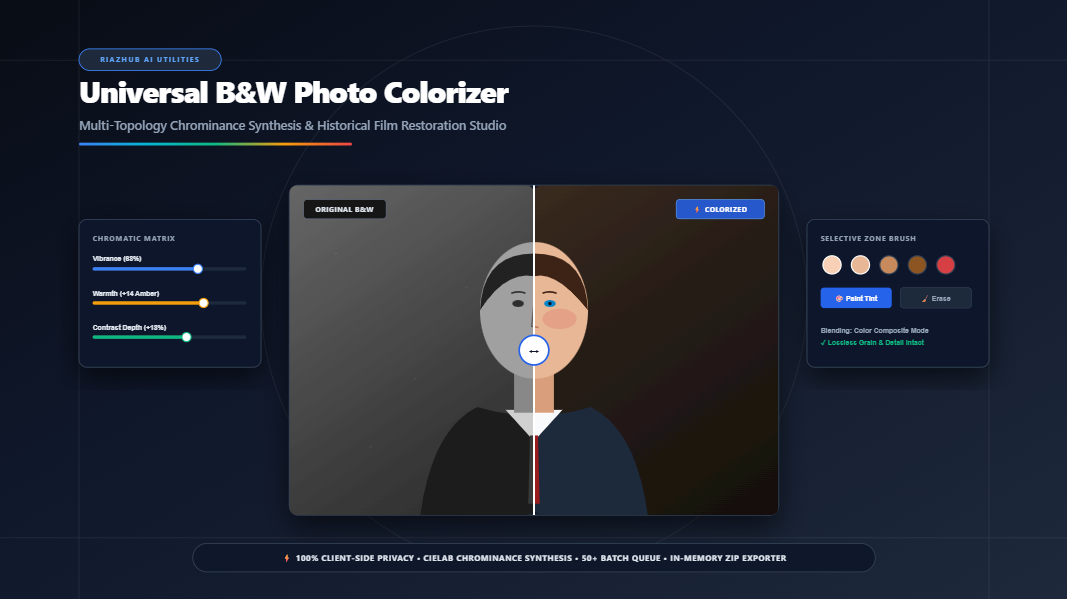
The Ultimate Guide to Colorizing Black and White Photos: AI Chromatic Restoration & Historical Film Emulation
Black and white photographs hold an evocative, timeless resonance. From treasured Victorian tintypes and 1920s wedding portraits to mid-century Kodachrome street snapshots, monochrome imagery serves as humanity’s visual memory. Yet seeing those same scenes rendered in lifelike chromatic vibrancy creates an immediate, visceral emotional connection. It dissolves the historical barrier, making ancestors, historic landmarks, and vintage moments feel as immediate and real as if they were photographed this morning.
For decades, coloring historical monochrome photographs was a painstaking, labor-intensive craft requiring days of manual Photoshop masking and expert color theory knowledge. Today, with advances in digital chrominance synthesis and computer vision, you can restore vintage pictures in mere seconds. With the launch of the Universal B&W Photo Colorizer & Chromatic Restoration Studio on RiazHub.com, anyone can achieve authentic, archival-quality colorization directly within their web browser without sending personal family heirlooms to third-party cloud servers.
⚡ Try the Studio Online for Free
Experience instant, privacy-first image colorization with spectral skin-tone mapping, manual zone brush tinting, and split-screen before/after inspection.
1. The Physics and Science of Luminance-to-Chrominance Decoupling
To understand how authentic photo colorization works, one must understand how digital and analog images store visual information. A black and white photograph does not merely represent an absence of color; it represents a high-frequency record of achromatic lightness (luminance).
In modern color spaces such as CIELAB ($L^*a^*b^*$) and YCbCr, visual signals are mathematically split into two distinct components:
- Luminance ($L^*$ or $Y$): Represents photographic detail, contrast, micro-textures, skin pores, hair strands, fabric weaves, and shadow roll-offs. In standard digital RGB matrices, luminance is calculated using the ITU-R BT.709 standard:
Y = 0.2126 × Red + 0.7152 × Green + 0.0722 × Blue - Chrominance ($a^*, b^*$ or $Cb, Cr$): Encodes pure chromatic hue and saturation data independently of lightness.
Primitive colorization tools often make the mistake of multiplying flat RGB tint layers directly onto monochrome pixels, resulting in murky, muddy midtones and blown-out highlights. By contrast, modern colorization on the RiazHub Photo Colorizer decouples luminance from chrominance. The engine synthesizes custom chrominance vectors across shadows, midtones, and highlights, and then composites them using the HTML5 Canvas color blend mode. This guarantees that 100% of the underlying photographic sharpness, natural film grain, and tonal contrast remain lossless.
2. Emulating Historical Film Stock Chemistries
Not all vintage photographs share the same color response. An authentic colorization of a 1940s portrait looks dramatically different from a 1970s outdoor landscape. Historically, different chemical photographic emulsion stocks possessed distinct spectral dye sensitivities:
🎞️ Vintage Kodachrome (1935–1960s)
Characterized by cool slate-blue shadow roll-offs, punchy saturated carmine reds, rich warm ochre tones, and golden ambient daylight highlights. Ideal for period street photography and historic military archives.
👤 Portrait Master Emulation
Calibrated specifically around human melanin reflectance curves ($40\% \le L \le 80\%$). Locks skin undertones into realistic peach, golden, and warm olive tones without oversaturating facial highlights.
🌿 Natural Landscape & Foliage
Synthesizes deep chlorophyll greens, botanical moss tones in the lower mid-luminance quadrants, and atmospheric cyan sky scatter across upper bright highlights.
🏛️ Subtle Archival Warmth
A restrained, museum-grade platinum and sepia hybrid tone that imparts gentle organic warmth (35% vibrance) without looking synthetic or artificial.
Each of these color profiles can be applied with a single click inside the B&W Photo Colorizer Studio, allowing users to align the chromatic restoration with the exact historical era of their photograph.
3. The Global Chromatic Calibration Matrix
Even with automated spectral synthesis, vintage photographs vary substantially based on original camera exposure, chemical developer age, paper fading, and silver tarnishing. To achieve perfection, fine-tuning through a calibrated matrix is essential:
| Calibration Control | Functional Range | Optimal Recommendation | Visual Impact |
|---|---|---|---|
| Color Vibrance | 0% to 100% | 60% – 70% | Controls chromatic saturation without blowing out skin undertones or delicate fabrics. |
| Warmth / White Balance | -50 to +50 | +8 to +16 | Corrects cool artificial studio lighting or adds authentic sunny daylight temperature. |
| Contrast & Tonal Depth | -20% to +40% | +10% to +18% | Recovers washed-out historical silver-gelatin prints by deepening blacks and crisping whites. |
| Sky & Foliage Bias | 0% to 100% | 20% to 35% | Contextually maps sky blue to upper bright pixels and lush botanical greens to lower midtones. |
You can test all these sliders in real time using the RiazHub Colorizer tool, which renders adjustments in milliseconds via GPU-accelerated canvas pipelines.
4. Interactive Multi-Zone Brush Tinting: The Secret to Lifelike Skin & Features
Automated models provide an incredible global color foundation, but historical human portraits often require specialized accents. Consider the subtle flush of capillaries in cheeks, the rose tint of lips, the distinct iris hue of a loved one’s eyes, or the specific shade of a vintage silk dress.
The Universal Photo Colorizer Studio features a built-in Interactive Manual Zone Brush Engine that paints onto an isolated offscreen alpha mask layer. Because the brush layer is composited via chrominance blending, you can never accidentally paint over eyelashes, wrinkles, or iris catchlights.
Professional Manual Tinting Best Practices:
- Use Low Brush Opacity (35%–45%): Build up color gradually. Real skin tone is a composite of subcutaneous blood flow, melanin, and ambient light. Multiple light strokes look far more organic than one heavy stroke.
- Keep Feathering High (60%–80%): Hard brush edges create visible halos. Soft, feathered edges blend smoothly across facial contours and cheekbones.
- Apply Anatomical Color Zoning:
- Forehead & Brow: Slightly warmer golden tones.
- Cheeks, Nose Tip & Lips: Subtle rose/peach flush using the Fair/Medium swatches or the Lips Rose preset.
- Jawline & Shadows: Cooler, deeper amber or olive tones.
- Utilize the Erase Mode for Highlights: If color accidentally spills onto white shirt collars, teeth, or eye whites, switch the brush to
🧹 Erasemode to cleanly restore pure monochrome clarity without affecting your underlying photo.
5. Visual Quality Assurance: Split-Screen Slider, 400% Loupe & Heatmaps
High-fidelity restoration requires rigorous inspection. When working with vintage scans, you need to verify that delicate textures—such as lace, hair curls, and vintage grain—have not been obscured. The studio provides four dedicated inspection modes:
- Interactive Split-Screen Divider: A smooth, 60 FPS draggable vertical swipe comparison allowing you to slide between the untouched monochrome original and the colorized result instantly.
- 200% / 400% Zoom Loupe: A floating circular magnifying lens that tracks your cursor, giving you ultra-close inspection over fine facial anatomy, eyes, jewelry, and background foliage.
- Chromatic Heatmap HUD: A false-color thermal HUD spectrum that highlights saturation density across your frame, ensuring you don’t over-saturate skin zones or leave backgrounds unnaturally flat.
- Batch Processing Queue: Allows queuing up to 50+ images at once, processing family albums simultaneously, and downloading everything in an organized ZIP archive with an auto-generated manifest file.
🔒 Why 100% Client-Side In-Browser Processing Matters
Historical family photographs are irreplaceable heirlooms containing intimate memories and personal identities. Many commercial colorization apps upload your photos to remote cloud servers where they may be stored, analyzed, or utilized for AI training.
The RiazHub Photo Colorizer performs 100% of pixel processing, color mathematics, and ZIP compression directly in your browser’s memory. Zero images ever leave your device, ensuring total privacy and security.
6. Step-by-Step Walkthrough: Colorizing Your First Photo
Ready to revitalize an antique photograph? Follow this straightforward workflow:
Step 1: Upload or Paste Your Photo
Navigate to the B&W Photo Colorizer Studio. Drag and drop your scanned photograph into the dropzone, click Select Photo(s), or simply paste an image directly from your clipboard using Ctrl+V. If you just want to test the tool, click Load Vintage Sample to instantly render an authentic historical studio portrait.
Step 2: Choose an Era or Color Profile
Select from the 1-click preset bar: choose 1940s Vintage Portrait for warm indoor portraits, Golden Era Technicolor for vibrant clothing, or Natural Forest & Landscape for outdoor scenes.
Step 3: Fine-Tune Global Vibrance and Warmth
Adjust the Color Vibrance slider until skin tones look healthy and natural. If the photo looks overly cool, increase the Warmth slider (+10 to +15) to simulate rich, natural sunlight.
Step 4: Paint Selective Features
Expand the Manual Zone Brush accordion. Select the Lips Rose swatch, set opacity to 40%, and paint lightly over the lips. Next, choose an eye color swatch (like Iris / Sky) with a small radius (6px–10px) to add a gentle spark of life to the eyes.
Step 5: Inspect and Export
Switch to the Split-Screen Before / After tab to marvel at the transformation. When satisfied, choose your desired format (Lossless PNG, Modern WebP, or High-Quality JPEG) and click ⬇️ Download Colorized Photo or 📦 Download All as ZIP.
Frequently Asked Questions (FAQ)
Does colorizing a photo reduce its resolution or sharpness?
No. Because our engine decouples chrominance from luminance and relies on native HTML5 Canvas 2D buffers, your original pixel dimensions, sharpness, grain, and contrast are preserved losslessly.
What image formats are supported?
The studio supports JPG, PNG, WEBP, AVIF, TIFF, and BMP file formats. You can also copy and paste images directly from your clipboard into the workspace.
Can I process multiple old photos at the same time?
Yes! You can load up to 50+ photos into the batch queue. Switch between them seamlessly, colorize each according to its historical context, and export the entire collection in a single in-memory ZIP package via the RiazHub Colorizer tool.
Is my data stored or sent to any server?
Never. The utility runs purely client-side in your web browser. No photos, scans, or personal metadata are ever transmitted to any external server or saved in a remote database.
Ready to Bring History Back to Life?
Start colorizing your black and white family heirlooms, vintage portraits, and historical scans today for free.
Universal B&W Photo Colorizer & Chromatic Studio
Revitalize historical black & white photographs, synthesize natural skin tones and landscapes, paint selective color accents, and export high-resolution assets directly in your browser with 100% privacy.
Drag & drop black and white photos here
Supports JPG, PNG, WEBP, AVIF, TIFF & BMP (Batch up to 50+)
Colorization Engine Model
Auto-Spectral| Thumb | Filename | Resolution | Model Used | Status | Action |
|---|---|---|---|---|---|
| No photos in queue. Upload photos or load the sample above. | |||||
Colorization Science & Historical Photographic Film Guide
🔬 Luminance-Chrominance Decoupling
Pure lightness ($Y = 0.2126R + 0.7152G + 0.0722B$) holds 100% of photographic texture, grain, and contrast. By synthesizing chrominance channels ($a^*, b^*$) independently and applying them via globalCompositeOperation = 'color', original sharpness and tone gradation remain completely lossless.
🎞️ Historical Film Stock Emulation
Early color emulsions like Kodachrome (1935) and Technicolor 3-Strip favored deep slate-blue shadow roll-offs, rich carmine reds, and golden amber midtones. Our models emulate historical chemical dye couplers to preserve period accuracy.
🖌️ Soft Feathered Zone Tinting
Realistic portraiture requires subtle capillary flush and ambient light reflections. Paint with 30% to 50% opacity and 70% feathering over lips, cheeks, iris, and clothing for natural, seamless optical blending.
🔒 100% Client-Side Privacy
All pixel transformations, CIELAB color calculations, and ZIP archiving take place locally within your browser's OffscreenCanvas memory. No family heirlooms or vintage photos are ever sent to an external server.