
The Art of the Border: How Gallery Mats, Polaroid Chins & Floating Shadows Elevate Digital Photography
In an era dominated by endless vertical scrolling feeds and uniform digital card grids, standard photographs often struggle to command attention. A raw photograph rendered without visual breathing room bleeds directly into browser viewports, operating system chrome, and conflicting website color schemes. The human visual cortex requires a frame of reference an intentional spatial boundary that signals where the digital environment ends and the artist’s visual narrative begins.
Historically, master printmakers and gallery curators have understood this principle for centuries. Physical archival mat boards, beveled fillet lines, and weighted margins do not merely protect physical paper; they visually isolate the photograph, anchor tonal contrast, and dramatically amplify perceived artistic value.
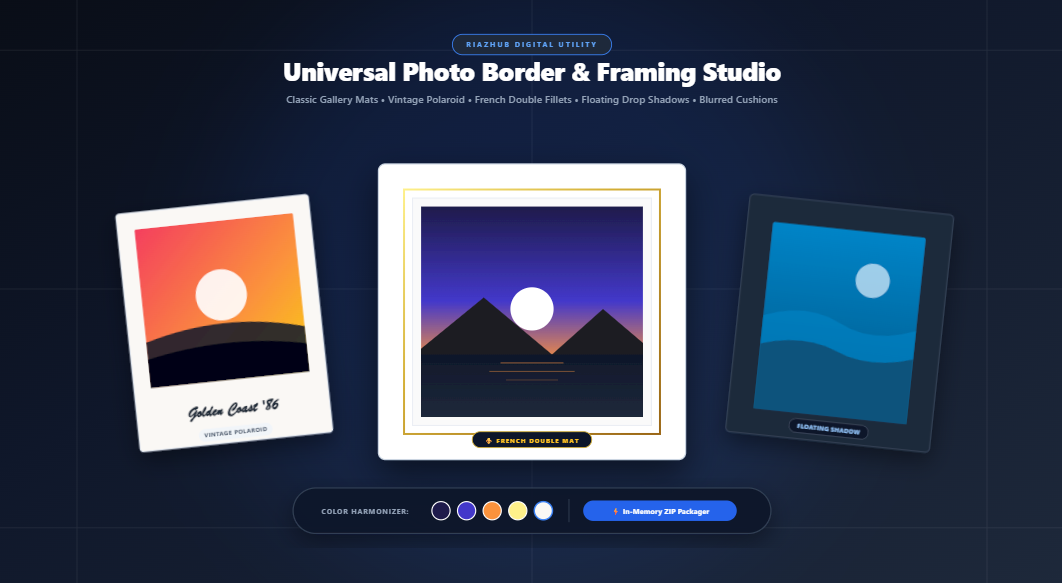
With the release of the Universal Photo Border & Framing Studio on RiazHub, creators, photographers, and social media managers can now apply professional multi-topology matting, instant vintage Polaroid chin margins, and 3D floating canvas drop shadows directly inside their web browser—with zero server uploads and zero loss in pixel fidelity.
Why Framing Matters: The Science of Chromatic Isolation & Visual Weight
Why does adding a simple border around an image instantly change how viewers perceive its quality? The phenomenon is rooted in two fundamental principles of visual perception:
- Chromatic Isolation: When a photograph sits directly on an uncurated webpage or social media background, surrounding interface colors (such as stark white backgrounds or deep dark modes) compete directly with the image’s internal color values. A physical or digital mat provides a neutral tonal buffer that shields the photograph from environmental distraction.
- Visual Weight & Grounding: An unbordered image appears fragile—floating ambiguously on the screen. Introducing structural margins gives the artwork physical permanence, transforming a casual snapshot into an intentional gallery exhibition piece.
💡 The High-Contrast Highlight Rule
Curatorial framing experts universally recommend selecting a matte color that is slightly darker or warmer than the lightest highlight in your photograph. Selecting stark artificial white (#FFFFFF) can unintentionally make bright elements within your photograph look dirty or underexposed. You can try this right now in the Photo Border & Framing Studio, which features an intelligent Color Harmonizer that samples your image’s actual tonal centroids to propose complementary border colors automatically.
The 5 Core Framing Topologies Explained
Different photographic genres demand distinct framing topologies. The Photo Border Studio at RiazHub provides five distinct architectural matting engines:
🔲 1. Solid Classic Matting
Uniform or asymmetric single-tone archival mat board. Features customizable border widths (1px to 150px), independent margin controls (Top/Bottom/Left/Right), and inner corner radius smoothing (0px to 80px) to simulate museum-grade archival framing.
📸 2. Vintage 1980s Polaroid
Authentic instant camera framing featuring an extended bottom chin (3.5× to 4× side margin width). Includes an integrated typography engine that renders cursive, typewriter, modern sans, or classic serif captions centered beneath your photo.
🖼️ 3. Double French Matting
The hallmark of luxury fine-art galleries. Combines a broad outer archival mat with a contrasting micro-fillet accent line (1px to 8px) rendered in metallic gold, deep slate, or crisp white, creating an unmistakable sense of layered depth.
☁️ 4. Floating Soft Shadow
Suspends your photograph above a wide contrasting backdrop using realistic multi-layer blurred elevation drop shadows. Perfectly mimics a modern gallery canvas floating off a minimalist wall.
The Fifth Topology: Blurred Bokeh Cushions for Social Media
Anyone who has ever tried to post vertical portraits or landscape photography to Instagram, TikTok, or Pinterest has encountered the dreaded crop factor. Social media platforms often ruthlessly chop off the tops of heads or scenic vistas to enforce 1:1 or 4:5 aspect ratios.
The Blurred Bokeh Cushion engine solves this problem elegantly. Instead of forcing letterbox black bars, the tool replicates your original photo behind itself, scales it outwards, and applies a heavy Gaussian blur (35px) with a subtle darkening overlay. Your original photograph remains 100% uncropped in the center while the surrounding border seamlessly matches the color palette and atmosphere of your image.
Outset Expansion vs. Inset Overlays: Which Mode Should You Use?
One of the most critical decisions when applying borders is deciding how canvas dimensions should behave. The Universal Photo Border Generator incorporates two mathematically distinct modes:
| Feature | Mode A: Outset (Canvas Expansion) | Mode B: Inset (Overlaid Framing) |
|---|---|---|
| Pixel Dimensions | Increases total dimensions ($W_{\text{total}} = W_{\text{orig}} + \text{Pad}_L + \text{Pad}_R$) | Maintains exact native dimensions ($W_{\text{total}} = W_{\text{orig}}$) |
| Image Cropping | Zero Cropping (100% native pixels preserved) | Perimeter pixels overlaid by frame |
| Best For | High-res print exports, portfolio showcases, archival photography | Social media card grids, profile avatars, fixed-size web banners |
Frame Your Photos in Seconds
Experience real-time interactive split-screen previews, 400% zoom inspection, and instant batch ZIP packaging right inside your browser.
Precision Color Harmony: Stop Guessing Hex Codes
One of the biggest mistakes in digital photo editing is defaulting to arbitrary border colors. A stark `#000000` border on a warm sunset portrait creates a harsh visual jarring effect, while pure `#FFFFFF` can wash out delicate morning highlights.
To solve this, the Photo Border & Framing Studio integrates an in-browser Dominant Palette Extractor. When you upload or drag-and-drop an image:
- The internal engine downsamples the image to a low-frequency color matrix.
- It performs 4-bit hue quantization to cluster visually similar color frequencies.
- It ranks the most harmonious color clusters and generates five ready-to-click interactive palette chips (such as Warm Cream, Slate Charcoal, Alpine Midnight, or Soft Ochre).
Clicking any swatch instantly shifts the entire frame’s mat board to match the natural color harmony of your subject, ensuring that the border complements your artwork rather than fighting it.
Step-by-Step Tutorial: How to Create a Gallery-Worthy Framed Photo
Creating a high-resolution, exhibition-ready framed piece takes less than sixty seconds with the free online tool:
- Load Your Images: Drag and drop up to 50+ photos into the dropzone, click to browse your local drive, paste directly from your clipboard (
Ctrl+V), or click Load Sample to test the engine with pre-loaded alpine photography. - Select Your Framing Style: Switch between Solid, Polaroid, French Mat, Floating, or Blurred using the top style selector.
- Calibrate Width & Margins: Adjust the Master Border Width slider (1px to 150px). If you want an authentic bottom-weighted art mat, uncheck Lock all sides proportional and set the bottom margin slightly wider than the top and sides.
- Harmonize Colors: Choose one of the five auto-extracted palette swatches, or pick a custom hex color. If you are using French Matting, select your metallic fillet accent line width and color.
- Inspect Your Composition: Use the Split-Screen Before/After slider to compare the raw photo against your framed piece, switch to the 200%/400% Zoom Loupe to examine corner bevels, or preview your artwork hanging on a living room wall using the Gallery Wall Mockup.
- Download or Copy: Choose your export format (lossless PNG, modern high-res WebP, or photo-quality JPEG), click Download Framed Photo, copy straight to your clipboard, or click Download Batch as ZIP to export an entire batch in a single archive.
100% In-Browser Privacy: Zero Network Uploads
Privacy is a critical requirement when working with personal family pictures, client portrait sessions, or proprietary commercial artwork. Many online photo editors transmit your images to third-party cloud servers where they are decoded, processed, and temporarily stored.
The Universal Photo Border & Framing Studio is built on a strict client-side architecture. Every operation—including image decoding, clipping masks, drop shadow synthesis, typography rendering, and binary ZIP archiving—executes entirely within your browser’s local sandbox via HTML5 Canvas and native JavaScript. Your photos never leave your device, ensuring complete privacy, zero bandwidth usage, and instantaneous rendering speeds.
Frequently Asked Questions (FAQ)
Does adding a border reduce the resolution of my photo?
No! When using Outset Mode (the default mode), the total canvas dimensions expand to accommodate your border while leaving 100% of your native camera pixels untouched. For instance, framing a 4000×3000px image with a 50px border creates an output of 4100×3100px with zero cropping or downsampling.
Can I frame multiple photos simultaneously?
Yes. You can drag and drop up to 50+ images into the batch queue. You can preview individual outputs or click Download Batch as ZIP to pack all framed images into a compressed ZIP file directly inside your browser memory.
Which image formats are supported?
The studio supports all standard modern image formats, including JPG, PNG, WEBP, AVIF, BMP, and TIFF. Outputs can be exported in lossless PNG, modern WebP, or quality-calibrated JPEG.
Ready to Transform Your Photography?
Give your photos the gallery presentation they deserve. Add classic mats, vintage Polaroid captions, and floating shadows now for free.
Universal Photo Border & Framing Studio
Add classic gallery mats, vintage Polaroid frames, floating drop shadows, and blurred cushions with custom dimensions in real time.
📖 Picture Framing Aesthetics, Visual Weight & Color Harmony Guide
🎨 Color Harmony & Visual Isolation
Physical and digital mat boards serve as a neutral buffer separating the photograph from surrounding environmental background colors. Selecting a mat tone slightly darker than the image's lightest highlight gives your photograph immense dimensional presence and draws the viewer's eye into the core focal point.
📐 Outset Expansion vs. Inset Cropping
Outset Mode expands total canvas pixel dimensions, ensuring 100% of your native camera resolution is preserved without any cropping. Inset Mode retains the exact original image dimensions, superimposing borders inward—ideal for social media card constraints and website grids.
📸 Traditional Polaroid Bottom Weighting
Classic Polaroid and instant camera framing relies on an asymmetric bottom chin that is 3.5× to 4× wider than the side borders. Historically designed to house chemical developer reagent pods, this lower visual weighting provides ideal balance and room for nostalgic captions.
🔒 100% Client-Side Privacy Guarantee
All image rendering, color sampling, dimension recalculations, and ZIP file packing happen entirely in memory within your browser via HTML5 Canvas. Zero photos or personal data are ever uploaded or transmitted across the network.