
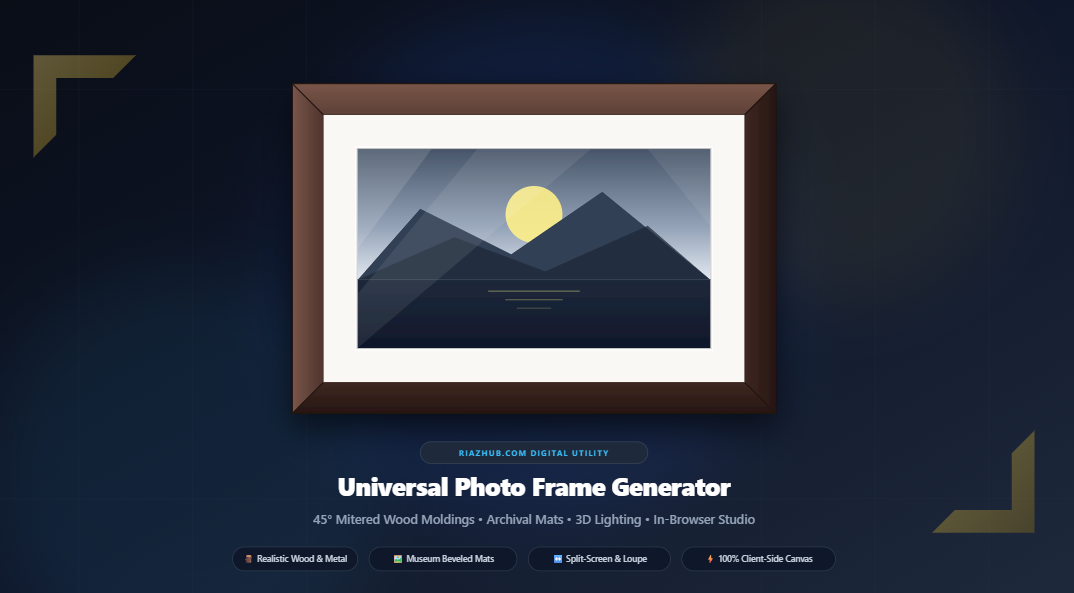
Universal Photo Frame Generator & Gallery Framing Studio: The Ultimate Guide to Photorealistic Virtual Picture Framing
In both digital presentation and traditional fine art exhibitions, framing represents far more than a decorative perimeter. A well-crafted picture frame establishes visual separation, protects delicate photographic surfaces, directs optical focus, and imparts spatial depth to flat pixels. However, until now, digitally framing photography or artwork required heavy desktop software, raster mockups with distorted corner seams, or clunky online tools that compromise your privacy by transmitting private photographs to remote cloud servers.
To solve this challenge, RiazHub developed the Photo Frame Generator & Gallery Framing Studio. This browser-based digital utility recalculates 45-degree mitered trapezoidal geometry, directional specular lighting angles, museum-grade archival mat boards, and specular glass glazing completely in-memory using HTML5 Offscreen Canvas and high-precision mathematics.
Architectural Highlights: What Sets the Studio Apart
Traditional photo framing tools simply slap a colored CSS border or a stretched four-sided box shadow around an image. In contrast, the Universal Photo Frame Generator treats framing as a mechanical woodworking and physical lighting pipeline:
Constructed from four independent trapezoidal polygons clipped at authentic 45-degree corner seams, just like master woodworking.
Directional lighting modulates highlights on top/left rails and casts ambient occlusion shadows on bottom/right rails for lifelike 3D depth.
Acid-free archival matting with an authentic 45-degree white core reveal fillet line and subtle aperture drop shadow.
Analyzes image pixels to suggest five harmonized mat board swatches tailored to the active photo’s dominant color palette.
Interactive 60 FPS before/after swipe divider and a circular magnifying lens to scrutinize fine miter corner seams and core fillets.
Zero bytes are ever uploaded. All canvas operations, rendering passes, and ZIP archives are processed in local browser RAM.
The Science of 45-Degree Miter Joints: Why Trapezoidal Polygons Matter
If you look closely at physical picture frames crafted by professional framers, you will observe that corners never overlap in a rectangular stack. Instead, the top rail, bottom rail, left stile, and right stile meet at crisp 45-degree diagonal seams known as miter joints.
When you launch the Photo Frame Generator on RiazHub, the rendering engine creates four distinct path polygons using HTML5 Canvas 2D context clipping:
- Top Rail: A horizontal trapezoid with vertices $(0,0) \to (W,0) \to (W – F_w, F_w) \to (F_w, F_w)$.
- Bottom Rail: A horizontal trapezoid with vertices $(0,H) \to (W,H) \to (W – F_w, H – F_w) \to (F_w, H – F_w)$.
- Left Stile: A vertical trapezoid with vertices $(0,0) \to (F_w, F_w) \to (F_w, H – F_w) \to (0,H)$.
- Right Stile: A vertical trapezoid with vertices $(W,0) \to (W – F_w, F_w) \to (W – F_w, H – F_w) \to (W,H)$.
By isolating each rail within its own clipped polygon, procedural woodgrain lines and brushed metal textures flow parallel to the molding length—horizontal on the top and bottom rails, and vertical on the side stiles. When these textures meet at the 45-degree seam line, the resulting visual authenticity mirrors hand-assembled timber molding.
Technical Note: The 315-degree gallery lighting model simulates ceiling halogen or LED spotlights positioned in the upper-left quadrant. Top and left rails receive additive highlight gradients ($L_{\text{rail}} = L_{\text{base}} \cdot (1 + d \cos\theta)$), while bottom and right rails receive ambient occlusion shading, creating true dimensional relief.
Dual Canvas Modes: Outset Canvas vs. Inset Crop
Different creative projects demand different framing strategies. The RiazHub Framing Studio features two specialized canvas geometry modes:
| Dimension Mode | How Dimensions Behave | Best Use Cases |
|---|---|---|
| ⤢ Outset (Canvas Expand) | Preserves 100% of the original photo pixels. Total output dimensions expand outward: $\text{Width}_{\text{out}} = W_{\text{orig}} + 2(F_w + M_w)$. | High-resolution fine art prints, photography archives, and preserving composition without cropping edges. |
| ⤡ Inset (Overlay Portal) | Maintains the photo’s exact original canvas dimensions. The frame molding and mat board crop gently over the outer boundary. | Social media profile cards, fixed-aspect gallery grids, e-commerce thumbnails, and banner assets. |
Museum-Standard Archival Mats & the 45° White Core Reveal
In museum curatorial practices, artwork is never placed directly against framing glass. Moisture condensation, temperature swings, and electrostatic attraction can cause photographic emulsion or fine pigment prints to bond irreversibly with glazing. Archival matting creates an essential air gap that preserves artwork longevity.
A hallmark of fine mat cutting is the signature 45-degree beveled aperture. High-end acid-free mat boards consist of a colored face paper laminated over a pristine, solid-white cotton core. When the aperture window is cut with a 45-degree bevel cutter, a 1.5mm to 3mm bright white line—the core reveal—frames the artwork.
The Photo Frame Generator faithfully simulates this museum standard, rendering a crisp white core fillet line coupled with a micro drop shadow cast from the mat window onto the artwork surface.
Intelligent Pixel Harmonizer: Automated Palette Coordination
Choosing the right mat color can be daunting. A mat that is too bright can distract from subtle highlights; a mat that is too saturated can clash with skin tones.
The studio includes an automated Intelligent Color Harmonizer. When you load your artwork, an in-browser sampling engine analyzes pixels across multiple compositional quadrants (center, corners, and focal boundaries). It extracts five tone-matched swatches directly from your image’s palette, allowing you to harmonize your mat board with your art in a single click.
How to Frame Your Photos in Under 60 Seconds
Framing fine art with the studio requires zero installation and zero technical expertise. Follow these quick steps:
- Open the Studio & Upload Your Art
Navigate to the Photo Frame Generator on RiazHub. Drag and drop single or multiple photos (JPG, PNG, WebP, AVIF, TIFF) into the dropzone, paste directly from your clipboard with Ctrl+V, or click “Load Sample Artwork” to test immediately. - Select Frame Material & Finish
Choose from five material families: Wood (Walnut, Oak, Mahogany, Ebony, Pine), Metal (Anodized Black, Brushed Silver, Champagne Gold, Bronze), Ornate Gold Leaf, Studio Shadowbox, or Archival Mat Only. - Calibrate Dimensions & Relief Depth
Use intuitive tactile sliders to adjust molding width (5px to 160px), 3D bevel depth (0% to 100%), and incident spotlight angle (0° to 360°). - Customize Mat Board & Glass Glare
Toggle the archival mat board on or off, set mat width (10px to 150px), choose from museum presets (Ivory Linen, Pure White, Slate Charcoal) or click an auto-extracted Harmonizer tone swatch. Enable optional diagonal anti-reflective glass glazing. - Scrutinize & Inspect in 5 Preview Modes
Switch seamlessly between the Live Studio Stage with pan/zoom, 60 FPS Split-Screen Slider, 400% Zoom Loupe, and Wall Gallery Mockup. - Download Lossless Artwork or ZIP Archive
Select your export format (PNG, WebP, or JPEG) and click “Download Framed Artwork” for instant lossless rendering, or click “Download All as ZIP” to bundle up to 50+ framed photographs in browser memory.
Interactive Studio Viewport: Five Ways to Review Your Art
Before committing to an export or high-resolution download, the Universal Photo Frame Studio equips you with five specialized diagnostic preview panels:
High-resolution interactive canvas with responsive display containment, wall drop shadow simulation, and smooth pan/zoom controls (+, −, ⊙ Fit).
An interactive vertical divider that lets you drag left and right to compare raw, unframed artwork against the finished gallery piece in real time.
A circular magnifying lens that follows your mouse cursor across the canvas, letting you scrutinize corner miter seams and bevel fillet lines at up to 400% magnification.
Simulates an elegant living room interior display with designer furniture and five selectable wall paint tones (Gallery Linen, Sage Whisper, Nordic Navy, Charcoal, Terracotta).
A comprehensive queue table displaying all loaded photographs, original dimensions, framed output dimensions, and individual download triggers.
Privacy First: Why Client-Side Processing Is Essential
Many online image manipulation platforms upload your photographs to remote cloud servers to process filters and framing scripts. This introduces serious privacy risks for private family photographs, unreleased commercial artwork, and sensitive client scans.
The Photo Frame Generator on RiazHub operates on a strict 100% client-side execution model. All canvas path drawing, procedural woodgrain shading, color extraction, and binary PKZIP archiving execute entirely within your browser’s local JavaScript virtual machine. Your artwork never travels over a network wire, guaranteeing complete confidentiality and zero latency.
Frequently Asked Questions (FAQ)
Is the Photo Frame Generator completely free to use?
Yes, the Photo Frame Generator & Gallery Framing Studio is 100% free with no account creation, no subscriptions, and no watermarks placed on your exported artwork.
Will the tool reduce the quality of my high-resolution photos?
Not at all. In “Outset” mode, the tool preserves 100% of your photo’s native pixel dimensions and aspect ratio, expanding the outer canvas to accommodate the mitered molding and mat border. When exporting to PNG, the result is completely lossless.
Can I frame multiple photos simultaneously in a batch?
Yes! You can drag and drop up to 50+ photos into the upload dropzone. Configure your desired framing profile, and click “Download All as ZIP” to download a cleanly packaged .zip archive assembled directly in your browser’s memory.
Does the tool work on mobile devices and tablets?
Yes. The studio features a fluid, responsive 1100px layout that automatically adapts to touchscreens, tablets, and smartphones with tactile buttons and touch-enabled split-screen comparison sliders.
Can I copy the framed photo directly to my clipboard?
Yes. With one click on the “Copy to Clipboard” button, the studio uses the native HTML5 Clipboard API to copy a full-resolution PNG directly to your system clipboard, ready to paste into Photoshop, Figma, Discord, Slack, or email.
Universal Photo Frame Generator
Craft photorealistic 45° mitered wood moldings, ornate gilded profiles, modern metal rails, and archival mat boards with specular lighting in real time.
| Thumb | File Name | Source Size | Framed Output | Actions |
|---|---|---|---|---|
| No photos loaded. Drag & drop files or click "Load Sample Artwork". | ||||