
The Definitive Guide to Photo Resizing, Print DPI Calibration, and Dimensional Resampling
Most users open a generic editor, stretch their picture to match arbitrary pixel bounds, and end up with fuzzy text, pixelated edges, distorted face ratios, or an immediate rejection notice from an automated visa or university portal stating: “File size exceeds 100 KB limit” or “Resolution does not meet 300 DPI print requirement”.
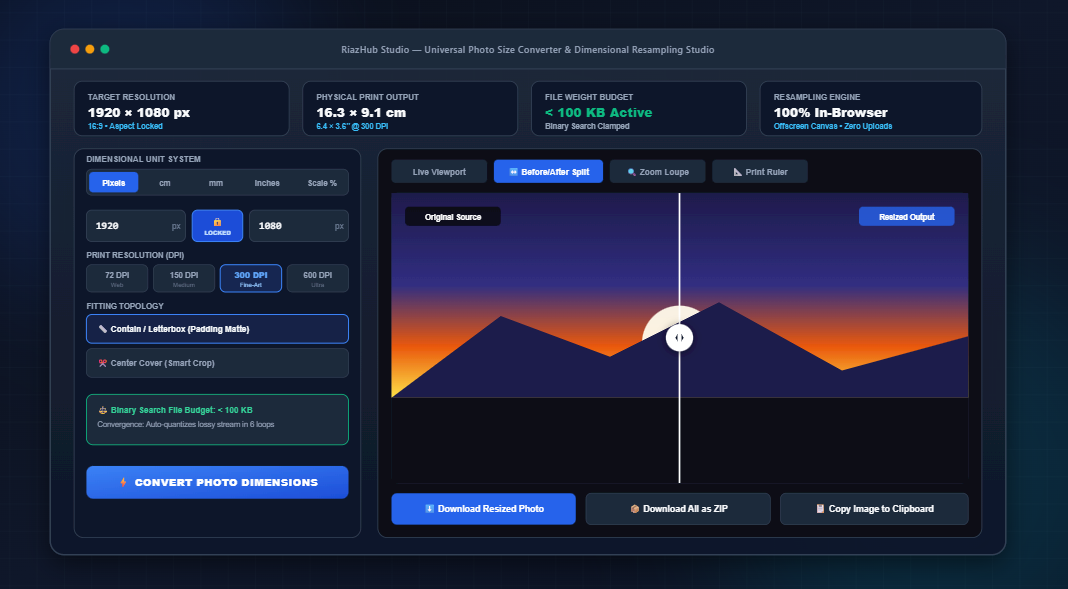
To permanently eliminate these errors, you can use the free browser-based Universal Photo Size Converter & Dimensional Resampling Studio. In this comprehensive guide, we will break down the underlying physics and mathematics of dimensional conversion, explain how physical inches and millimeters translate into canvas pixels via DPI, explore proportional aspect fitting topologies, and examine in-memory binary search compression algorithms.
⚡ Need to Convert Dimensions or Clamp File Sizes Right Now?
Switch between Pixels, Centimeters, Millimeters, and Inches, lock aspect ratios, and clamp byte budgets instantly inside your browser without uploading to external servers.
1. The Fundamental Mathematics: Pixels vs. Physical Units
Digital displays and cameras operate in discrete picture elements called pixels (px). A 4K monitor or a smartphone sensor knows only how many light receptors or phosphor diodes it contains. Physical print mediums (photo paper, cotton canvases, billboards, plastic identity cards), however, exist in metric or imperial dimensions: centimeters (cm), millimeters (mm), and inches (in).
The bridge connecting physical length to screen pixels is DPI (Dots Per Inch), often used interchangeably in digital prepress with PPI (Pixels Per Inch).
For instance, if an official Schengen Visa or UK Passport requires a photo measuring exactly 35 × 45 mm at the international archival print standard of 300 DPI, the required canvas pixel dimensions are calculated as follows:
- Width: $(35 / 25.4) \times 300 = 413.38 \approx \mathbf{413\text{ px}}$
- Height: $(45 / 25.4) \times 300 = 531.49 \approx \mathbf{531\text{ px}}$
Entering these exact dimensions manually on standard tools is cumbersome. With the Photo Size Converter & Dimensional Resampling Studio, you simply select the Millimeters pill tab, enter 35 and 45, select 300 DPI, and the engine automatically computes the sub-pixel raster grid.
| Physical Standard | Metric / Imperial Size | Target DPI | Calculated Pixel Grid | Primary Use Case |
|---|---|---|---|---|
| US Passport / Visa | 2.0 × 2.0 inches (51 × 51 mm) | 300 DPI | 600 × 600 px | US State Dept, Green Card, DS-160 |
| Schengen / UK Passport | 35 × 45 mm | 300 DPI | 413 × 531 px | EU Visa, British Passport Office |
| Standard 4×6″ Print | 4.0 × 6.0 inches (102 × 152 mm) | 300 DPI | 1200 × 1800 px | Fine-art photo albums, lab prints |
| A4 International Page | 210 × 297 mm | 300 DPI | 2480 × 3508 px | Official PDF flyers, resumes, certificates |
| Web Thumbnail Card | Screen-only (variable) | 72 DPI | 300 × 300 px | Fast-loading website galleries |
2. Aspect Ratio Fitting Topologies: Why Photos Get Distorted
When converting a picture captured in one aspect ratio (for example, standard 4:3 from an iPhone or 3:2 from a full-frame Nikon or Canon DSLR) into another ratio (such as a 16:9 widescreen thumbnail or a 1:1 Instagram square), pixel mathematics forces a geometric decision. The online resampling studio provides three distinct fitting modes:
Mode A: Contain / Letterbox (Padding with Color Matte)
The scaling algorithm scales down the source image until both width and height fit entirely inside the target boundary. Because the original aspect ratio is maintained, empty spaces are left along the borders. The tool fills these margins with a clean color matte:
- White (`#FFFFFF`): The standard for passport applications and gallery photo mounts.
- Black (`#000000`): Ideal for cinematic widescreen frames and moody portraits.
- Transparent Alpha: Essential for WebP and PNG graphics used in web design and UI buttons.
Mode B: Cover / Smart Center Crop
The scaling algorithm scales the image up until the entire target boundary is filled without any empty margins. Any surplus portions exceeding the frame are cropped symmetrically from the center. This is the optimal mode for social media cards, hero banners, and profile avatars where bars look unprofessional.
Mode C: Stretch to Exact (Non-Uniform Resampling)
Both width and height are forced into the exact pixel coordinates specified. While this guarantees 100% adherence to the bounding box without cropping or borders, it alters original proportions. Faces may appear abnormally wide or narrow.
3. The Binary-Search File Weight Locker (< 50 KB, < 100 KB)
A frequent issue for applicants submitting documents online is the strict file size ceiling. Many portals enforce constraints such as:
“Photo must be at least 600×600 pixels, but strictly under 100 KB in file size.”
Manually finding the exact slider value that produces a file size below 100 KB without unnecessarily degrading image quality is time-consuming.
When you activate the Strict File Size Limit on the Universal Photo Size Converter, an automated 6-iteration convergence loop tests compression qualities $Q \in [0.05, 1.0]$. In less than 150 milliseconds, it identifies the highest quality coefficient that keeps the resulting blob under your designated byte limit.
4. Real-Time Viewport Inspection: Loupe & Split-Screen Slider
When resampling down from 24 megapixels to web or passport dimensions, anti-aliasing interpolation can soften high-frequency edges like eyelashes, hair strands, or architectural text.
The studio includes specialized real-time inspection features:
- Split-Screen Before/After Swipe Divider: An interactive vertical slider that lets you drag across the canvas at 60 FPS to compare the original raw photo directly against the resampled output.
- 200% / 400% / 800% Zoom Loupe: A floating circular inspection lens that magnifies sub-pixel anti-aliasing edges so you can verify that text and facial features remain sharp before downloading.
- Calibrated Physical Print Ruler HUD: Overlays millimeter and inch rulers around the canvas based on your chosen DPI, showing the true physical size of the printout.
5. 100% In-Browser Privacy: Zero Server Uploads
Unlike conventional cloud-based converters that transmit your files across the internet to an unverified third-party server, the RiazHub Photo Size Converter & Dimensional Resampling Studio runs entirely client-side.
All image decodings, unit mathematics, canvas transforms, and even multi-file PKZIP package archiving are executed directly inside your local browser’s memory using HTML5 2DContext, FileReader, and TypedArray buffers. Your personal identity cards, confidential client imagery, and private family photos never leave your device.
🚀 Convert, Resample & Crop Your Photos with Precision
No subscriptions, no software downloads, and zero server uploads. Experience precision high-DPI dimensional resampling for both print and web.
Summary Checklist Before Exporting
- Choose Your Primary Unit: Use Pixels (px) for web and social media; use Millimeters (mm) or Inches (in) for physical prints or government documents.
- Select the Correct DPI: 72 DPI for web; 300 DPI for high-quality printing.
- Pick Your Fitting Topology: Contain (Letterbox) to keep 100% of the image; Cover (Smart Crop) to fill the frame without borders.
- Set Byte Ceiling if Required: Enable the Binary-Search File Weight Locker if submitting to a portal with a size limit (e.g., < 100 KB).
- Inspect in Viewport: Use the Split-Screen slider and Loupe to verify sharpness, then download your optimized file or batch ZIP archive.
Universal Photo Size Converter & Dimensional Resampling Studio
Transform photo dimensions across Pixels (px), Centimeters (cm), Millimeters (mm), and Inches (in). Calibrate 72–600 DPI print density, lock proportional aspect ratios, clamp byte budgets under strict portal limits, and inspect sub-pixel sharpness with 60 FPS before/after inspection lenses.
🎓 Photographic Dimensional Science & Print Calibration Reference
1. The Physical Print DPI Formula: Bridging Screen Pixels and Printed Ink
Digital screens measure images exclusively in discrete light points called pixels (px). In contrast, physical print mediums (fine-art photo papers, magazines, ID cards) measure space in physical units: inches (in), centimeters (cm), or millimeters (mm).
- 72 DPI: Legacy screen display standard. Clean on monitors, but prints appear blurry with visible jagged raster artifacts.
- 150 DPI: Adequate for everyday commercial flyers, newspapers, and budget office documentation.
- 300 DPI: The worldwide golden standard for high-fidelity photo prints, official visa/passport documents, and professional galleries.
- 600 DPI: Ultra-dense vector, typography, and microscopic archival museum reproductions.
2. Aspect Ratio Fitting Topologies: Contain (Letterbox), Cover (Crop), and Stretch
When converting a photograph from one aspect ratio (e.g. 4:3 camera capture) to another (e.g. 16:9 widescreen or 1:1 Instagram square), pixel mathematics requires one of three geometric decisions:
- Contain / Letterbox: Scales the photo down until it fits entirely inside the target rectangle. The remaining space is filled with a uniform matte border (White, Black, or Transparent Alpha). Zero image data is discarded.
- Cover / Smart Center Crop: Scales the photo up until the target rectangle is completely filled without empty borders. Outer margins exceeding the target frame are trimmed from the center.
- Stretch / Non-Uniform Resample: Forces the image to adhere strictly to width and height without regard to natural proportions. Faces or circular objects will appear squished or elongated.
3. Binary Search Quality Clamping for Strict Portal Submissions
Government visa portals, university admission forms, and recruitment databases frequently mandate strict file size caps (such as "Must not exceed 100 KB").
Traditional manual compression requires frustrating trial-and-error slider adjustments. Our studio features an automated 6-iteration in-memory binary search convergence engine. It repeatedly executes lossy JPEG/WebP quantization $Q \in [0.05, 1.0]$ in milliseconds until the output file size is maximized just beneath your designated byte threshold, preserving the highest possible visual clarity without rejection.
4. 100% Client-Side Privacy Guarantee • Zero Server Uploads
All image transformations, calculations, sub-pixel rasterization passes, and ZIP file packing happen entirely in your local browser's memory using modern HTML5 Canvas, File API, and TypedArrays. No photos, personal portraits, or private company documents are ever uploaded to any external server.