
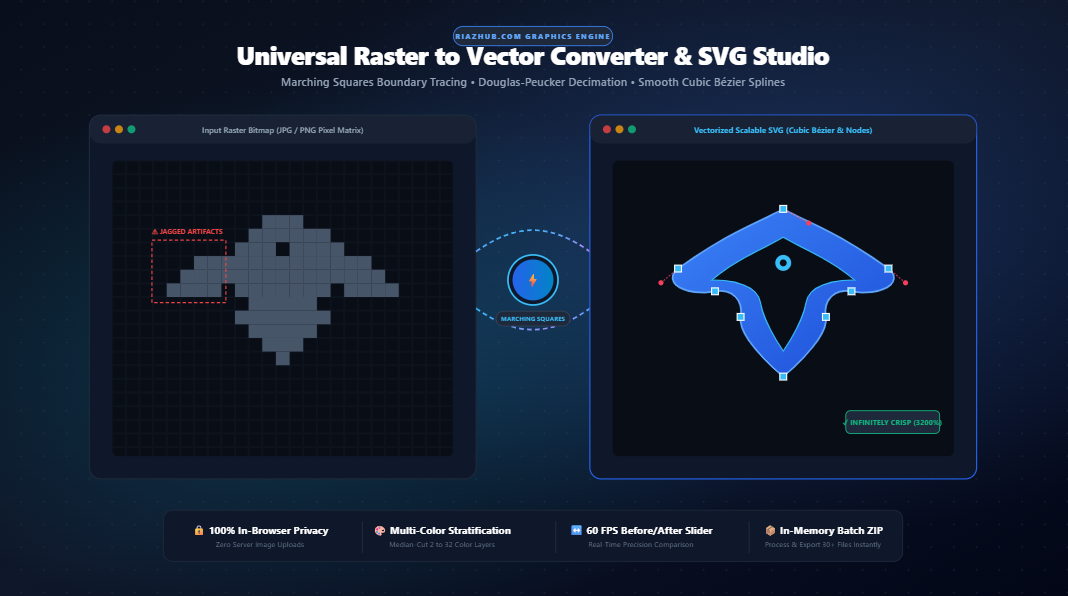
How to Convert Raster Images to Clean Vector SVGs: The Ultimate Guide to In-Browser Vectorization and Bézier Path Tracing
Every digital designer, frontend architect, and physical manufacturer has faced the same dreaded challenge: a client submits a low-resolution JPG or PNG logo that looks passably acceptable on a compact phone screen, but transforms into an unsightly, blurry grid of jagged pixels when enlarged on a 4K display, sent to an industrial vinyl plotter, or printed across an exhibition trade-show banner.
For decades, turning flat raster bitmaps into mathematically flawless vector paths required expensive desktop software licenses, laborious manual pen-tool tracing, or untrusted cloud services that uploaded your private corporate assets to remote servers. Today, modern client-side computational geometry makes it possible to perform high-precision vectorization directly inside your web browser using RiazHub’s Universal Raster to Vector Converter & SVG Studio.
In this comprehensive technical guide, we examine the fundamental differences between raster pixels and vector mathematics, walk through the 5-stage algorithmic pipeline (from Marching Squares boundary extraction to cubic Bézier spline fitting), and demonstrate how you can transform low-res sketches and logos into copy-ready production SVG graphics in seconds.
1. Bitmaps vs. Vectors: The Mathematical Divide
To understand why vectorization is so critical, one must first recognize the architectural difference in how digital images store visual information:
| Attribute | Raster Bitmaps (JPG, PNG, WebP, GIF) | Vector Graphics (SVG, EPS, PDF) |
|---|---|---|
| Underlying Structure | Rigid 2D matrix of colored square pixels $(x, y, R, G, B, A)$. | Mathematical geometric instructions $(M, L, C, Z)$ and coordinates. |
| Scaling Fidelity | Degrades severely when enlarged; exhibits jagged stair-stepping. | Infinitely scalable; remains microscopic-sharp at any resolution or billboard size. |
| File Size Behavior | Grows proportionally with physical pixel dimensions and DPI. | Dependent only on path and node complexity, regardless of display scale. |
| Styling & Interactivity | Static pixel buffer; cannot alter paths without destructive edits. | DOM-addressable via CSS (fill, stroke, hover effects) and JavaScript. |
| Fabrication Readiness | Unusable for CNC routers, plotters, and laser cutters. | Industry standard for cutting paths, engraving, embroidery, and CAD. |
When you zoom into a 200×200 px PNG logo, the browser must interpolate between fixed pixel centers, yielding either a blurry bilinear haze or pixelated nearest-neighbor blocks. In contrast, an SVG file generated by the Universal Raster to Vector Converter stores pure geometric formulas: regardless of whether the emblem is rendered on a 16px favicon or a 50-foot digital billboard, the rendering engine recalculates the curves instantaneously at 60 FPS.
2. Inside the 5-Stage Mathematical Vectorization Engine
True vectorization is not a cosmetic filter; it is an intricate computational pipeline that converts continuous tonal pixel grids into discrete parametric geometric splines. The RiazHub Vector Studio executes this entire sequence client-side using HTML5 Canvas pixel buffers and native JavaScript algorithms:
Stage 1: Grayscale Luminance & Adaptive Binarization
Every raster input is first projected onto an uncompressed ImageData byte buffer. The engine calculates the precise perceptual luminance $Y$ of each pixel using the ITU-R BT.709 colorimetric formula:
Y = 0.2126 * R + 0.7152 * G + 0.0722 * BDepending on the user-calibrated Luminance Threshold $\tau \in [1, 254]$ and the Polarity Inversion toggle (which allows tracing white shapes against dark backgrounds), each pixel is mapped into a discrete binary mask: 1 for vector fill regions and 0 for negative space.
Stage 2: Marching Squares Boundary Contour Extraction
Rather than simply converting pixels into blocky polygon stair-steps, the engine evaluates $2 \times 2$ pixel neighborhood cells across the padded binary grid. Depending on which of the four cell corners are activated, one of 16 topological configurations is selected.
Directed line segments are placed at the exact half-integer midpoints of the cell edges. These directed edges are assembled into closed, continuous perimeter loops. The algorithm preserves both exterior boundaries and interior cutout holes (such as the interior loops inside letters like ‘O’, ‘P’, and ‘B’) using the standard evenodd winding rule.
Area = 0.5 * |Σ(x_i * y_{i+1} - x_{i+1} * y_i)|
Any isolated island smaller than the user’s defined Noise Island Filter (e.g., < 4px) is discarded, preserving clean, silhouette edges.
Stage 3: Douglas-Peucker Polyline Decimation
A raw contour loop extracted from a 1000px image can easily contain upwards of 4,000 pixel vertices. Storing this directly into an SVG yields bulky XML documents that choke web browsers. The engine applies the recursive Douglas-Peucker algorithm:
- It establishes a baseline chord between the loop’s extremities.
- It identifies the vertex with the maximum perpendicular distance $d_{\text{max}}$ from the baseline.
- If $d_{\text{max}} > \epsilon$ (the user’s Simplification Tolerance slider), that node is retained as an essential geometric anchor, and the segment splits recursively.
- If $d_{\text{max}} \le \epsilon$, all intermediate points along the chord are decimated.
This reduces vertex counts by up to 90% without noticeable deviation from the original silhouette.
Stage 4: Smooth Cubic Bézier Spline Interpolation
Decimated polygons still look like faceted polygons with sharp angles. To produce fluid, professional vector artwork, the engine converts polygonal vertices $P_0, P_1, \dots, P_n$ into smooth tangent-continuous cubic Bézier curves:
B(t) = (1-t)³P₀ + 3(1-t)²tP₁ + 3(1-t)t²P₂ + t³P₃ for t ∈ [0, 1]By evaluating local Catmull-Rom tangent factors modulated by the Curve Roundness control (0% sharp corners to 100% smooth curves), the studio synthesizes compact d="M ... C ... Z" SVG path commands that render naturally on all operating systems.
Stage 5: Multi-Color Layer Stratification (Median-Cut)
For rich brand mascots, illustrations, and badges, monochrome thresholding is insufficient. In Multi-Color mode, the tool applies Median-Cut Color Quantization to partition the 3D RGB color space into 2, 4, 8, 16, or 32 tonal clusters.
An independent binary mask is generated for each color cluster. The Marching Squares and Bézier pipelines trace each color layer separately, assembling them in ascending luminance order inside the SVG root: <g id="layer-1" fill="#..."><path d="..."/></g>. You can test this live on the RiazHub Vector Studio.
3. Step-by-Step Tutorial: How to Vectorize Images in 3 Clicks
Converting your raster graphic into a production-ready SVG on RiazHub.com requires zero software installations:
- Load Your Source Graphic: Drag and drop up to 30+ raster images (PNG, JPG, WebP, BMP, or GIF) into the dropzone. You can also paste directly from your clipboard with
Ctrl+Vor click “Load Sample Logo” to test the engine immediately. - Choose Your Tracing Topology & Calibrate:
- Monochrome Silhouette: Best for single-color icons, dark logos, and high-contrast stamps. Adjust the Luminance Threshold slider until crisp perimeters emerge.
- Multi-Color Layers: Ideal for multi-tone illustrations and mascots. Select between 2 and 32 color layer chips.
- Technical Line-Art: Tailored for fine sketches, architectural blueprints, and engineering schematics.
- Fine-Tune Smoothing & Noise: Slide the Simplification Tolerance (ε) to balance node efficiency against fine detail, and adjust Curve Roundness to achieve smooth, aerodynamic curves.
- Inspect on the 3200% Zoom Stage: Use the Split-Screen Before/After Slider to compare your original raster against the vector output. Toggle the Wireframe & Nodes HUD to review vector anchor points.
- Export Scalable Assets: Download a standalone
.SVGfile, copy the raw XML code directly to your clipboard, copy a base64 Data URI, or package the entire batch into a compressed in-memory.ZIParchive.
4. Real-World Applications for Browser-Based Vectorization
Scalable vector graphics generated via RiazHub’s Vector Studio serve dozens of practical modern workflows:
- Web Design & High-DPI UI Graphics: Replace blurry PNG icons with inline SVG paths that scale crisply across Apple Retina, 4K, and 8K displays while cutting HTTP payload sizes.
- Laser Cutting, CNC Routing & Plotting: Computer-controlled cutters (Glowforge, Cricut, Shapeoko) require exact continuous vector toolpaths rather than pixel matrices to guide laser beams and cutting blades.
- Embroidery & Screen Printing: Automated stitch digitizing software and apparel silkscreen color separation require crisp vector outlines for color plate generation.
- Brand Identity Remastering: Reclaim legacy raster logos, business cards, and company stationery when the original vector
.AIor.EPSfiles have been lost. - Architectural & CAD Schematics: Digitize physical paper blueprints and technical patent line drawings into CAD-importable vector curves.
5. Frequently Asked Questions (FAQ)
No. The entire vectorization pipeline runs 100% locally inside your web browser using HTML5 Canvas and native JavaScript. Zero images, sketches, or vectorized assets are ever transmitted to an external server or saved in a remote database, ensuring complete confidentiality for proprietary brand assets.
High-contrast images with clean edges yield the most accurate results. Uncompressed PNGs or high-resolution WebP files are ideal. While JPG images work seamlessly, heavy compression artifacts can be smoothed out using the Noise Island Filter and Simplification Tolerance sliders in the RiazHub Vector Tool.
The Marching Squares algorithm natively tracks perimeter loops and internal holes. By exporting the paths with fill-rule="evenodd", the browser’s SVG renderer automatically punches out interior negative spaces cleanly without overlapping artifacts.
Yes. You can drag and drop up to 30+ files into the queue. After vectorization, you can download individual SVGs or use the “Download All as ZIP” button to trigger an in-memory PKZIP download that packages all SVG vectors and an audit JSON manifest without third-party plugins.
6. Experience Precision In-Browser Vectorization Today
Eliminate raster pixelation and unlock infinite resolution independence for your graphics. Whether you are fine-tuning a company trademark, digitizing technical line art, or preparing artwork for CNC fabrication, experience the mathematical precision of the Universal Raster to Vector Converter & SVG Studio on RiazHub.com today.
Universal Raster to Vector Converter & SVG Studio
Transform pixelated JPG, PNG, and WebP logos into infinitely scalable, resolution-independent SVG vector graphics in real time directly inside your browser.
| File | Resolution | Mode | Paths / Nodes | Status | Action |
|---|---|---|---|---|---|
| No items in batch queue. | |||||
📚 Vector Tracing Science & Marching Squares Algorithmic Pipeline
1. Raster Pixels vs Mathematical Vectors
Raster images (JPG, PNG, WebP) store static matrices of colored pixels that lose clarity and produce blurry jagged edges when enlarged. SVG vectors store pure mathematical geometric coordinate equations that scale infinitely to any resolution, billboard size, or retina display with microscopic sharpness.
2. Marching Squares Boundary Extraction
Our client-side engine evaluates 2×2 pixel neighborhood configurations across the binarized image to construct continuous closed polygon contours. This eliminates stair-stepping and accurately traces both exterior perimeters and interior cutout holes via the standard even-odd winding rule.
3. Douglas-Peucker Polyline Decimation
Raw pixel contours contain thousands of redundant micro-vertices. The Douglas-Peucker algorithm measures the perpendicular distance ($\epsilon$) of intermediate vertices against chord baselines, decimating colinear points and keeping only defining geometric anchor nodes.
4. Smooth Cubic Bézier Spline Fitting & Privacy
Decimated polygons are transformed into smooth tangent-continuous cubic Bézier curves ($M\dots C\dots Z$). Multi-color images undergo median-cut color quantization into discrete tonal layer stacks. 100% of calculations run in local browser memory with zero server transmission.