
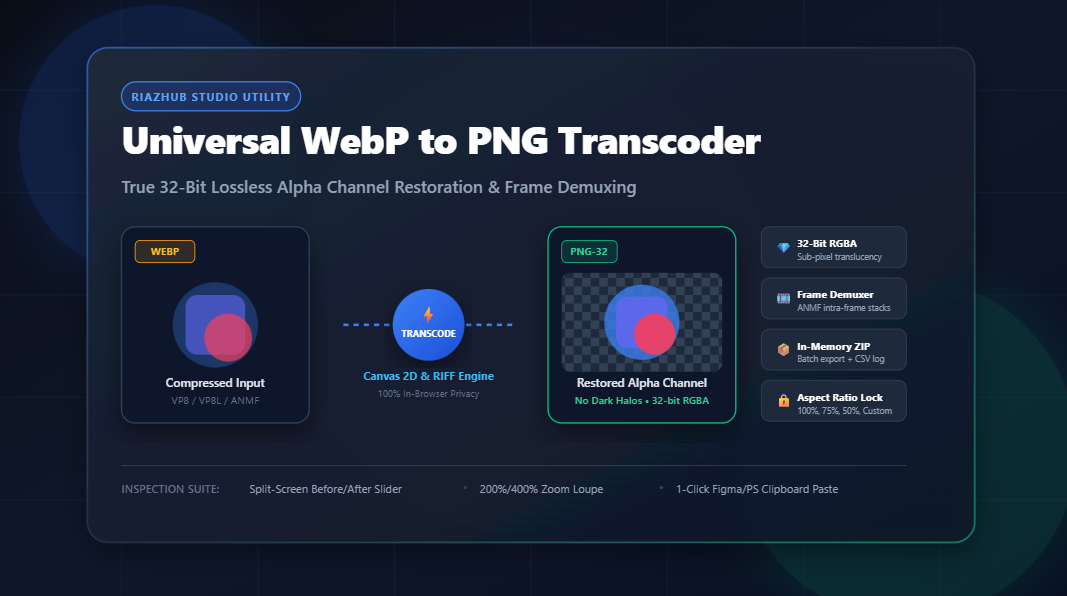
Universal WebP to PNG Transcoder & Alpha Studio: The Definitive Guide to Lossless 32-Bit RGBA Conversion
Eliminate premultiplied dark halos, extract animated WebP intra-frames, restore complete sub-pixel opacity, and batch export production-ready PNGs entirely inside your browser.
The WebP Revolution and the Lingering Interoperability Dilemma
In the modern web ecosystem, Google’s WebP format has achieved widespread dominance. Thanks to its predictive VP8 (lossy) and VP8L (lossless) compression algorithms, WebP routinely trims 25% to 35% off image payloads compared to traditional JPEGs and PNGs. Nearly all major web browsers now load WebP natively to score top marks on Google Core Web Vitals.
However, when you leave the browser, a frustrating bottleneck emerges. Try dragging a newly downloaded WebP banner or logo into Adobe Photoshop, Adobe Illustrator, desktop publishing tools, older macOS or Windows image rasterizers, video editing suites like DaVinci Resolve, or certain native Figma desktop environments. You are often greeted by dreaded error dialogs: “Could not complete your request because it is not the right kind of document.”
To bridge this gap without compromising on color accuracy or alpha transparency, RiazHub developed the
WebP to PNG Transcoder & Alpha Studio.
Unlike generic online converters that upload your confidential files to unknown servers, this utility runs 100% client-side, demuxes animated frames, restores pristine 32-bit RGBA transparency, and packages batch downloads in instant browser memory.
Need to convert assets right now? Open the
RiazHub WebP to PNG Transcoder
to ingest up to 300+ WebP files, preview before/after differences with an interactive slider, and download clean transparent PNGs immediately.
The Alpha Channel Breakdown: Why Generic Converters Create “Dark Border Halos”
If you have ever used a rudimentary online file converter or a quick command-line script to convert a transparent WebP graphic to PNG, you may have noticed an irritating visual artifact: an unsightly dark, dirty fringe along soft feathered edges, translucent drop shadows, or anti-aliased curved typography.
This defect occurs due to Premultiplied Alpha Mishandling. Here is the mathematical reality behind the issue:
- Unpremultiplied (Straight) Alpha: Every pixel stores independent color values $(R, G, B)$ and an opacity value $A \in [0, 255]$. A semi-transparent white drop shadow retains true white color channels $(255, 255, 255)$ while only adjusting the alpha byte (e.g., $A = 128$).
- Premultiplied Alpha: The color values are multiplied by the alpha ratio prior to storage:
R' = R × (A / 255), G' = G × (A / 255), B' = B × (A / 255)
When naive decoders paint WebP data onto a default, unconfigured canvas or an opaque backbuffer, semi-transparent edge pixels blend into black (#000000). When subsequently saved as a PNG, those black-contaminated RGB values become permanent, creating the notorious “dark halo” effect around logos and icons.
The WebP to PNG Transcoder & Alpha Studio completely overcomes this defect. By reconstructing a pristine 32-bit RGBA buffer directly within an unpainted HTML5 Canvas 2DContext with high-smoothing quality, every sub-pixel opacity byte is preserved bit-for-bit. Translucent glassmorphism reflections, soft gaussian drop shadows, and delicate antialiasing curves remain clean and luminous over any backdrop.
Demuxing Animated WebP Files: RIFF Chunks Explained
WebP files are encapsulated within the Resource Interchange File Format (RIFF) container. While static WebP files store simple VP8 or VP8L payloads, Animated WebP graphics feature a more sophisticated chunk structure:
VP8XExtended Header: Contains global configuration bitflags. Bit0x02explicitly flags the stream as animated, while bit0x10confirms an alpha channel presence.ANIMChunk: Dictates global canvas parameters, default background fill color, and overall animation loop count.ANMFAnimation Frame Chunks: Each individual frame of the animation is encapsulated in its ownANMFchunk, containing temporal coordinates ($X, Y$), frame width, frame height, frame duration (in milliseconds), and frame disposal instructions (e.g., whether to retain or clear the previous frame’s pixels).
When you load an animated WebP file into the
Universal WebP to PNG Studio,
the tool’s binary RIFF analyzer detects the multi-frame structure immediately. You can choose to either:
- Extract the Keyframe Hero: Capture the primary opening frame as a crisp, standalone 32-bit PNG graphic.
- Demux the Entire Frame Sequence: Automatically unpack every single intra-frame into a sequentially numbered PNG image stack (
frame-001.png,frame-002.png, etc.), fully compatible with Adobe After Effects, Blender, Premiere Pro, and motion graphics workflows.
Tailored Output: Three Specialized Color Depth Profiles
Different deployment targets require different color representations. The studio provides three dedicated color topology options accessible via 1-click pill buttons:
1. 💎 32-Bit RGBA TrueColor + Alpha
The gold standard for UI/UX designers and frontend developers. Provides 8 bits per channel (Red, Green, Blue, Alpha), yielding over 16.7 million colors alongside 256 distinct levels of translucency. This profile guarantees that assets pasted into Figma or Photoshop retain identical transparency fidelity to the original design source.
2. 🎨 24-Bit RGB with Solid Studio Matte
Ideal for print preparation, physical merchandise production, or platforms that don’t support transparency. This profile flattens the image against a solid background color chosen by you. The studio provides 1-click swatches for Pure White (#FFFFFF), Studio Off-White (#F8FAFC), Dark Slate (#0F172A), and Pitch Black (#000000), or any custom hue via an interactive color picker.
3. 🗜️ 8-Bit PNG-8 (Quantized 256-Color Palette)
Need ultra-compact PNGs for bandwidth-constrained web delivery? The PNG-8 quantizer analyzes image color frequencies and clusters the pixel array into an optimal 256-color indexed palette, clamping 1-bit binary transparency. This slashes PNG file weights by up to 60% while maintaining crisp vector-like graphics.
Built-In Quality Assurance & Inspection Tools
Professional image transcoding demands meticulous verification. Rather than forcing you to download converted files and inspect them in separate software, the
RiazHub WebP to PNG Studio
integrates a suite of real-time inspection features:
- Interactive 60 FPS Split-Screen Slider: Drag a vertical comparison divider to inspect the original WebP source against the converted PNG side by side in real time.
- 200% and 400% Zoom Loupe Lens: Hover a circular magnifying optic over tricky edges, transparent gradients, and text anti-aliasing to verify zero halo fringing.
- Multi-Backdrop Alpha Inspector: Toggle the viewport canvas between a high-contrast Transparency Checkerboard pattern, Dark Slate (
#0F172A), and Pure White (#FFFFFF). - 1-Click System Clipboard Writer: Click “Copy to Clipboard” to write the PNG blob directly into your OS clipboard (
navigator.clipboard.write) for immediate paste into Figma, Slack, Photoshop, or Google Docs without cluttering your downloads folder.
Technical Comparison: WebP vs. PNG
Understanding the strengths of both formats ensures you make the right architectural choice for your assets:
| Specification | Google WebP | Portable Network Graphics (PNG) |
|---|---|---|
| Primary Advantage | Aggressive web compression | Universal desktop & software support |
| Alpha Channel Opacity | Lossy/Lossless compressed alpha | Uncompressed 8-bit true alpha ($A \in [0, 255]$) |
| Edge Anti-Aliasing | May show slight macroblocking at low Q | Exact bit-for-bit pixel preservation |
| Desktop App Support | Requires third-party plugins in older software | Native across 100% of creative & OS suites |
| Animation Demuxing | Single multi-frame RIFF file | Discretely addressable PNG sequence stacks |
| Client-Side Transcoding | Hardware-accelerated browser decode | Lossless Canvas toBlob('image/png') |
How to Convert WebP to PNG in 4 Simple Steps
- Ingest Your Media: Visit the
WebP to PNG Transcoder tool page.
Drag and drop your WebP files into the designated dropzone, click “Select Files”, select an entire folder viawebkitdirectory, or click “Load Sample” to run an immediate test. - Configure Color Depth & Scaling: Select your preferred color mode (32-bit RGBA for full transparency, 24-bit RGB for a solid matte background, or 8-bit PNG-8). Optionally choose a scaling preset (100% Native, 75%, 50%, 25%, or Custom dimensions with proportional aspect ratio lock).
- Execute Transcoding: Click the primary “⚡ Convert All to PNG” button. The in-browser engine will transcode all files asynchronously with an animated progress bar.
- Export & Verify: Inspect your converted graphics using the Before/After slider or Zoom Loupe. Download individual PNG files, demuxed animation frames, or click “📦 Download All as ZIP” to receive an in-memory ZIP package complete with a detailed CSV conversion audit manifest.
Client-Side Security: Why Zero-Upload Transcoding Matters
In an era of increasing data vulnerability, uploading company brand guidelines, proprietary product screenshots, or personal photographs to unknown third-party cloud conversion servers poses genuine confidentiality risks.
The RiazHub Universal WebP to PNG Studio executes 100% within your local browser runtime. Using modern HTML5 Canvas, typed Uint8Array binary buffers, and an in-memory PKZIP generator with native CRC-32 checksumming, zero image bytes ever travel across a network wire. Your media remains completely private on your local machine.
Frequently Asked Questions (FAQ)
ANMF chunks and unpacks each individual intra-frame into a sequentially numbered PNG stack (frame-001.png, etc.), complete with timing metadata.Universal WebP to PNG Transcoder & Alpha Studio
Convert lossy and lossless WebP images to 32-bit transparent PNG format, demux animated WebP frame sequences, preserve pristine alpha channels, and batch export in real time.
| Filename | WebP Size | PNG Size | Dimensions | Color Depth | Action |
|---|---|---|---|---|---|
| No files transcoded yet. Click "Convert All to PNG" to populate the audit matrix. | |||||
📘 WebP to PNG Alpha Restoration Architecture & Guide
VP8X header with the animation flag enabled (0x02). Within the payload, global canvas parameters reside in ANIM chunks, while discrete temporal intra-frames are multiplexed inside ANMF chunks. This studio's demuxing engine traverses the binary chunks, isolates each individual frame with its duration and disposal properties, and renders individual sequentially numbered PNG stacks ideal for video editors and motion designers.
Uint8Array buffers, and an in-memory PKZIP packager. No image data, business logos, or personal files are ever transmitted to any remote server or third-party cloud.