
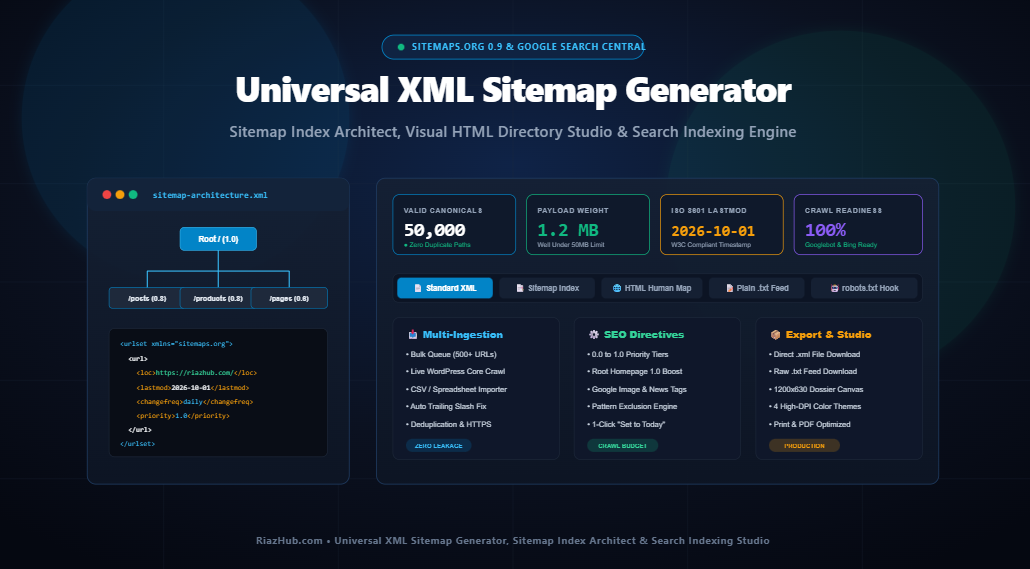
The Ultimate Technical XML Sitemap & Index Architecture Guide: Sitemaps.org Protocol, Googlebot Crawl Efficiency, and Search Indexation Studio
Search engines do not discover the web by magic. Behind every indexable keyword ranking on Google and Bing lies an automated web crawler governed by crawl budget limits, canonical resolution pipelines, and strict protocol specifications. At the heart of this indexing pipeline sits the XML Sitemap the universal technical contract between your web server and search engine crawlers.
⚡ Instant Production Tool
Need to generate valid, Sitemaps.org Schema 0.9 compliant XML sitemaps, partition massive multi-file sitemap indexes, or audit URL crawl priorities directly in your browser?
1. What is an XML Sitemap and Why Does It Matter for Modern SEO?
An XML (Extensible Markup Language) Sitemap is a structured document defined by the Sitemaps.org protocol a unified standard jointly adopted in 2005 by Google, Microsoft (Bing), Yahoo, and Ask. It informs search engine crawlers about the canonical URLs available for crawling, along with valuable contextual metadata:
<loc>(Location): The fully-qualified, canonical HTTPS absolute URL of the page.<lastmod>(Last Modification): The ISO 8601 date timestamp representing when the page content was genuinely modified.<changefreq>(Change Frequency): An advisory hint indicating how frequently the document changes (e.g.,daily,weekly,monthly).<priority>(Relative Priority): An advisory value between0.0and1.0establishing relative importance compared to other internal URLs on your site.
Without a clean XML sitemap, search crawlers rely strictly on organic internal hyperlinking. While shallow site architectures with few pages may crawl well, medium to large sites, dynamic e-commerce stores, news portals, and faceted archives inevitably suffer from “orphan pages” valuable revenue-generating URLs trapped deep inside directory silos where Googlebot rarely treads.
2. XML Sitemap vs. HTML Sitemap: Understanding the Strategic Difference
A common point of confusion among webmasters is the distinction between an XML sitemap and an HTML sitemap. Both serve navigation, but their intended audiences and technical mechanisms are fundamentally different:
| Characteristic | XML Sitemap (sitemap.xml) |
HTML Sitemap (/sitemap/) |
|---|---|---|
| Target Audience | Search engine crawlers (Googlebot, Bingbot, YandexBot) | Human site visitors & screen readers |
| File Format | Machine-readable XML schema (Sitemaps.org 0.9) | Semantic HTML directory page with hyperlinks |
| Location | Root directory or linked via robots.txt |
Accessible in website footer or main navigation |
| SEO Function | Direct crawler ingestion, crawl budget optimization | Internal PageRank distribution & user accessibility |
| Metadata Included | ISO 8601 lastmod, changefreq, priority |
Descriptive anchor text, categories, and hub silos |
The most effective enterprise websites deploy both in tandem. You can construct both your crawler-ready XML sitemap and a responsive, visitor-friendly visual HTML directory simultaneously using the Universal XML Sitemap Generator & Search Indexing Studio on RiazHub.
3. The Sitemaps.org Protocol Standard: Strict Architectural Rules
To prevent crawler overload, the Sitemaps.org consensus enforces hard architectural limitations on every sitemap document:
Rule 1: The 50,000 URL & 50MB Threshold
An individual uncompressed XML sitemap file must never exceed 50,000 URLs and must not exceed 50 Megabytes (50MB) in uncompressed payload size. If your website exceeds either threshold, you must partition your URLs across multiple shard sitemaps (e.g., post-sitemap.xml, page-sitemap.xml, category-sitemap.xml) and tie them together inside a master <sitemapindex> file:
<?xml version="1.0" encoding="UTF-8"?>
<sitemapindex xmlns="http://www.sitemaps.org/schemas/sitemap/0.9">
  <sitemap>
    <loc>https://riazhub.com/post-sitemap.xml</loc>
    <lastmod>2026-10-01</lastmod>
  </sitemap>
  <sitemap>
    <loc>https://riazhub.com/page-sitemap.xml</loc>
    <lastmod>2026-10-01</lastmod>
  </sitemap>
</sitemapindex>
Rule 2: Strict XML Entity Escaping
Search parsers will reject or throw parse errors on XML sitemaps containing unescaped characters inside <loc> nodes. Any URL containing query parameters, ampersands, or quotes must be strictly encoded:
- Ampersand (
&) →& - Single Quote (
') →' - Double Quote (
") →" - Greater Than (
>) →> - Less Than (
<) →<
Rule 3: Canonical, HTTPS-Only Consistency
Never include redirected URLs (301/302), canonicalized non-primary URLs, 404 broken links, or non-secure HTTP variants in your sitemap. Feeding non-canonical URLs forces Googlebot to waste crawl budget resolving redirects instead of indexing your fresh content.
🛠️ Automated Protocol Validation & Sharding
The RiazHub XML Sitemap Generator automatically handles strict entity escaping, enforces canonical HTTPS protocols, strips duplicate slash variations, and partitions large inventories into a clean Sitemap Index format with 1 click.
4. The Googlebot <lastmod> Precision Rule vs. Advisory Priority Signals
Over the past several years, Google Search Central advocates (including John Mueller and Gary Illyes) have clarified how Googlebot genuinely processes sitemap directives:
<priority>and<changefreq>are purely advisory: Googlebot rarely alters crawl frequency based on artificial “always” or “priority 1.0” declarations. Crawlers dynamically calculate re-crawl intervals using historical crawl telemetry and server responsiveness.<lastmod>is a critical crawl budget signal: An accurate, truthful ISO 8601 timestamp (e.g.,2026-10-01) that corresponds with actual textual content revisions tells Googlebot that a cached document is stale. Googlebot utilizes this signal to prioritize re-fetching modified pages immediately.- The Penalty of Falsified Timestamps: If webmasters automatically set every page’s
<lastmod>to today’s date during site generation without actual revisions, Google’s algorithms detect the mismatch and systematically stop trusting your sitemap’s timestamps entirely.
5. How to Submit Your Sitemap to Search Engines
Once your XML sitemap is generated and uploaded to your server (or generated via WordPress), follow these three primary distribution channels:
Channel 1: Declare in robots.txt
Search crawlers inspect /robots.txt before requesting any other resource on your domain. Declare your sitemap URL at the bottom of the file:
User-agent: *
Allow: /

Sitemap: https://riazhub.com/sitemap.xml
Channel 2: Google Search Console
- Log into your Google Search Console dashboard.
- Navigate to Indexing → Sitemaps in the left navigation sidebar.
- Under “Add a new sitemap”, enter
sitemap.xmland click Submit. - Monitor the “Discovered pages” metric to ensure Google successfully parses all URLs without schema errors.
Channel 3: Bing Webmaster Tools & IndexNow
In Bing Webmaster Tools, submit your full URL: https://yourdomain.com/sitemap.xml. Bing automatically shares verified sitemap discoveries with downstream partner engines including Yahoo and DuckDuckGo.
6. Step-by-Step Walkthrough: Using the RiazHub In-Browser Sitemap Studio
Generating a production-grade sitemap requires zero command-line scripts or third-party server tracking. Here is how to construct your sitemap in seconds using the Universal XML Sitemap Generator & Search Indexing Studio:
- Ingest Your URLs: Choose between three convenient ingestion methods:
- Bulk URL Paste: Paste up to 500 URLs into the raw queue.
- Crawl WordPress: Click “Query Current WordPress Site” to securely pull published posts, pages, and categories via WordPress core APIs with genuine modification dates.
- CSV Import: Upload a structured spreadsheet or plain text link list.
- Configure Directives: Set your base domain to automatically expand relative paths (e.g.,
/blog→https://riazhub.com/blog), select your default change frequency, and define priority tiers with auto-boost enabled for your homepage. - Apply Exclusion Filters: Open the Advanced Filters drawer to purge non-indexable directory patterns like
/wp-admin/,/cart/,/checkout/, query strings, and pagination parameters. - Audit Your URL Ledger: Inspect the real-time Interactive URL Audit Ledger to review parsed URLs, filter entries, or purge unwanted URLs with individual deletion controls.
- Export in Multi-Formats: Instantly download
sitemap.xml,sitemap.txt, copy the robots.txt declaration, or generate a shareable 1200×630 technical SEO specification dossier card in four custom themes.
🚀 Optimize Your Website’s Crawl Budget Today
100% Client-Side. Sitemaps.org 0.9 Compliant. Googlebot & Bingbot Ready. Generate your XML sitemap, multi-sitemap index, and visual HTML sitemap now.
Universal XML Sitemap Generator & Search Indexing Studio
Compile production-grade XML sitemaps, build partitioned multi-file sitemap indexes, construct visitor-friendly HTML directory sitemaps, and optimize Googlebot crawl prioritization 100% inside your browser.
📥 URL Ingestion & Directives
0 lines<!-- Paste URLs on the left and click 'Generate XML Sitemap' -->post-sitemap.xml, page-sitemap.xml, category-sitemap.xml) and bundle them under a root <sitemapindex> file. This tool automatically provides both single sitemap and partitioned sitemap index views.
<priority> and <changefreq> primarily as advisory hints, often determining real crawl intervals dynamically based on actual page change patterns. In contrast, accurate <lastmod> timestamps are a critical crawl budget signal. When Googlebot sees a verifiable <lastmod> update, it prioritizes re-crawling that specific URL. However, if a webmaster artificially fakes today's date for every unchanged page, Google's algorithms will systematically distrust the sitemap's timestamps and revert to standard heuristic crawling.