
The Ultimate Google SERP Preview & Pixel Width Optimization Guide: How to Eliminate Title Truncation, Leverage Rich Snippets, and Boost Organic CTR
If you are still counting characters to craft your Google title tags and meta descriptions, you are relying on a legacy SEO myth that costs you organic rankings and high-intent clicks every single day. Google has never measured search snippet titles in characters it renders them strictly in typographic pixels.
A 56-character title packed with wide capital letters like W and M will awkwardly truncate with an ellipsis (...), cutting off your primary value proposition right in front of prospective customers. Meanwhile, a 63-character title built with slender proportional glyphs like i, l, and t fits cleanly on a single line.
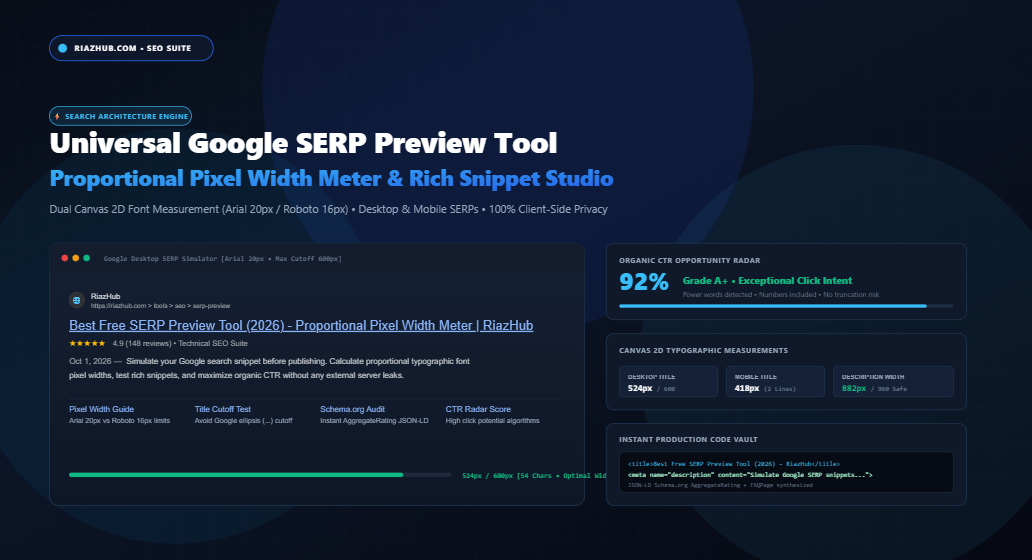
In this definitive guide, we dissect the exact typographic mathematics governing Google’s desktop and mobile search engine results pages (SERPs), examine why Google rewrites over 60% of title tags, and demonstrate how you can test, audit, and preview your listings before publishing using the free browser-based Google SERP Preview Tool & Rich Snippet Simulator on RiazHub.com.
1. The Death of the Character Count: Why Google Thinks in Typographic Pixels
When Google renders a search result on desktop, it places the title link inside a fixed-width CSS container with a strict cutoff boundary of 600 pixels (using 20px Arial, sans-serif with a line-height of 1.3).
Because Arial is a proportional typeface, every letter is assigned an individualized horizontal pixel allocation:
- The capital letter ‘W’ consumes approximately 20.5 pixels.
- The capital letter ‘M’ consumes approximately 18.8 pixels.
- The lowercase letter ‘m’ consumes approximately 15.2 pixels.
- In stark contrast, lowercase ‘i’, ‘l’, and punctuation marks like pipes (
|) or periods consume only 4.2 to 5.5 pixels.
| Sample Title Tag (Both are 58 Characters) | Char Count | Arial 20px Pixel Width | Desktop SERP Status |
|---|---|---|---|
WOMEN'S WINTER WATERPROOF WARM WALKING BOOTS SALE 2026 |
58 chars | 638 px | ❌ Truncated with Ellipsis (…) |
Best Slim Minimalist Travel iPad & Tablet Stand in 2026 | Kit |
58 chars | 536 px | ✅ 100% Fully Visible (Safe Zone) |
Notice the stark contrast: both titles contain exactly 58 characters. Yet the first title is brutally cut off because its uppercase wide letters pushed the width to 638px. You can verify your own URLs right now using the live canvas typographic engine on the RiazHub Google SERP Preview Tool.
⚡ Test Your Titles in Typographic Pixels
Don’t risk having your call-to-action truncated by Google. Simulate exact Arial 20px and Roboto 16px character metrics with in-browser HTML5 Canvas precision.
2. Google’s Dynamic Title Tag Rewriting Algorithm: What Triggers It?
In August 2021, Google introduced a sweeping update to how it generates search titles. Rather than reliably displaying whatever webmasters placed inside the HTML <title> element, Google began algorithmically rewriting titles based on visible page content, user search intent, and anchor text.
Industry empirical audits conducted across millions of SERPs indicate that Google currently rewrites between 60% and 65% of all title tags. The most common triggers for automated rewriting include:
- Repetitive Keyword Stuffing: Stuffing variations of the same query (e.g., “Car Insurance, Cheap Car Insurance, Best Auto Insurance”). Google typically replaces these with the primary visible
<h1>heading. - Boilerplate Site Names: Repeating long brand boilerplate on every subpage (e.g., “Home Goods | Global Wholesale Delivery Free 2026”). Google strips the boilerplate and appends just your core brand name.
- Severe Truncation Hazards: Titles that exceed 600px often end on awkward conjunctions or mid-word cutoffs, prompting Google to rewrite the entire title to provide a cleaner snippet.
- Missing Brand Attribution: When a title omits the brand entirely, Google frequently appends
- BrandNameor replaces the title with internal anchor text.
By keeping your title tag within the sweet spot of 520px to 580px (around 50 to 58 characters) and matching your visible <h1> heading, you substantially lower the probability of Google overriding your custom marketing copy.
3. Desktop vs. Mobile SERP Mechanics: Viewport Containers & Cutoff Rules
Optimizing for search listings requires treating desktop and mobile search as two entirely distinct visual environments. Here is how Google differentiates the two:
Desktop Google SERPs (Fixed Container)
- Title Container: Capped at 600px wide. Displays on a single line. Anything past 600px is truncated with an ellipsis.
- Meta Description: Displays up to 960px wide (approximately 155 to 160 characters).
- Attribution: Features a small 16×16 or 24×24 favicon, a website domain name, and an organic breadcrumb trail.
Mobile Google SERPs (Fluid Smartphone Viewport)
- Title Container: Rendered in
16px Robotoinside a fluid 360px–412px smartphone viewport. Crucially, mobile Google allows titles to wrap across two lines before truncating. This gives effective headroom of up to ~70 characters across both lines. - Meta Description: Mobile descriptions cut off much earlier than desktop—often at just 680px (around 110 to 120 characters).
- Brand Pill: Features a prominent circular favicon pill alongside the verified site name directly above the blue title link.
When testing snippets inside the RiazHub Google SERP Preview Tool, you can toggle between Desktop View and Mobile View with a single click to ensure your description remains fully legible across all screen sizes.
4. The Click-Through Rate (CTR) Impact of Rich Snippets
Ranking #1 on Google is only half the battle. If position #2 features bright golden review stars, a publication date, and sitelinks, it will regularly siphon away a massive share of your organic traffic.
Rich snippets elevate organic CTR by up to 35% by claiming vertical screen real estate and providing social proof. The RiazHub simulator supports testing the four most impactful rich snippet formats:
- Review Aggregators (AggregateRating): Golden star ratings (e.g.,
★★★★★ 4.9 - 148 reviews) immediately signal credibility and quality. - Publication Date Stamps: Showing fresh, current-year date prefixes (e.g.,
Oct 1, 2026 —) signals up-to-date relevance for technical guides and news. - Organic Sitelinks Extensions: Simulating 4-pack compact sitelinks doubles your vertical snippet height and gives searchers multiple direct entry points.
- FAQ Accordion Dropdowns: Interactive collapsible FAQ questions claim prominent organic screen real estate directly on the search page.
⭐ Synthesize Schema.org JSON-LD in Seconds
Enable star ratings, dates, and FAQ accordions inside the simulator, and automatically copy valid Schema.org JSON-LD code directly into your WordPress headers.
5. How to Use the RiazHub Google SERP Preview Tool (Step-by-Step)
The Google SERP Preview Tool & Rich Snippet Simulator is designed for search architects, content strategists, and digital marketers. Follow these simple steps to audit your pages:
Step 1: Ingest Your Core Metadata
Enter your proposed Page Title and Meta Description. Watch the real-time proportional pixel meter calculate character width using HTML5 Canvas measurements. Aim for the green sweet spot (≤ 580px for title, ≤ 960px for description).
Step 2: Enter Your Simulated Search Query
Input the primary keyword query you are targeting (e.g., “serp preview tool”). The live bolding engine will instantly bold matching keywords in your simulated snippet—just like Google does when matching searcher queries.
Step 3: Toggle Rich Snippets
Open the Rich Snippet Extensions Drawer to activate AggregateRating review stars, publication date stamps, 4-pack organic sitelinks, or snippet thumbnail images.
Step 4: Check Your Organic CTR Opportunity Radar
Switch to the CTR Blueprint Tab to view your algorithmic score (0%–100%) and Grade (A+ to D). The audit checklist will verify whether you have included high-converting power words, numbers, and proper keyword ingestion.
Step 5: Export Code and Social Dossier Cards
Use the Code Vault Tab to copy ready-to-paste HTML5 <head> tags, WordPress PHP hooks, or Schema.org JSON-LD markup. You can also generate and download a certified 1200×630 Social Benchmark Dossier Card to attach to client deliverables and SEO reports.
6. Actionable Checklist for a 90%+ Organic CTR Score
To ensure your organic listings capture the maximum click volume in competitive search landscapes, follow this 7-point checklist:
- Keep Title Pixel Width Between 520px and 580px: Maximizes descriptive real estate without risking truncation on desktop Google.
- Inject Proven Power Words: Incorporate high-engagement action terms like Best, Ultimate, Guide, Fast, Free, Review, How-To, or Checklist.
- Incorporate Numbers or Current Year: Titles containing numerals (e.g., “10 Tips”, “2026 Update”) generate 15% to 20% higher click volume.
- Place Primary Keywords Near the Front: Front-loading your primary query ensures immediate visual confirmation when users scan results.
- Craft Intent-Driven Meta Descriptions (130–155 Characters): Treat your description as organic ad copy with an explicit call to action (e.g., “Learn more today”, “Calculate now”).
- Implement Valid Schema.org Structured Data: Claim star ratings and breadcrumbs to expand your visual footprint on Google.
- Test Across Both Desktop and Mobile Viewports: Always verify that your key message doesn’t truncate prematurely on mobile screens.
🚀 Ready to Optimize Your SERP Snippets?
Eliminate guesswork, eliminate title truncation, and maximize your organic search visibility with 100% in-browser privacy and zero server leaks.
Universal Google SERP Preview & Rich Snippet Studio
Simulate authentic Google desktop & mobile search snippets with typographic pixel accuracy. Measure exact Arial/Roboto letter proportional widths, audit CTR potential, and synthesize Schema.org markup.
Best Free SERP Preview Tool (2026) - High-Accuracy Pixel Width Meter | RiazHub
🔬 Exact Canvas 2D MeasureText Typographic Breakdown
Unlike monospace code editors, Google SERPs render with proportional typefaces (Arial and Roboto). Capital 'W' or 'M' occupies ~20px, whereas lowercase 'i' or 'l' occupies only ~4px.
Word-by-Word Pixel Density Breakdown:
| Typographic Element | Active Length | Pixel Width | Google Cutoff Threshold | Truncation Risk |
|---|---|---|---|---|
| Desktop Title Tag | 0 Chars | 0 px | 600 px (580px Sweet Spot) | Safe (0%) |
| Mobile Title Tag | 0 Chars | 0 px | ~600 px (Wraps 2 Lines) | Safe |
| Meta Description | 0 Chars | 0 px | 960 px Desktop / 680 px Mobile | Safe (0%) |
Algorithmic Audit Checklist:
<!-- Loading HTML Head Tags... -->
<!-- Loading WordPress Hook... -->
<!-- Loading Schema JSON-LD... -->
Certified 1200x630 pixel benchmark card ready for client reporting, social sharing, and technical documentation.
Technical SEO & Google Search Architecture Standards
<title> tags. Common reasons for rewriting include repetitive keyword stuffing, boilerplate site titles repeated across every subpage, missing brand names, or severe mismatch with the user's specific query intent. When Google rewrites your title, it typically draws from your page's visible <h1> heading, prominent anchor text, or internal links. Crafting human-readable, intent-focused titles within the 520px–580px safe zone reduces the likelihood of automated rewriting.
- Title Wrapping: Mobile Google allows titles to wrap across two lines (giving effective headroom of up to ~70 characters or ~650px across both lines) before cutting off.
- Description Truncation: Mobile descriptions truncate earlier (typically around 110–120 characters or ~680px) compared to desktop search (which displays 155–160 characters or ~960px).
- Favicon & Site Name Pill: Mobile search prominently displays a rounded site favicon and distinct sitename above the blue title link, reinforcing brand authority.