
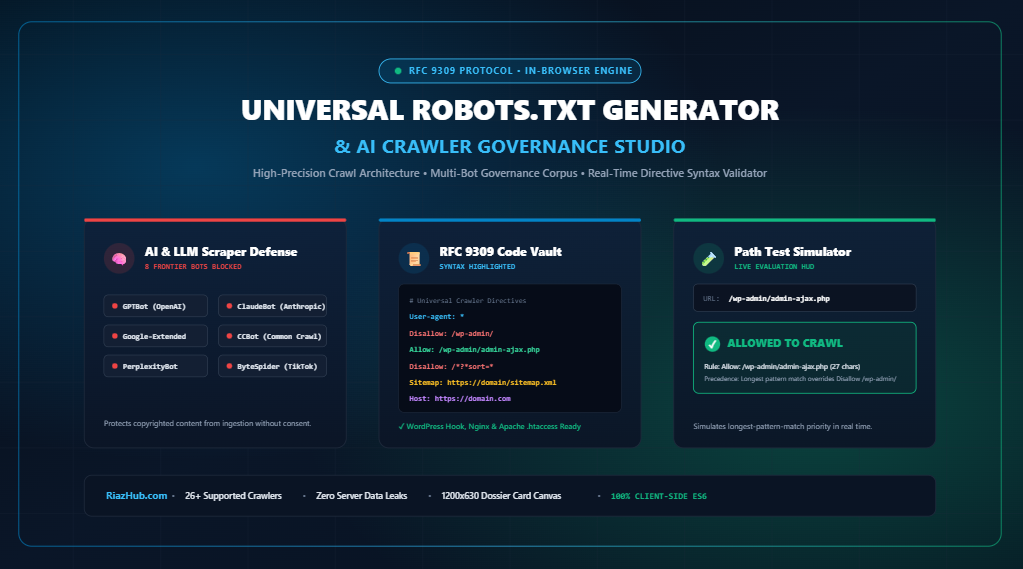
Mastering Robots.txt in the AI Era: RFC 9309 Protocol, Generative AI Crawler Governance & Crawl Budget Architecture
Learn how the official IETF RFC 9309 standard resolves directive conflicts, why blocking pages in robots.txt does not prevent indexation, and how to configure a multi-bot governance matrix to shield intellectual property from automated LLM training scrapers without harming organic search rankings.
1. The Evolution of the Robots Exclusion Protocol: From 1994 to RFC 9309
For nearly three decades, the web operated on an informal, consensus-based specification created in 1994 by Martijn Koster: the original Robots Exclusion Protocol (REP). While search engines like Google, Yahoo, and Bing largely adhered to common conventions, interpretations of wildcard operators, character precedence, file encoding, and HTTP status codes varied widely between crawler engines.
In September 2022, the Internet Engineering Task Force (IETF) formally standardized the protocol under RFC 9309. This landmark RFC cemented critical syntactic and behavioral rules:
- Character Encoding: Robots.txt must be served as plain text encoded strictly in UTF-8.
- Maximum File Size: Compliant crawlers must parse at least the first 500 Kibibytes (512,000 bytes) of a robots.txt file. Directives beyond this threshold may be ignored.
- Path Matching Precedence: When multiple rules match a specific URL path, the directive with the longest character pattern length strictly wins. If an
Allowand aDisallowrule match with equal length,Allowtakes absolute precedence. - Glob Pattern Anchors: Formal adoption of the asterisk wildcard (
*) for zero or more arbitrary characters, and the end-of-string dollar sign ($) anchor.
To formulate compliant directives without syntax errors, webmasters can utilize the Universal Robots.txt Generator & AI Crawler Governance Studio on RiazHub.com, which validates syntax against RFC 9309 specifications directly in the browser.
Audit, formulate, and test your website’s crawl directives with 1-click presets for WordPress, WooCommerce, and Shopify.
2. Crawling vs. Indexing: The Costly Webmaster Trap
Perhaps the most widespread and damaging misunderstanding in technical SEO is conflating crawler access (crawling) with search engine visibility (indexing).
If a page is blocked via Disallow: /private-page/, Googlebot is forbidden from fetching the page’s HTML. However, if external websites or internal pages link to that URL, Google will still index the naked URL based on anchor text and incoming signals. Because Googlebot cannot crawl the page, it can never read a <meta name="robots" content="noindex"> directive!
Consider this table illustrating how different configurations impact crawlability and search engine visibility:
| Directive Setup | Can Googlebot Crawl HTML? | Will URL Appear in Google? | Recommended Use Case |
|---|---|---|---|
| Disallow: /path/ (No meta tags) | ❌ No (Crawling blocked) | ⚠️ Yes (Indexed via external links) | Preventing crawl budget waste on internal search, faceted filters, or server endpoints. |
Allow: /path/ + noindex meta |
✅ Yes (Crawled to read meta) | ❌ No (Completely de-indexed) | Authoritative de-indexing of thank-you pages, thin utility pages, and legal disclosures. |
Disallow: /path/ + noindex meta |
❌ No (Crawler cannot read page) | ⚠️ Yes (Naked URL indexed) | Fatal Error! Never combine disallow with on-page noindex tags. |
HTTP Header: X-Robots-Tag: noindex |
✅ Yes (Header processed on fetch) | ❌ No (De-indexed) | Omit non-HTML assets (PDFs, DOCX, ZIP files) from search results. |
Before restricting directories, you can test how specific URLs behave under active rules using the interactive path simulator inside the RiazHub Robots.txt Generator & Directive Syntax Validator.
3. The Rise of Generative AI Scrapers: Governing LLM Ingestion
In recent years, the crawler landscape shifted from traditional web search indexers to aggressive artificial intelligence web scrapers harvesting editorial prose, proprietary databases, and artistic media to train frontier Large Language Models (LLMs).
Unlike conventional search engines that provide webmasters with referral traffic in exchange for crawling content, generative AI scrapers frequently ingest billions of tokens to power conversational assistants that satisfy user queries zero-click, bypassing the publisher entirely.
The 4 Distinct Crawler Classifications
Modern crawl governance architecture segments bots into 4 operational classes:
- Major Web Search Engines:
Googlebot,bingbot,Applebot,YandexBot, andBaiduspider. Essential for organic discovery and website traffic. - Generative AI & LLM Training Scrapers:
GPTBot— OpenAI’s designated automated crawler for training future GPT foundation models.ChatGPT-User— Used when a ChatGPT subscriber prompts the chatbot to browse a live link.ClaudeBot&anthropic-ai— Ingestion agents operated by Anthropic for Claude model training.Google-Extended— Google’s token governance agent allowing publishers to opt out of Gemini training without hurting their Google Search ranking.CCBot— Common Crawl’s mass repository robot, widely used as base training material for open-source AI models.ByteSpider— ByteDance / TikTok’s crawler collecting web data for multimodal AI systems.PerplexityBot— Real-time indexer for Perplexity’s conversational answer engine.
- SEO Audit & Competitive Intelligence:
AhrefsBot,SemrushBot,DotBot, androgerbot(Moz). Used for backlink auditing and technical diagnostics. - Social Media Rich Link Previews:
Twitterbot,facebookexternalhit,LinkedInBot, andTelegramBot. Necessary to render rich Open Graph social cards when visitors share your links.
The dedicated AI Governance drawer in the RiazHub AI Crawler Governance Studio allows webmasters to block all 8 frontier AI training bots with a single click while preserving organic search visibility.
4. Mastering Directive Syntax: Wildcards (*) and Anchors ($)
RFC 9309 pattern matching operates under rigorous mathematical rules. Mastering glob patterns enables you to eliminate crawl budget waste across millions of automated URLs:
1. The Query String Wildcard Pattern: /*?*
E-commerce stores and faceted blogs often suffer from index bloat when bots crawl endless filter combinations (e.g., /shop/?sort=price&color=blue&size=large). You can disallow arbitrary query parameters while permitting clean canonical paths:
User-agent: *
Disallow: /*?*
Allow: /wp-admin/admin-ajax.php
2. The End-of-String Anchor: $
The dollar sign anchors the pattern to the exact trailing character of a URL. If you want to block search crawlers from downloading raw PDF brochures or spreadsheet files without blocking a page named /pdf-whitepaper-guide/, anchor the file extension:
User-agent: *
Disallow: /*.pdf$
Disallow: /*.xlsx$
3. Specific Path Precedence Resolution
Under RFC 9309, longer patterns always supersede shorter patterns regardless of the order they appear in the file:
User-agent: *
# Pattern length: 10 chars
Disallow: /wp-admin/

# Pattern length: 27 chars -> LONGER PATTERN WINS!
Allow: /wp-admin/admin-ajax.php
When evaluating /wp-admin/admin-ajax.php, both directives match. Because the Allow directive contains 27 characters versus 10 characters for the Disallow directive, Googlebot and Bingbot permit crawling. You can simulate any URL against active rules in the RiazHub In-Browser Path Validator to verify exact winning rules and line numbers.
5. How to Deploy Robots.txt: Physical File vs. WordPress Filter Hook
Once you compile your standardized directives, you have two primary deployment strategies:
Strategy A: Static Physical File (Recommended for High Traffic & Nginx)
Download your compiled robots.txt file and upload it to your web server’s root directory (e.g., /var/www/html/robots.txt or public_html/robots.txt). Serving a static file offloads computation from your application server:
# Nginx server block directive to serve physical file directly
location = /robots.txt {
    allow all;
    log_not_found off;
    access_log off;
    try_files $uri /index.php?$args;
}
Strategy B: WordPress Virtual robots_txt Filter Hook
WordPress automatically serves a dynamic, virtual robots.txt at https://yourdomain.com/robots.txt if no physical file exists in the document root. You can inject your customized directives directly into your theme’s functions.php or the Code Snippets plugin:
// Dynamic WordPress Robots.txt Hook Generated by RiazHub.com
add_filter('robots_txt', function($output, $public) {
    return <<<ROBOTS
# ========================================================
# Robots.txt Directive Architecture — Generated by RiazHub.com
# Standard: Robots Exclusion Protocol (RFC 9309 Standard)
# ========================================================

User-agent: *
Disallow: /wp-admin/
Disallow: /wp-includes/
Disallow: /*?*
Allow: /wp-admin/admin-ajax.php

# AI Training & LLM Scraper Governance
User-agent: GPTBot
Disallow: /

User-agent: ClaudeBot
Disallow: /

User-agent: CCBot
Disallow: /

Sitemap: https://riazhub.com/sitemap_index.xml
ROBOTS;
}, 999, 2);
The RiazHub Robots.txt Studio automatically compiles this exact PHP snippet in real time for effortless 1-click clipboard copying.
6. Summary Checklist for an Audit-Proof Robots.txt
Before releasing your crawl architecture into production, review this five-point compliance checklist:
- UTF-8 Encoding: Ensure your file does not contain non-standard Unicode byte order marks (BOM) or corrupted characters.
- Verify admin-ajax.php: In WordPress sites, never disallow
/wp-admin/without providing an explicitAllow: /wp-admin/admin-ajax.phprule. Modern themes require AJAX access to render frontend forms and interactive elements. - Sitemap Declaration: Link your authoritative XML Sitemap index using absolute HTTPS paths (e.g.,
Sitemap: https://example.com/sitemap_index.xml). - Shield AI Scrapers: Explicitly declare disallows for
GPTBot,ClaudeBot,CCBot, andByteSpiderif you wish to restrict automated model training on your articles. - Test Paths Interactively: Simulate your key canonical paths, staging folders, and parameter URLs against your active rules using an RFC 9309 simulator.
Ready to build and validate your website’s crawl architecture? Access the free client-side utility below:
🚀 Open Universal Robots.txt Generator & AI Crawler Studio on RiazHub.com
Universal Robots.txt Generator & AI Crawler Governance Studio
Formulate standardized RFC 9309 robots.txt directives, govern generative AI scrapers, audit crawl budget leakage, test URL path matches in real time, and download verified specifications.
Prevent frontier artificial intelligence model trainers and automated scrapers from ingesting your copyrighted articles, intellectual property, and content without permission.
Test any relative URL path against your active robots.txt directives. The engine simulates the RFC 9309 longest-pattern-match priority algorithm to determine crawler permissions in real time.
Allow: /wp-admin/admin-ajax.php
When both Allow and Disallow rules match a path, the rule with the longest character pattern wins. If lengths are equal, Allow takes precedence over Disallow.
Real-time status overview across the 4 distinct crawler classifications recognized by modern technical crawl architecture:
| Crawler Classification | User-Agent Identifier | Operator / Organization | Access Verdict | Directive Source |
|---|
WordPress natively serves a virtual robots.txt file dynamically without requiring a physical file in your web root directory. You can inject these rules directly into your child theme's functions.php or the Code Snippets plugin.
location = /robots.txt {
    allow all;
    log_not_found off;
    access_log off;
    try_files $uri $uri/ /index.php?$args;
}# Enable WordPress virtual robots.txt routing
RewriteEngine On
RewriteBase /
RewriteRule ^robots\.txt$ /index.php?robots=1 [L]Generate high-DPI specification cards certified against the RFC 9309 protocol for SEO audit dossiers, team handoffs, client deliverables, or social media sharing.
📖 Technical SEO, RFC 9309 Protocol & AI Scraping Architecture
What is Robots.txt & How Does the RFC 9309 Protocol Standardize It? ▼
Originally introduced in 1994 by Martijn Koster as the informal Robots Exclusion Protocol (REP), robots.txt was formally adopted as an official Internet Engineering Task Force (IETF) standard under RFC 9309 in 2022. It specifies how compliant web crawlers (such as Googlebot, Bingbot, and Applebot) discover and parse root-level crawl directives before fetching any website resources. RFC 9309 standardized longest-pattern matching, case sensitivity in URL paths, support for wildcard asterisks (*), and end-of-line anchors ($).
Crawling vs. Indexing: Why Robots.txt Does Not Prevent Indexation ▼
A frequent misconception among webmasters is assuming that adding Disallow: /private/ will eliminate that URL from Google search results. Robots.txt only controls crawler access, not indexation. If third-party websites or internal links point to that disallowed URL, Google will index the naked URL based on external anchor text without fetching its HTML. To guarantee a page is permanently omitted from search indexes, crawlers must be allowed to crawl the page so they can process a <meta name="robots" content="noindex"> directive.
Governing Generative AI Training Scrapers (GPTBot, Claude, CCBot, ByteSpider) ▼
Generative AI organizations operate distinct web crawlers explicitly used to harvest training data for large language models (LLMs). Major frontier providers honor specific user-agent directives:
- GPTBot & ChatGPT-User: OpenAI's training and conversational browsing scrapers.
- ClaudeBot & anthropic-ai: Anthropic's ingestion crawlers for Claude models.
- Google-Extended: Google's explicit token governance user-agent for Gemini training (without impacting Googlebot search ranking).
- CCBot: Common Crawl's mass web ingestor utilized widely by open-source LLM datasets.
- ByteSpider: ByteDance / TikTok crawler used for search and model training.
Mastering Pattern Syntax: Wildcards (*) and Dollar Anchors ($) ▼
Under RFC 9309, path values support powerful glob expression patterns:
Disallow: /*?*— Blocks any URL containing a question mark (query string parameters such as sorting, faceted navigation, or session tracking).Disallow: /*.pdf$— The dollar sign acts as an end-of-string anchor, blocking only URLs that terminate strictly with the extension.pdf.Allow: /wp-admin/admin-ajax.php— Provides a specific exception inside an otherwise disallowed directory, permitting dynamic frontend AJAX requests.
Privacy & Browser-Based Operation Guarantee ▼
This studio runs 100% in-browser using pure ECMAScript and HTML5 Canvas. None of your custom paths, staging endpoints, proprietary URLs, or server configurations are ever transmitted to any remote backend server or third-party tracking system. Your governance configurations stay strictly within your browser's local sandbox.