
Mastering WCAG 2.2 Image Accessibility: In-Depth Guide to In-Browser AI Alt Text Generation & Semantics Telemetry
Yet, across millions of websites, image accessibility remains plagued by two persistent extremes: either images are completely stripped of alt descriptions (forcing screen readers to read obscure, confusing file paths like /uploads/2026/09/IMG_89304_v2.jpg), or content creators resort to bloated, generic clichés like “picture of a laptop” that cause screen readers to stutter and fatigue blind users.
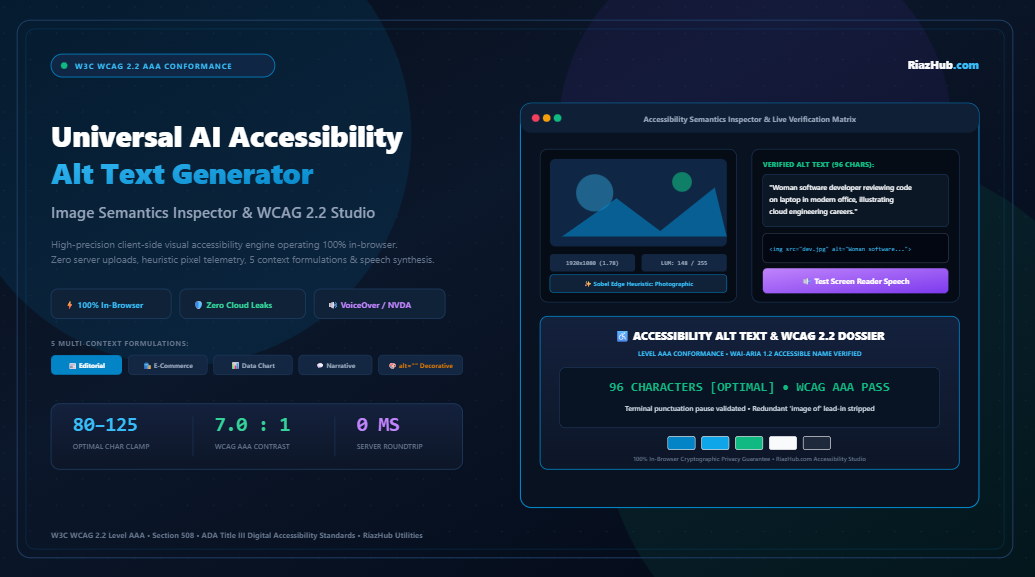
To solve this universal challenge without compromising visitor data privacy or racking up cloud API fees, RiazHub developed the AI Accessibility Alt Text Generator, Image Semantics Inspector & WCAG 2.2 Compliance Studio. Operating 100% in-browser with zero external server dependencies, this studio empowers content authors, digital agencies, and accessibility auditors to inspect image semantics, synthesize tailored alt descriptions, and verify assistive screen reader speech cadence in real time.
1. The WCAG 2.2 Landscape: Guideline 1.1.1 Non-Text Content
WCAG Guideline 1.1.1 states unequivocally: “All non-text content that is presented to the user has a text alternative that serves the equivalent purpose.”
While this sounds straightforward, executing it properly across diverse digital surfaces requires understanding how assistive technologies digest graphical data. Screen reading software such as JAWS, NVDA on Windows, and Apple VoiceOver on macOS and iOS interacts with the browser’s Accessibility Tree through the WAI-ARIA 1.2 Accessible Name and Description Computation specification.
When an image element is encountered:
- If
alt="[Text]"is present: The screen reader announces “Graphic” or “Image” followed immediately by the text alternative. - If
alt=""(null alt attribute) is present: The screen reader treats the element as purely decorative and silently skips it, sparing the listener unnecessary noise. - If the
altattribute is completely missing: The assistive software attempts to guess the image’s significance by reading the raw URL or file name, creating a frustrating, incomprehensible user experience.
“Leaving an alt attribute empty (alt=””) is a deliberate semantic instruction. Omitting the alt attribute entirely is an accessibility failure.”
2. Why Client-Side Privacy Outperforms Cloud AI APIs
Many commercial alt-text generators rely on cloud-hosted vision APIs (such as OpenAI GPT-4o Vision, Google Cloud Vision, or AWS Rekognition). While capable, cloud pipelines introduce severe architectural liabilities for corporate web development:
- Confidentiality Leaks: Uploading unreleased product sketches, proprietary medical diagrams, or sensitive corporate infographics to third-party cloud servers risks IP leaks and violates GDPR/HIPAA compliance frameworks.
- Latency Bottlenecks: Transmitting 10MB to 25MB high-resolution images over external networks creates network delay and upload throttles.
- API Paywalls: Recurring metered API costs quickly scale out of control for high-volume publishing teams.
By contrast, the RiazHub AI Accessibility Alt Text Generator uses browser-native HTML5 Canvas telemetry, FileReaders, and heuristic pixel downsampling. Your images never leave your local device. No pixels or metadata packets are transmitted over the network, providing 100% cryptographic data privacy.
3. Inside the Engine: How In-Browser Pixel Telemetry Works
When you drag and drop an image into the studio, the engine initiates a 4-stage heuristic evaluation pipeline:
Phase 1: High-Speed Analytical Downsampling
The uploaded image (whether JPG, PNG, WEBP, or SVG) is scaled to an analytical 64×64 pixel offscreen canvas. This creates a standardized matrix of 4,096 pixels, allowing instant mathematical analysis in under 5 milliseconds.
Phase 2: ITU-R BT.709 Relative Luminance Matrix
The engine computes the relative optical luminance of each pixel using the international standard ITU-R BT.709 formula:
By calculating the mean luminance across all sample bins, the tool determines whether the asset is High-Key (brightly lit studio composition) or Low-Key (moody, deep-contrast atmosphere).
Phase 3: 5-Tone Dominant Palette & WCAG Contrast HUD
Through 4-bit color quantization, the engine isolates the top 5 dominant color frequencies in the image. It then calculates the exact contrast ratio of each hue against pure black (#000000) and pure white (#FFFFFF), tagging each swatch with WCAG AA (4.5:1) and WCAG AAA (7.0:1) badges. This helps graphic designers ensure text badges overlaid on the image remain accessible.
Phase 4: Sobel Gradient Edge Complexity Detection
By measuring delta variance between adjacent pixel coordinates, the algorithm differentiates between simple geometric icons, natural photographic scenes, and dense multi-axis infographics.
4. The 5 Multi-Context Purpose Architectures
An image never exists in a vacuum. A photograph of a running shoe means something completely different in a fashion editorial than it does on an e-commerce checkout page. The AI Accessibility Alt Text Studio on RiazHub provides five purpose-engineered context formulations:
| Context Objective | Semantic Focus | Ideal Use Case |
|---|---|---|
| 📰 Informative & Editorial | Core subject, action, and surrounding article message. | News blogs, corporate announcements, thought leadership. |
| 🛍️ E-Commerce & Product | Physical materials, finish, branding, colorways, and condition. | WooCommerce, Shopify catalogs, marketplace listings. |
| 📊 Technical & Diagram | Structured breakdown of flowcharts, data axes, and workflows. | Documentation, financial reports, whitepapers. |
| 💬 Social & Narrative | Atmospheric mood, lighting perspective, and emotional storytelling. | Portfolio galleries, lifestyle posts, community boards. |
| 🎨 Purely Decorative (alt=””) | Generates alt="" paired with role="presentation". |
Background flourishes, divider lines, abstract spacers. |
5. Screen Reader Speech Cadence & The Two Golden Rules
Writing compliant alt text is not just about grammatical accuracy; it is about how synthesized vocal engines pronounce your text.
Rule #1: Why Screen Readers Hate “Image of” and “Picture of”
Screen readers automatically identify HTML <img> elements and speak the role identifier aloud. When an author writes:
VoiceOver or JAWS will announce:
“Graphic, photo of a modern laptop on a desk.”
The double prefix (*“Graphic, photo of…”*) creates auditory clutter. Over hundreds of web pages, this causes significant cognitive fatigue for blind users. The studio automatically flags and strips these redundant prefixes per W3C best practices.
Rule #2: The Critical Importance of the Terminal Period (.)
Speech synthesis engines (such as the Web Speech API, NVDA Speech Synthesizer, and VoiceOver TTS) rely on terminal punctuation marks (., !, ?) to insert a natural vocal pause before reading the next DOM element. Without a terminal period, the screen reader may run the alt description directly into the next heading or body paragraph without pausing for breath:
“Graphic, Software developer typing on keyboard Click here to read more about our cloud services.”
By enforcing terminal punctuation, the synthesizer breathes naturally:
“Graphic, Software developer typing on keyboard. [Pause] Click here to read more about our cloud services.”
6. Step-by-Step Tutorial: Auditing Graphics on RiazHub
Generating certified, accessible alt descriptions takes less than 30 seconds using the RiazHub Accessibility Alt Text Studio:
- Ingest Your Graphic: Drag and drop your JPG, PNG, WEBP, or SVG file into the ingestion dropzone, or click “✨ Load Sample Graphic” to test immediately.
- Review Visual Telemetry: Check the 4-card telemetry grid to inspect dimensions, aspect ratio, mean luminance, and color contrast.
- Select Your Context Objective: Choose between Editorial, E-Commerce, Diagram / Chart, Social Story, or Decorative (alt=””).
- Refine Subject & Focus Context: Add your primary subject and page purpose. The engine automatically capitalizes, verifies length against the 80–125 character clamp, and applies terminal periods.
- Audition Screen Reader Audio: Click “🔊 Test Screen Reader” to simulate how VoiceOver and NVDA articulate the description.
- Export Your Code: Use the 1-click clipboard chips to copy standard HTML
<img>tags, WordPress Gutenberg Image Blocks, or Markdown syntax. - Download Compliance Dossier: Open the Dossier Card tab to download a high-DPI 1200×630 certification card for QA audit records.
7. Multi-Format Code Integration Examples
The tool provides one-click export syntax for every popular content management system and framework:
Standard Semantic HTML5
<img src=”developer-workspace.svg” alt=”Woman software developer reviewing code on laptop in modern office, illustrating cloud engineering careers.”><!– Purely Decorative Asset –>
<img src=”decorative-wave.svg” alt=”” role=”presentation” aria-hidden=”true”>
WordPress Gutenberg Ready Block JSON
<figure class=”wp-block-image”>
<img src=”developer-workspace.svg” alt=”Woman software developer reviewing code on laptop in modern office, illustrating cloud engineering careers.”/>
</figure>
<!– /wp:image –>
Markdown Syntax (GitHub / CMS)
8. Frequently Asked Questions (FAQ)
What is the recommended character length for alt text?
The optimal screen reader threshold is 80 to 125 characters. Descriptions under 80 characters often omit critical context, while descriptions exceeding 150 characters can overwhelm listeners. For complex infographics exceeding 125 characters, provide a concise summary in the alt attribute and link an extended table or description via aria-describedby.
How does the studio protect my confidential images?
The RiazHub Studio processes images entirely within your browser’s JavaScript runtime using HTML5 Canvas and Blob APIs. No image data is sent to external cloud servers, preventing data leaks.
Does proper alt text improve search engine optimization (SEO)?
Yes. Search engine crawlers (like Googlebot) cannot “see” pixels directly. High-quality alt descriptions provide rich semantic context for Google Image Search, improve topical relevance, and boost overall organic search rankings.
When should I mark an image as purely decorative?
Mark an image decorative when it serves only visual styling purposes (such as gradient flourishes, background spacers, or stock art that conveys no unique information). In these cases, WCAG 2.2 Guideline 1.1.1 requires alt="" and role="presentation" so screen readers skip the asset silently.
What are the legal consequences of non-accessible web graphics?
Under ADA Title III, thousands of digital accessibility lawsuits are filed each year targeting commercial websites with missing alt attributes and contrast failures. Meeting WCAG 2.2 Level AA and AAA standards provides a strong defense against compliance disputes.
9. Conclusion: Build an Inclusive Web with RiazHub
Digital accessibility is a fundamental requirement for the modern internet. By combining client-side computer vision heuristics, multi-context purpose synthesis, and live speech simulation, the Universal AI Accessibility Alt Text Generator on RiazHub.com bridges the gap between regulatory compliance and human-centered design.
Empower Your Web Content Today
Fast, completely free, and 100% private. Audit your graphics and generate screen reader-certified alt text in seconds.
AI Accessibility Alt Text & Semantics Studio
Generate contextual, screen reader-optimized alt descriptions directly in-browser. Inspect image luminance, analyze 5-tone color contrast ratios, simulate live VoiceOver/NVDA speech, and verify WAI-ARIA 1.2 compliance with zero server uploads.
Drop image here or click to browse
Supports JPG, PNG, WEBP, SVG • Max 25MB • 100% Client-Side
<img src="image.jpg" alt="...">
Contrast values are measured against standard #000000 (Black) and #FFFFFF (White) text per WCAG 2.2 Section 1.4.3 (AA 4.5:1) and Section 1.4.6 (AAA 7:1). When overlaying UI text labels onto graphic badges, ensure high-contrast compliance.
Images that convey a concept or information must have a short, descriptive alt text that explains the vital subject and message.
When an image serves as a link, button, or interactive element, alt text must describe the destination action, NOT physical visual attributes.
Background textures, decorative dividers, or redundant stock graphics MUST have null alt attributes (alt="") so screen readers skip them cleanly.
Diagrams exceeding 125 characters cannot fit in standard alt text. Provide a high-level summary in alt and link detailed analysis via aria-describedby.
📚 Assistive Technology & WCAG 2.2 Deep-Dive
alt attribute entirely, screen readers assume it might be important and resort to reading the full file URL (e.g., "/wp-content/uploads/2026/09/IMG_89304_scaled.jpg"). By explicitly setting alt="", you instruct assistive technologies that the image is purely decorative and should be skipped silently.
alt tag and link to a full table or structured description container via the aria-describedby="container-id" attribute.