
Technical Overview
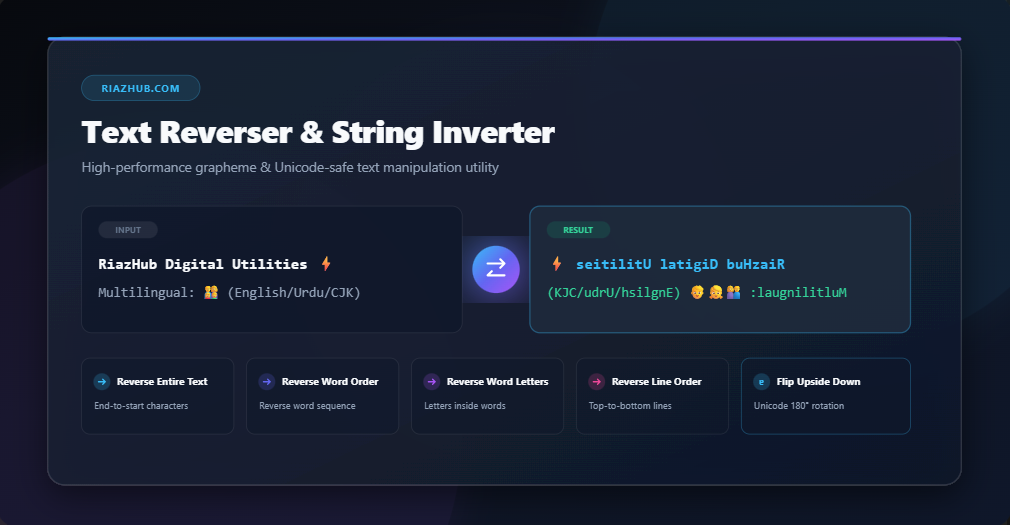
The RiazHub Online Text Reverser & String Inverter is a versatile, high-performance web utility designed for developers, content creators, researchers, cryptographers, and social media enthusiasts. Whether you need to test palindrome strings, reverse line sequences in data logs, invert word lettering for coding puzzles, or generate stylized upside-down text for social media captions, this tool handles complex string operations completely client-side in your browser.
Unlike legacy string reversal tools that break multi-byte characters, composite emojis, or Right-to-Left (RTL) scripts, our Online Text Reverser incorporates modern JavaScript Intl.Segmenter grapheme-cluster evaluation. This ensures every emoji sequence (such as 👨👩👧👦 or 🏋️♂️), accented diacritic character (such as é, ñ, ü), and non-Latin character set maintains absolute visual integrity during reversal operations.
Detailed Features & Reversing Modes
When using the RiazHub Text Reverser Tool, you can instantly choose between five specialized string inversion modes:
1. Reverse Entire Text / Characters
Flips the entire input text character-by-character from end to start. Perfect for reversing individual sentences, decoding backward messages, or verifying palindrome properties in the String Inverter.
2. Reverse Word Order
Maintains the correct spelling of each individual word while completely reversing the sequence of words across sentences or paragraphs. Useful for linguistic studies, sentence structure analysis, and text restructuring.
3. Reverse Word Letters
Preserves the original order of words in your text while reversing the character order inside each individual word. Ideal for generating encrypted-looking text puzzles or wordplay challenges.
4. Reverse Line Order
Flips top-to-bottom line order line-by-line while leaving the internal characters of each line completely untouched. Excellent for reordering chronological log files, inverted data lists, or code stacks.
5. Flip Upside Down (Mirror Text)
Uses comprehensive Unicode character mapping to rotate your text 180 degrees upside down (e.g., ɐ/a, q/b, ɔ/c). Perfect for creating eye-catching social media posts, secret status updates, and fun nicknames.
Universal Multilingual & Unicode Grapheme Support
Standard string reversal routines in basic programming languages frequently split UTF-16 surrogate pairs into corrupted code points. For example, reversing an emoji string without grapheme segmentation yields invalid characters or missing glyphs.
Our Text Reverser Utility resolves this by using browser-native Grapheme Cluster Segmentation. It accurately identifies grapheme boundaries across diverse language scripts:
- Latin & European Languages: Accented letters, cedillas, umlauts, and diacritical marks stay attached to their base characters.
- Right-To-Left (RTL) Scripts: Arabic, Urdu, Hebrew, and Persian text automatically adjust alignment with dynamic
dir="auto"detection. - Asian CJK Scripts: Chinese, Japanese Kanji/Kana, and Korean Hangul characters are safely reversed without symbol corruption.
- Complex Emojis & Symbols: Zero-width joiner (ZWJ) emoji combinations and skin tone modifiers remain intact.
Popular Use Cases for Text Reversing
Step-by-Step Guide: How to Reverse Text Online
- Open the Tool: Access the free Text Reverser & String Inverter Tool on RiazHub.com.
- Input Your Text: Type or paste your original text directly into the “Original Text” input area, or click Upload .txt File to load a local file.
- Select Reversing Mode: Choose one of the 5 reversing radio options above the editor (Reverse Entire Text, Word Order, Word Letters, Line Order, or Flip Upside Down).
- Instant Live Preview: The tool automatically calculates and updates the reversed output in real-time as you type or change options.
- Copy or Download: Click Copy Reversed Text to copy the result directly to your clipboard, or click Download .txt File to save it to your device.
Frequently Asked Questions (FAQ)
Q: Is my text uploaded to a server?
No. The RiazHub Text Reverser operates 100% client-side inside your web browser. Your text or uploaded files are never transmitted to any external server, guaranteeing maximum privacy and security.
Q: Does this tool preserve line breaks in paragraphs?
Yes. All line breaks (`\n`, `\r\n`) are preserved cleanly across all reversing modes, ensuring formatted paragraphs and structured lists maintain proper layout structure when processed with the String Inverter.
Q: Is there any file size limit for text files?
Because processing runs locally on your browser using optimized JavaScript engines, you can process large text files containing thousands of lines seamlessly without latency.
Q: Is this tool free to use?
Yes! The Text Reverser & String Inverter on RiazHub.com is completely free with no registration, subscription, or usage caps required.