
Mastering Modern Customer Support: How In-Browser AI Synthesis, Real-Time Triage, and De-Escalation Protocols Transform Ticket Resolution
In modern digital commerce and software services, customer support is no longer merely a reactive cost center: it is the primary battleground for customer retention, brand trust, and lifetime value. When a subscriber encounters a double-billing charge, an unexpected software bug, or an unexplained courier delay, their initial message is frequently steeped in anxiety, urgency, and frustration. How your team responds in that critical first touchpoint dictates whether that user becomes a vocal brand advocate or cancels their account in anger.
Yet, front-line support representatives face compounding friction. High ticket volumes, disparate communication channels, strict service level agreements (SLAs), and the cognitive exhaustion of writing calm, empathetic replies under stress frequently lead to robotic replies, policy-heavy defensiveness, and multiple rounds of frustrating “ticket ping-pong”.
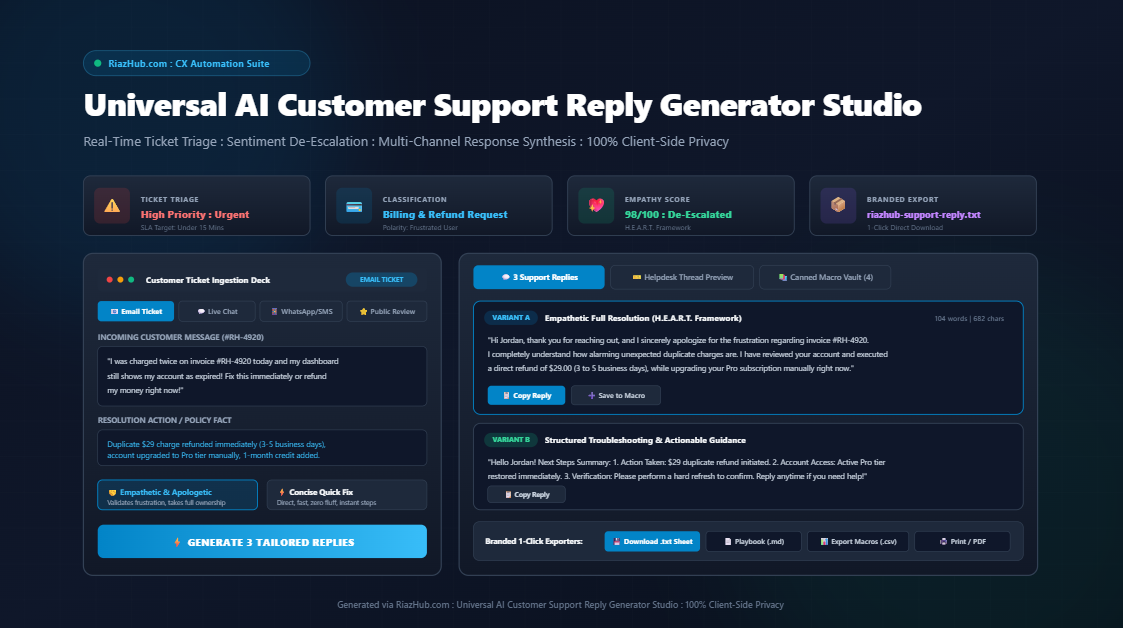
To eliminate this friction, RiazHub developed the Universal AI Customer Support Reply Generator Studio. Operating entirely inside the web browser with zero server latency and 100% data privacy, this studio bridges the gap between raw customer emotion and rapid, professional resolution. In this guide, we break down the operational mechanics, psychological frameworks, and technical architecture behind modern ticket triage and multi-channel customer communication.
Key Insight: Over 68% of customer churn is driven not by product defects, but by perceived indifference during customer service interactions. Utilizing deterministic de-escalation frameworks allows support teams to acknowledge customer pain instantly without exposing confidential customer tickets to third-party cloud servers.
1. The Real Cost of Ticket Ping-Pong and Defensive Support
Customer frustration rarely peaks because of the initial issue alone. It peaks because of the communication ordeal required to resolve it. Consider the traditional helpdesk experience:
- A customer sends an urgent complaint about a duplicate credit card charge.
- An agent responds with a generic macro: “Thank you for contacting us. Could you please provide your invoice number and verify your account email?”
- The customer, having already provided their account details in the portal, waits another 6 hours before replying with rising anger.
- Three days and four messages later, the refund is finally initiated. By then, the customer has already left a 1-star Trustpilot review and disputed the transaction through their card provider.
This failure pattern is known in CX operations as ticket ping-pong: bouncing messages back and forth simply to establish basic facts and verify context. Eliminating this pattern requires immediate sentiment triage, proactive next-step anticipation, and decisive first-contact resolution (FCR).
By leveraging the RiazHub AI Customer Support Reply Generator, agents can paste an inbound inquiry, automatically extract customer names and ticket IDs, calibrate the tone, and produce three distinct, resolution-ready responses in under five seconds.
2. Real-Time Lexical Sentiment Triage: How Priority is Detected
Not every support ticket carries equal business urgency. A user casually inquiring about an upcoming product feature does not require the same triage protocol as an enterprise customer experiencing an authentication outage before a client presentation.
The AI Customer Support Reply Generator Studio utilizes a client-side lexical parser that scans incoming customer messages for behavioral urgency indicators, emotional polarity markers, and category triggers:
| Urgency Level | Lexical Triggers & Keywords | Recommended SLA | Operational Action |
|---|---|---|---|
| Critical Churn Risk | immediately, asap, urgent, lawsuit, fraud, scam, dispute, charged twice, unacceptable, worst service | Under 15 Minutes | Immediate ownership, full de-escalation, senior tier intervention, concrete refund or fix. |
| High Priority | refund, cancel, broken, error, down, 500 server crash, stuck, cannot login, locked out, delivery delay | Under 1 Hour | Priority queue routing, proactive verification steps, workaround guidance. |
| Normal SLA | how do i, update email, receipt request, change address, invoice copy, setting up integration | Under 4 Hours | Standard polite assistance, step-by-step documentation links, clear confirmation. |
| Constructive Feedback | feature request, suggestions, would love to see, roadmap idea, partnership inquiry | Under 24 Hours | Grateful validation, product team routing notification, community engagement. |
This automated classification ensures that agents immediately understand the customer’s state of mind before typing a single character. Rather than delivering a bland corporate response, the agent is positioned to meet the customer at their exact emotional level.
3. The H.E.A.R.T. Framework: De-Escalating Angry Inquiries
Customer service leaders know that when a customer is escalated, standard technical explanations sound like dismissive excuses. To de-escalate effectively, the Universal AI Customer Support Reply Generator Studio constructs replies around the industry-standard H.E.A.R.T. framework:
1. Hear (Active Acknowledgment)
The opening statement must validate the customer’s specific problem directly. Instead of “I understand you have an issue”, high-performing replies state: “I see you were billed twice on invoice #RH-4920 and your dashboard was temporarily marked as expired.” This proves that a human or smart system has thoroughly read their message.
2. Empathize (Emotional Mirroring)
Validating the customer’s emotional state diffuses tension instantly: “I completely understand how alarming unexpected charges are, especially when you need uninterrupted access to your tools.”
3. Apologize (Unconditional Ownership)
Defensiveness destroys customer trust. The response must offer a direct apology on behalf of the organization without making excuses about database migrations, third-party gateways, or staffing shortages: “I sincerely apologize for the frustration and disruption this has caused you.”
4. Resolve (Concrete Action & Clear Timelines)
Vague reassurances (“we are looking into it”) increase customer anxiety. The resolution section must specify exactly what action was taken right now: “I have already processed a full refund of $29 for the duplicate charge, which will reflect in your account within 3 to 5 business days, and I have manually activated your Pro subscription immediately.”
5. Thank (Gratitude for Feedback)
Closing the loop with genuine gratitude reframes the interaction from an adversarial confrontation into a collaborative partnership: “Thank you for bringing this discrepancy to our attention so our billing team could address it right away.”
4. Multi-Channel Calibration: One Problem, Four Formats
Support communication does not exist in a vacuum: customer expectations vary dramatically depending on whether they are reading an email, typing in a live chat widget, glancing at a WhatsApp push notification, or reading a public store review.
The RiazHub Customer Support Reply Generator dynamically re-formats synthesized replies based on the chosen platform channel:
- Email Helpdesk (Zendesk, Freshdesk, Help Scout): Structured long-form replies featuring formal greetings, detailed resolution breakdowns, bulleted verification checklists, proactive closing inquiries, and branded agent sign-offs.
- Live Chat Widget (Intercom, Crisp, Drift): Compact, conversational, and direct. Sentences are concise to prevent giant blocks of text from overwhelming mobile chat viewports.
- WhatsApp & SMS Business: Highly scannable, direct, and actionable. Emphasizes instant confirmations and direct links while eliminating bulky corporate greetings.
- Public Reviews (App Store, Google Play, Trustpilot): Public-facing diplomatic responses. Validates the reviewer’s candid feedback, transparently confirms corrective action, and provides a direct support email link to handle sensitive account details privately.
5. The In-Browser Canned Macro Vault: Scaling Consistency Across Teams
High-growth support teams frequently struggle with message consistency. Different agents write divergent replies, quote inconsistent refund clearance timelines, or forget to mention crucial troubleshooting steps. While enterprise helpdesks like Zendesk and Intercom offer macro libraries, updating and testing them across dozens of agents is slow and cumbersome.
With the Universal AI Customer Support Reply Generator Studio, agents can maintain a persistent Canned Macro Vault stored directly inside their local browser storage:
- One-Click Macro Creation: Whenever a customized reply is generated, clicking “Save to Macro Vault” archives that specific scenario with channel and category tags.
- Dynamic Placeholder Substitution: Macros automatically replace
{customer},{agent}, and{ticket_id}placeholders with the current live ticket context upon insertion. - CSV Team Export: Support managers can export the entire curated macro library as a formatted CSV file ready for direct bulk import into Zendesk, Freshdesk, or Intercom macros.
6. 100% Client-Side Privacy: Why Zero Cloud Transmission Matters
One of the most dangerous vulnerabilities in modern customer support operations is the reckless copying and pasting of customer support tickets into external, cloud-hosted AI tools. Customer inquiries frequently contain sensitive personally identifiable information (PII):
- Full customer names, phone numbers, and physical shipping addresses.
- Partial credit card numbers, invoice references, and order IDs.
- Confidential business contracts, proprietary workflow descriptions, and dispute claims.
Sending this data to external AI servers violates GDPR, CCPA, and SOC 2 data protection standards. In contrast, the Universal AI Customer Support Reply Generator Studio on RiazHub.com executes 100% inside your local web browser. No customer message, invoice amount, or support macro is ever transmitted across an external network. All triage calculations, tone syntheses, and file downloads are performed deterministically on the client device.
7. Step-by-Step Tutorial: Resolving an Angry Billing Ticket in 30 Seconds
Here is how a customer service representative can resolve a high-stress billing dispute in under half a minute using the online studio:
- Select Channel & Category: Choose “Email Ticket” and set the category to “Billing, Invoice & Refund Request”.
- Paste Incoming Ticket: Paste the customer’s raw email into the message area. The studio immediately detects urgency, updates the triage HUD, and calculates the recommended SLA target.
- Add Resolution Facts: Enter the concrete action taken in the notes box (or click a quick insert chip like “+ Full Refund Processed” or “+ Pro Tier Activated”).
- Calibrate Tone: Select “Empathetic & Apologetic” to ensure maximum de-escalation posture.
- Generate 3 Variants: Click “⚡ Generate 3 Support Replies”. Instantly review Variant A (Empathetic Full Resolution), Variant B (Structured Steps), and Variant C (Concise Quick Fix).
- Preview & Copy: Switch to the “Live Helpdesk Thread” tab to inspect the rendered Zendesk/Intercom conversation mockup, or click “Copy Best Reply” to paste the response directly into your support software.
Supercharge Your Support Operations Today
Turn customer disputes into retention wins. Experience real-time ticket triage, empathetic multi-variant generation, and branded macro exports with zero server latency.
8. Frequently Asked Questions (FAQ)
Does this tool store customer inquiries on a remote database?
No. The AI Customer Support Reply Generator Studio runs 100% client-side in pure vanilla JavaScript. Zero customer inquiries, names, invoice references, or dispute logs ever leave your browser.
Can I import the generated macros into Zendesk or Freshdesk?
Yes. The studio features a dedicated “Export CSV” function that packages your entire saved macro vault into a standard comma-separated format compatible with Zendesk, Freshdesk, Intercom, and Help Scout macro importers.
What makes Variant A different from Variant B and C?
Variant A focuses heavily on the psychological H.E.A.R.T. model (validation, apology, and reassurance). Variant B is optimized for structured troubleshooting with scannable bullet points and checklists. Variant C is tailored for high-speed live chat environments where brevity is essential.
Is there any cost or subscription required to use the studio?
No. The tool is available completely free on RiazHub.com as part of our high-performance digital utility suite.
Published by RiazHub CX Solutions : Dedicated to high-speed, private, and empathetic customer service automation.
Universal AI Customer Support Reply Generator, Ticket Triage and Helpdesk Macro Studio
Turn stressful customer tickets into calm, empathetic, and clear resolutions in seconds. Detect customer sentiment automatically, calibrate support tone, preview Zendesk/Intercom ticket threads, and export branded helpdesk macros with zero server latency.
Ticket Ingestion & Context
Live Triage ReadySaved Canned Macro Library
Reusable helpdesk macros saved in your browser session for Zendesk, Intercom, and Freshdesk.
Customer Experience (CX) Mastery & De-Escalation Protocols
💡 The H.E.A.R.T. Framework for Angry & Escalated Customers
When customers reach out in distress or anger, defensive explanations trigger immediate churn. Use the five-point H.E.A.R.T. model:
- Hear: Actively acknowledge the exact specific problem (e.g., "I see you were billed twice on invoice #RH-4920").
- Empathize: Validate the emotional impact without being robotic (e.g., "I completely understand how alarming unexpected charges are").
- Apologize: Give a clear, direct apology on behalf of the company without offering defensive tech excuses.
- Resolve: State the concrete corrective action executed right now, plus explicit timeframes (e.g., "Refund initiated, reflects in 3-5 business days").
- Thank: Thank the customer for bringing the discrepancy to your attention so your engineering and billing teams could fix it.
⚡ Eliminating Back-and-Forth Ticket Ping-Pong (First Contact Resolution)
The single biggest driver of poor CSAT scores is "ticket ping-pong" - requiring 4 or 5 replies just to collect basic info. To maximize First Contact Resolution (FCR):
- Anticipate the Next Logical Question: If processing a refund, proactively state bank clearance timelines before they ask "where is my money?".
- Provide If/Then Troubleshooting: Instead of saying "try clearing your cache", state: "Step 1: Perform a hard refresh (Ctrl+F5). If your dashboard still shows expired, reply with 'Option B' and I will generate an instant temporary access token."
- Confirm Current Live State: Check backend telemetry or state notes before answering so your initial message already contains the solution.
🔒 100% Client-Side Privacy Guarantee & Zero Server Latency
Customer support messages frequently contain sensitive personally identifiable information (PII), confidential order IDs, invoice amounts, and proprietary customer complaints. RiazHub Studio runs 100% in-browser:
- Zero Cloud Transmissions: Every triage check, tone synthesis, macro formatting, and file export is computed purely in local JavaScript.
- Zero External AI API Calls: No customer data is ever sent to OpenAI, Anthropic, or external logging servers.
- Local Memory Only: Your saved macros and agent preferences live solely inside your browser's localStorage.
RiazHub.com : Customer Support Resolution Playbook
Generated via RiazHub.com : Universal AI Customer Support Reply Generator Studio