
Mastering Time-Blocking and Energy Optimization: The Complete Guide to the Universal AI Daily Planner Studio
Modern knowledge workers face a pervasive crisis of attention. Each morning begins with boundless optimism and an ever-expanding to-do list. Yet by mid-afternoon, reactive emails, sudden Slack pings, and fragmented priorities reduce the most dedicated professional to cognitive exhaustion. Despite working ten exhausting hours, you look back at the day and wonder: What meaningful work did I actually accomplish?
The problem is rarely lack of effort or willpower. The fatal flaw lies in the format of the standard vertical to-do list itself. To solve this problem, RiazHub developed the Universal AI Daily Planner, Time-Blocking Scheduler and Energy Optimization Studio. This interactive, privacy-first web utility turns messy, overwhelming task dumps into realistic, hour-by-hour schedules calibrated to your biological energy peak.
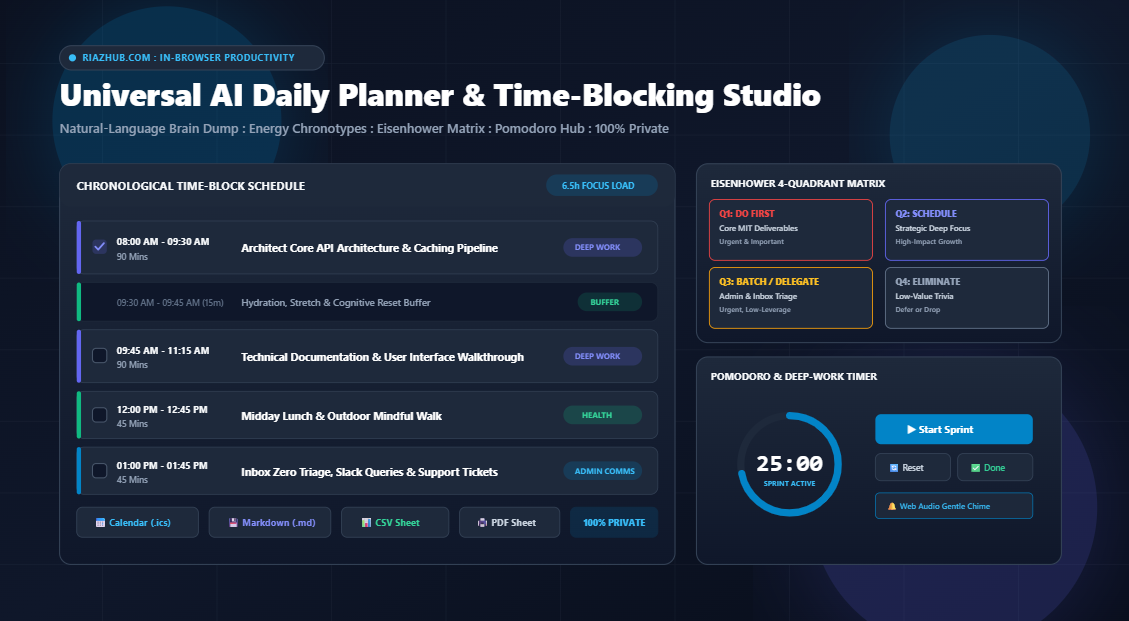
Experience the In-Browser Scheduling Engine
Turn messy notes into a time-blocked schedule with automated buffers and Google/Apple calendar sync.
1. The Cognitive Psychology: Why Time-Blocking Beats Endless To-Do Lists
Standard to-do lists present tasks as an unranked, timeless inventory. When thirty disparate items sit on a flat page, your brain assigns them equal visual weight. Deciding which item to tackle next burns finite willpower, a cognitive drain known as decision fatigue.
Furthermore, traditional checklists trigger Parkinson’s Law, which dictates that work expands to fill the time available for its completion. Without an explicit calendar slot, a straightforward task that should take thirty minutes frequently inflates to consume the entire morning.
By contrast, chronological time-blocking forces realistic constraints:
- Enforces Hard Trade-Offs: A workday only contains a finite number of usable hours. Placing tasks onto a timeline forces you to accept what fits and discard what does not.
- Protects Monotasking Flow: When the 10:00 AM block is dedicated strictly to deep software architecture or client proposals, you have pre-committed your attention. You no longer re-evaluate what you should be doing every fifteen minutes.
- Prevents Schedule Collapse: By incorporating structured transition buffers, an unexpected fifteen-minute delay does not ruin your entire afternoon agenda.
| Factor | Standard To-Do List | Time-Blocked Energy Studio |
|---|---|---|
| Time Awareness | Zero (creates illusion of infinite hours) | Strict (anchored to chronological clock) |
| Decision Fatigue | High (constant re-prioritization) | Low (decisions made once in the morning) |
| Task Overload | Unbounded and overwhelming | Auto-capped by your workday wind-down time |
| Deep Work Protection | Vulnerable to constant interruptions | Safeguarded during peak energy windows |
2. Natural-Language Brain-Dump Ingestion: From Chaos to Chronology
One of the biggest hurdles to disciplined daily planning is friction. Traditional calendar interfaces require clicking multiple dropdown menus to create each individual event.
The AI Daily Planner and Time-Blocking Scheduler eliminates this friction with an intelligent, client-side natural-language task parser. You simply open the calibration deck and paste your raw, messy notes directly into the Brain-Dump textarea:
Reply to urgent vendor emails and support tickets 30m
Weekly team alignment standup sync 15m
Review pull requests and deploy hotfix 2h
Gym workout and protein shake 60m
Deep code architecture refactor 1h 30m
The client-side algorithm instantly evaluates every line:
- Duration Detection: Recognizes standard abbreviations such as
30m,45 mins,1.5h,2h, or compound durations like1h 30m. If no time is specified, it assigns a realistic 45-minute default block. - Category Classification: Automatically classifies tasks into Deep Work, Admin / Comms, Meeting, or Health / Break based on contextual keywords.
- Buffer Insertion: Automatically inserts 15-minute recovery buffers following high-intensity deep work blocks, ensuring you have time to stretch, hydrate, and clear your cognitive cache.
- Midday Lunch Safeguard: Automatically reserves a 45-minute midday lunch block around noon to prevent mental burnout.
3. The Productivity Methodology Matrix: Choose Your Operating System
Productivity is not one-size-fits-all. A software engineer requires uninterrupted four-hour stretches, whereas a department manager navigates rapid communication bursts. The Universal AI Daily Planner Studio on RiazHub.com features four proven organizational methodologies:
1. Time-Blocking (Sequential)
Systematically maps your Top 3 MITs and tasks sequentially from your morning start time to evening wind-down.
2. Eat The Frog (Morning Priority)
Places your hardest, most impactful deliverable (MIT #1) into the very first morning slot when your willpower is pristine.
3. Pomodoro Focus Sprints
Structures work into intense 50-minute deep work cycles paired with compulsory 10-minute rest intervals.
4. Energy-Wave Alignment
Synchronizes high-complexity cognitive tasks with your biological chronotype peak, pushing admin to low-energy troughs.
Aligning Work with Your Biological Chronotype
Pioneering sleep research confirms that our internal circadian clocks dictate peak alertness periods throughout the day. The tool allows you to select your personal chronotype:
- Morning Lark (Peak: 08:00 AM – 12:00 PM): Allocates demanding creative, writing, and coding tasks to early morning. Administrative communications are deferred to the afternoon post-lunch dip.
- Midday Balanced (Peak: 10:00 AM – 03:00 PM): Perfect for professionals who use early mornings for planning and triage, concentrating their deepest focus blocks during late morning and early afternoon.
- Night Owl (Peak: 02:00 PM – 08:00 PM): Begins the day with low-stress inbox triage and meetings, preserving the afternoon and early evening for uninterrupted strategic execution.
4. Visualizing Priorities: The Eisenhower 4-Quadrant Matrix
Beyond chronological scheduling, the studio features a real-time **Eisenhower Matrix** tab. Tasks are parsed and categorized across urgency and importance:
- Quadrant 1: Do First (Urgent & Important): Critical deadlines, core daily MITs, and immediate project deliverables.
- Quadrant 2: Schedule (Strategic Focus): Deep work architecture, skill acquisition, exercise, and recovery buffers. This quadrant is the primary driver of long-term career growth.
- Quadrant 3: Delegate / Batch (Urgent & Less Critical): Routine email triage, brief team syncs, Slack queries, and administrative tickets.
- Quadrant 4: Eliminate / Defer (Low Priority): Peripheral backlog items and time-wasting trivia that can be deferred or dropped entirely.
Triage Your Workload with the Eisenhower Matrix
Switch seamlessly between chronological hourly time-slots and 4-quadrant priority mapping.
5. Built-In Pomodoro Focus Timer with Web Audio API Bell Chime
Planning your day is only half the battle: execution is where success happens. Rather than switching to an external phone timer or cluttered browser extension, the studio includes an integrated **Live Pomodoro Focus Studio**:
- Direct Block Linking: Select any scheduled block from your timeline with one click to populate the timer.
- Preset Sprint Intervals: Toggle between 25-minute standard Pomodoro sprints, 50-minute deep-work ultradian sessions, 15-minute buffer breaks, or 5-minute rapid rests.
- Circular SVG Progress Ring: Provides an ambient visual gauge of elapsed sprint time without distracting numerical clutter.
- Zero-Asset Acoustic Bell Synthesis: At sprint completion, the tool uses the native HTML5 Web Audio API to synthesize a pure harmonic acoustic chord (523 Hz to 1046 Hz). It does not require downloading external MP3 files or relying on network CDNs.
6. 1-Click Multi-Format Exporting: Sync Everywhere
A great planning tool must integrate friction-free into your existing workflow. The Universal AI Daily Planner on RiazHub.com features a branded one-click export toolbar:
- Standard Calendar File (.ics): Generates an RFC 5545 compliant
.icscalendar file namedriazhub-daily-planner-[date].ics. Import it into Google Calendar, Apple Calendar, or Microsoft Outlook to instantly populate your digital calendar. - Markdown Daily Plan (.md): Downloads a formatted action plan named
riazhub-daily-schedule-[date].mdcomplete with Top 3 MIT checklists, hourly schedule tables, and Eisenhower breakdowns for Obsidian, Notion, or GitHub. - Spreadsheet Schedule (.csv): Exports
riazhub-time-blocks-[date].csvfor logging billable hours, project tracking, or corporate timesheets. - Plain-Text Clipboard Agenda: Copies a clean ASCII schedule to your clipboard, perfect for pasting into team Slack channels, daily standup notes, or Discord threads.
- Clean Single-Page PDF Day Sheet: Utilizes a dedicated print stylesheet designed to produce clean, high-contrast printouts and PDFs without trailing blank pages.
7. Absolute Privacy: 100% Client-Side Architecture
In an era of invasive cloud tracking, privacy is essential. Your daily calendar reveals your private health appointments, sensitive business negotiations, financial routines, and personal habits.
“The RiazHub Universal AI Daily Planner executes 100% locally within your client browser. Zero task titles, durations, calendar dates, or personal habits are ever sent to an external database, cloud server, or third-party AI provider.”
The tool uses native ES6 JavaScript, standard DOM manipulation, and browser LocalStorage. When you close the tab, your data remains safely stored on your machine and nowhere else.
8. Quick Tutorial: Planning Your Day in 3 Minutes
- Set Workday Boundaries: Open the AI Daily Planner Studio. Select today’s date and set your Workday Start (e.g., 08:30 AM) and Wind-Down End time (e.g., 06:00 PM).
- Identify Your MITs: Enter your Top 3 Most Important Tasks. Treat MIT #1 as your primary high-value deliverable for the day.
- Dump Your Tasks: Paste all remaining secondary tasks into the Brain-Dump textarea, adding duration cues such as
30m,45m, or1.5h. - Select Methodology & Peak: Choose your productivity framework (e.g., Eat The Frog) and chronotype window (e.g., Morning Lark). Keep the 15-minute buffer and lunch checkboxes checked.
- Auto-Build & Export: Click Auto-Build Time-Blocked Schedule. Fine-tune any blocks on the timeline, then click Calendar File (.ics) to sync directly with your calendar or Print / PDF Sheet for a paper day sheet on your desk.
Frequently Asked Questions (FAQ)
Can I import the generated .ics file into Google Calendar on my smartphone?
Yes. The exported .ics file adheres strictly to RFC 5545 calendar specifications. You can open it directly in Google Calendar, Apple Calendar on iOS and macOS, or Microsoft Outlook on Android and Windows.
What happens if my scheduled tasks exceed my workday end time?
The scheduler will still map all tasks chronologically. You will see your planned hours displayed in the Planned Focus Load KPI card, alerting you to trim lower-priority tasks so your schedule stays realistic.
Are my daily tasks saved if I accidentally refresh the browser?
Yes. All your inputs, MITs, schedule blocks, and completion checkmarks are saved automatically to your browser LocalStorage in real time.
Is this planner completely free to use?
Yes, 100% free with no registration, no subscription tiers, and no cloud data storage. You can access the tool anytime directly at RiazHub.com Universal AI Daily Planner Studio.
Ready to Take Control of Your Time?
Experience the calm, focus, and momentum of a perfectly time-blocked day.
Universal AI Daily Planner & Time-Blocking Studio
Transform chaotic to-do lists into a calm, realistic, hour-by-hour schedule. Auto-assign deep work blocks during your peak energy hours, balance urgency with the Eisenhower Matrix, run integrated focus sprints, and sync directly to Google or Apple Calendar with complete client-side privacy.