
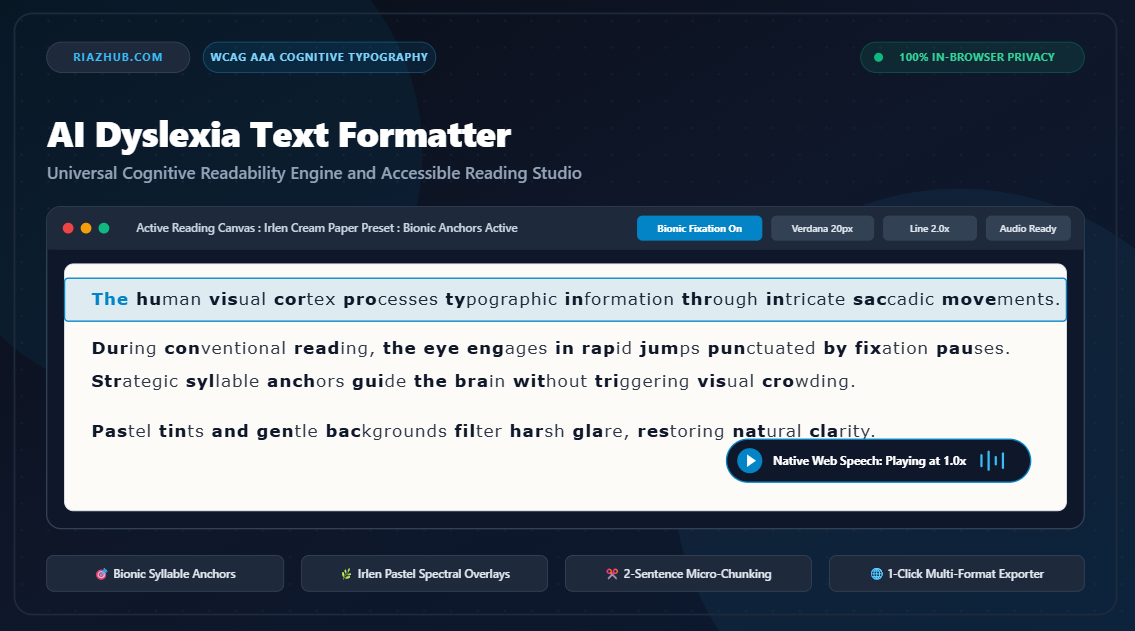
Universal AI Dyslexia Text Formatter: How Cognitive Typography, Bionic Anchors, and Pastel Overlays Transform Reading Accessibility
For over 700 million individuals worldwide living with developmental dyslexia, ADHD, or visual stress syndromes, the modern internet remains a hostile visual terrain. Conventional web design prioritizes compact layouts, razor-sharp black text on stark white backgrounds, and tightly justified margins. While visually crisp to neurotypical eyes, these design choices trigger severe cognitive friction, visual crowding, letter vibration, and exhaustion for neurodivergent readers.
To solve this pervasive digital barrier, RiazHub engineered the AI Dyslexia Text Formatter and Accessible Reading Studio. This browser-based cognitive readability utility redesigns how human eyes ingest digital prose by pairing evidence-based typography stacks, bionic syllable anchors, pastel spectral overlays, and synchronized text-to-speech audio directly inside the client browser.
Experience It Live in Your Browser
Paste any textbook chapter, dense research article, or study notes for instant dyslexia relief.
1. The Hidden Friction of Standard Digital Typography
During silent reading, the human eye does not glide smoothly across lines of text. Instead, it moves in rapid ballistic leaps called saccades, separated by brief fixation stops lasting 200 to 250 milliseconds. For readers with dyslexia or Meares-Irlen syndrome, three critical typographic hazards frequently compromise this saccadic mechanism:
- Rivers of White Space: Fully justified paragraphs stretch word gaps unevenly to create flat outer edges. This creates distracting vertical channels of empty space that draw the reader’s eye vertically, causing frequent line skipping and lost position.
- Visual Crowding and Symmetrical Glyph Confusion: Standard serif and sans-serif fonts feature mirror-image glyphs (such as ‘b’ and ‘d’, or ‘p’ and ‘q’) and narrow counters that visually melt together under eye strain.
- Luminance Glare: High-contrast black characters on blinding white digital screens emit intense high-frequency light that overstimulates the visual cortex, producing perceptual illusions where words appear to shimmer, vibrate, or drift.
“Accessibility is not merely about larger font sizes. True cognitive accessibility demands the elimination of visual noise, intentional tracking expansion, and precise syllable anchoring that honors how the brain recognizes whole word patterns.”
2. Bionic Fixation Anchors: Guiding Eye Tracking Effortlessly
One of the centerpiece technologies inside the AI Dyslexia Text Formatter Studio is its native Bionic Fixation Engine. Bionic reading operates on the neurological principle that the brain does not need to decode every letter in a familiar word to understand its meaning.
By strategically bolding the initial 40% to 45% of letters in every word, the engine provides artificial fixation points. These visual anchors catch the eye during saccadic leaps, guiding rapid optical progression down the line while the brain instantly completes the word shape. The result is a dramatic reduction in cognitive fatigue, allowing readers to maintain high comprehension across lengthy academic papers and dense textbooks.
3. Irlen Syndrome and Spectral Paper Tint Overlays
For millions of individuals diagnosed with Irlen syndrome or light sensitivity (photophobia), white background glare makes sustained reading physically painful. The Universal AI Dyslexia Text Formatter features six calibrated paper tint swatches designed to stabilize the retinal image:
| Paper Tint Swatch | Hex Value | Cognitive Target & Optimal Reading Scenario |
|---|---|---|
| Warm Cream | #FDFBF7 | Gentle book-paper simulation; neutralizes stark screen contrast for general study and long articles. |
| Soft Sepia | #F4ECD8 | Warm yellow-amber spectral shift; softens blue-light fatigue during evening review and legal analysis. |
| Pastel Mint | #EDF7ED | Irlen-tested green overlay; significantly calms optical vibration and word-shimmering for sensitive readers. |
| Calm Sky Blue | #EDF4FA | Cool cyan tint; recommended for ADHD focus, daily work memos, and high-stress screen triage. |
| Soft Charcoal | #1E293B | Muted dark canvas; preserves wide letter spacing for night reading without blinding high contrast. |
| Theme Inherit | Transparent | Seamlessly mirrors your host operating system and website global color scheme. |
4. The Power of Chunking: Conquering the 15-Sentence Text Wall
When faced with an uninterrupted, 15-sentence academic paragraph, the dyslexic working memory is quickly flooded with visual information. Readers frequently lose their place mid-paragraph, re-reading the same sentence four or five times in frustration.
The Studio features an automated 2-Sentence Micro-Chunker. With a single click, dense walls of text are intelligently parsed and split into airy, digestible two-sentence reading units. Each chunk is given generous vertical breathing room, transforming an intimidating wall of text into a sequence of easily achievable reading milestones.
Ready to Transform Difficult Text?
Upload any .TXT, .MD, or .HTML document or paste text directly into the reader.
5. Interactive Horizontal Reading Ruler: Eliminating Line Skipping
Many dyslexic learners rely on physical index cards, rulers, or bookmarks held against paper books to isolate the line they are reading. The RiazHub Dyslexia Text Formatter brings this tactile physical tool directly onto digital screens through its interactive Horizontal Focus Reading Ruler.
As you glide your mouse pointer across the reading canvas, a semi-transparent cyan focus band effortlessly tracks your vertical position, framing the active paragraph or sentence while gently muting surrounding text. When using keyboard navigation or automated audio read-aloud, the ruler automatically locks onto the active line, eliminating accidental line skipping entirely.
6. Dual-Coding Comprehension: Synchronized Web Speech Read-Aloud
Educational psychologists have long documented the benefits of Dual-Coding Theory: presenting textual information simultaneously through visual and auditory modalities dramatically reinforces vocabulary retention and conceptual understanding.
Built directly upon the native browser window.speechSynthesis API, the Studio provides synchronized read-aloud capabilities with:
- Zero Cloud Audio Latency: Synthesizes speech locally on your device without transmitting audio packets across external cloud servers.
- Precision Speed Slider: Calibrate playback speed from 0.6x (for complex clinical or technical terms) up to 1.4x (for rapid review).
- Synchronized Visual Tracking: The active paragraph is highlighted in real-time as the audio plays, ensuring your eyes and ears remain perfectly synchronized.
7. 100% Client-Side Privacy: Zero Data Leaves Your Device
In an era dominated by cloud-based AI tools that log, store, and analyze user inputs, privacy is paramount. Students frequently input unsubmitted thesis drafts; patients review private medical instructions; professionals paste confidential client agreements and corporate emails.
The Universal AI Dyslexia Text Formatter Studio operates under a strict, verifiable 100% Client-Side Privacy Guarantee. All parsing, syllable anchoring, sentence chunking, and speech synthesis run deterministically within your browser memory using pure JavaScript DOM APIs. Zero characters are ever uploaded to cloud servers, external databases, or third-party AI endpoints.
8. 1-Click Multi-Format Branded Exporter
Once you have calibrated your ideal reading setup, the Studio allows you to export your formatted materials across four accessible formats:
- Standalone Accessible HTML Reader (.html): Generates a self-contained web document preserving your exact chosen font, paper tint, letter spacing, line height, and even embeds an offline interactive reading ruler for offline study.
- Chunked Markdown Reading Sheet (.md): Clean, hierarchical Markdown structured into two-sentence units, ideal for importing into Obsidian, Notion, or GitHub.
- Simplified Plain Text (.txt): Uncluttered text file containing complete reading metrics and estimated reading duration.
- Accessibility Profile Backup (.json): Saves your personalized typography coordinates so you can restore your preferred settings on any computer.
Conclusion: Reclaiming the Joy of Reading
Reading should be an inspiring doorway to knowledge, not a grueling battle against visual fatigue and cognitive friction. By harmonizing cognitive typography science with modern browser technology, RiazHub offers a free, private, and universal reading sanctuary for students, researchers, neurodivergent professionals, and lifelong learners worldwide.
Start Your Fatigue-Free Reading Journey Today
Access the Universal AI Dyslexia Text Formatter and Accessible Reading Studio 100% free on RiazHub.
Universal AI Dyslexia Text Formatter, Cognitive Readability Engine and Accessible Reading Studio
Transform dense, hard-to-read walls of text into calm, dyslexia-friendly layouts. Apply bionic fixation anchors, wide letter and line spacing, soft pastel tints, paragraph chunking, and natural read-aloud audio 100% locally in your browser.
Document & Text Ingestion Deck
Granular Typography & Cognitive Calibration
Live Cognitive Reading Canvas
Classic Dyslexia ModeQuick Preset Cognitive Reading Scenarios
Academic Textbook & Research Paper
Breaks dense 15-line paragraphs into 2-sentence chunks with Bionic fixation anchors and 2.0x line height.
Legal Contract & Policy Fine Print
Converts cramped clauses into 22px wide-tracked Verdana on warm sepia tint to eliminate visual crowding.
Daily Email & Work Memo Triage
Activates 1.1x Web Speech audio read-aloud paired with the horizontal focus reading ruler and sky blue tint.
Evening Eye-Strain Relief Mode
Soft pastel mint background with 2.3x line height and Atkinson Hyperlegible typography for fatigue-free night reading.
Cognitive Typography & Visual Stress Science
Why Left-Aligned Text Eliminates 'Rivers of White Space' ▼
Justified text stretches spaces inconsistently across words to create artificial straight edges on both margins. For dyslexic readers, these irregular word gaps create vertical white channels known as 'rivers of white space.' The reader's eye is unconsciously pulled into these vertical channels, triggering disorientation, line skipping, and perceptual crowding. Strict left-aligned text preserves uniform spacing between every word, creating a dependable visual anchor at the start of each line.
How Bionic Fixation Anchors Guide Eye Saccades ▼
During reading, the human eye performs rapid ballistic movements called saccades, punctuated by brief fixation pauses. The brain only requires the initial letters of a familiar word to trigger lexical recognition. By bolding the first 40% to 45% of each word, Bionic fixation styling provides artificial focal anchors. This allows the eye to leap effortlessly from word to word without losing orientation, significantly reducing the cognitive effort required to track across long sentences.
Irlen Syndrome and Spectral Tint Overlays (Why Pastel Paper Works) ▼
Pure black text on stark white digital screens produces severe luminance contrast that over-stimulates the visual cortex. For individuals with Meares-Irlen syndrome or light sensitivity (photophobia), this glare causes optical distortions such as words appearing to shimmer, vibrate, or drift across the page. Replacing stark white with warm cream, soft sepia, pastel mint, or calm sky blue filters out harsh high-frequency light, stabilizing visual perception and extending comfortable reading duration.
100% Client-Side Privacy Guarantee (Zero Cloud Data Leaks) ▼
Every document, textbook chapter, confidential email, medical leaflet, or student assignment ingested into this studio is processed 100% locally inside your web browser using client-side JavaScript APIs (DOM parsing, FileReader API, and native window.speechSynthesis). Zero characters are ever transmitted across the internet, logged in external databases, or processed by cloud third-party servers. Your personal reading materials remain strictly private on your device at all times.