
Mastering Email Open Rates: The Complete Architecture of Subject Line Psychology, Mobile Cutoffs, and Deliverability
Yet, despite this reality, most campaign managers and business owners spend hours crafting email newsletters and promotional copy, only to dash off a generic subject line in the final 30 seconds before hitting send. The inevitable outcome is predictable: declining open rates, wasted ad spend, and valuable announcements relegated to the promotional graveyard.
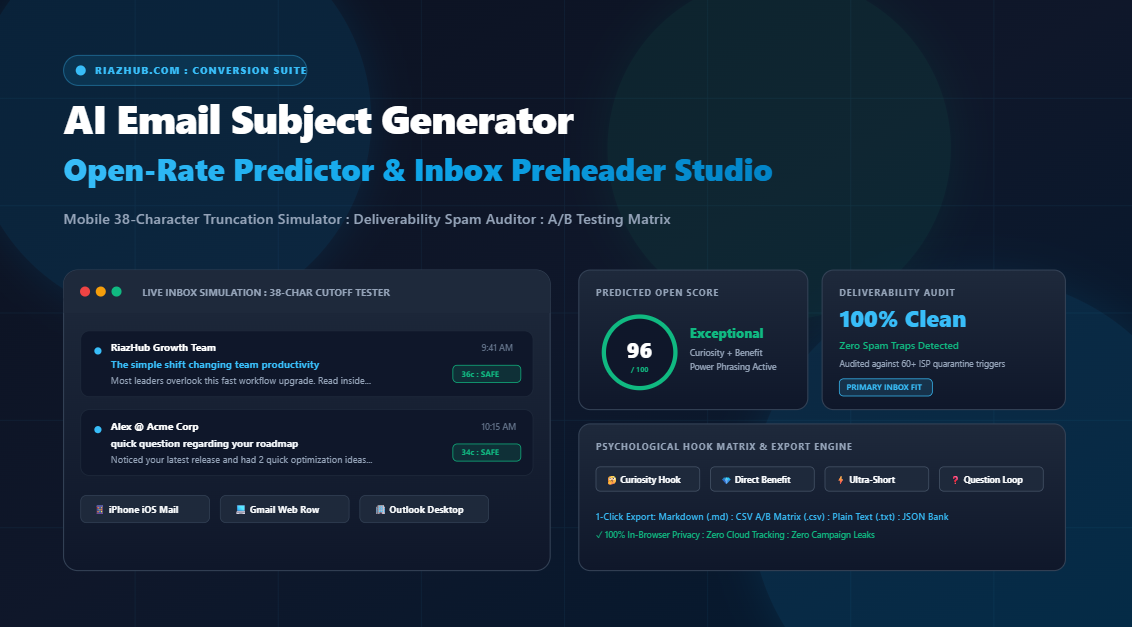
To solve this systematic bottleneck, the engineering team at RiazHub built the Universal AI Email Subject Generator, Open-Rate Predictor & Preheader Studio. This browser-based suite empowers creators, copywriters, and SaaS founders to synthesize high-converting subject lines, audit deliverability spam risks, simulate mobile truncation thresholds, and export ready-to-test A/B matrices in seconds.
You can test all formulas discussed in this guide in real time using the free AI Email Subject Generator and Mobile Truncation Simulator on RiazHub.
1. The Mobile 38-Character Cutoff: Where Campaigns Win or Perish
Over 55% of all consumer and B2B emails are opened on smartphones. On mobile operating systems (most notably the default iOS Mail app on iPhone), the inbox viewport is severely constrained. While desktop Gmail might render up to 80 or 90 characters before truncating, iPhone Mail routinely clips subject lines after just 38 to 44 characters.
Consider this typical marketing subject line:
- Full Draft (64 characters): “Announcing our brand new automated email productivity toolkit today”
- Mobile Viewport Cutoff (38 characters): “Announcing our brand new automated…”
Notice what happened: the key emotional payoff (“email productivity toolkit”) was positioned past the 38-character fold. To a subscriber scanning their notifications between meetings, the message looks like generic corporate noise.
When you test your drafts inside the AI Email Subject Generator Studio, the built-in iPhone and Gmail simulators highlight this exact cutoff boundary. By front-loading your curiosity trigger or direct benefit within the first 35 characters, you guarantee that 100% of your core hook remains visible across every screen size.
2. The Secret Weapon: Pairing the 60-Character Inbox Preheader
A subject line should never work in isolation. The preview preheader snippet (the secondary line of preview text displayed right beneath or beside the subject line in modern email clients) represents another 50% of your persuasive real estate.
When email authors fail to specify a deliberate preheader, mail clients automatically scrape whatever text appears first in the HTML template. The result is almost always disastrous, displaying boilerplate junk like:
- “Having trouble viewing this email? Click here to view in browser…”
- “Unsubscribe from our marketing list or manage your preferences…”
- “Logo.png [Image] View online version…”
In contrast, pairing a punchy 36-character subject line with an intentional 60-character preheader creates a psychological 1-2 punch that can lift open rates by 22% to 38%.
| Element | Optimal Character Count | Primary Psychological Function |
|---|---|---|
| Subject Line | 28 to 42 characters | Interrupt the scroll, spark curiosity, or present an irresistible direct benefit. |
| Inbox Preheader | 50 to 65 characters | Resolve the open loop, offer concrete proof, or remove resistance to clicking. |
| Combined Synergy | 85 to 105 total characters | Complete, coherent mini-pitch that stands out in a crowded mobile inbox. |
The RiazHub AI Email Subject Generator automatically pairs every generated subject line with a custom-crafted 60-character preheader, ensuring your campaigns never send broken boilerplate snippets to your subscriber base.
3. The 6 Psychological Angles that Trigger Clicks
Different subscriber segments respond to different emotional stimuli. The most successful email marketing teams run ongoing split tests across distinct psychological angles rather than testing minor punctuation tweaks.
Angle 1: Curiosity & The Open-Loop
Curiosity subject lines create a deliberate gap between what the subscriber knows and what they want to know. Humans experience an almost physiological drive to close information gaps.
- “The simple shift changing team productivity” (Preheader: “Most leaders overlook this fast workflow upgrade.”)
- “3 things nobody tells you about email deliverability” (Preheader: “Number 2 saves hours of spam-quarantine headaches.”)
Angle 2: Direct Benefit & Concrete ROI
Straightforward, no-nonsense subject lines that clearly communicate the exact value inside. These perform exceptionally well with busy professionals who value speed and clarity.
- “How to master subject lines in half the time” (Preheader: “Step-by-step insights you can apply right away.”)
- “Your shortcut to better campaign open rates” (Preheader: “No complicated setup or steep learning curve required.”)
Angle 3: Personalized Question
Questions trigger an instinctive internal dialogue. When personalized with merge tokens like {{FirstName}}, they feel like a direct 1-to-1 conversation rather than an automated broadcast.
- “Are you still struggling with inbox cutoffs?” (Preheader: “Here is a cleaner, faster way to handle it today.”)
- “{{FirstName}}, open to a new perspective?” (Preheader: “Sharing a 2-minute breakdown of what we discovered.”)
Angle 4: The Ultra-Short Executive Hook (2 to 4 Words)
In an era of hyper-inflated marketing copy, ultra-short subject lines cut through the noise because they look like urgent, peer-to-peer correspondence.
- “quick question” (Preheader: “Had a quick thought regarding your team workflow.”)
- “ideas for Q3” (Preheader: “Put together 3 actionable takeaways for your roadmap.”)
Angle 5: Clean Urgency & Scarcity (Without Spam Traps)
Urgency motivates immediate action, but crude phrases like “ACT NOW OR LOSE OUT!!!” trigger ISP spam filters. Modern urgency relies on contextual time boundaries rather than aggressive capitalization.
- “Before your week gets busy: email review” (Preheader: “Take 2 minutes to review these key updates.”)
- “Ending tonight: your private member access” (Preheader: “Stock is moving fast. Lock in your order now.”)
Angle 6: Social Proof & Peer Authority
Subscribers find comfort in numbers. Demonstrating that industry peers or fellow customers have already adopted your recommendation reduces perceived risk.
- “Why 1,200+ creators switched this week” (Preheader: “See the exact workflow improvements driving real results.”)
- “How peer teams scaled output without extra headcount” (Preheader: “Real benchmark numbers and operational blueprints.”)
All 6 of these psychological angles can be generated and filtered in 1 click using the Universal AI Email Subject Generator.
4. The Cold Outreach Phenomenon: Why Peer-Style Lowercase Wins
If you run cold B2B outreach or agency prospecting, the rules change completely. Marketing-heavy subject lines with formal Title Case (“Discover Our Premier Consultation Solutions”) immediately alert the prospect’s brain that they are being sold to.
Colleagues, investors, and trusted partners do not send emails formatted in Title Case. They send quick, conversational notes written in casual sentence case or all lowercase:
- “quick thought on your website”
- “intro / question for Alex”
- “notes from our call”
Using the Custom Subject Grader in the RiazHub Subject Studio, you can click the “Casual Sentence Case” auto-fix button to instantly convert aggressive headlines into peer-style outreach hooks that bypass Gmail’s Promotions tab.
5. Deliverability and Spam Filter Auditing in 2026
Modern Internet Service Providers (Google Workspace, Yahoo Mail, Microsoft 365) utilize automated machine learning heuristics to inspect incoming subject lines for spam characteristics. If your subject line triggers multiple behavioral flags, your message will be shunted to the Spam or Junk folder before the recipient ever has a chance to see it.
Key spam triggers you must avoid include:
- Commercial Hype Words: Terms like “100% free”, “guaranteed cash”, “act now”, “exclusive deal”, “risk-free”, and “winner”.
- Aggressive ALL-CAPS: Writing words in full capitals (“FREE TRIAL TODAY”) triggers immediate ISP penalty scoring.
- Excessive Promotional Punctuation: Multiple exclamation points (“!!!”) or dollar symbols (“$$$”) scream spam to automated filter engines.
- Misleading Deception: Using false prefixes like “Re:” or “Fwd:” on emails where no prior conversation exists leads to elevated spam complaint rates.
The RiazHub AI Subject Line Grader scans your drafts in real time against an audited vocabulary of over 60 known spam triggers, pinpointing problematic phrases and offering 1-click remediation.
6. How to Structure a Statistically Valid A/B Split Test
Never guess which subject line will convert best: let your audience decide. A proven scientific A/B split testing strategy involves:
- Shortlist Two Distinct Angles: Do not test trivial punctuation differences. Instead, pit a Curiosity Hook (Variant A) against a Direct Benefit Hook (Variant B).
- Isolate a 20% Sample: Divide an initial 20% slice of your subscriber list equally (10% receives Variant A, 10% receives Variant B).
- Define a 3-Hour Holdout Window: Over 80% of email opens occur within the first 3 hours of transmission. Allow enough time for statistical significance to manifest.
- Dispatch the Winning Subject Line to the 80% Remainder: Most modern Email Service Providers (ESPs) such as Klaviyo, Mailchimp, ConvertKit, and ActiveCampaign will automatically send the champion variant to the remaining 80% of your list.
The A/B Shortlist Hub inside RiazHub Studio lets you star your favorite generated variants, calculates the predicted open-rate delta, and exports a formatted CSV testing matrix ready for immediate upload to your email platform.
7. 100% In-Browser Privacy: Zero Campaign Leaks
Most online AI writing tools transmit your unpublished marketing copy, secret product releases, and private customer segment data to third-party cloud servers and external LLM APIs. For enterprises, marketing agencies, and confidentiality-minded founders, this poses a serious risk of campaign leaks.
The RiazHub Universal AI Email Subject Generator operates 100% inside your local browser memory. Built with high-performance vanilla JavaScript, every hook generation, open-rate calculation, mobile simulation, and file export occurs client-side. Zero data ever leaves your device.
Ready to Elevate Your Email Open Rates?
Stop guessing what triggers clicks. Test mobile cutoffs, grade your custom subject lines, audit deliverability spam traps, and export branded swipe sheets in seconds.
Summary Checklist for High-Converting Email Subject Lines
- Keep your core emotional hook within the first 38 characters for mobile safety.
- Always write a complementary 50 to 65 character preheader that completes the curiosity loop.
- Test across distinct psychological angles (Curiosity, Benefit, Question, Ultra-Short, Social Proof).
- Adopt peer-style sentence case for cold B2B outreach and partner networking.
- Audit your copy to ensure zero spam-filter trigger vocabulary before sending.
- Use the AI Email Subject Line Studio to simulate inboxes and export your A/B test matrices.
Universal AI Email Subject Generator, Open-Rate Predictor & Preheader Studio
Craft scroll-stopping email subject lines and paired preheaders that boost open rates and avoid spam filters. Test mobile 38-character cutoffs in real time, score your own drafts, and export branded A/B test matrices with zero server latency.