
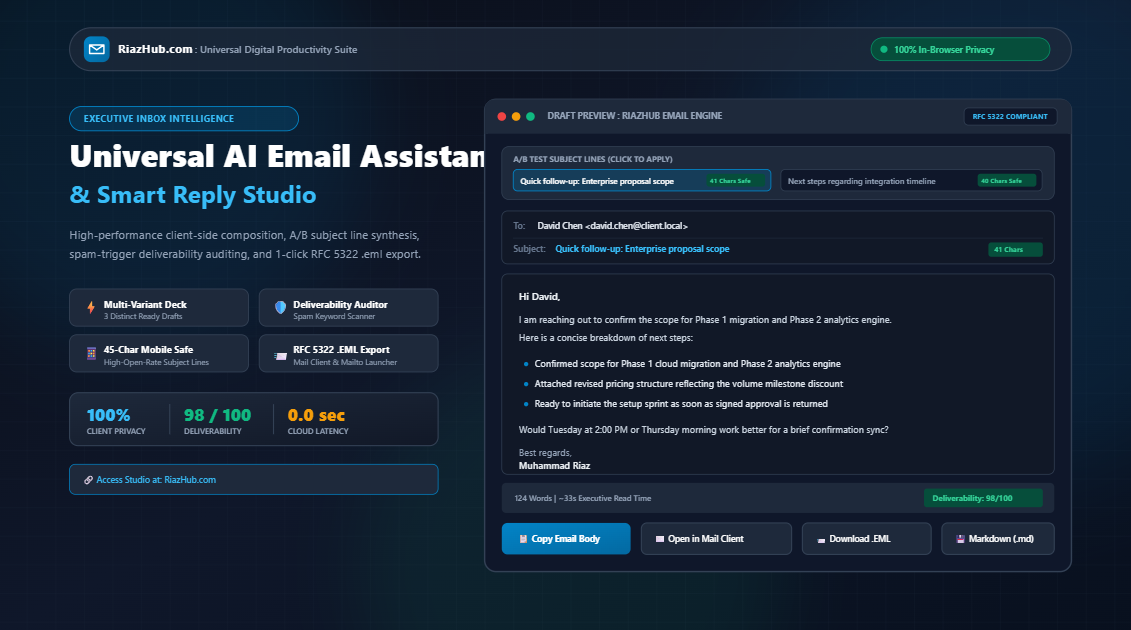
Universal AI Email Assistant: How to Draft High-Converting Emails and Smart Replies in Seconds
The average business professional spends between 2.5 and 3.5 hours daily reading, triaging, and responding to emails. Yet despite that massive time investment, vague subject lines, inappropriate tones, and unintentional spam triggers regularly undermine deal momentum, delay project sign-offs, and clutter inboxes. Learn how the free AI Email Assistant & Smart Reply Synthesizer operates directly inside your web browser with zero server latency or data exposure.
The Silent Productivity Tax of the Modern Inbox
Email remains the undisputed nervous system of global business. Contracts are negotiated, product roadmaps are confirmed, client issues are resolved, and executive updates are delivered over email threads every single second. However, composing effective emails poses a recurring cognitive tax that drains executive stamina:
- Blank Slate Paralysis: Starting a fresh follow-up or cold outreach email from a blank cursor takes an average of 14 minutes, often leading to overthinking and delayed replies.
- Tone Miscalibration: Striking the exact balance between authoritative corporate structure and collaborative warmth is notoriously difficult, particularly under tight deadlines.
- Mobile Truncation Blindness: Over 60% of modern emails are triaged on smartphones first. When subject lines exceed 45 characters, critical takeaways get truncated mid-sentence, causing open rates to plummet.
- Accidental Spam Filtration: Legitimate business proposals routinely end up in the junk folder simply because the author used high-pressure words like “act now”, “urgent”, or excessive exclamation points.
- Confidential Data Leaks to Cloud AI: Pasting sensitive client quotes, financial figures, or internal negotiation memos into public cloud AI services exposes private corporate correspondence to remote server storage and third-party model training.
To solve these challenges in a unified, safe environment, RiazHub developed the Universal AI Email Assistant, Smart Reply Synthesizer and Inbox Productivity Studio. It bridges the gap between high-speed synthesis, deliverability protection, and enterprise privacy.
Core Architecture: How the Studio Operates
Unlike traditional tools that rely on remote API roundtrips, the AI Email Assistant Studio on RiazHub.com executes its entire pipeline client-side inside the user’s browser using modern JavaScript, Blob compilers, and RFC 5322 message formatters.
Compose new emails from raw bullet points, or paste received email threads to draft articulate smart replies.
Instantly calibrate tone across Professional, Warm, Concise (BLUF), Persuasive, Formal, and Empathetic styles.
Generates 5 curiosity-driven subject lines equipped with live mobile inbox truncation telemetry.
Scans text for aggressive marketing keywords, formatting flags, and calculates a 0 to 100 deliverability score.
Download standard .eml files that open directly in Microsoft Outlook, Apple Mail, and Mozilla Thunderbird.
Zero cloud API calls, zero database logging, and zero risks of confidential client data leaving your device.
Mastering the Multi-Tone Calibration Matrix
One of the most powerful features of the AI Email Assistant is its tone calibration engine. The exact same business objective requires radically different wording depending on your audience:
| Tone Profile | Best Used For | Structural Characteristic | Typical Call to Action |
|---|---|---|---|
| 👔 Professional & Polished | Client proposals, vendor inquiries, enterprise follow-ups | Balanced greetings, structured bullet takeaways, clean sign-off | Specific calendar alignment or meeting window |
| 😊 Warm & Friendly | Team collaboration, warm introductions, long-term partners | Appreciative tone, collaborative phrasing, conversational rhythm | Low-pressure question, offering mutual assistance |
| ⚡ Concise (BLUF) | C-Suite executives, busy founders, rapid operational decisions | Bottom Line Up Front; 2-line summary; under 90 words | Binary decision ask (e.g., “approve or adjust?”) |
| 🎯 Persuasive | Cold B2B outreach, sales follow-ups, partnership pitches | Value proposition hook, quantified benefit, objection mitigation | Low-friction 10-minute discovery chat |
| 🏛️ Formal Corporate | Legal notices, procurement boards, institutional steering committees | Unambiguous passive/active clarity, compliance reassurance | Formal written sign-off and timeline confirmation |
| 🤝 Empathetic & Diplomatic | Issue resolution, missed deadlines, project delay updates | Unconditional accountability, root-cause transparency, proactive credit | Confirmation of revised milestone schedule |
The 45-Character Mobile Subject Line Rule
According to recent email marketing benchmarks, more than 62% of professional emails are first triaged on smartphone screens via iOS Mail, Gmail mobile app, or Outlook mobile. On typical smartphone viewports, email subject lines are truncated after 40 to 45 characters:
The Truncation Trap: If your subject line reads: “Following up on the enterprise integration proposal and discussing next steps for phase two” (93 characters), the mobile user only sees: “Following up on the enterprise integration…” This hides your value hook and creates decision fatigue.
The Universal AI Email Assistant automatically scores every generated subject line against this 45-character threshold. Subject lines under 45 characters receive a green Mobile Safe indicator, ensuring that your core value proposition is fully visible before the recipient even swipes to open.
Spam-Trigger Auditing & Deliverability Telemetry
Modern inbox providers (Google Workspace, Microsoft 365, Proton, and corporate mail exchange servers) employ aggressive heuristic filters. Even legitimate business messages can be automatically relegated to the spam folder if they trip algorithmic triggers.
The built-in Deliverability Auditor inside the Inbox Productivity Studio checks your copy against three critical spam vectors:
- Aggressive Keywords: Words like “free”, “guaranteed”, “act now”, “urgent”, “100%”, “click here”, “winner”, or “risk-free” immediately trigger automated spam scoring rules.
- Excessive Capitalization: Words written in ALL CAPS inside the subject line (e.g., “URGENT UPDATE FOR YOUR TEAM”) trigger spam weighting penalties of up to 12 points.
- Punctuation Hygiene: Multiple exclamation marks (e.g., “Don’t miss out!!”) are treated as aggressive promotional markers by enterprise mail servers.
The studio dynamically displays a real-time deliverability score (from 0 to 100) alongside line-item recommendations, allowing you to sanitize your draft before hitting send.
The 3-Variant Deck: Choosing the Perfect Strategy
Every time you click “Generate Drafts” in the AI Email Assistant Studio, the engine synthesizes three distinct ready-to-send draft options simultaneously:
- Variant A (Direct & Action-Oriented): Perfect for maintaining deal velocity. It clearly highlights key objectives, summarizes milestones in concise bullet points, and concludes with a definitive next step.
- Variant B (Warm & Relationship-Focused): Crafted for high-trust partnerships. It leads with sincere appreciation, acknowledges team effort, and maintains an inviting, low-pressure tone.
- Variant C (Ultra-Concise Executive TL;DR): Built specifically for executive triage. It places the Bottom Line Up Front (BLUF) and confines the entire message to under 80 words, enabling rapid mobile decisions.
You can compare all three variants side-by-side in the “Compare 3 Variations” tab, copy any draft with one click, or load it directly into the active interactive preview window for live inline refinement.
Standard RFC 5322 .EML File Export: An Executive Secret
While copying plain text to your clipboard is fast, the AI Email Assistant introduces a dedicated RFC 5322 .eml compiler.
When you click Download .EML File, the studio formats a standard MIME message complete with:
MIME-Version: 1.0
Date: Mon, 17 Nov 2026 10:30:00 GMT
From: Muhammad Riaz <sender@riazhub.local>
To: David Chen <david.chen@client.local>
Subject: Quick follow-up: Enterprise proposal scope
Content-Type: text/plain; charset=UTF-8; format=flowed
Content-Transfer-Encoding: 8bit[Synthesized Email Body]
Double-clicking a downloaded .eml file on Windows, macOS, or Linux opens your default email client (Microsoft Outlook, Apple Mail, or Mozilla Thunderbird) with the recipient, subject line, and body pre-populated in a fresh draft window, completely eliminating copy-paste errors.
100% Client-Side Privacy: Why In-Browser Processing Matters
In modern corporate environments, confidentiality is non-negotiable. Pasting sales proposals, proprietary pricing sheets, employee dispute records, or merger discussions into traditional generative AI web forms sends unencrypted text to external third-party servers.
The Universal AI Email Assistant Studio on RiazHub.com executes 100% of its logic locally using native browser APIs:
- Zero Server Transmission: Your input points, recipient names, and drafted emails never leave your computer.
- Zero Database Storage: Templates saved in your vault are stored exclusively in your browser’s local storage (
localStorage). - Zero Cloud Latency: Because processing happens locally on your machine, generation takes less than 50 milliseconds with zero server wait times.
Frequently Asked Questions (FAQ)
▼
▼
▼
▼
▼
Start Writing Better Emails in Seconds
Save hours each week, safeguard confidential correspondence, and maximize your inbox reply rates with RiazHub’s dedicated productivity studio.
Universal AI Email Assistant, Smart Reply Synthesizer and Inbox Productivity Studio
Draft clear, persuasive emails and replies in seconds. Generate high-open-rate subject lines, calibrate your tone from formal to friendly, check for spam triggers, and launch directly into your mail app with zero server latency.
Multi-Variant Email Draft Deck
Select any draft variant to load it directly into your editable preview window or copy immediately.
Spam-Trigger & Deliverability Telemetry
| Diagnostic Rule | Location | Result | Recommendation |
|---|
💡 Actionable Deliverability Insights:
- 45-Character Mobile Subject Limit: Smartphone screens clip subject lines past 45 characters. Keep your main value hook at the very beginning.
- Micro-Yes Closing Question: Asking a binary, low-friction question ("Would Tuesday at 2 PM work for 10 minutes?") doubles reply rates over vague endings ("Let me know your thoughts").
- Avoid Deceptive Urgency: Excessive use of terms like "ACT NOW", "URGENT", or multiple exclamation points triggers automated spam categorization filters.
Saved Reusable Email Templates
Templates are stored 100% locally in your browser. They never touch an external server.
Professional Email Communication & Deliverability Principles
The 45-Character Mobile Subject Line Rule ▼
Over 60% of professional emails are triaged on smartphones first (iOS Mail, Gmail Mobile, Outlook Mobile). On standard mobile screens, subject lines longer than 45 characters get truncated mid-thought. Placing your primary value proposition and specific context within the first 35 to 45 characters ensures your core message is understood before the recipient even decides to swipe or open.
Ending With a Low-Friction 'Micro-Yes' Question ▼
Vague closings like "Let me know your thoughts" impose a heavy cognitive load on busy executives, who often postpone replying because formulating a response requires significant mental effort. Replacing vague asks with a clear, low-friction "Micro-Yes" question (e.g., "Would Tuesday at 2 PM work for a brief 10-minute sync, or does Wednesday morning fit better?") drastically reduces hesitation and consistently generates 2x higher reply rates.
100% Client-Side Privacy Guarantee ▼
Unlike traditional cloud-based AI tools that upload confidential client messages, proposal numbers, and private negotiations to external servers, this studio operates 100% inside your web browser. All email synthesis, spam scoring, subject line variation, and .eml file compilation are performed locally using client-side JavaScript. Zero emails are logged, stored on a remote database, or transmitted across the network.
Generated via RiazHub.com : Universal AI Email Assistant Studio
Standard Email Communication Sheet