
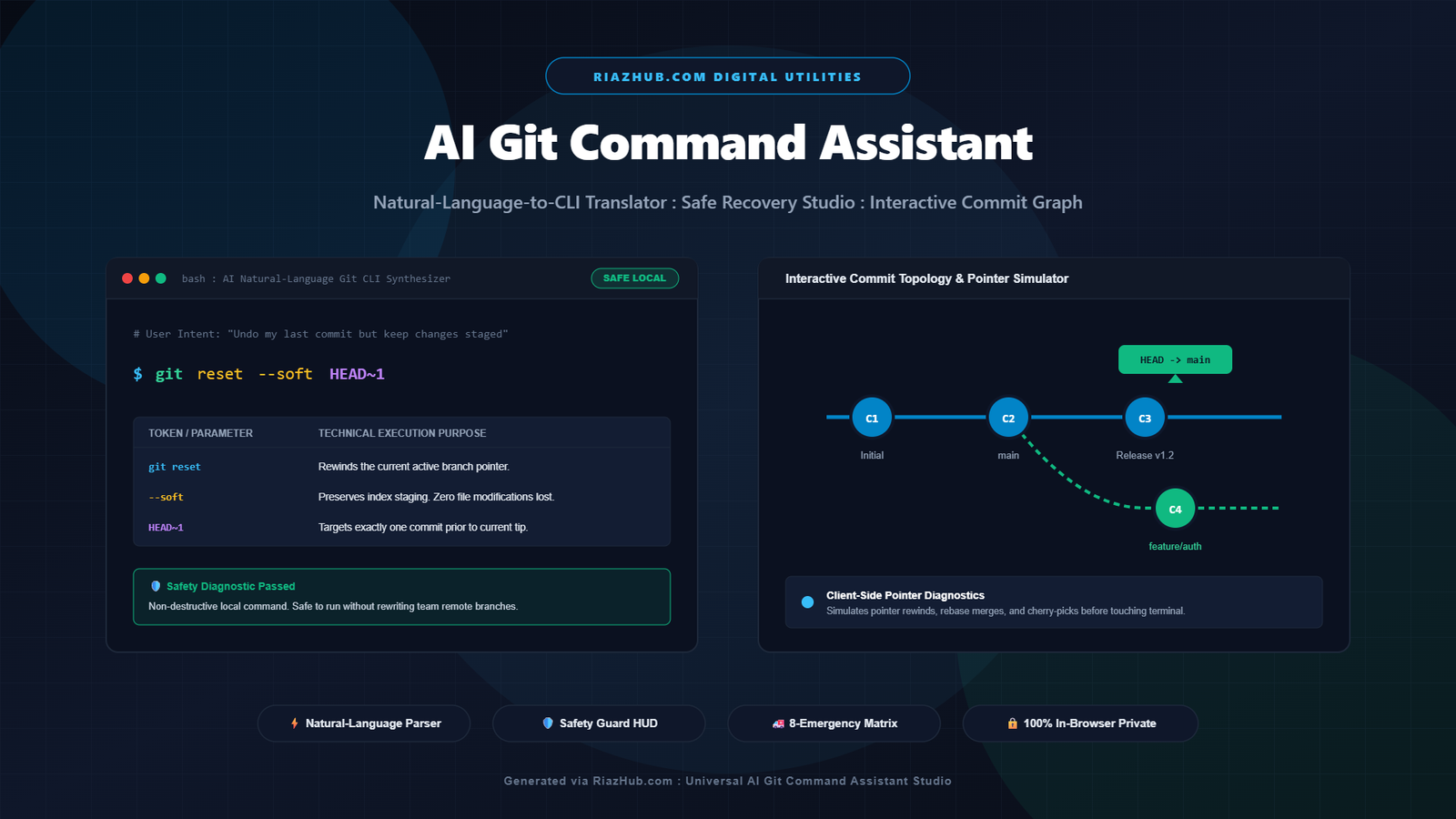
The High-Stakes Reality of Git Terminal Commands
Git is the undeniable backbone of modern software engineering. Every second, millions of developers stage files, switch branches, squash historical commits, and deploy code to production through distributed repositories. Yet, despite its universal ubiquity, Git remains one of the most intellectually taxing and stress-inducing command-line tools ever created.
The fundamental challenge lies in the mental model. Git was engineered as a content-addressable filesystem wrapped around directed acyclic graphs (DAGs). When a developer wants to perform a conceptually simple human task (such as “undo my last commit but keep all my edited code ready to recommit”), Git requires them to translate that intent into specific pointer manipulations:
$ git reset --soft HEAD~1
One minor syntax slip (such as typing --hard instead of --soft) wipes out uncommitted work permanently from disk with zero confirmation prompts. A casual force push (git push -f) can overwrite hours of collective branch contributions made by teammates.
To eliminate this panic and bridge the gap between human language and precision version control, the engineering team at RiazHub built the Universal AI Git Command Assistant & Safe Recovery Studio. This browser-based utility transforms plain English intent into copy-ready terminal commands, audits destructive risks in real time, and renders interactive commit graph previews.
How Natural-Language-to-CLI Synthesis Works
Unlike cloud-based generative AI systems that transmit your codebase paths and commit histories across external server endpoints, the AI Git Command Assistant runs a deterministic natural language synthesis engine 100% inside your client browser.
The engine tokenizes natural language developer statements, extracting operational intent, target references, numeric quantities, and branch qualifiers:
Detects actions including soft undo, squash, context switching, stashing, history rewinds, rebasing, cherry-picking, and reflog recovery.
Seamlessly injects your real working branch names, remote configurations (origin/upstream), commit counters, and file paths live as you type.
Classifies each compiled command as SAFE READ-ONLY, WORKING TREE MODIFIER, or DESTRUCTIVE HISTORY REWRITE before you paste it into your shell.
Illustrates how the command affects HEAD, local branches, staging index, and ancestor nodes on a visual topology tree.
Deconstructing the Architecture: Flag-by-Flag Explanations
A core philosophy behind the Universal AI Git Command Assistant is that developers should never run commands they do not understand. Every synthesized terminal sequence is accompanied by a technical flag-by-flag breakdown table.
Consider a typical scenario where a developer wants to combine multiple incremental feature commits before opening a pull request. The user types: “Squash my last 3 commits into one clean snapshot”. The tool generates:
$ git reset --soft HEAD~3 && git commit -m "feat: implement user authentication flow"
| CLI Flag / Token | Technical Purpose & Pointer Mechanics |
|---|---|
git reset |
Moves the active HEAD branch pointer backward in the commit graph. |
--soft |
Preserves the working tree and leaves all modified file content staged in the Git index. |
HEAD~3 |
Specifies an offset of exactly three ancestor commits prior to current tip. |
&& |
Chaining operator ensuring the commit is created only if the reset exits with zero errors. |
git commit -m "..." |
Records a single unified snapshot containing all combined diffs with your descriptive message. |
The Three-Tier Destructiveness Safety Guard System
Every Git command carries inherent side effects. To protect development teams from unintentional code loss, the RiazHub Git Command Studio evaluates each command against an automated risk matrix:
git reset --soft, git switch -c, and git stash push preserve modified working files and only alter local pointers. They carry zero risk of data loss.git commit --amend, squashing, or interactive rebasing modify local commit history. They are safe on private feature branches but should never be executed on shared remote branches.git reset --hard, git clean -fd, and raw git push --force. The tool immediately flags these actions with prominent warning badges and suggests safer, non-destructive alternatives like --force-with-lease or automatic stash backups.The 8 Common Git Emergencies Solved in Seconds
When version control goes wrong, developers often waste hours combing through disconnected forum threads. The Safe Recovery Studio integrates an emergency quick-fix matrix addressing the 8 most frequent panic scenarios:
1. Committed Directly to Main by Mistake
You spent three hours coding a new feature only to realize you committed straight to your local main branch instead of branching off.
Safe Recovery Solution:
$ git branch feature/my-new-feature
$ git reset --hard origin/main
$ git switch feature/my-new-feature
This preserves your new commits safely on the new feature branch while restoring your local main to mirror the remote upstream cleanly.
2. Accidentally Deleted a Branch With Unmerged Work
You ran git branch -D feature/checkout thinking the work was merged, only to realize critical commits were lost.
Safe Recovery Solution:
$ git reflog | grep checkout
$ git branch feature/checkout HEAD@{1}
Git never discards commits immediately. The internal reflog retains orphaned commits for 30 to 90 days. You can resurrect the deleted branch tip instantly.
3. Undoing an Already-Pushed Commit Without Rewriting Shared History
A bug slipped into production on origin/main. Running git reset and force-pushing will corrupt your entire team’s local clones.
Safe Recovery Solution:
$ git revert --no-edit HEAD
$ git push origin main
git revert generates an inverse commit that cancels out the targeted changes without altering historical commits, keeping collaborative workflows intact.
4. Discarding All Local Working Changes Safely
When an experimental coding attempt fails completely and you need to return your repository to a pristine state:
$ git restore .
$ git clean -nd    # Dry run first to preview untracked files
$ git clean -fd    # Forcibly remove untracked directories
5. Stopping Tracking on a File Without Deleting It Locally
Accidentally committed an environment configuration or large SQLite database:
$ git rm --cached config.env
$ echo "config.env" >> .gitignore
$ git commit -m "chore: stop tracking local environment configuration"
Conventional Commit Formatter & Project .gitignore Generator
Writing standardized commit messages improves team communication and automates semantic versioning pipelines. Inside the Universal AI Git Assistant, the built-in Conventional Commit Builder standardizes inputs into structured strings:
feat(auth)!: add OAuth2 refresh token auto-rotation
In addition, the tool provides copy-ready .gitignore configuration templates for popular technology stacks, including WordPress, Node.js, Python, and Android Studio, preventing sensitive build artifacts, logs, and dependencies from entering source control.
Zero Cloud Dependencies: 100% In-Browser Privacy
In enterprise engineering environments, confidentiality is non-negotiable. Many corporate policies strictly forbid sending internal repository architectures, branch identifiers, or commit messages to third-party language model servers.
The AI Git Command Assistant on RiazHub.com executes entirely within your browser’s V8 or JavaScript engine. It makes zero HTTP requests, uses zero tracking webhooks, and stores zero telemetry. Your branch topologies, API keys referenced in commit drafts, and proprietary directory paths remain strictly confidential on your local machine.
Multi-Format Runbook Exporters
Once you compile a workflow, the tool provides one-click exports formatted for team handoffs and continuous integration:
- Markdown Runbook (.md): Formatted with step-by-step documentation, flag tables, and team guidelines.
- Cross-Platform Shell Script (.sh): Ready-to-execute script with
set -euo pipefailsafety guards. - Team Cheat Sheet (.csv): Tabular cheat sheet suitable for importing into spreadsheets or team wikis.
- Print / PDF Guide: Clean print-optimized document ready for onboarding documentation.
All generated runbooks and scripts automatically feature verified file branding: riazhub-git-commands-[category]-[slug].md.
Frequently Asked Questions (FAQ)
All three commands rewind your current branch pointer to a previous commit. The difference is what happens to your modified files. --soft keeps all your changes staged in the index, ready to be recommitted immediately. --mixed (the default) keeps your changes in your local directory but unstages them. --hard completely overwrites your working tree and staging index, permanently destroying all uncommitted edits.
Standard git push --force blindly overwrites the remote branch regardless of whether anyone else has pushed new commits. git push --force-with-lease checks the remote reference before pushing; if a coworker pushed new commits to that branch in the interim, Git rejects your push, preventing accidental destruction of your teammate’s work.
Yes. Once the page is loaded inside your web browser, all intent translation, flag decomposition, canvas graph rendering, and file exporting operate completely offline using local client-side JavaScript.
Git maintains an internal journal called the Reference Log (reflog) that records every time the HEAD pointer moves (such as checking out branches, committing, rebasing, or resetting). Even if you delete a branch, the commit objects remain in Git’s object store until garbage collected. Inspecting git reflog allows you to identify the orphan commit hash and branch off it cleanly.
Universal AI Git Command Assistant & Safe Recovery Studio
Describe any Git goal in plain English to immediately synthesize copy-ready terminal commands, inspect flag-by-flag logic, test branch recovery scenarios, and visualize pointer changes without rewriting remote history.
git reset exclusively for local unpushed commits that only exist on your own computer. Once commits have been pushed to a remote branch shared with teammates, running reset and force-pushing will overwrite and corrupt their working copies. Instead, always use git revert <commit> on shared branches, which creates a new forward-moving commit that cleanly reverses the targeted changes without rewriting history.
git push --force tells the remote server: "Overwrite the remote branch with my history regardless of what is currently there." If a coworker pushed commits to that branch five minutes ago, their work is completely destroyed. In contrast, git push --force-with-lease checks the remote reference before overwriting. If anyone else pushed new commits, the operation aborts immediately, protecting team collaboration.