
How to Transform Blunt Emails into Diplomatic Executive Communication: Complete Guide to Local AI Formalization
In modern digital workplaces, the words you type in an email or Slack message often form the entire impression colleagues, executives, and clients have of your competence. A message that feels quick and harmless to you can easily read as dismissive, demanding, or careless to someone else. When invoices are overdue, deadlines slip, or project scopes expand without warning, informal phrasing can quickly escalate tensions.
Learning how to elevate your linguistic register from rough colloquial drafting to polished, authoritative corporate prose is one of the highest leverage communication skills you can develop. In this guide, we explore the science of diplomatic de-escalation, the hidden impact of casual contractions, and how you can polish rough drafts in seconds using the free, browser-based RiazHub AI Formalizer Studio.
1. The Cost of Casual and Blunt Workplace Communication
Written text lacks the tone of voice, facial expressions, and body language that soften spoken dialogue. When team members type rapid messages during high-stress moments, they frequently rely on imperative demands and accusatory syntax.
Consider common everyday scenarios where rough phrasing causes unnecessary friction:
- Accounts Receivable Delays: Writing “We haven’t got paid yet and need this sorted ASAP” immediately puts the client on the defensive.
- Scope Creep and Feature Requests: Stating “We don’t have time for this stuff, figure out what you want first” damages commercial relationships.
- Status Reporting to Leadership: Sending “We ran into bugs and messed up the timeline” signals operational chaos rather than controlled problem-solving.
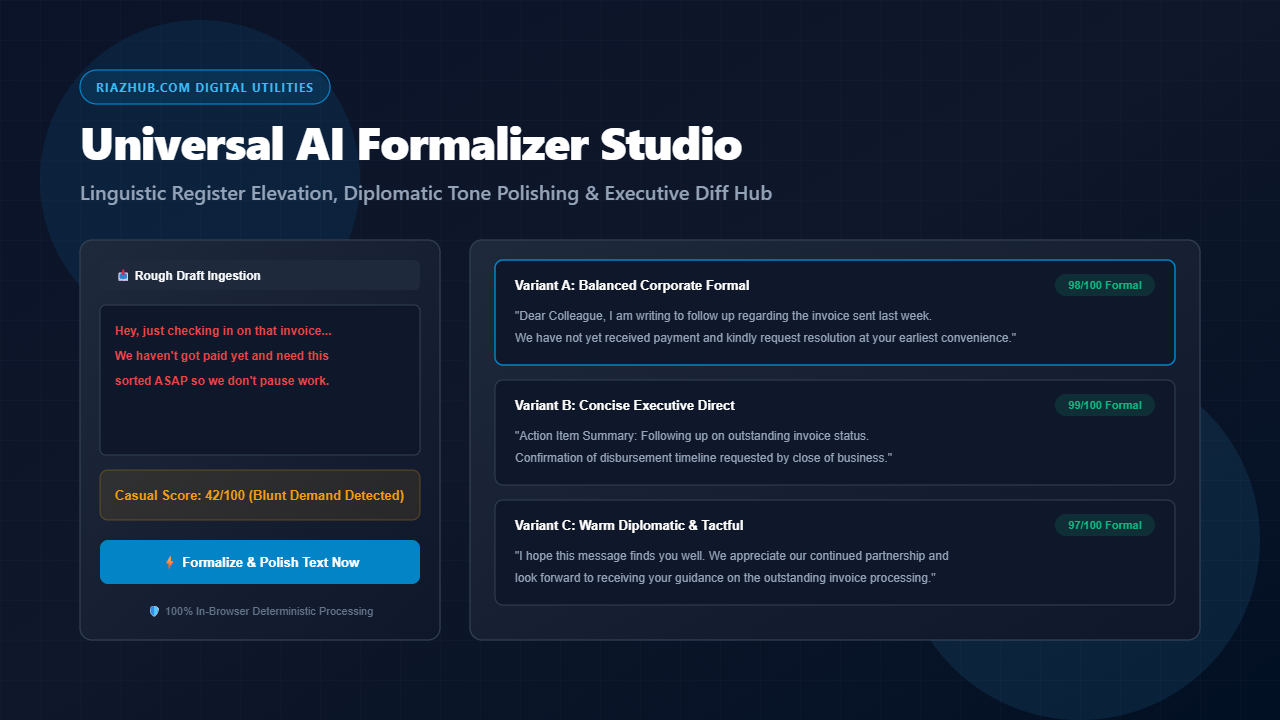
When you run these rough drafts through RiazHub AI Formalizer Studio, the software systematically replaces colloquial filler words, restructures blunt directives into collaborative requests, and delivers professional alternatives tailored to your target audience.
2. Understanding Linguistic Register: The Ladder of Formality
In sociolinguistics, a register refers to the variety of language used in a particular social or professional setting. Professional communication spans multiple registers:
| Formality Register | Typical Context | Defining Characteristics |
|---|---|---|
| Standard Corporate Formal | Internal emails, vendor check-ins | Balanced syntax, courteous salutations, expanded contractions |
| Executive Boardroom | C-suite briefings, leadership updates | Concise, action-oriented, high authority, zero conversational filler |
| Diplomatic & Tactful | Client disputes, complaint de-escalation | Empathetic framing, solution-oriented, mutual goodwill preservation |
| Academic & Scholarly | Theses, research memos, essays | Objective 3rd-person phrasing, empirical precision, formal syntax |
| Legal & Contractual | Formal notices, compliance letters | Unambiguous terminology, procedural boundaries, explicit rights reservation |
You can easily toggle between these registers inside the AI Formalizer Studio at RiazHub.com to evaluate how different phrasing resonates before hitting send.
3. The Three Pillars of Linguistic Formalization
Pillar A: Expanding Casual Contractions
In everyday spoken English, contractions like don’t, can’t, won’t, and haven’t are natural and efficient. In executive correspondence, academic publications, and official agreements, however, writing out full verbs (do not, cannot, will not, have not) creates a measured, deliberate cadence. It communicates patience, attention to detail, and professional distance.
Pillar B: Diplomatic De-Escalation (‘I/We’ Framing vs ‘You’ Accusations)
The most destructive pattern in workplace writing is the accusatory second-person demand. Phrases such as “You forgot to attach” or “You need to fix this” trigger immediate psychological resistance.
Diplomatic phrasing neutralizes conflict by describing the situation objectively: “We have not yet noted receipt of the attachment” or “Could you kindly provide clarification on this item?”
Pillar C: Upgrading Weak and Colloquial Vocabulary
Informal vocabulary often introduces vagueness. Replacing colloquialisms with concrete business terms strengthens the authority of your writing:
- ASAP upgraded to at your earliest convenience
- figure out upgraded to determine or ascertain
- stuff / things upgraded to deliverables / materials
- fix this upgraded to resolve this matter
- let me know what is going on upgraded to please provide a brief status update
4. Real-World Transformation Examples
| Original Rough Draft | Elevated Formal Version | Primary Shift |
|---|---|---|
| “Hey, just checking in on that invoice. We haven’t got paid yet and need this sorted ASAP.” | “Dear Colleague, I am writing to follow up regarding the outstanding invoice. We have not yet received payment and kindly request resolution at your earliest convenience.” | Eliminates impatience, expands contractions, establishes structured protocol. |
| “No way can we add those extra features right now. We don’t have time for this stuff.” | “Dear Valued Partner, we are unable to accommodate these additional specifications within the current timeline. We look forward to evaluating these requests in our subsequent phase.” | Maintains boundaries firmly while protecting commercial goodwill. |
To test these exact scenarios yourself, open the RiazHub AI Formalizer Studio and click any of the 1-click Quick Presets situated along the top of the workspace.
5. Why Client-Side Local Processing Matters for Sensitive Correspondence
Most online grammar check and rewriting tools send your text to third-party cloud servers and external language model APIs. When you are editing sensitive executive emails, confidential employee performance notes, legal disputes, or unreleased academic manuscripts, uploading that text creates compliance and data security risks.
The Universal AI Formalizer Studio on RiazHub.com was architected with a strict privacy-first model:
- 100% In-Browser Execution: All contraction expansions, diplomatic softens, diff calculations, and RTF/Markdown document generation happen locally inside your web browser.
- Zero Server Transmission: No draft text, email recipient, or client data is ever transmitted across the internet or stored on external servers.
- Offline Resilient: Because the linguistic dictionary is embedded directly in client-side code, the tool functions instantly with zero latency.
6. How to Use the Studio in Your Daily Workflow
- Navigate to the AI Formalizer Studio.
- Paste your rough email draft, quick chat message, or blunt response into the input textarea.
- Select your Target Formality Register (Corporate, Executive, Diplomatic, Academic, or Legal) and your desired Intensity Level.
- Click ⚡ Formalize & Polish Text Now to instantly generate three calibrated variations:
- Variant A: Balanced Corporate Formal with framing salutations.
- Variant B: Concise Executive Direct tailored for leadership action.
- Variant C: Warm Diplomatic & Tactful for relationship preservation.
- Review every detected upgrade in the Side-by-Side Diff Log or jump straight to the Live Official Preview to launch directly into your email client or download an official Word-compatible .rtf document.
Universal AI Formalizer & Executive Tone Polisher Studio
Instantly transform casual messages, rough notes, or blunt replies into polished, professional, and diplomatic writing. Compare three tailored formality styles, review every word upgrade side-by-side, and export clean documents 100% locally in your browser.
📥 Rough Draft & Context
0 characters🔍 Elevated Phrase Upgrade Log
| Detected Casual Expression | Elevated Formal Replacement | Category | Linguistic Function |
|---|---|---|---|
| No modifications detected yet. Formalize a text draft above. | |||