
How to Master Google Responsive Search Ads: Copywriting Frameworks, Live SERP Simulation and Quality Score Optimization
Responsive Search Ads (RSAs) are the absolute core of Google search advertising. Since Google permanently retired expanded text ads, the ability to architect, balance, and test up to 15 distinct headlines and 4 persuasive descriptions has become the single biggest differentiator between high-converting campaigns and wasted ad spend. With modern auction dynamics, manual guessing no longer suffices. You need a dedicated workflow that enforces character ceilings, mirrors search intent, simulates live desktop and mobile search engine results pages, and compiles directly into Google Ads Editor.
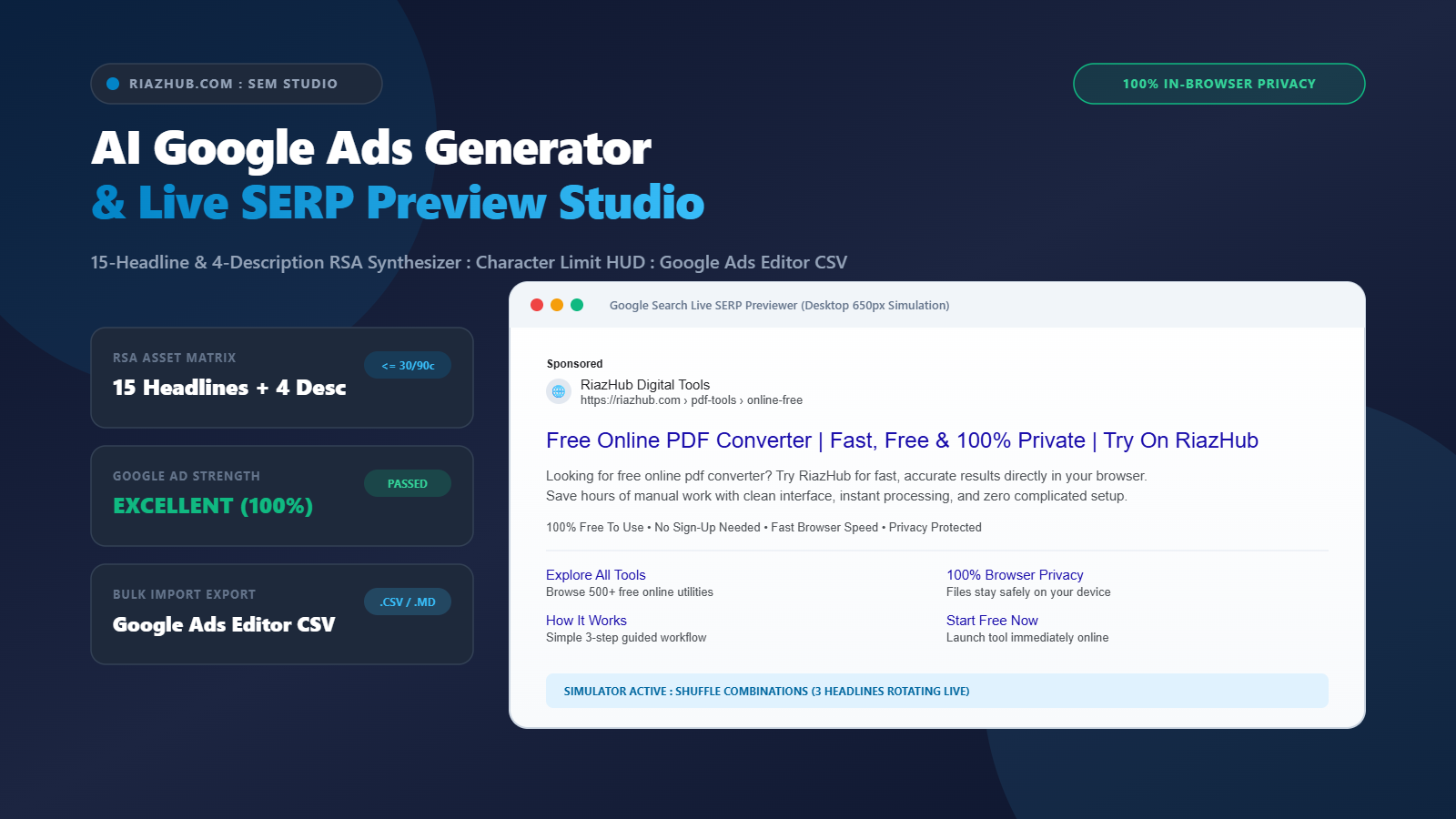
To streamline this entire process without risking campaign leaks or relying on clunky spreadsheets, explore the free browser-based AI Google Ads Generator & Live SERP Studio. It synthesizes all 15 headlines and 4 descriptions in seconds, validates character ceilings in real time, and exports bulk-import CSV files completely in your browser.
1. The Anatomy of Responsive Search Ads (RSAs) in Google Ads
Unlike legacy search ad formats where media buyers configured a static combination of headlines and descriptions, an RSA operates as an asset pool. Advertisers provide up to 15 headlines and up to 4 descriptions. During every single live auction, Google machine learning algorithms evaluate the user query, search history, location, device, and contextual signals to dynamically assemble up to 3 headlines and 2 descriptions.
To achieve Google coveted “Excellent” Ad Strength status, your 15 headlines must not merely be slight variations of the same phrase. Instead, Google ad rank algorithm demands a carefully orchestrated asset matrix:
- Keyword-Anchored Headlines (Positions 1 to 3): Reflecting the exact search query so searchers instantly recognize relevance.
- Value & Benefit Propositions (Positions 4 to 7): Highlighting core advantages, speed, cost savings, or unique technology.
- Social Proof & Trust Triggers (Positions 8 to 11): Incorporating ratings, reviews, certifications, or guarantees.
- Direct Action CTAs (Positions 12 to 15): Encouraging immediate clicks with clear next steps such as “Try Free Today” or “Get Instant Quote”.
2. Strict Character Limits: The Non-Negotiable Ceilings
One of the most frequent frustrations when authoring search ads is writing compelling copy only to discover in Google Ads Editor that a headline is 31 characters long. Google enforces strict, unforgiving character caps across all search ad components:
| Asset Component | Maximum Allowed Characters | Strategic Purpose |
|---|---|---|
| RSA Headlines | 30 Characters | Immediate relevance anchor, brand recognition, and primary hook. |
| RSA Descriptions | 90 Characters | Elaborates on product features, overcomes friction, and builds credibility. |
| Display URL Paths (1 & 2) | 15 Characters Each | Visual vanity path that reinforces topic relevance before the click. |
| Sitelink Extension Title | 25 Characters | Clickable auxiliary page link underneath the main ad unit. |
| Sitelink Description Lines | 35 Characters Each | Secondary context displayed beneath desktop sitelink links. |
| Callout Extensions | 25 Characters Each | Non-clickable bulleted value statements (e.g., Free Shipping, 24/7 Support). |
Using the AI Google Ads Generator & Live SERP Studio eliminates character counting errors. Its built-in telemetry HUD displays color-coded badges (Emerald for compliant copy, Rose for over-limit strings) and offers a 1-click “Auto-Trim” utility that cleanly truncates trailing words without awkward mid-word breaks.
3. The Quality Score Formula: Driving Down Cost-Per-Click (CPC)
Every Google Ads professional understands that ad position and real cost per click are governed by the Ad Rank formula:
Ad Rank = Maximum CPC Bid × Quality Score + Ad Extensions Impact
Quality Score (scored on a scale of 1 to 10) directly influences how much you pay for every customer click. A Quality Score of 8, 9, or 10 yields a 30% to 50% discount on your CPC, allowing you to outrank competitors who bid significantly more. Quality Score consists of three specific components:
- Expected Click-Through Rate (eCTR): The probability that a searcher will click your ad. Anchoring your primary keyword into Headline 1 and Display Path 1 immediately catches the searcher eye, dramatically increasing engagement.
- Ad Relevance: How closely your ad copy matches the user search intention. Supplying 15 diverse angles guarantees that Google machine learning can construct a contextually perfect match for niche query variations.
- Landing Page Experience: Ensuring your destination URL delivers exactly what your headlines promised.
4. The Power of Live SERP Simulation Before You Launch
Writing ad copy in a sterile spreadsheet is deceptive. You cannot easily evaluate visual balance, headline truncation, or the interaction between your description text and sitelink extensions. A headline combination that looks great in a table cell might look repetitive or awkwardly formatted when rendered side by side on a smartphone screen.
The AI Google Ads Generator & Live SERP Studio solves this by providing a faithful replica of live Google Search results:
- Desktop Simulation (650px): See the classic Google desktop search layout with favicon, brand title, breadcrumb paths, clickable blue headline link, description block, callouts, and multi-column sitelinks.
- Mobile SERP Simulation (375px): Preview compact mobile viewports where headlines wrap across lines and sitelinks condense into vertical stacks.
- Combination Shuffler: Click the “Rotate RSA Combination” button to cycle through 5 distinct simulated combinations of your 15 headlines and 4 descriptions, checking rhythm and clarity before spending a dollar.
5. Avoiding Fatal Google Ads Editorial Policy Traps
Google maintains strict automated editorial policies. Violating them results in disapproved ads, limited delivery, or account quality penalties. Three common traps trip up marketers every day:
- Exclamation Marks in Headlines: Google explicitly bans exclamation marks (!) in search ad headlines. While permitted in descriptions (limited to one per description block), an exclamation mark in any of your 15 headlines guarantees disapproval.
- Excessive or Gimmicky Capitalization: Writing words in ALL-CAPS (e.g., “BUY NOW TODAY”) violates Google capitalization policies unless it represents a legally registered trademark or recognized acronym.
- Vague or Missing URL Paths: Display Path 1 and Path 2 should not be left empty or filled with random tracking IDs. They should be clean, hyphenated topical keywords (e.g., “pdf-tools” / “online-free”) that confirm relevance to the user.
6. Seamless Bulk Uploading with Google Ads Editor
Setting up campaigns manually inside the web interface of Google Ads is painfully slow, especially when managing dozens of ad groups. Professional agency media buyers build their campaigns offline in Google Ads Editor.
When you generate your campaign with the AI Google Ads Generator & Live SERP Studio, clicking “Download Google Ads Editor CSV” generates an official bulk-import CSV file containing standard headers:
Campaign, Ad Group, Headline 1, …, Headline 15, Description 1, …, Description 4, Final URL, Path 1, Path 2
Simply open Google Ads Editor, choose Account > Import > Paste Text or From File, select your downloaded CSV, and your entire 15-headline, 4-description campaign is staged in seconds with zero manual re-typing.
7. Privacy-First Architecture: Why In-Browser Processing Matters
In competitive search engine marketing, your target keyword lists, unreleased product launches, private landing page URLs, and promotional hooks are highly confidential intellectual property. Cloud-based AI tools often transmit your proprietary marketing plans to third-party model servers where data could be retained or analyzed.
The AI Google Ads Generator & Live SERP Studio operates on a 100% client-side privacy paradigm. Every permutation algorithm, character limit checker, and CSV serialization runs locally inside your browser via vanilla JavaScript. Zero proprietary keywords or landing page URLs ever leave your machine.
Frequently Asked Questions (FAQ)
Universal AI Google Ads Generator, RSA Headline Matrix & Live SERP Preview Studio
Generate high-CTR Responsive Search Ads (15 Headlines <=30 chars, 4 Descriptions <=90 chars) plus Sitelinks and Callouts in seconds. Preview live Google Search results, verify strict character limits, and export Google Ads Editor CSVs 100% locally in your browser.
15 Responsive Search Ad (RSA) Headlines
Google Ads strictly enforces a maximum ceiling of 30 characters per headline.
4 RSA Descriptions
Google Ads strictly enforces a maximum ceiling of 90 characters per description.
4 Sitelink Extensions
Link text <=25 chars, Description lines 1 and 2 <=35 chars each.
4 Callout Extensions
Non-clickable highlight snippets <=25 chars each.
Google Ads Policy & Quality Score Pre-Flight Check
Automated scanner for editorial compliance, quality score factors, and syntax traps.
Google Ads Architecture, Ad Rank & Privacy Standards
Why 15 Diverse Headlines Maximize Google RSA Auction Performance ▼
In Google Ads Responsive Search Ads (RSAs), Google machine learning algorithms test combinations of up to 15 headlines and 4 descriptions across millions of search queries. Providing all 15 diverse headlines (covering exact search keyword anchors, clear benefit propositions, social proof trust triggers, and direct call-to-actions) gives the Google auction system maximum combinatorial flexibility. This ensures your ad matches search query intent more precisely, unlocking the coveted "Excellent" Ad Strength status and improving ad rank eligibility.
Boosting Expected CTR & Ad Relevance (Quality Score Formula) ▼
Google calculates Quality Score (1 to 10) based on three primary pillars: Expected Click-Through Rate (eCTR), Ad Relevance, and Landing Page Experience. By anchoring your target search keyword directly into Headline 1, Headline 2, and both Display URL Paths (Path 1 and Path 2), your ad appears bolded and visually congruent with the searcher intent. This immediate relevance dramatically lifts searcher engagement, raising eCTR and driving down your average Cost-Per-Click (CPC).
100% Client-Side Privacy Guarantee : Zero Cloud Transmission ▼
Every single calculation, character validation check, RSA copy permutation, and Google Ads Editor CSV compiler runs 100% client-side inside your browser via vanilla JavaScript. Your proprietary target keywords, private landing page URLs, unreleased product offers, and custom bidding strategies are never sent to external servers, cloud databases, or third-party APIs.