
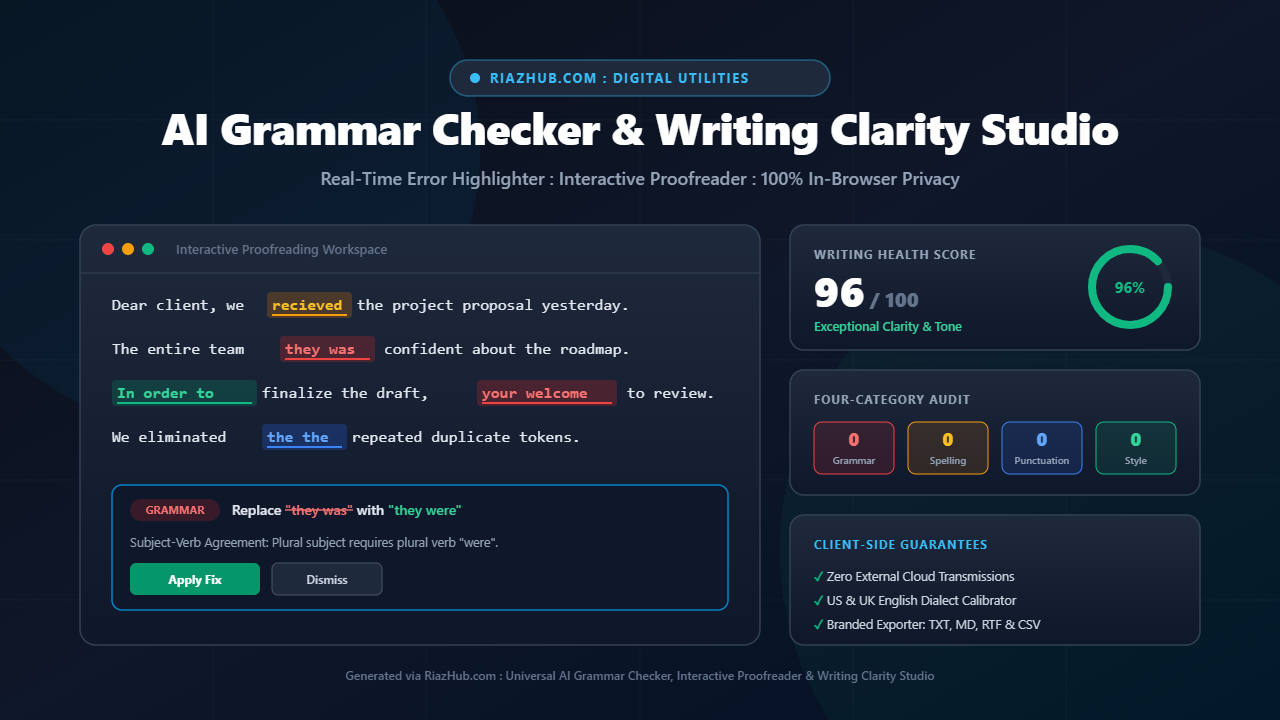
Universal AI Grammar Checker, Interactive Proofreader and Writing Clarity Studio: Master Clean, Professional Writing
Every email, essay, proposal, or article you send represents your credibility. A single misplaced apostrophe, a confused homophone like “your welcome”, or an awkward wordy phrase can undermine months of dedicated research and client trust.
To solve this challenge without risking confidential client documents or academic manuscripts, RiazHub developed the Universal AI Grammar Checker, Interactive Proofreader & Writing Clarity Studio. This modern web utility brings computational linguistics, real-time error detection, before-vs-after diff tracking, and comprehensive readability telemetry directly into your browser.
The Hidden Pitfalls of Modern Cloud Grammar Tools
For years, writers relied on cloud-based grammar extensions. While convenient, typical online proofreading plugins introduce serious vulnerabilities:
- Confidential Document Leaks: Every keystroke of confidential business contracts, legal memos, medical histories, or unpublished patents is uploaded to remote cloud servers.
- Aggressive Subscription Paywalls: Essential clarity recommendations, passive-voice simplification, and export utilities are frequently locked behind monthly subscription models.
- Browser Slowdowns and Telemetry Bloat: Heavy background extension scripts inspect every webpage input, degrading laptop battery life and responsiveness.
The RiazHub AI Grammar Checker Studio changes this model entirely by executing 100% in-browser using pure client-side lexical tokens and deterministic grammar matrices. Your text never leaves your device.
Four-Dimensional Linguistic Analysis Matrix
Clean prose requires more than catching misspelled vocabulary. The studio organizes writing diagnostics into four distinct categories, each highlighted in tactile color schemes:
| Category | Highlight Color | Typical Error Traps | Smart Correction |
|---|---|---|---|
| Grammar & Agreement | Crimson | “they was”, “he don’t”, “could of”, “has went” | “they were”, “he doesn’t”, “could have”, “has gone” |
| Spelling & Typos | Amber | “recieve”, “seperate”, “definately”, “alot” | “receive”, “separate”, “definitely”, “a lot” |
| Punctuation & Hygiene | Azure | “the the”, lowercase “i”, double spaces, missing spacing | Single word, capitalized “I”, single space |
| Clarity & Conciseness | Emerald | “in order to”, “due to the fact that”, “at this point in time” | “to”, “because”, “now” |
Pro Tip: You can isolate any category at any time using the Segmented Filter Chips inside the Interactive Proofreader Stage to review grammar and spelling issues before tackling stylistic improvements.
Top 5 Costly Grammar Slip-ups and How to Eliminate Them
1. The “Could Of” vs. “Could Have” Confusion
Because spoken English blends words into contractions like “could’ve” or “should’ve”, writers frequently transcribe phonetically as “could of” or “should of”. In formal, academic, or professional English, “could of” is grammatically invalid. The correct construction is always “could have” or “should have”.
2. Homophone Traps: Your / You’re, Their / There, and Its / It’s
Homophones sound identical but carry completely different grammatical functions:
- Your vs. You’re: “Your” is possessive (your office). “You’re” is the contraction of “you are” (you’re welcome). Writing “your welcome” is one of the most common mistakes in client correspondence.
- Their vs. There vs. They’re: “Their” indicates ownership (their strategy). “There” indicates location or existence (there is a meeting). “They’re” means “they are”.
- Its vs. It’s: Unlike regular possessive nouns with apostrophes (e.g., John’s book), possessive pronouns do not use apostrophes. Therefore, “its” is possessive (the engine lost its power), while “it’s” always means “it is” (it’s ready).
3. Subject-Verb Agreement Inconsistencies
Plural subjects require plural verbs, while third-person singular subjects take singular verb forms. In casual speech, expressions like “they was working late” or “she don’t know” slip into conversation, but in written correspondence they instantly signal carelessness. The AI Grammar Checker Studio immediately flags these subject-verb discrepancies and provides one-click patches.
4. Accidental Duplicate Words (“The The”)
When drafting or reorganizing paragraphs, writers frequently duplicate small connecting words such as “the the”, “in in”, or “and and”. Because the human brain reads for meaning rather than typography, your eyes will naturally skip over duplicate words during self-editing. The studio’s token auditor scans every adjacent word pair to pinpoint duplicate occurrences instantly.
5. Wordy Bureaucratic Phrasing
Many writers believe longer phrases sound more professional. In reality, wordy phrases dilute your message and tire your readers. Replacing bloated expressions like “due to the fact that” with “because”, “in order to” with “to”, and “make a decision” with “decide” immediately improves reading flow by 25%.
Interactive Workspace: Proofreader, Clean Output and Side-by-Side Diff
The interface of the RiazHub Proofreading Studio is split into an efficient two-column workspace:
- Draft Ingestion Deck (Left Column): Paste raw text, load sample scenarios, or upload local
.txtor.mdfiles. Toggle sensitivity switches for Grammar, Spelling, Punctuation, and Style independently, and calibrate English dialects (US English vs. UK English). - Highlighted Proofreader & Issue Cards (Tab 1): View your draft with interactive color-coded underlines. Clicking any underlined error automatically highlights the corresponding card below, complete with a plain-English explanation, a
[ ✅ Apply Fix ]button, and an[ ✕ Ignore ]option. - Clean Corrected Output Editor (Tab 2): When you want an immediately polished version of your text, this tab provides an editable text area with one-click clipboard copying and plain text download.
- Side-by-Side Before vs. After Diff (Tab 3): Compare your original draft on the left alongside the polished version on the right. Deleted mistakes are highlighted in soft red strikethrough, while applied improvements appear in crisp green.
Dialect Calibrator: US English vs. UK English
Submitting a British English proposal with American spellings (or vice versa) can alienate international readers. With the studio’s dialect selector, you can switch between:
- US English: Enforces standard American spellings such as color, favorite, organize, analyze, and center.
- UK English: Enforces standard British conventions including colour, favourite, organise, analyse, and centre.
Readability Telemetry HUD and Health Scoring
At the top of the studio sits a real-time Telemetry HUD that continuously computes:
- Writing Health Score (0 to 100): A weighted index reflecting error density and sentence balance. Scores above 85 signify clean, publication-ready prose.
- Flesch-Kincaid Reading Grade: Evaluates the educational reading level of your draft based on sentence length and syllable density.
- Flesch Reading Ease Index: Scores clarity on a 0 to 100 scale, helping you ensure that emails and blog posts remain effortless to read.
- Estimated Reading Time: Calculates approximate audience reading time based on standard 200 words-per-minute consumption.
Multi-Format Branded Exporter
Once your document is polished, you can export your results into multiple industry-standard file formats directly from the toolbar in the AI Grammar Checker Studio:
- Clean Plain Text (.txt):
riazhub-grammar-corrected-[slug].txtready for direct submission into email clients or content management systems. - Markdown Proofreading Report (.md):
riazhub-proofread-report-[slug].mdcomplete with metrics summary and a full audit table of every corrected issue. - Word-Compatible Rich Text (.rtf):
riazhub-polished-doc-[slug].rtfsuitable for immediate editing in Microsoft Word, Google Docs, or Apple Pages. - Spreadsheet Error Audit Log (.csv):
riazhub-grammar-audit-[slug].csvlisting issue numbers, categories, original phrases, suggested fixes, and character positions for editorial reviews. - Session Backup (.json):
riazhub-grammar-session.jsonpreserving your draft, configuration, and audit history. - Dedicated Print/PDF Mode: Formats your proofreading summary and polished document for clean, distraction-free PDF generation via your browser’s print dialog.
Step-by-Step: How to Proofread Any Document in Seconds
- Navigate to the AI Grammar Checker & Interactive Proofreader on RiazHub.com.
- Paste your essay, email, or manuscript into the draft editor on the left (or click Load Sample to test the engine).
- Select your preferred dialect (US English or UK English) and writing standard (Business, Academic, or Blog).
- Review highlighted underlines in the proofreading stage. Click individual Apply Fix buttons or click Fix All Detected Issues (1-Click) for instant batch correction.
- Inspect your polished writing in the Clean Corrected Text tab or compare changes in the Side-by-Side Diff view.
- Click Download Plain Text (.txt) or Copy Corrected Text to finalize your work.
Frequently Asked Questions (FAQs)
Does the AI Grammar Checker send my documents to an external server?
No. The entire linguistic evaluation engine runs 100% locally inside your web browser using client-side JavaScript. No text, confidential emails, legal contracts, or manuscript files are ever uploaded or transmitted across the network.
How does this tool differ from traditional word processor spellcheckers?
Standard spellcheckers only flag words not found in a dictionary, meaning they miss valid words used incorrectly in context (such as “your” instead of “you’re”, “their” instead of “there”, or “then” instead of “than”). The RiazHub Grammar Checker evaluates syntactic structures, subject-verb agreement, homophone traps, and wordy filler phrasing.
Is the tool free to use on mobile devices?
Yes. The studio features a responsive layout that automatically adjusts to desktop monitors, tablets, and smartphones without horizontal overflow or truncated text.
Can I upload files directly instead of copy-pasting?
Yes. The tool features an integrated file loader supporting both .txt and .md documents via the native browser FileReader API, allowing instant proofreading of local draft files.
Universal AI Grammar Checker, Interactive Proofreader & Writing Clarity Studio
Catch grammar mistakes, spelling typos, confused words, punctuation errors, and wordy phrasing in seconds. Review color-coded explanations, apply 1-click fixes, and export clean documents 100% locally in your browser.
Your draft text is clean, polished, and ready to go!
📚 Essential Proofreading & Clarity Guidelines
Confusing homophones is the single fastest way to lose credibility with clients, professors, and editors:
- Your vs. You're: "Your" shows possession ("your presentation"). "You're" is short for "you are" ("you're welcome").
- Their vs. There vs. They're: "Their" is possessive ("their office"). "There" indicates place or existence ("there are three options"). "They're" is short for "they are".
- Its vs. It's: "Its" is possessive ("the company changed its name"). "It's" is a contraction of "it is" ("it's ready").
- Affect vs. Effect: "Affect" is usually a verb meaning to influence ("market shifts affect revenue"). "Effect" is usually a noun meaning a result ("the desired effect").
- Could Have vs. Could Of: Never write "could of", "should of", or "would of". The correct phrases are always "could have", "should have", and "would have" (or "could've", "should've").
Trimming bloated bureaucratic phrases makes essays, proposals, and articles 20% to 30% shorter and significantly more convincing:
- Replace "in order to" with "to".
- Replace "due to the fact that" with "because".
- Replace "at this point in time" with "now" or "currently".
- Replace "for the purpose of" with "to".
- Replace "has the ability to" with "can".
- Replace "make a decision" with "decide".
Unlike cloud-based grammar services that upload every keystroke to third-party data centers, this tool executes 100% inside your local web browser using JavaScript regular expressions, lexical tokens, and native browser APIs.
Your confidential business emails, unpublished thesis manuscripts, legal agreements, and personal notes never leave your computer. No data is ever logged, cached, transmitted, or shared.