
Mastering PDF Typography: How to Extract Embedded Fonts & Inspect Document Typefaces Online
Have you ever opened a beautifully designed PDF file be it a brand guideline, corporate annual report, or graphic eBook—and wondered exactly which font family was used for the headers or body copy? Even better, have you wished you could extract that embedded font file (.ttf or .otf) directly to test or audit it locally?
In the past, extracting binary font streams out of a PDF required expensive desktop publishing software, terminal CLI utilities like pdfdetox or fontforge, or uploading confidential PDF documents to untrusted third-party cloud servers.
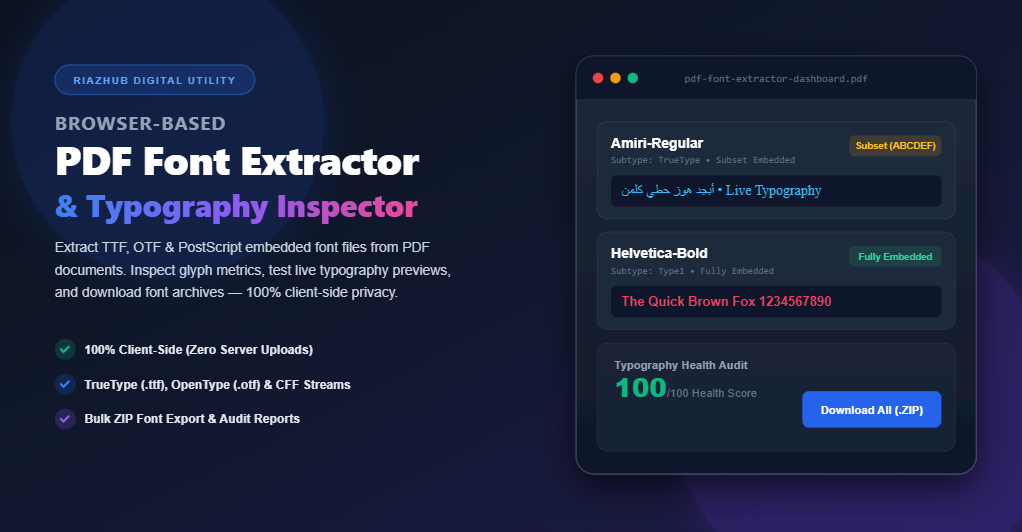
Fortunately, with modern WebAssembly and browser-based JavaScript parsing, you can now analyze PDF dictionaries and download extractable embedded fonts right inside your web browser. You can test this immediately using the official Browser-Based PDF Font Extractor & Typography Inspector on RiazHub.com.
Understanding How Fonts Are Embedded Inside PDF Documents
When a graphic designer or document author exports a document to PDF, the publishing software (such as Adobe InDesign, Figma, Microsoft Word, or LaTeX) packages font data into the PDF dictionary objects. However, fonts are not always embedded in the exact same manner.
Understanding the three primary types of PDF font embedding is key to diagnosing typography rendering across different devices:
1. Fully Embedded Fonts (Extractable Binary Streams)
What it means: The authoring software embeds the entire original TrueType (.ttf) or OpenType/CFF (.otf) binary file into the PDF’s /FontFile2 or /FontFile3 dictionary streams.
Extraction Status: 100% extractable. The full font file, including all Unicode glyphs, character tables, kerning pairs, and metrics, can be cleanly extracted and installed.
2. Subset Embedded Fonts (Subset Glyphs)
What it means: To optimize file size, the authoring application creates a tailored “subset” containing only the exact characters used in the document text. PDF spec identifies subset fonts with a unique 6-capital-letter prefix followed by a plus sign (e.g., ABCDEF+Helvetica-Bold or XYZWUV+Amiri-Regular).
Extraction Status: Extractable as a functional subset font. The extracted file contains the subset glyphs present in the document.
3. System Referenced / Non-Embedded Fonts (Standard Base-14)
What it means: The PDF references standard system fonts by PostScript name (e.g., Helvetica, Times-Roman, Courier, Symbol, ZapfDingbats) without embedding binary glyph streams inside the PDF file.
Extraction Status: Non-extractable (binary stream does not exist inside the PDF file). The PDF relies on the visitor’s OS or PDF reader system fallbacks.
How Browser-Based PDF Font Extraction Works Under the Hood
How can a web browser extract binary font streams without uploading your document to a remote server? The secret lies in low-level client-side PDF dictionary traversal using the RiazHub PDF Font Extractor & Typography Inspector.
Here is a step-by-step technical breakdown of the browser execution pipeline:
- ArrayBuffer Reading: When you drag and drop a PDF file, the HTML5
FileReaderAPI reads the file into an in-memoryArrayBufferinside your browser sandbox. - PDF Resource & Operator List Traversal: PDF.js parses page
/Resourcesdictionaries, inspecting/Fontobject descriptors,/Subtype,/Encoding, and/BaseFontproperties. - Low-Level Byte Stream Extraction: For embedded fonts, the engine accesses raw
Uint8Arraybyte buffers stored under/FontFile(Type 1),/FontFile2(TrueType.ttf), or/FontFile3(Compact Font Format CFF.otf). - Dynamic DOM @font-face Registration: Extracted binary font buffers are converted into
BlobObject URLs (e.g.,blob:https://riazhub.com/...) and dynamically registered into the browser using the WebFontFaceAPI:
const fontBlob = new Blob([fontUint8Array], { type: ‘font/ttf’ });
const fontUrl = URL.createObjectURL(fontBlob);
const dynamicFontFace = new FontFace(‘ExtractedFontFamily’, `url(${fontUrl})`);await dynamicFontFace.load();
document.fonts.add(dynamicFontFace);
Once registered in document.fonts, the extracted font immediately renders live editable typography text boxes in real-time!
Step-by-Step Guide: How to Extract & Audit PDF Fonts on RiazHub.com
Extracting fonts and inspecting typography metrics on RiazHub is straightforward and requires zero software installation. Follow these simple steps:
- Navigating to the Online PDF Font Extractor & Typography Inspector utility page.
- Drag and drop your PDF document into the designated upload area or click Select PDF Document to select a file from your device.
- Review the Document Diagnostic Header Card, which instantly displays the total pages, file size, and total unique font families detected.
- Filter fonts by format pills (TrueType .ttf, OpenType / CFF .otf, Type 1 / PostScript, Type 0 / Composite) or search by PostScript family name.
- Use the Live Interactive Typography Preview Box to type custom text in English, Arabic, Urdu, or other languages, and adjust the font size slider (12px to 48px) to inspect glyph rendering.
- Click Download (.ttf / .otf) on individual cards or click Download All Extracted Fonts (ZIP) on the bulk toolbar to save all extractable font files.
Ethical Font Usage & Intellectual Property Considerations
“Font software is protected by intellectual property laws. Always ensure you comply with desktop usage and commercial licensing agreements before installing or distributing extracted font binaries.”
While extracting embedded font streams is invaluable for diagnostic audits, web design verification, pre-flight printing checks, and accessibility compliance, it is essential to keep copyright considerations in mind:
- Diagnostic & Inspection Rights: Extracting fonts to inspect metric properties, kerning, font families, or verify brand guideline compliance inside a document is universally recognized as standard pre-flight editing.
- Commercial Usage & Licensing: If an extracted font is a commercial proprietary typeface (e.g., Helvetica, Futura, Proxima Nova), you must purchase a desktop or web font license from the font foundry before using it in new commercial projects.
- Open Source Typefaces: Fonts licensed under SIL Open Font License (OFL) or Apache 2.0 (e.g., Google Fonts like Roboto, Inter, Amiri, Noto Sans) can be freely extracted, modified, and redistributed according to their open license terms.
Frequently Asked Questions (FAQs)
dir="auto"), allowing you to type custom Arabic, Urdu, Persian, or Hebrew sample sentences to inspect glyph shapes and ligatures.Conclusion
Whether you are a digital designer verifying brand typefaces, a web developer debugging font rendering, or a print engineer performing pre-flight document checks, having a reliable browser-based font extraction utility saves time and protects document privacy.
Bookmark and launch the Browser-Based PDF Font Extractor & Typography Inspector on RiazHub.com to inspect your PDF documents today!