
Mastering PDF Proofreading: How the Browser PDF Grammar, Spell Checker & Style Auditor Works
Proofreading digital PDF manuscripts, academic dissertations, executive business reports, and dual-language tax invoices can be a daunting challenge. Standard web-based spell checkers often require you to upload your confidential files to remote third-party cloud servers—exposing sensitive personal data, financial records, and copyrighted content to unwanted privacy risks.
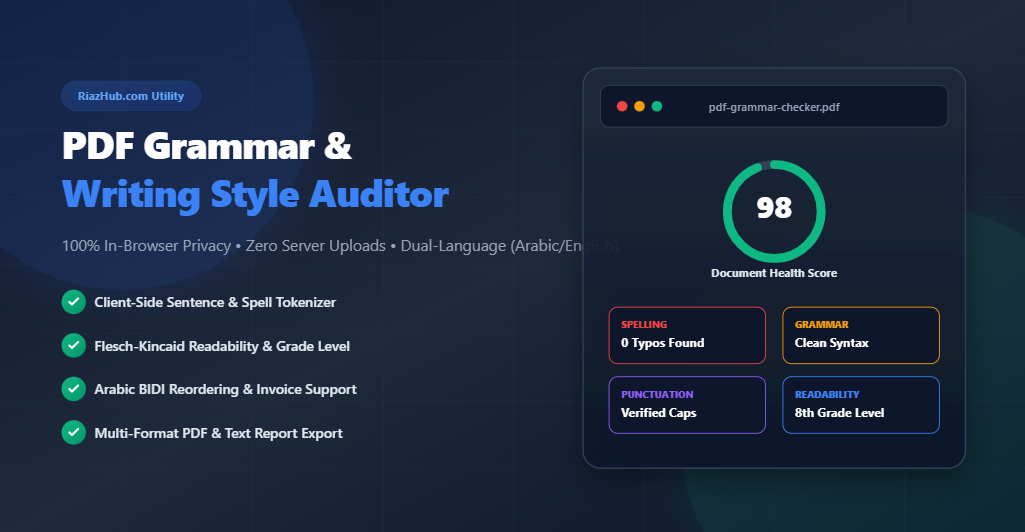
To eliminate these privacy concerns while delivering professional linguistic analysis, RiazHub launched the Browser PDF Grammar, Spell Checker & Writing Style Auditor. This client-side utility parses documents, tokenizes sentences, identifies spelling typos, evaluates grammatical syntax, detects passive voice, and calculates Flesch-Kincaid readability scores 100% inside your browser.
Try the Online PDF Auditor Tool Now
Audit your PDF files instantly with zero server uploads, 100% browser privacy, and dual-language Arabic/English support.
Why Client-Side In-Browser PDF Parsing Matters for Privacy
Most traditional online document converters and proofreading tools upload your PDF file to a cloud server, extract text on remote backend scripts, and stream the results back to your browser. While functional, this cloud architecture poses significant security risks for confidential manuscripts, corporate contracts, and customer tax invoices.
The RiazHub PDF Grammar Checker Tool takes a revolutionary privacy-first approach. By leveraging client-side Web APIs, HTML5 FileReader, and Mozilla’s PDF.js library, all document parsing occurs locally in your device’s memory. Your uploaded files never leave your computer or mobile device.
🔒 Privacy Guarantee: Zero bytes of your document text, manuscripts, or invoices are uploaded to external servers. You can even disconnect your internet connection after loading the page and continue auditing PDFs offline!
Key Capabilities of the PDF Grammar & Style Auditor
1. Multi-Category Linguistic Analysis
Our rule-based Natural Language Processing (NLP) engine categorizes writing errors into four clear, color-coded categories:
- Red Badges (Spelling & Typos): Identifies misspelled words, accidental double-typed words (e.g., “the the”), and common typographical flaws.
- Yellow/Orange Badges (Grammar & Syntax): Flags subject-verb disagreements (e.g., “they is”, “he have”), article mismatches (e.g., “a apple”), and preposition errors.
- Purple Badges (Punctuation & Capitalization): Spots multiple spaces, missing spaces after punctuation marks, and unclosed quotes or parentheses.
- Blue Badges (Style & Clarity): Highlights wordy phrases (e.g., “in order to” → “to”), redundant modifiers (e.g., “very unique” → “unique”), and passive voice structures.
2. Live PDF Interactive Text Viewer & Wavy Underlines
The tool provides an interactive two-column workspace. On the right side, the live page text viewer renders extracted PDF page text with wavy colored underlines corresponding to flagged issues. Clicking any wavy underline in the viewer automatically scrolls to and highlights the matching suggestion card on the left column.
You can test this interactive viewer directly by opening the PDF Grammar Checker Utility on RiazHub.
3. Flesch-Kincaid Readability & Document Health Score
Understanding reader comprehension is essential for academic papers, legal documents, and digital publishing. The tool calculates key readability metrics in real time:
- Flesch Reading Ease (0-100 scale): Measures how easy a document is to read. Scores between 60.0 and 70.0 represent standard plain English suitable for general web audiences.
- Flesch-Kincaid Grade Level: Converts text length and syllable counts into U.S. educational grade levels (e.g., 8th Grade Level).
- Document Health Score Gauge: An overall circular radial score (0 to 100) that dynamically updates as you accept or ignore writing recommendations.
Dual-Language (Arabic & English) BIDI PDF Invoice Support
One of the biggest technical hurdles when proofreading digital PDFs is handling dual-language documents—such as tax invoices, commercial receipts, and bilingual legal agreements containing mixed Right-to-Left (RTL Arabic) and Left-to-Right (LTR English) text.
Standard PDF text extraction frequently reverses Arabic letter order or outputs isolated glyph characters (e.g. “ة م ا د ل ا”). The RiazHub Multilingual PDF Auditor includes custom BIDI re-ordering and line Y-coordinate grouping to ensure Arabic and English text streams render cleanly side-by-side with full readability.
Universal Multilingual Support Across 14+ Major Languages
In addition to English and Arabic, the tool features script-aware Unicode tokenization (`\p{L}`) that supports document auditing across major world languages:
- Spanish (Español): Flags missing accents, double words, and contraction errors (e.g., “de el” → “del”).
- French (Français): Detects elision and contraction errors (e.g., “de le” → “du”, “je ai” → “j’ai”).
- German (Deutsch): Checks spelling updates, double words, and capitalization formatting.
- Russian, Turkish, Italian, Portuguese, Hindi, Urdu, Chinese, and Japanese.
Multi-Format Exporting Options
Once you complete your document audit on RiazHub’s PDF Auditor Tool, you can choose from three export options:
- Download Full Audit Report (Printable PDF): Compiles a branded audit summary PDF via jsPDF detailing your overall health score, readability grade, and a list of open recommendations.
- Export Corrected Clean Text (.txt): Downloads a clean text file containing your document text with all accepted replacements applied.
- Copy Error Summary to Clipboard: Instantly copies a plain-text error breakdown for email or chat collaboration.
Step-by-Step Proofreading Workflow
- Visit the PDF Grammar Checker Page on RiazHub.com.
- Drag & drop your `.pdf` file into the upload zone or click “Select PDF Document”.
- Review the Document Diagnostic Card for word counts, page counts, and text layer status.
- Configure rule toggles and target language in the scope selector panel.
- Review flagged issues in the left column or click wavy underlines in the right page viewer.
- Click “Replace with: …” or “✔ Accept” to apply suggestions and boost your Document Health Score.
- Click “Download Full Audit Report” or “Export Corrected Text” to save your work.
Frequently Asked Questions (FAQ)
A: No. All parsing, text extraction, and rule evaluations happen 100% locally inside your web browser. Zero bytes are uploaded to remote cloud servers.
A: Digital PDF auditors require selectable text layers. If your PDF is a scanned paper image, run an OCR (Optical Character Recognition) tool first to generate editable text before auditing grammar.
A: Yes! The tool includes custom Arabic BIDI re-ordering to fix reversed letters and render dual-language invoices clearly.
Ready to Proofread Your PDF Document?
Start auditing your manuscripts, essays, and invoices with 100% client-side privacy on RiazHub.com.
Browser PDF Grammar, Spell Checker & Style Auditor
Comprehensive client-side document auditor for spelling, syntax, punctuation, style, and readability metrics across all major world languages.
🔒 100% Private Client-Side Processing • Zero Server Uploads • Universal Multilingual Support