
Have you ever received a PDF document, ebook, or presentation slide deck that contained stunning photos, high-resolution vector illustrations, or detailed diagrams that you desperately needed for a design project or report? If so, you have likely tried taking a screenshot or copying and pasting the images, only to discover that the resulting files were blurry, low-resolution, or cropped incorrectly.
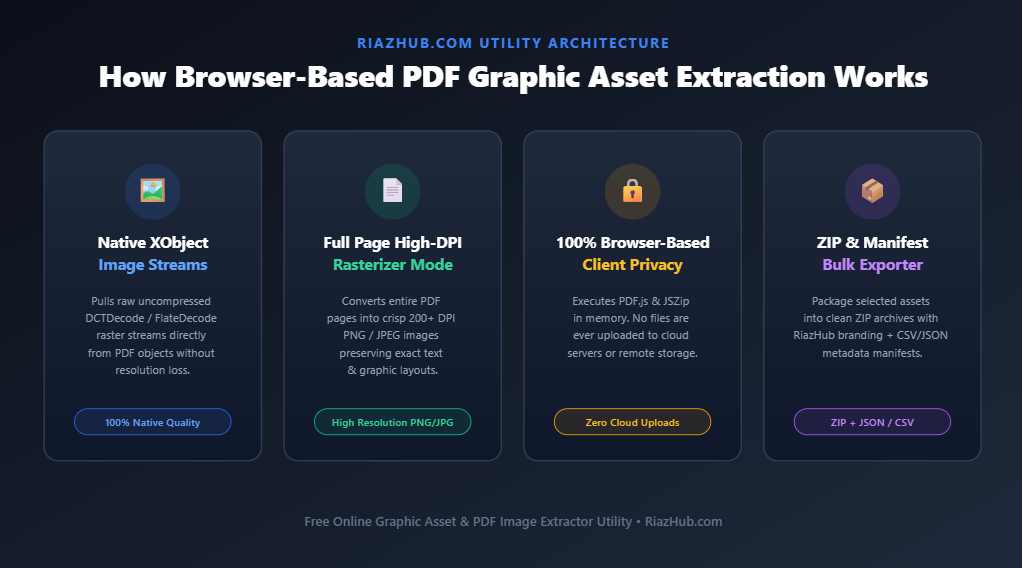
Fortunately, PDF files do not compress images into flattened bitmaps by default. Instead, PDFs store graphic assets as standalone, uncompressed XObject binary streams inside the document structure. By using the RiazHub PDF Image Extractor & Graphic Asset Exporter tool, you can pull every single original photo and diagram out of any PDF document in full native quality within seconds.
Try the Free Online PDF Image Extractor Utility
Extract native embedded photos, diagrams, and full page renders directly in your browser with zero server uploads.
Why Traditional Methods Fail for PDF Image Extraction
When attempting to save images from a PDF file, most users rely on three common methods—each with significant drawbacks:
- Taking Desktop Screenshots: Capturing a screenshot is restricted by your physical screen resolution. A 4K image embedded inside a PDF will be downsampled to your monitor’s display pixel grid (e.g., 1080p), resulting in loss of fidelity and crispness.
- Copy-Pasting into Image Editors: Copying an image from a standard PDF reader often rasterizes vector assets and applies default OS color-profile conversions, destroying transparent PNG backgrounds.
- Uploading to Unknown Cloud Converters: Many traditional online PDF converters force you to upload your sensitive PDF files, financial reports, or personal photos to distant third-party servers, posing serious privacy and data leak security risks.
This is exactly why we built the PDF Image Extractor on RiazHub.com. It operates 100% inside your web browser using HTML5 Web APIs and JavaScript, ensuring your files never leave your computer.
Two Modes of PDF Graphic Asset Extraction
The RiazHub PDF Image Extractor offers two distinct extraction modes to suit any design workflow:
1. Embedded Images Mode (XObject Stream Extraction)
Scans the internal PDF document structure and extracts original raw photos, illustrations, and logos at their native resolution without background text, margins, or headers.
2. Full Page Render Mode (High-DPI Page Images)
Renders complete PDF pages into crisp, standalone 200+ DPI high-resolution PNG or JPEG images, capturing all typography, graphic layouts, and background designs.
Key Features of the RiazHub PDF Image Extractor
- Minimum Dimension Filtering: Automatically filter out small bullet points, icons, logos, or line spacers by setting pixel thresholds (e.g.,
> 50x50 pxor> 300x300 px). - Custom Page Range Selection: Extract assets from all pages, the first page only, or specific page numbers (e.g.,
1-5, 8, 12). - Format & Quality Control: Choose between original native format, PNG (lossless), or JPEG with customizable compression quality sliders (70% to 100%).
- One-Click ZIP Archive Download: Package all selected extracted assets into a single clean ZIP file named with your custom document title and site branding.
- Asset Manifest Exporter (JSON & CSV): Download detailed asset manifests detailing image dimensions, source page numbers, file formats, and byte sizes.
- One-Click Clipboard Copy: Copy any extracted image directly to your system clipboard for instant pasting into Photoshop, Figma, Canva, or Slack.
- 100% Client-Side Privacy Guarantee: Powered by PDF.js and JSZip. Your documents are parsed in system memory—zero server storage or cloud processing.
Step-by-Step Guide: How to Extract Images from a PDF
Extracting high-resolution graphics from your PDF documents is quick and straightforward:
- Navigate to the Online PDF Image Extractor & Graphic Asset Exporter on RiazHub.com.
- Drag and drop your PDF document into the designated upload area or click “Browse PDF File”.
- Review the document diagnostic card to verify your file name, size, and page count.
- Select your preferred Extraction Target Mode (Embedded Images Only or Full Page Render).
- Adjust the Minimum Image Dimension Filter to filter out tiny icons or bullet points.
- Specify your desired page range and target image format (Auto, PNG, or JPEG).
- Click “Extract Graphic Assets Now” to run the in-browser extraction engine.
- Browse the interactive gallery grid, click any thumbnail to preview in high-res lightbox, copy individual images, or click “Download Selected Images as ZIP Archive”.
Ready to Extract Assets from Your PDF Files?
Access our free, browser-based tool now—no installation, account signup, or server upload required.
Frequently Asked Questions (FAQ)
1. Will extracting embedded images decrease their resolution?
No. Embedded image extraction retrieves the exact binary pixel streams (XObjects) stored inside the PDF document by its creator. You receive the exact original image resolution.
2. Are my uploaded PDF documents safe and confidential?
Absolutely. The RiazHub PDF Image Extractor operates entirely on the client side inside your web browser. No PDF files, personal photos, or extracted assets are ever transmitted to an external server.
3. Can I extract images from password-protected PDF files?
Yes. If your PDF is encrypted or password-protected, the tool will prompt you for the password and decrypt the document locally inside your browser memory before extracting the graphic assets.
4. What output file formats are supported?
You can export extracted images in their original native stream format, uncompressed PNG, or compressed JPEG with custom quality control settings.
Conclusion
Extracting high-resolution graphic assets from PDF files no longer requires expensive desktop software or risky third-party cloud uploads. With the RiazHub PDF Image Extractor & Graphic Asset Exporter, graphic designers, digital marketers, researchers, and content creators can quickly isolate, preview, and download embedded PDF photos and diagrams in full native quality.
PDF Image Extractor & Asset Exporter
Extract high-resolution embedded photos, vector illustrations, graphics, and page renders from any PDF document in high fidelity directly inside your browser.
💡 PDF Graphic Extraction Guide & Frequently Asked Questions
Mode 2 (Full Page Render) renders entire pages of the PDF (text, layout, fonts, and graphics combined) into standalone crisp 200+ DPI high-resolution page image files.