
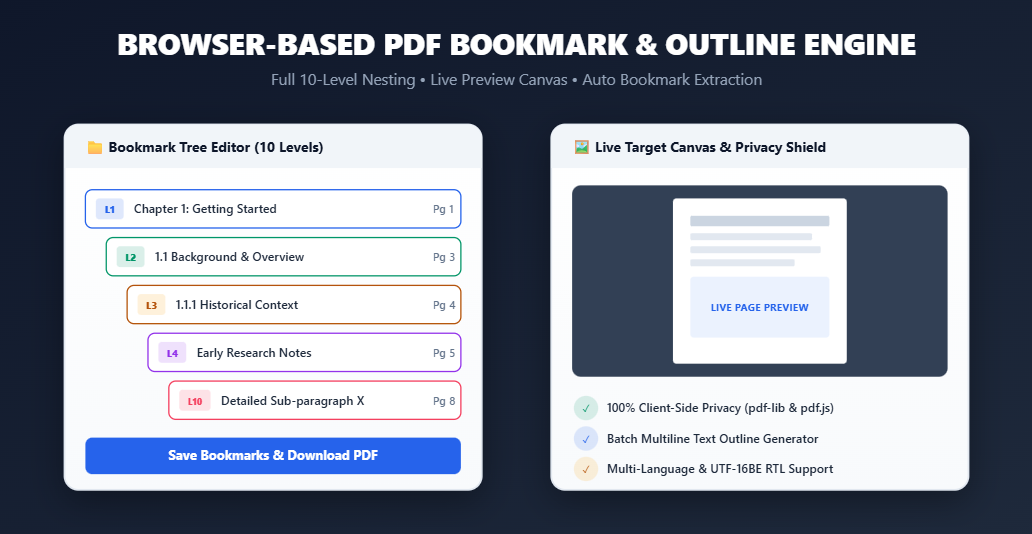
Large PDF documents such as digital eBooks, academic research papers, technical manuals, legal briefs, and multi-chapter reports can be exhausting to read without a structured, clickable Table of Contents (Outline). PDF bookmarks allow readers to instantly jump to specific chapters, sections, or sub-topics with a single click inside Adobe Acrobat, Foxit Reader, Apple Books, Chrome, or Edge.
If your PDF document is missing a table of contents, or if you need to edit existing chapter links, you can use our free, privacy-first Add PDF Bookmarks & Outline Editor Tool on RiazHub.com. This online utility lets you auto-extract pre-existing bookmarks, add new chapters, nest sub-sections up to 10 levels deep, and download enhanced PDFs entirely inside your web browser.
Why Are PDF Bookmarks (Outlines) Essential?
Technically referred to as PDF Outlines in the Adobe PDF 1.7 specification, bookmarks provide a persistent side-panel hierarchy. Adding structured bookmarks offers several crucial advantages:
🚀 Seamless Reader Navigation
Allow users across desktop and mobile PDF viewers to jump directly to target pages without tedious manual scrolling.
📚 Structured 10-Level Hierarchy
Organize complex documents with up to 10 nested levels (from main chapter titles down to detailed sub-paragraphs).
⚡ Auto-Extract Pre-Existing Outlines
Uploading a PDF automatically populates any embedded bookmarks directly into the editor for instant modification.
🔒 Absolute In-Browser Privacy
Powered by pdf-lib and pdf.js, all parsing and dictionary compilation run locally on your device. Zero server uploads.
Support for Deep Nesting (Levels 1 to 10)
Unlike basic tools that restrict outlines to flat lists or 2–3 levels, the RiazHub PDF Bookmark Editor supports deep nesting up to Level 10. Each level features distinct color-coded badges for visual clarity:
L1 Main Chapter
L2 Sub-chapter
L3 Section
L4 Subsection
L5 Paragraph
L6 Sub-paragraph
L7 Detail 7
L8 Detail 8
L9 Detail 9
L10 Detail 10
Step-by-Step Guide: How to Add & Edit PDF Bookmarks
Adding or editing bookmarks with RiazHub requires no installation, plugins, or registration. Follow these simple steps using the RiazHub PDF Bookmark Utility:
- Select or Drag & Drop Your PDF File:
Open the RiazHub Add PDF Bookmarks Tool and drop your document into the upload area. The tool instantly scans page count, file size, and pre-existing outlines.
- Auto-Load & Edit Existing Bookmarks:
If your PDF already contains bookmarks, they will automatically populate the interactive tree editor. You can edit bookmark titles, update target page numbers, reorder items with
↑/↓arrows, add child sub-bookmarks (+), or delete rows instantly. - Use the Batch Text Generator for Bulk Chapters:
If you have a multi-page document outline in text format, click
Batch Text Importand paste lines formatted asTitle / Page. Indent sub-levels with spaces or tabs up to 10 levels deep:Chapter 1: Getting Started / 1 1.1 System Architecture & Requirements / 3 1.1.1 Hardware Specifications / 4 1.1.1.1 Memory Allocation Detail / 5 Chapter 2: Installation Guide / 10 - Verify Destination Pages via Live Preview Canvas:
Clicking any bookmark in your outline tree renders a real-time canvas preview of its target page in the right column, complete with page stepper controls to verify target destinations.
- Save Bookmarks & Download Enhanced PDF:
Click Save Bookmarks & Download PDF. The tool compiles compliant PDF outline dictionary objects and triggers an immediate download named
[Document_Name]_with_bookmarks_RiazHub.pdf.
Frequently Asked Questions (FAQ)
Does this tool upload my PDF file to any external server?
No. 100% Privacy Guaranteed. All PDF reading, rendering, and outline catalog dictionary compilation take place locally inside your web browser using HTML5 Web APIs and JavaScript binaries. Your confidential files never leave your computer.
Does adding bookmarks modify or compress the text or images in my PDF?
No. The utility strictly inserts or updates the PDF catalog outline dictionary object (`/Outlines` and `/OutlineItem`). Your original text formatting, vector graphics, images, and page layouts remain 100% untouched.
Can I export my bookmark tree structure as a backup?
Yes! You can click Export JSON inside the Add PDF Bookmarks Tool to download your outline tree as a [Document_Name]_bookmarks_RiazHub.json file, and reload it anytime using Import JSON.
Add PDF Bookmarks & Outline Editor
Create, nest, edit, and embed a fast Table of Contents outline directly into any PDF file. 100% private in-browser processing.
Drag & Drop your PDF file here
or Browse Files from your device
Supports PDF documents up to 500MB • Zero server uploadsFrequently Asked Questions & Guide
How do PDF Bookmarks (Outlines) work in e-readers & browsers?
PDF bookmarks (technically called PDF Outlines) act as a clickable side-panel table of contents. When readers open your PDF in Adobe Acrobat, Foxit Reader, Apple Books, Chrome, or Edge, they can instantly jump to specific chapters or subsections without manual scrolling.
What is the difference between flat and hierarchical bookmarks?
A flat outline lists every item at the top level. A hierarchical outline nests sub-chapters (Level 2) and detailed sections up to Level 10 under main headings. You can collapse or expand sub-levels in e-readers to keep long documents organized.
Is my PDF uploaded to any server?
No. 100% Privacy Guaranteed. All PDF reading, rendering, and outline compilation take place locally inside your browser using HTML5 Web APIs and WebAssembly binaries. Your files never leave your computer or touch RiazHub servers.
Does this tool support Arabic, Urdu, or Right-to-Left (RTL) titles?
Yes! Our engine encodes bookmark titles using 16-bit UTF-16BE PDF Hex strings, ensuring full support for Arabic, Urdu, Hebrew, Persian, CJK, and mathematical symbols without character corruption.