
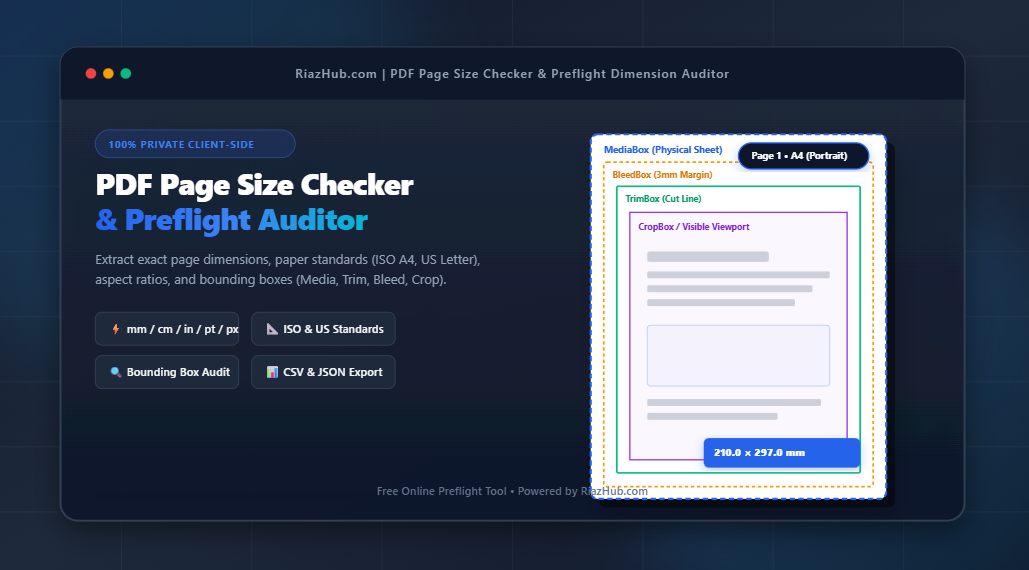
Whether you need to quickly check if a 50-page document is consistently sized in ISO A4, convert vector points into millimeters, or inspect complex print bounding boxes (like MediaBox, TrimBox, and BleedBox), using a dedicated web tool like the PDF Page Size Checker & Preflight Auditor on RiazHub.com ensures complete accuracy in seconds.
Audit Your PDF Page Dimensions Instantly
Check exact page dimensions, paper standards, orientation splits, and vector bounding boxes inside your browser with 100% privacy.
Why PDF Page Dimension Auditing is Essential
PDF (Portable Document Format) files store geometry using vector points ($72 \text{ points} = 1 \text{ inch}$). Unlike physical paper sheets, a single PDF document can legally contain pages of completely arbitrary widths and heights. This flexibility creates several technical challenges:
- Mixed Page Sizes in Single Files: Multi-page PDFs compiled from different sources often mix ISO A4 ($210 \times 297\text{ mm}$) with US Letter ($8.5 \times 11\text{ in}$) pages without the author realizing it.
- Commercial Offset Print Failures: Print shops require strict sheet standardization. If a booklet submitted for printing contains pages with varying widths or missing bleed allocations, automated preflight RIP (Raster Image Processor) software will flag or reject the job.
- Architectural & Engineering Blueprint Verification: Large-format schematics (ARCH A through E, ANSI A through E) must adhere to strict scaling ratios. Auditing page sizes prevents blueprint plots from printing out-of-scale.
- Digital Document Uniformity: Professional ebooks, pitch decks, and legal contracts demand consistent visual proportions across every slide or page.
Understanding Standard Paper Sizes: ISO 216 vs. US Imperial vs. ARCH
Commercial paper dimensions fall under distinct regional standards. When auditing documents via the RiazHub.com PDF Page Size Checker, uploaded files are automatically classified against these global benchmarks:
| Paper Standard | Category | Dimensions (mm) | Dimensions (Inches) | PDF Points (72 pt/in) |
|---|---|---|---|---|
| ISO A4 | International Metric | 210.0 × 297.0 mm | 8.27 × 11.69 in | 595.3 × 841.9 pt |
| ISO A3 | International Metric | 297.0 × 420.0 mm | 11.69 × 16.54 in | 841.9 × 1190.6 pt |
| US Letter | North American | 215.9 × 279.4 mm | 8.50 × 11.00 in | 612.0 × 792.0 pt |
| US Legal | North American | 215.9 × 355.6 mm | 8.50 × 14.00 in | 612.0 × 1008.0 pt |
| Tabloid / Ledger | North American | 279.4 × 431.8 mm | 11.00 × 17.00 in | 792.0 × 1224.0 pt |
| ARCH D | Architectural | 609.6 × 914.4 mm | 24.00 × 36.00 in | 1728.0 × 2592.0 pt |
Decoding PDF Bounding Boxes: MediaBox, CropBox, BleedBox & TrimBox
A major feature of the RiazHub PDF Dimension Preflight Auditor is its ability to extract native PDF dictionary bounding boxes. In professional publishing, a PDF page is governed by up to five nested rectangular boundaries:
- MediaBox: The total physical sheet boundary on which the page is rendered or printed.
- CropBox: Defines the visible region displayed when the document is opened in standard PDF viewers like Adobe Acrobat. If not explicitly specified, it defaults to the MediaBox.
- BleedBox: Defines the region including extra print bleed margins (typically $3\text{ mm}$ or $0.125\text{ in}$) required for edge-to-edge printing before guillotine cutting.
- TrimBox: The single most critical box in prepress. It defines the exact intended dimensions of the finished printed page after trimming.
- ArtBox: Encloses the meaningful content or artwork on the page.
Preflight Tip: If your TrimBox matches your CropBox but lacks a BleedBox allocation, edge-to-edge printed artwork risks leaving white slivers along cut boundaries after physical bindery trimming!
How PDF Point Conversions Work
PDF engines measure all page geometry using vector points ($1\text{ pt} = \frac{1}{72}\text{ inch}$). To convert native vector points into common measurement units, use the following formulas:
- Millimeters (mm): $\text{mm} = \text{pt} \times \frac{25.4}{72} \approx \text{pt} \times 0.352778$
- Centimeters (cm): $\text{cm} = \text{mm} / 10 = \text{pt} \times 0.035278$
- Inches (in): $\text{in} = \text{pt} / 72$
- High-Res Print Pixels (300 DPI): $\text{px}_{300} = \text{pt} \times \frac{300}{72}$
Rather than performing these math calculations manually, you can select any active unit (mm, cm, in, pt, px @ 72/150/300 DPI) inside the online PDF Page Size Auditor, and all metrics instantly recalculate across every page in real time.
Step-by-Step: How to Audit Your PDF File on RiazHub.com
Auditing your PDF page sizes and preflight health on RiazHub takes only three simple steps:
Step 1: Load Your PDF File
Navigate to the PDF Page Size Checker & Preflight Auditor tool page. Drag and drop your file into the upload zone or click to select a document from your device.
Step 2: Inspect Overview Metrics & Page Matrix
Once loaded, the diagnostic dashboard instantly analyzes your document:
- Diagnostic Summary Card: Displays total file size, page count, and uniformity score (e.g., “Uniform Document: 100% A4” vs “Mixed Page Sizes Detected”).
- Overview Metric Grid: View dominant paper size, orientation breakdown (Portrait vs Landscape), aspect ratio range, and print readiness badge.
- Interactive Page Cards: Scroll through canvas thumbnail previews of every page, tagged with exact width × height dimensions and auto-classified paper badges.
Step 3: Export Your Preflight Audit Report
Click Export Audit Report (CSV) or Export JSON Report to download a comprehensive spreadsheet detailing page numbers, dimensions, orientation splits, and raw vector coordinates for your records or prepress handoff.
Try the PDF Page Size Checker Now
Fast, free, and 100% private. Audit page sizes, dimensions, and bounding boxes right now.
100% Privacy Guarantee: Zero Server Uploads
Security and confidentiality are paramount when handling proprietary reports, blueprints, or legal contracts. Unlike conventional online PDF tools that upload your sensitive documents to remote third-party cloud servers, the utility on RiazHub.com processes 100% of your PDF parsing locally inside your browser using client-side JavaScript WebAssembly and HTML5 File APIs. Your documents never leave your personal computer or mobile device.
Frequently Asked Questions (FAQ)
Can a single PDF file contain different page sizes?
Yes. PDF specifications allow each page to define its own unique width, height, and bounding boxes. This is common when combining portrait text documents with landscape spreadsheet inserts or architectural foldouts.
What is the standard tolerance when checking ISO A4 or US Letter paper sizes?
Standard software tolerances are typically within $\pm 1.5\text{ mm}$ ($\pm 4\text{ pt}$). This accounts for minor floating-point rounding variations during PDF rendering or export from design applications like Adobe InDesign, Illustrator, or Canva.
How do I fix mixed page sizes in my PDF?
Once you identify non-conforming pages using the PDF Page Size Checker, you can re-export or resize those specific pages in your document editor or print to PDF using a fixed paper target like A4 or Letter.
Conclusion
Verifying PDF page sizes, orientation consistency, and bounding box compliance is an essential quality control step for designers, print operators, architects, and office professionals. By auditing your documents with the free PDF Page Size Checker & Preflight Auditor on RiazHub.com, you ensure seamless document presentation and zero print preflight errors every time.
Browser-Based PDF Page Size Checker
Inspect exact page dimensions, paper standards (ISO A4, US Letter, ARCH), orientation splits, and PDF bounding boxes (Media, Crop, Bleed, Trim) instantly.
Standard Paper Sizes & PDF Preflight Guide
Global commercial printing relies on two primary standards: ISO 216 (International Metric) and North American Imperial sheet dimensions:
| Paper Standard | Width × Height (mm) | Width × Height (Inches) | PDF Vector Points (72 pt/in) |
|---|---|---|---|
| ISO A4 | 210 × 297 mm | 8.27 × 11.69 in | 595.28 × 841.89 pt |
| ISO A3 | 297 × 420 mm | 11.69 × 16.54 in | 841.89 × 1190.55 pt |
| US Letter | 215.9 × 279.4 mm | 8.50 × 11.00 in | 612.00 × 792.00 pt |
| US Legal | 215.9 × 355.6 mm | 8.50 × 14.00 in | 612.00 × 1008.00 pt |
| Tabloid / Ledger | 279.4 × 431.8 mm | 11.00 × 17.00 in | 792.00 × 1224.00 pt |
Every PDF document contains up to five technical coordinate viewports known as Bounding Boxes:
- MediaBox: The physical sheet size boundaries on which the page is rendered.
- CropBox: The region displayed when opened in PDF viewers (Adobe Reader).
- BleedBox: The region including extra print bleed margins (usually 3mm / 0.125 in).
- TrimBox: The intended final physical cut line after commercial printing and finishing.
- ArtBox: The boundary enclosing the meaningful content/artwork on the page.
PDF documents store geometry in native vector PostScript points, where $1 \text{ inch} = 72 \text{ pt}$. To calculate exact metric dimensions:
1 pt = (25.4 / 72) mm ≈ 0.352777778 mm
mm = pt × 0.352778 | Inches = pt / 72 | Pixels (300 DPI) = pt × (300 / 72)
Your privacy is paramount. This auditing tool executes entirely inside your web browser using HTML5 File API and JavaScript WebAssembly vector engines. Zero PDF files, blueprints, or documents are ever uploaded, saved, or processed on external web servers.