
How to Extract PDF Links Online: The Ultimate Guide to Hyperlink Audit & Export
PDF documents are the global standard for whitepapers, e-books, research studies, legal contracts, and financial reports. However, harvesting links, references, and citations trapped inside a multi-page PDF has historically been a tedious, manual task.
Whether you are performing an SEO backlink audit, verifying broken hyperlinks in a digital whitepaper, or harvesting citations for research, having an instant way to audit PDF links is essential. That’s why we built the free online Extract PDF Links utility on RiazHub.
- 1. Why Extracting PDF Hyperlinks Matters
- 2. Embedded Annotation Links vs. Raw Text URLs
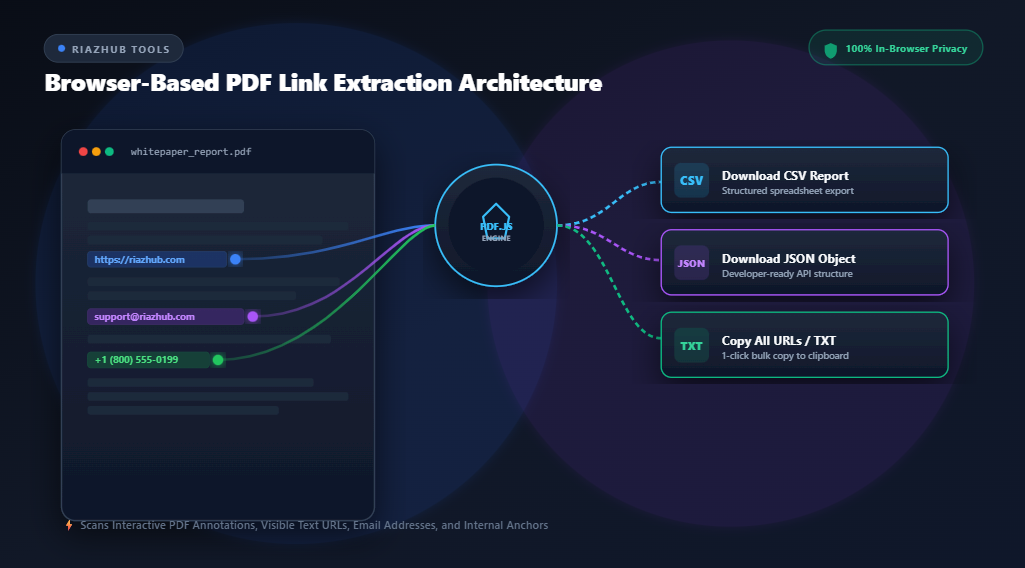
- 3. The Privacy Advantage: In-Browser vs. Server Uploads
- 4. How to Extract Links from Any PDF (Step-by-Step)
- 5. Exporting Links to CSV, JSON, & TXT Formats
- 6. Top Use Cases for Marketers & Researchers
- 7. Frequently Asked Questions (FAQ)
1. Why Extracting PDF Hyperlinks Matters
Digital marketers, SEO specialists, legal teams, and academic researchers frequently handle 50+ page PDF documents containing dozens or hundreds of URLs. Manually opening every page, hovering over links, and copying URLs into a spreadsheet is inefficient and prone to error.
Using an automated link scanner like RiazHub’s Extract PDF Links lets you parse thousands of hyperlinks in seconds. You receive a structured overview categorizing every link by page location, link type, anchor display text, and target destination.
2. Embedded Annotation Links vs. Raw Text URLs
PDF documents store hyperlinks in two fundamentally different technical structures. Understanding this distinction is key to complete data extraction:
| Link Feature | Embedded Annotation Links | Raw Text URLs & Emails |
|---|---|---|
| Storage Location | PDF Metadata Annotation Dictionary layer | Visible document text stream |
| Interactivity | Clickable hotspot rects embedded over text | Plain text strings (e.g., https://...) |
| Display Text | Custom anchor text (e.g. “Click Here”) | The visible URL string itself |
| Extraction Method | Bounding box coordinate mapping | Optimized regular expression regex matching |
3. The Privacy Advantage: In-Browser vs. Server Uploads
Most online PDF conversion utilities require you to upload your files to remote servers. This introduces major security risks when working with confidential whitepapers, internal financial statements, NDA contracts, or unreleased research papers.
4. How to Extract Links from Any PDF (Step-by-Step)
Extracting links using our web app takes only three simple steps:
- Open the Utility: Navigate to the Extract PDF Links Web Tool.
- Upload Your PDF: Drag and drop your document into the upload zone or click “Browse files”. Files up to 250MB are supported.
- Analyze & Filter: Watch the real-time scanning progress bar. Once completed, explore live statistics, filter by protocol (Web URLs, Email addresses, Phone numbers, or Internal Anchors), search by keyword, or exclude unwanted domains.
5. Exporting Links to CSV, JSON, & TXT Formats
Once your links are extracted, you can instantly export them into your workflow of choice using the toolbar at RiazHub Extract PDF Links:
- Download as CSV: Perfect for importing into Microsoft Excel, Google Sheets, or Screaming Frog for link audits. Includes page numbers, link types, display anchor text, target URLs, and link sources.
- Download as JSON: Clean, structured JSON objects ideal for developers building web scrapers, automation scripts, or database imports.
- Download as TXT / Markdown: Clean formatted list for quick documentation, bibliographies, or markdown reports.
- Copy All URLs: Single-click bulk clipboard copy to paste directly into your browser tabs or notes.
6. Top Use Cases for Marketers & Researchers
Our visitors utilize Extract PDF Links for a variety of digital workflows:
- SEO Whitepaper & E-book Audits: Verify all outbound links in promotional PDFs to ensure no 404 broken links or insecure HTTP URLs remain.
- Competitor Backlink Analysis: Extract all outbound citations and resource links from competitor whitepapers to identify backlink opportunities.
- Academic Bibliography Harvesting: Harvest all DOI, JSTOR, and web citations from research papers in seconds.
- QA & Internal Document Bookmarks: Test table of contents internal page jumps and anchor links before publishing official company reports.
7. Frequently Asked Questions (FAQ)
Is the Extract PDF Links tool completely free to use?
Yes! Extract PDF Links is 100% free with no hidden fees, page limits, or account registration requirements.
Are my uploaded PDF files safe?
Absolutely. Because processing is handled strictly client-side via JavaScript, your files are never transmitted to any external server or stored anywhere online.
Can I extract plain text URLs that aren’t clickable?
Yes. The tool features a regex text scanner that detects visible text links like www.domain.com or email@domain.com even if they were not formatted as clickable interactive annotations in the PDF editor.
Can I exclude specific internal or vendor domains from the results?
Yes! Enter any comma-separated domains into the “Exclude Common Domains” filter box inside the Extract PDF Links utility to automatically hide unwanted URLs.