
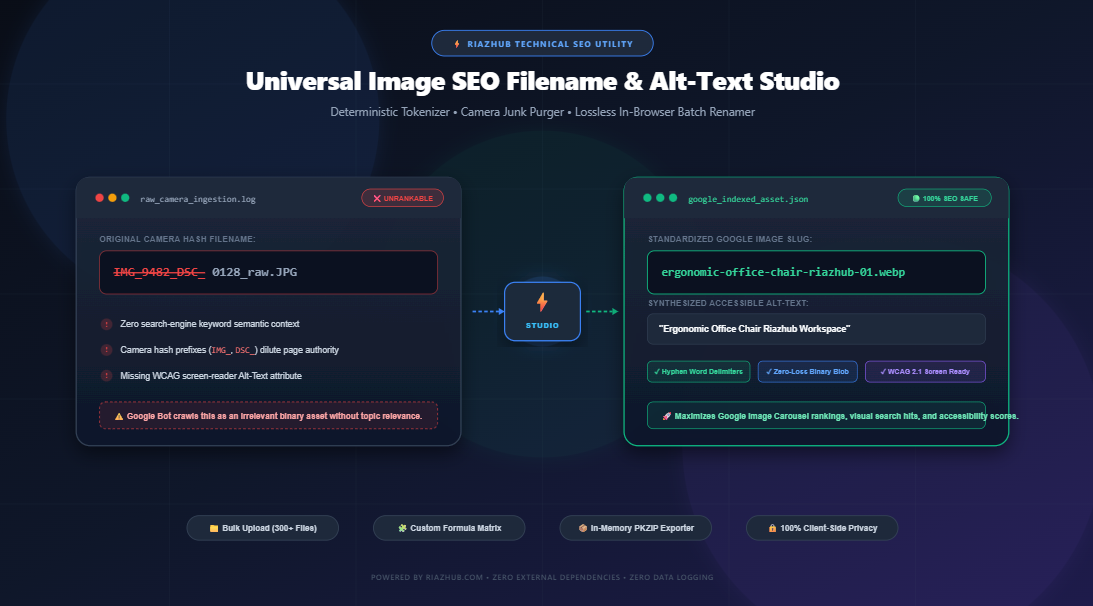
How to Optimize Image Filenames and Alt-Text for Google Search: The Complete Technical SEO Guide
Why raw camera hashes like IMG_9482.jpg torpedo your organic click-through rates, and how deterministic tokenization, clean hyphenation, and accessible Alt-Text unlock top rankings on Google Image Search.
Looking to batch-rename hundreds of photos without reading the full technical guide? Launch RiazHub’s free, in-browser Image SEO Filename & Alt-Text Generator to losslessly rename, sanitize, and bundle up to 300+ images directly inside your browser.
1. The Forgotten Ranking Factor: Why Filenames Dictate Visual SEO Performance
When search engine optimization specialists audit an e-commerce catalog, blog, or agency portal, they meticulously inspect title tags, meta descriptions, schema markup, and internal linking structures. Yet, one of the most authoritative on-page visual signals is routinely left to chance: image filenames.
Every day, millions of digital assets are uploaded directly from digital cameras, smartphones, and design software with default identifiers such as IMG_8492.JPG, DSC_00192.png, Screenshot_2026-03-12_at_14.22.19.webp, or WhatsApp Image 2026-06-11 at 10.15.02.jpeg.
To a human visitor looking at a webpage, the filename is invisible behind the rendered graphic. But to Googlebot-Image, the filename represents the very first contextual anchor in its computer vision and indexing pipeline. Uploading generic camera noise is equivalent to publishing a blog post with an empty title tag.
2. The Mechanics of Google Image Crawling: What Search Algorithms Actually Read
According to Google Search Central’s official Image Best Practices documentation, Google algorithms draw topical understanding from several direct signals:
- The File Path and Filename: The actual URL path (e.g.,
/images/ergonomic-mesh-office-chair.webpversus/images/dcim_1048.jpg). - The HTML
altAttribute: Screen reader text that serves as alternative content if the visual asset fails to render. - Surrounding Page Copy & Headings: The contextual paragraphs and
<figcaption>tags adjacent to the image. - Computer Vision & OCR: Google Cloud Vision AI analyzing shapes, color distribution, and embedded raster text.
While modern AI models can recognize a chair or a car in a photo, they cannot reliably deduce brand specificity, model numbers, color variations, geographical targeting, or product SKU distinctions without explicit filename metadata.
Google treats hyphens (-) as natural word delimiters. For example, modern-leather-sofa.jpg is parsed as three distinct dictionary words: modern, leather, and sofa.
In contrast, Google historically treats underscores (_) as string connectors. A filename written as modern_leather_sofa.jpg may be evaluated by older algorithmic components as a single compound token: modernleathersofa. To maximize search coverage, hyphenation is strictly recommended by Google engineers.
3. Raw Camera Noise vs. Search-Optimized Filenames: The Comparison
Here is a breakdown of how search engines evaluate raw camera filenames compared to structured SEO filenames:
| Attribute | Raw Camera Export (Poor) | Optimized SEO Asset (Best Practice) |
|---|---|---|
| Example Filename | IMG_9482_DSC_0128.JPG |
ergonomic-office-chair-mesh-lumbar-01.webp |
| Keyword Intent | 0% — Random camera hash | 100% — Exact product topic + attributes |
| Word Delimiter | Underscores & irregular numbers | Clean Google-standard hyphens (-) |
| Capitalization | Mixed case / uppercase (.JPG) |
Clean lowercase standard (.webp) |
| Alt-Text Ready | Requires manual drafting per photo | Synthesizes automatically into accessible copy |
| Google Carousel Eligibility | Extremely Low / Unlikely | High — Matches user transactional queries |
Manually re-typing dozens or hundreds of image names in your file explorer is slow and error-prone. By using the Image SEO Filename & Alt-Text Studio on RiazHub, you can apply custom formula matrixes to entire batches in seconds.
4. The Formula Matrix: Constructing High-Impact Filename Patterns
A deterministic formula template ensures that every single image across your site adheres to a structured nomenclature. Depending on your industry, use the following battle-tested templates:
A. E-Commerce Product Formula
Pattern: {brand}-{category}-{product-name}-{color}-{counter}
Result:  riazhub-furniture-ergonomic-office-chair-black-01.webp
Why it works: Captures high-intent transactional queries (e.g., customers searching for “black ergonomic office chair” in Google Images).
B. Local SEO & Service Business Formula
Pattern: {service}-{neighborhood}-{city}-{brand}-{counter}
Result:  emergency-ac-repair-al-hamra-jeddah-riazhub-01.jpg
Why it works: Directly injects geo-modifiers (City, Postal Code, District) that local pack algorithms prioritize when ranking service businesses on Google Maps and localized image results.
C. Blog & Editorial Content Formula
Pattern: {main-topic}-{article-slug}-{counter}
Result:  technical-seo-core-web-vitals-audit-guide-01.png
Why it works: Bridges the topical relationship between the blog post’s primary keyword and its supporting visual charts or infographics.
D. Creative & Photography Portfolios
Pattern: {photographer}-{subject}-{location}-{date}-{counter}
Result:  riaz-studio-architectural-skyline-dubai-2026-001.webp
You can build and test these formula matrixes interactively using the token chips inside the RiazHub SEO Filename Generator.
5. The Dual Role of Accessible Alt-Text: WCAG 2.1 Compliance Meets Search Relevance
While filenames provide direct crawling cues, the HTML alt attribute fulfills a vital dual purpose:
- Accessibility for Assistive Technology (WCAG 2.1 AA): Screen readers for visually impaired users read the Alt-Text aloud. If the Alt-Text is missing, assistive tech often reads the raw filename or skips the element entirely.
- Fallback Context for Crawlers: If a content delivery network (CDN) fails to render the image, or if a user has images disabled on low-bandwidth connections, the Alt-Text describes the missing visual element.
While filenames benefit from sequential padding (e.g., -01, -02) to prevent filesystem collisions, screen readers find numbers like “zero one” or “zero zero two” robotic and repetitive.
The RiazHub Alt-Text Synthesizer automatically strips trailing numerical counters and converts hyphenated slugs into natural Title Case or Sentence Case phrases ensuring your site remains 100% compliant with accessibility guidelines while preserving pure SEO value.
6. Step-by-Step Workflow: How to Batch Rename Photos Losslessly
Traditional image renamers often require downloading desktop software, installing command-line utilities, or uploading proprietary photos to third-party cloud servers. RiazHub’s browser-based utility bypasses all of these bottlenecks:
- Batch File Ingestion: Drag and drop your image files directly into the workspace, click
Select Files, or useSelect Folderto import nested folder structures up to 300+ assets at once. - Define Your Formula Pattern: Click the dynamic token chips (
+ {keyword},+ {brand},+ {category},+ {location},+ {counter}) to assemble your desired naming hierarchy. - Calibrate Formatting: Choose between Google-compliant Hyphens (
-) or Underscores (_), specify zero-padding (01vs001), and enforce lowercase file extensions. - Audit in Real-Time: Review the side-by-side comparison matrix. Original camera hashes (e.g.,
IMG_,DSC_) are highlighted in strikethrough red, while your clean Google-ready filename appears in bold green. - One-Click Export: Download all renamed files packed into a single standard
.ziparchive, copy tab-separated Alt-Texts for WordPress, or download an import-ready CSV manifest.
7. The In-Browser Privacy Advantage: Zero Data Transmission
When dealing with client product photos, unreleased hardware prototypes, personal photography, or proprietary branding mockups, uploading assets to third-party web servers introduces major privacy and compliance risks.
The RiazHub Studio processes everything using pure client-side JavaScript (ES6+ FileReader, HTML5 Blob, and native in-memory PKZIP generation). Your files never leave your device.
- Zero Server Uploads: Photos are manipulated purely in local browser memory.
- Zero Quality Degradation: The tool rewraps the original binary bitstream under the new filename without re-encoding, preserving 100% of original image quality and EXIF metadata.
- Unlimited Ingestion: Process hundreds of high-resolution RAW, JPEG, PNG, WEBP, and AVIF files without server upload timeouts or file size limits.
8. Frequently Asked Questions (FAQ)
Does renaming an image improve search rankings immediately?
Search engines update their image index whenever Googlebot recrawls your URLs. While it is not instantaneous, replacing generic camera codes with keyword-rich, hyphen-separated filenames provides immediate topical relevance that compounds over time, particularly for competitive Google Image Search queries and rich snippet carousels.
What is the recommended filename length for Google Image SEO?
Aim for 3 to 6 words separated by hyphens (roughly 25 to 50 characters). Avoid keyword stuffing (e.g., best-cheap-affordable-office-chair-buy-now.jpg), as search algorithms may flag repetitive strings as manipulative. Keep it concise, descriptive, and relevant.
Can I import the generated CSV manifest directly into WordPress?
Yes! The Export CSV Manifest feature creates a structured table mapping original filenames, new SEO filenames, Alt-Texts, Titles, and pixel dimensions. This format is compatible with popular WordPress media import plugins like WP All Import, Media Library Assistant, and Rank Math bulk editors.
Why does the tool convert spaces and underscores into hyphens?
Web browsers encode spaces as %20 in URLs (e.g., office%20chair.jpg), which looks untidy and disrupts search indexing. The tool purges whitespace and converts both underscores and spaces into clean hyphens according to Google’s webmaster recommendations.
Universal Image SEO Filename & Alt-Text Studio
Optimize image filenames for Google Image Search, eliminate camera junk codes, generate accessible WCAG-compliant Alt-Text, and batch rename photos losslessly inside your browser.
| Thumb | Original Filename | Optimized SEO Filename | Alt-Text (WCAG) | Meta | Action |
|---|---|---|---|---|---|
|
No images loaded yet
Drag & drop image files, select a folder, or click "Sample Files" to test! |
|||||
IMG_8392.jpg or DSC_001.png offer zero contextual semantic relevance. By replacing generic codes with keyword-rich, hyphen-separated slugs (e.g., ergonomic-office-chair-mesh-lumbar.jpg), search engine crawlers immediately understand the topic, leading to dramatically higher visibility in Google Image search and rich snippet carousel results.
-) as natural word delimiters (e.g., blue-dress is indexed as the individual words "blue" and "dress"). In contrast, underscores (_) are often parsed as compound or joined strings (e.g., blue_dress may be seen as "bluedress"). Hyphen-separated filenames remain the gold standard for on-page image SEO.
alt) serves dual purposes: it is essential for visually impaired users relying on screen readers (fulfilling WCAG 2.1 accessibility guidelines), and it provides the primary contextual anchor for search algorithms when images cannot load. Our tool automatically converts hyphenated slugs into clean Title or Sentence case, stripping trailing counter digits so assistive devices read natural, descriptive phrases.