
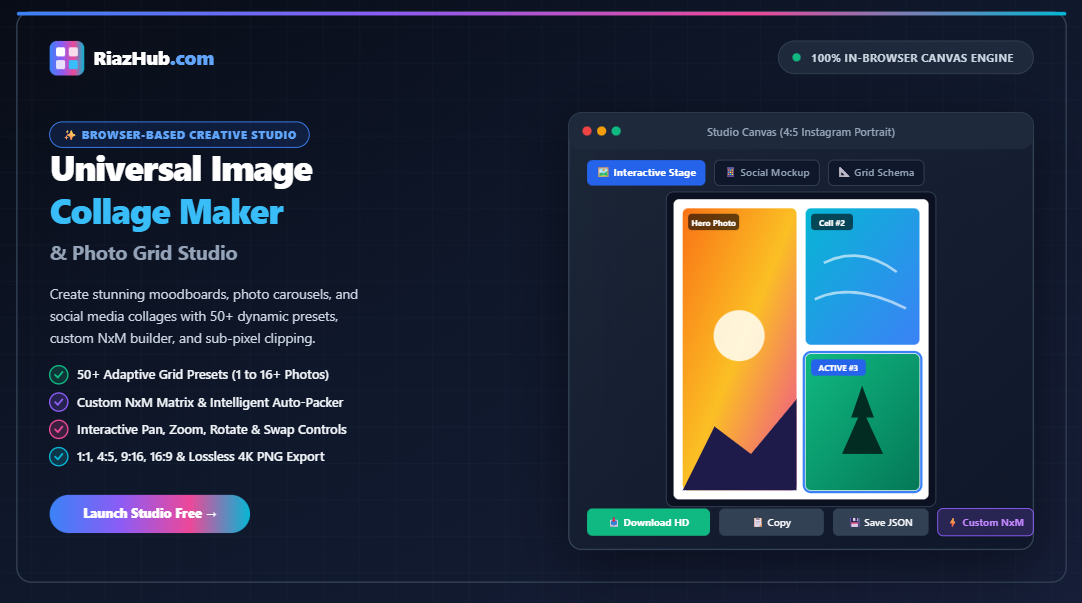
Universal Image Collage Maker & Photo Grid Studio: The Definitive Guide to Dynamic Layouts, Custom Grids & Lossless HD Compositing
- The Evolution of Digital Photo Collages & Visual Storytelling
- Why 100% Client-Side Canvas Processing Outperforms Cloud Converters
- Mastering Aspect Ratios: From Instagram 4:5 to 9:16 Fullscreen Reels
- Exploring the 50+ Adaptive Grid Presets (1 to 16+ Photos)
- Custom NxM Matrix Builder & Intelligent Photo Auto-Packer
- Freeform Scrapbook Mode: The Polaroid & Vision Board Canvas
- Per-Cell Controls: Pan-Crop, 300% Zoom, 90° Rotation & Cell Swapping
- Step-by-Step Tutorial: Building a Gallery-Grade Collage in Under 60 Seconds
- Digital vs. Print Resolution: 1x, 2K (2x), and 4K (3x) Ultra-HD Multipliers
- Frequently Asked Questions (FAQ)
1. The Evolution of Digital Photo Collages & Visual Storytelling
Since the dawn of photography, artists, curators, and editors have recognized that juxtaposing multiple images communicates narrative context that a single photograph cannot convey alone. In traditional analog publishing, photo editors meticulously cut contact sheets, measured framing borders with drafting rulers, and mounted prints onto museum board with acid-free matting.
In the modern digital creator economy, multi-image grids have become an indispensable visual currency. Social media influencers compile travel moodboards to capture the atmosphere of a destination; e-commerce merchants present product angles and texture close-ups in a unified frame; fitness trainers display before-and-after transformations; and digital artists compile character model sheets.
However, the software tools historically available for this task have been fundamentally flawed:
-
- Bloated Mobile Apps: Plagued with intrusive watermarks, expensive monthly recurring subscriptions, and forced downscaling that degrades photo sharpness.
- Complex Desktop Editors: Programs like Photoshop and Illustrator require steep learning curves, tedious manual clipping masks, and time-consuming alignment snapping.
- Server-Side Cloud Converters: Upload your private family snapshots, unreleased commercial products, and high-resolution personal pictures to remote servers, raising severe privacy concerns and introducing network latency.
To solve these challenges, RiazHub developed the Browser-Based Universal Image Collage Maker & Photo Grid Studio — an uncompromising, high-speed, and completely private studio designed from the ground up to empower creators with instant desktop-grade compositing inside any modern web browser.
2. Why 100% Client-Side Canvas Processing Outperforms Cloud Converters
The architectural foundation of RiazHub’s studio relies on native browser APIs: the HTML5 Canvas 2D Rendering Context, OffscreenCanvas, and modern JavaScript Binary Blobs. By keeping 100% of image decoding, matrix math, coordinate transforms, and pixel rendering inside your device’s memory, the studio delivers unmatched advantages:
-
-
- Absolute Privacy & Data Sovereignty: Zero photos, family vacation memories, private medical records, or confidential product prototypes are ever transmitted over the Internet. Your images never leave your local device.
- Sub-Millisecond Interactive Feedback: When you adjust cell gap sliders, corner radii, or background colors, the canvas re-renders in real-time at 60 frames per second without waiting for network roundtrips.
- Lossless Sub-Pixel Path Clipping: Adjacent photo cells calculate exact normalized sub-pixel boundaries using geometric
roundRect()clipping paths. This eliminates the unsightly dark fringes, blurry seams, or fractional pixel gaps that plague standard CSS web grids. - Offline & Bandwidth-Free Reliability: Once loaded, the tool works completely offline without requiring an active Internet connection, making it ideal for photographers working on location or in remote environments.
-
3. Mastering Aspect Ratios: From Instagram 4:5 to 9:16 Fullscreen Reels
Different digital platforms enforce strict aspect ratio standards. If you upload a collage formatted in the wrong ratio, platforms will aggressively crop vital edges or surround your image with awkward letterbox bars. The RiazHub Image Collage Studio includes a 1-click aspect ratio switcher engineered for industry standards:
| Aspect Ratio | Pixel Dimensions (1x) | Optimal Use Cases | Platform Recommendation |
|---|---|---|---|
| 1:1 Square | 1080 × 1080 px | Traditional photo grids, product showcases, profile feeds | Instagram Feed, Facebook Posts, LinkedIn Carousel |
| 4:5 Portrait | 1080 × 1350 px | Maximum vertical screen real estate, aesthetic hero stacks | Instagram Mobile Feed (Highest Engagement) |
| 9:16 Story / Reel | 1080 × 1920 px | Vertical fullscreen moodboards, behind-the-scenes compilations | Instagram Stories, TikTok, YouTube Shorts, Reels |
| 16:9 Widescreen | 1920 × 1080 px | Video thumbnails, desktop wallpapers, slide presentations | YouTube Thumbnails, Twitter/X Banners, Keynote |
| 3:2 Classic Photo | 1800 × 1200 px | Traditional 35mm photography standard, framed gallery prints | Physical 4×6″ and 8×12″ Photo Prints |
| 4:3 Standard Print | 1600 × 1200 px | Medium format cameras, classic museum matting | Physical 8×10″ and 16×20″ Wall Art Prints |
When publishing to Instagram, always select the 4:5 Portrait ratio. Vertical 4:5 posts occupy 25% more screen area on mobile smartphones compared to square 1:1 posts, significantly slowing down user scrolling and boosting viewer engagement by up to 35%.
4. Exploring the 50+ Adaptive Grid Presets (1 to 16+ Photos)
Selecting an optimal arrangement for multiple photos can be daunting. The studio provides over 50 hand-crafted layout presets categorized cleanly into filter tabs:
-
-
- 1 Photo Hero: Single full-canvas presentation designed for applying high-DPI resolution upscaling, custom rounded corners, and artistic framing mats.
- 2 Photos: 50/50 vertical split, 50/50 horizontal split, asymmetric 65/35 hero-left, 35/65 hero-right, top-heavy, and bottom-heavy layouts.
- 3 Photos: Classic editorial hero layouts (1 large left + 2 stacked right; 1 large top + 2 columns bottom; 3-column filmstrip; 3-row strip; and asymmetric T-splits).
- 4 Photos: The universally balanced 2×2 grid, 1 hero + 3 right stack, 1 hero + 3 bottom strip, pinwheel diagonal mosaic, and 4-column filmstrip.
- 5 Photos: 2 top + 3 bottom mosaic, 3 top + 2 bottom, hero left + 4-quad right, center hero column, and staggered editorial layouts.
- 6 Photos: 3×2 balanced grid, 2×3 tall grid, hero left + 5 right, 2 wide top + 4 bottom columns, and central hero mosaics.
- 7 to 9 Photos: Complex editorial layouts including 3×3 grid, central 2×2 hero surrounded by 8 border cells, and 3-tier staggered rows.
- 10, 12, and 16 Photos: High-density matrix grids (5×2, 2×5, 4×3, 3×4, 6×2, and 4×4 ultra grids) tailored for event catalogs, real estate portfolios, and yearbook collages.
-
5. Custom NxM Matrix Builder & Intelligent Photo Auto-Packer
Standard collage tools restrict you to rigid, hardcoded templates. If you have 7, 11, or 13 photos, most tools force you to discard pictures or fill awkward empty boxes. The Universal Collage Studio eliminates this limitation with a dedicated ⚡ Custom Grid Generator:
Mode 1: Custom Rows × Columns ($N \times M$) Matrix
Need a 3×5 grid for 15 product items? Or a 2×6 strip for a panorama banner? Simply adjust the interactive stepper controls:
-
-
- Set Columns (Width) from 1 to 8.
- Set Rows (Height) from 1 to 8.
- Review the live badge summary (e.g.,
3 Cols × 4 Rows = 12 Cells). - Click Apply Custom NxM Grid to immediately partition the canvas into exact mathematical coordinates.
-
Mode 2: Target Photo Count Auto-Packer
When you have an arbitrary or odd number of photos (such as 7, 11, or 14), our intelligent auto-packer algorithm dynamically calculates the optimal aspect distribution:
Given a target count $N$, the engine computes the ideal row count $R = \text{round}(\sqrt{N})$ and divides $N$ into integer partitions across rows. For example, for 7 photos, it creates 3 balanced rows formatted as [2 + 3 + 2]; for 11 photos, it generates 3 rows formatted as [3 + 4 + 4]. Each row computes custom fractional cell widths, producing a magazine-grade layout automatically!
6. Freeform Scrapbook Mode: The Polaroid & Vision Board Canvas
While structured grids convey symmetry and order, creative scrapbooking requires freedom and spontaneity. By clicking the 📌 Freeform Scrapbook button on the studio interface, the workspace transforms into an organic pinboard:
-
-
- Authentic Polaroid Frames: Every loaded photo is rendered as a vintage polaroid card with natural white borders, customizable drop shadows, and card captions.
- Rotatable & Staggered Cards: Photos are arranged with subtle random rotational offsets (-8° to +8°) mimicking casually tossed photographic prints on an art studio table.
- Backdrop Customization: Pair your scrapbook cards with aesthetic pastel backdrops, warm cream matting, or deep slate night backgrounds.
-
7. Per-Cell Controls: Pan-Crop, 300% Zoom, 90° Rotation & Cell Swapping
A great collage is not just about where photos are placed, but how each individual image is framed within its cell. In the RiazHub Studio, clicking any photo cell opens the Active Cell Inspector:
-
-
- Direct Canvas Panning: Click and drag any photo directly on the canvas to reposition its crop alignment in real-time. Center faces, adjust horizon lines, or focus on key subjects effortlessly.
- Smooth Zoom Slider (100% to 300%): Scale the photo up to three times its native cover size to emphasize fine details.
- 90° Incremental Rotation: Fix orientation issues with 1-click rotation triggers.
- Horizontal Mirroring (Flip H): Flip composition direction to guide the viewer’s eye toward the center of your collage.
- Drag-to-Swap Between Cells: Drag any thumbnail from the bottom photo tray onto a canvas cell to swap photos instantaneously.
-
8. Step-by-Step Tutorial: Building a Gallery-Grade Collage in Under 60 Seconds
Creating a finished, social-ready collage is straightforward and requires zero technical experience:
-
-
- Open the Studio: Navigate to the Universal Image Collage Maker & Photo Grid Studio on RiazHub.com.
- Load Your Photos: Drag and drop your photos into the dropzone, click “Browse Images”, or paste directly from your clipboard with Ctrl+V. You can also click “Load Demo Photos” to explore sample images instantly.
- Choose Your Aspect Ratio: Select
1:1 Square,4:5 Portrait,9:16 Story, or16:9 Widebased on your intended destination. - Pick a Grid Preset or Build a Custom Matrix: Browse the 50+ presets filtered by photo count, or use the
⚡ Custom Gridtab to define custom rows and columns. - Fine-Tune Spacing & Radii: Use the sliders to adjust cell gap ($0\text{px}$ to $40\text{px}$), outer canvas margins ($0\text{px}$ to $60\text{px}$), and corner rounding ($0\text{px}$ to $40\text{px}$).
- Adjust Cell Crop: Click any cell to pan, zoom, or rotate the image to achieve the perfect visual composition.
- Export in Lossless HD: Choose your target format (PNG, WebP, or JPEG), select a resolution multiplier (Standard 1x, High-Res 2K, or Ultra-HD 4K), and click Download Collage Image (HD).
-
9. Digital vs. Print Resolution: 1x, 2K (2x), and 4K (3x) Ultra-HD Multipliers
One of the most common pitfalls of free collage tools is aggressive downsampling. When you download a collage from typical web services, the image is frequently compressed to 800×800 pixels — blurry on high-resolution Retina displays and completely unprintable.
The RiazHub Collage Studio incorporates an offscreen high-DPI scaling pipeline:
-
-
- Standard 1x (1080px base): Optimized for lightweight web pages, email newsletters, and fast social media uploads.
- High-Res 2K 2x (2160px base): Double pixel density rendering, razor-sharp on 4K computer monitors, iPads, and high-end smartphones. Perfect for 8×10″ physical photo prints.
- Ultra-HD 4K 3x (3240px base): Over 3,000 pixels wide, outputting crisp commercial-grade files tailored for physical gallery canvas prints, wall art frames, and archival portfolios.
-
10. Frequently Asked Questions (FAQ)
Is RiazHub’s Image Collage Maker completely free to use?
Yes, 100% free. There are no subscription paywalls, no hidden premium tiers, no forced account sign-ups, and absolutely zero watermarks added to your downloaded collages.
Are my uploaded photos safe and private?
Your privacy is completely protected. All image decoding, collage matrix math, and raster export operations execute locally inside your web browser using HTML5 Canvas APIs. Zero images or personal metadata are ever sent to RiazHub.com servers or third-party cloud providers.
What image formats are supported?
You can import JPG, JPEG, PNG, WebP, AVIF, BMP, SVG, and GIF images. You can export your compiled collage in lossless PNG, modern lightweight WebP, or photo-quality JPEG.
Can I save my collage and resume editing later?
Yes! The studio includes a Save Project (.json) feature that serializes your cell photos, zoom levels, pan offsets, and layout parameters into a downloadable JSON file. You can restore your entire project anytime using the Load Project button.
Can I copy my collage directly to the clipboard?
Yes. Clicking 📋 Copy to Clipboard uses the modern browser navigator.clipboard.write() API to place a full-resolution PNG bitmap into your system clipboard, ready to be pasted directly into Photoshop, Slack, Discord, Word, or WhatsApp Web with Ctrl+V.
Start Designing Your Collage Today
Experience the freedom of 50+ adaptive grid presets, custom NxM matrix creation, and high-resolution lossless export.
Universal Image Collage Maker & Photo Grid Studio
Combine photos into creative grids, moodboards, and social collages with customizable layouts, borders, and instant HD export. Zero uploads — entirely processed in your browser.
Collage Grid Geometry & Sub-Pixel Matrix
| Cell ID | Norm Coordinates (X, Y, W, H) | Pixel Rect | Target Ratio | Assigned Photo |
|---|
When multiple images touch in a digital collage grid, standard HTML rendering often suffers from fractional pixel rounding artifacts, creating noticeable dark or blurry seam lines between adjacent photos.
Our in-browser canvas compositor solves this through precision sub-pixel path clipping (ctx.clip() using geometric roundRect paths). Every cell computes exact boundary coordinates factoring in your custom margin and gap parameters, ensuring razor-sharp edges and zero bleed between adjacent photos.
Selecting the right aspect ratio ensures your photos are displayed in maximum quality without aggressive platform cropping:
- 1:1 Square (1080×1080 px): Traditional Instagram feed posts, Facebook posts, and profile hero grids.
- 4:5 Portrait (1080×1350 px): The gold standard for Instagram mobile feeds, consuming maximum vertical screen real estate for maximum engagement.
- 9:16 Story / Reel (1080×1920 px): Optimal fullscreen dimensions for TikTok, Instagram Stories, Reels, and YouTube Shorts.
- 16:9 Widescreen (1920×1080 px): YouTube video thumbnails, desktop wallpapers, and presentation slide moodboards.
- 3:2 / 4:3 Classic Print: Photography print standards corresponding to 4×6", 8×10", and 8×12" photo prints.
Standard web displays operate at 72–96 DPI, whereas physical printing demands 300 DPI for gallery-grade sharpness. Using our Resolution Multiplier:
- Standard 1x: Fast web previews and lightweight social sharing.
- High-Res 2K (2x): 2160px width, crisp on Retina / 4K displays and suitable for 8×10" photo prints.
- Ultra-HD 4K (3x): 3240px width, designed for large poster prints, framed canvas art, and archival portfolio printing.
Every photo you drag into this studio is decoded, arranged, transformed, and exported entirely within your browser's memory using HTML5 OffscreenCanvas and JavaScript binary blobs.
No photos, personal snapshots, or compiled designs are ever uploaded to RiazHub.com servers or third-party cloud processors. Your privacy is 100% protected.