
Universal Image Checksum Generator & Cryptographic Integrity Verifier: The Definitive Guide to Image Authenticity, Multi-Algorithm Hashing & Perceptual Fingerprinting
1. The Problem: Silent Bit Rot, Metadata Stripping, and Digital Tampering
Digital images are more than decorative pixels they serve as legal forensic evidence, commercial design deliverables, medical radiography archives, and high-value NFT or blockchain assets. Yet, digital imagery is uniquely vulnerable to silent degradation and unauthorized manipulation:
- Silent Bit Rot: Physical solid-state drives (SSDs), archival optical disks, and cloud object storage buckets experience microscopic cosmic ray bit flips and flash memory degradation over multi-year lifespans. Without cryptographic checksum validation, corrupted image blocks can go undetected until rendering errors destroy the file.
- Content Delivery Network (CDN) Recompression: Social platforms, chat messengers, and file mirrors routinely strip EXIF metadata, re-encode PNGs into lossy WebP/AVIF formats, or apply aggressive chroma subsampling. While the image may look similar to the human eye, its cryptographic signature is completely modified.
- Malicious Forensics Tampering: From altered contracts and manipulated forensic crime scene photos to deepfake insertions, tampering often involves altering only a few dozen pixels. Detecting whether a photo matches its vendor-provided master digest requires cryptographic precision.
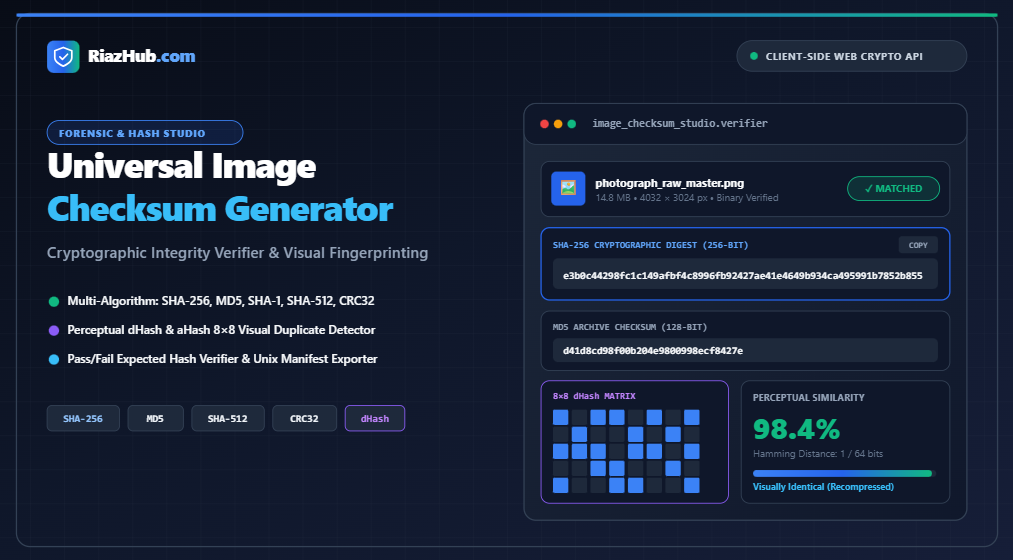
To solve both binary integrity checks and visual duplicate detection simultaneously, you can utilize the interactive Universal Image Checksum Generator, which executes all cryptographic digests and perceptual gradient matrices directly inside your browser.
2. Cryptographic Hashes vs. Perceptual Image Hashes
One of the most frequent misconceptions in digital imaging is confusing cryptographic hashing with perceptual image fingerprinting. Both techniques serve vital but completely opposite purposes:
| Feature | Cryptographic Hashes (SHA-256, MD5, SHA-512) | Perceptual Hashes (dHash, aHash) |
|---|---|---|
| Core Mechanism | Processes raw binary byte streams via mathematical compression functions. | Downsamples image to an 8×8 or 9×8 grayscale grid and maps luminance gradients. |
| Avalanche Effect | Extreme: Flipping 1 single bit changes ~50% of the entire output hash. | Zero: Slight modifications yield nearly identical or matching fingerprints. |
| Tolerance to Compression | Fails immediately (hash changes completely). | Survives JPEG compression, resolution scaling, and EXIF stripping. |
| Primary Use Case | Bit rot verification, tamper detection, software distribution security. | Reverse image search, copyright tracking, duplicate photo library deduplication. |
| Comparison Metric | Exact String Equality (Pass or Fail). | Hamming Distance (0 to 64 bit difference; 0% to 100% similarity score). |
The Avalanche Effect in Cryptographic Hashes
A secure cryptographic hash function exhibits strict non-linear confusion and diffusion. If you change a single camera tag in an image’s metadata or change the color value of one pixel from #FFFFFF to #FFFFFE, the SHA-256 digest shifts completely from one pseudo-random 64-character hex sequence to an entirely unrelated sequence:
# Original Master Photograph
SHA-256: e3b0c44298fc1c149afbf4c8996fb92427ae41e4649b934ca495991b7852b855

# Same Photograph with 1 Byte of Metadata Modified
SHA-256: 7f83b1657ff1fc53b92dc18148a1d65dfc2d4b1fa3d677284addd200126d9069
This avalanche behavior is what makes SHA-256 the gold standard for software releases and legal forensics. With the Image Checksum Verifier, you can test any suspicious graphic against an expected hash string with automated pass/fail validation.
Perceptual dHash (Difference Hash) and Hamming Distance
In contrast, a difference hash (dHash) extracts the visual structure of the graphic. The algorithm proceeds as follows:
- Grayscale Downsampling: The image is resized down to a 9×8 grid (72 pixels) without preserving aspect ratio, converting each pixel to perceived luminance:
L = 0.299*R + 0.587*G + 0.114*B. - Adjacent Pixel Gradient Comparison: For each of the 8 rows, the algorithm compares adjacent pixels horizontally across 8 columns (Column x vs. Column x+1). If pixel x is brighter than pixel x+1, it outputs a binary
1; otherwise, it outputs a0. - Binary to Hex Fingerprint: 8 rows × 8 comparisons produce a 64-bit binary bitstream, which is expressed as a 16-character hexadecimal fingerprint.
- Hamming Distance Calculation: When comparing two images, the Hamming distance counts how many bits differ across the 64 positions. A distance of 0 indicates an identical visual fingerprint (100% match). A distance of 1 to 6 indicates identical visual content with mild compression or watermarking.
💡 Practical Example: Detecting Recompressed Web Graphics
Suppose you upload a 24-megapixel TIFF image (80 MB) and compare it against a downscaled 1080p JPEG (350 KB) derived from the same source. Their SHA-256 hashes will not match at all. However, running them through the Dual Image Comparator on the RiazHub Image Checksum Studio reveals a Hamming distance of only 2 bits, confirming a 96.9% perceptual match.
3. The Supported Cryptographic Algorithm Suite
The studio integrates a multi-tier cryptographic and redundancy hashing suite tailored for production graphic workflows:
SHA-256 (Secure Hash Algorithm 256-bit)
Designed by the National Security Agency (NSA) and published as FIPS PUB 180-2, SHA-256 produces a 32-byte digest with 2256 possible outcomes. It possesses proven collision resistance and is the global baseline for verifying downloaded Linux distributions, Git LFS asset trees, and blockchain ledgers.
MD5 (Message Digest 5)
Invented by Ronald Rivest in 1991, MD5 generates a 128-bit (32-hex character) hash. While no longer recommended for high-security digital signatures due to collision vulnerabilities, MD5 remains universally indispensable for game asset verification, legacy stock photo catalogs, and rapid deduplication pipelines.
SHA-512 & SHA-384
Part of the SHA-2 family, SHA-512 computes a 512-bit (64-byte) message digest using 64-bit operational words. It is heavily utilized in high-security government archives and forensic imaging where multi-decade collision resistance is required.
SHA-1 (Secure Hash Algorithm 1)
A 160-bit hash standard that powered Git commit hashing for decades. It remains widely used across package managers and distribution mirrors to confirm that download mirrors are serving unmodified binaries.
CRC32 (Cyclic Redundancy Check)
A non-cryptographic 32-bit linear checksum designed to catch unintentional transmission errors in ZIP archives, PNG chunk headers, and Ethernet frames. It verifies that zero network packets were dropped during large media transfers.
4. Step-by-Step: How to Generate and Verify Image Checksums
Authenticating an image using the online checksum utility requires no command-line terminal or specialized software:
- Load Your Source Image: Drag and drop your image file (JPEG, PNG, WEBP, AVIF, TIFF, BMP, SVG, or camera RAW) directly onto the upload dropzone. You can also paste an image straight from your operating system clipboard by pressing
Ctrl+V(orCmd+Von macOS), or click “Load Sample” to experiment with a synthetic cryptographic graphic. - Select Desired Algorithms: By default, the recommended “Security & Forensic Suite” activates SHA-256, MD5, SHA-1, SHA-512, and perceptual dHash. You can customize the checkboxes or toggle quick profiles such as “Distribution Package” (SHA-256 + CRC32) or “Visual Duplicate Finder”.
- Inspect the Computed Checksums Matrix: View your image’s unique visual Identicon stamp, exact byte size, and full monospace digests with convenient 1-click copy buttons.
- Verify Against an Expected Hash: Paste a checksum provided by your vendor, photographer, or release mirror into the “Compare Against Expected Hash” input box. The tool automatically detects the algorithm based on bit length and displays a green
🟢 Exact Cryptographic Matchor red🔴 Hash Mismatch / File Tamperedbadge. - Export Standard Manifests: Download an authentic Unix
.sha256or.md5manifest file, or export a complete multi-file audit report in CSV or JSON format for your asset catalog records.
5. Visual Identicons: Instant Visual Security Stamps
Comparing long 64-character hexadecimal strings manually is prone to human error. To make visual recognition instantaneous, the Image Checksum Generator computes a 5×5 symmetric Identicon security stamp derived from the bytes of the SHA-256 hash:
- The first 6 characters define the dominant RGB hue of the stamp.
- Subsequent bytes determine the bilateral symmetry pattern across the canvas grid.
- Even if a photo is subtly altered, its Identicon stamp will radically shift colors and patterns, providing instant visual feedback before you even read the hash characters.
6. Batch Multi-Image Processing & Manifest Creation
Commercial photography studios and design agencies frequently handle batches of hundreds of product assets. The inspection queue within the Image Checksum Studio enables batch workflows:
- Multi-File Queue: Drop multiple images simultaneously to queue them for rapid sequential hashing.
- Interactive File Switching: Click any file name in the batch table to inspect its individual perceptual 8×8 matrix or run dual comparisons.
- Standard Unix Manifest: Generates ready-to-use manifest files compatible with standard command-line validation utilities:
sha256sum -c checksums.sha256
- Audit Log Exports: Download clean CSV spreadsheets or structured JSON files containing file names, exact byte counts, resolutions, and multi-algorithm hash maps.
7. Privacy & Security: Why 100% In-Browser Execution Matters
Uploading sensitive graphics—such as proprietary branding mockups, high-resolution forensic evidence, medical radiographs, identity documents, or signed contracts to third-party web servers introduces severe confidentiality and compliance risks.
The RiazHub Image Checksum Studio operates on a strict zero-data-leak client-side architecture:
- Binary reading is executed directly through the browser’s native
FileReaderandArrayBuffermemory buffers. - SHA algorithms are calculated using the hardware-accelerated W3C Web Crypto API (
crypto.subtle.digest), achieving gigabyte-per-second processing speeds on modern multi-core devices. - Perceptual dHash downsampling is performed using sandboxed HTML5 Offscreen Canvases.
- Zero image bytes or file metadata ever leave your local computer. You can even disconnect your internet connection entirely after loading the page, and the tool will continue to function flawlessly.
Frequently Asked Questions (FAQ)
• Distance = 0: Visually identical.
• Distance 1 to 6: Minor recompression, slight color shift, or watermarking (90%–98% similarity).
• Distance 7 to 10: Moderately altered or heavily cropped graphic.
• Distance > 12: Completely different image.
Universal Image Checksum Generator & Verification Studio
Compute MD5, SHA-1, SHA-256, SHA-512, CRC32, and perceptual visual fingerprints (dHash/aHash). Verify file integrity and detect visual duplicates entirely inside your browser.
📁 Source Graphic Upload
0 Files Loaded⚙️ Algorithm Suite
No Image Selected
Perceptual Visual Fingerprint (dHash & aHash)
Unlike cryptographic hashes which change completely with a 1-byte alteration, perceptual hashes analyze visual luminance gradients. Visually duplicate, resized, or re-compressed images retain near-identical perceptual hashes.
Dual Image Cryptographic & Visual Similarity Comparator
Compare two images to measure both exact byte-level cryptographic integrity (SHA-256) and perceptual visual similarity (Hamming distance on dHash).
Multi-Image Inspection Queue
| Thumb | Filename | Size | SHA-256 (Truncated) | MD5 | dHash | Action |
|---|---|---|---|---|---|---|
| No images loaded in batch queue. Drag & drop multiple files to populate. | ||||||
Standard Unix Checksum Manifest
Format compatible with command-line utilities (sha256sum -c or md5sum -c).
📚 Cryptographic Hashing, Perceptual Fingerprints & Image Verification Guide
Perceptual hashes (dHash, aHash), on the other hand, analyze visual features (luminance gradients and frequency distributions). If an image is saved as a lower-quality JPEG, resized by 50%, or has its EXIF metadata stripped, its cryptographic hash will fail completely, but its perceptual fingerprint will match with a 95% to 100% Hamming similarity score.
ArrayBuffer and Uint8Array, and HTML5 Canvas rendering execute 100% locally inside your web browser using the hardware-accelerated W3C Web Crypto API (crypto.subtle.digest). Zero image bytes, filenames, or medical/forensic graphics are ever uploaded or transmitted over the network to any server.