
How to Generate Engaging Image Captions & Visual Stories: The Complete Guide to In-Browser OCR, Dwell-Time Hooks, and SEO Figcaptions
In an era dominated by rapid vertical scrolling, an eye-catching graphic is only half the battle. Whether you are publishing on Instagram, Threads, LinkedIn, or an SEO-focused WordPress blog, your written caption dictates whether visitors scroll past or stop to engage.
Modern social media recommendation engines measure content authority through dwell time the exact number of seconds a user lingers on your post. Yet millions of creators still post generic captions like “Good morning ☀️” or robotic filename placeholders like “WhatsApp Image 2026-08-13”, which kill engagement and sabotage algorithmic reach.
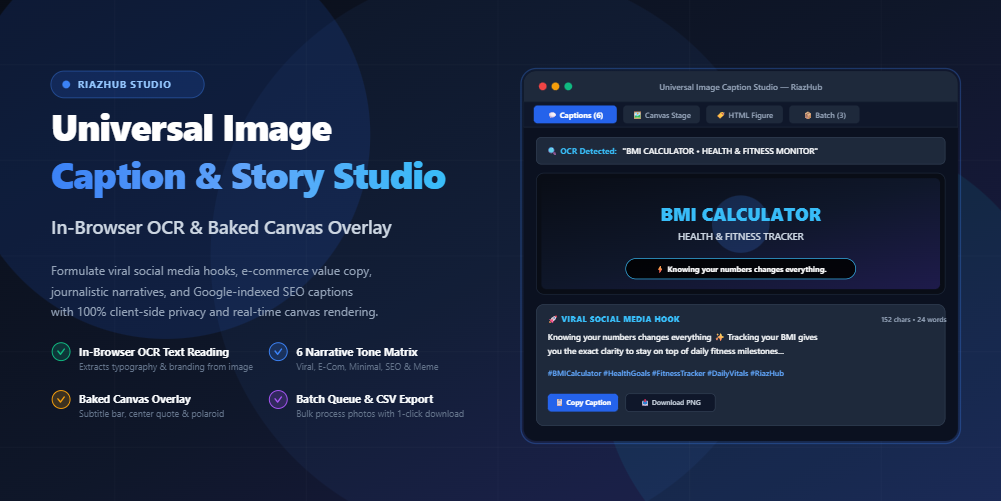
To solve this challenge, we developed the free Image Caption & Visual Storytelling Studio on RiazHub. In this comprehensive guide, you will discover how to extract embedded text with in-browser Optical Character Recognition (OCR), craft irresistible first-line hooks, generate semantic <figcaption> tags for Google Image search, and burn branded typography overlays onto your graphics in real time.
1. The Science of Dwell Time: Why First-Line Hooks Rule Social Algorithms
Algorithms on Instagram, TikTok, LinkedIn, and Pinterest have evolved far beyond basic like-counts. They actively prioritize posts that create an extended pause in the feed. When a user pauses for more than 3 seconds or taps the “…more” button to read through an expanded caption, the algorithm receives an unmistakable signal: this post is high-value.
Your first 40 to 60 characters represent your curiosity hook. Here is how modern feed mechanics treat different hook structures:
| Hook Approach | Example First Line | Algorithmic Result |
|---|---|---|
| Generic / Passive | “Loving this view today! ✨” | ❌ Ignored within 0.8 seconds; zero expansion clicks. |
| Counter-Intuitive Question | “What if the hardest part of health isn’t diet, but knowing your numbers?” | ✅ Triggers curiosity; visitors expand to read the full context. |
| Value Proposition (Tools) | “Work smarter, not harder: Meet the new BMI Calculator…” | ✅ High save and share rate; clear benefit for professionals. |
| Relatable Meme Setup | “Me pretending this is my entire personality now 😂” | ✅ Sparks humor; massive comment reply velocity. |
When you run your image through the Universal Image Caption Studio, the engine automatically formulates high-retention opening hooks with clean emojis and engagement questions tailored specifically to your image category.
2. In-Browser OCR: Why Reading Text Inside Images Unlocks Authentic Relevance
One of the biggest flaws of automated caption generators is their reliance on generic image tagging. If you upload a graphic of a digital health utility displaying the headline “VITALS” or an e-commerce badge showing “BMI CALCULATOR”, generic cloud tools frequently mislabel the scene as “blue background with shapes”.
The Image Caption & Visual Storytelling Studio takes a fundamentally smarter approach:
- Client-Side Optical Character Recognition (OCR): Using high-performance WebAssembly OCR, the studio inspects the actual typography, titles, and logos embedded inside your graphic.
- Dark & Light Contrast Normalization: Whether your image features neon cyan text on dark navy dashboards or black serif headlines on white cards, the scanner reliably identifies the text without destructive binarization.
- Clutter & Timestamp Stripping: File metadata like
WhatsApp Image 2026-08-13 at 2.22.22 PM (1), camera prefixes (IMG_,DSC_), and file extensions are automatically scrubbed, leaving only high-value semantic tokens.
💡 Pro Tip: If your graphic contains a specific slogan, brand name, or feature list, the studio displays the detected words inside an editable Detected Image Text (OCR) box. You can modify, re-scan, or inject custom keywords with a single click.
3. The 6-Persona Narrative Matrix: Matching Tone to Audience
A caption that works brilliantly on a personal Instagram Reel will fall flat on a formal WordPress editorial blog post. That is why the Image Caption Studio features a multi-persona formulation engine:
📱 1. Viral Social Hook
Conversational storytelling, contextual emojis, and comment-prompt questions engineered for maximum feed dwell time on Instagram and Threads.
💡 2. E-Commerce Value Prop
Clear bullet-pointed feature highlights, problem-solution breakdowns, and shopping calls-to-action that drive conversions for products and digital tools.
📰 3. Editorial & Journalistic
Objective documentary structure complete with date stamps, location context, and archival credit formatting suitable for news and reference imagery.
✨ 4. Clean Minimalist
Short, poetic, sophisticated 1-liners with lowercase spacing designed for aesthetic portfolios, architecture, and luxury brands.
😂 5. Meme & Witty Punchline
Sharp, humorous observations and trending punchline setups designed for viral sharing on Twitter/X, TikTok, and Reels.
🌐 6. Semantic SEO Web Caption
Accessible, keyword-rich narrative structured specifically for WordPress <figure> and <figcaption> elements to rank in Google Image Search.
4. Step-by-Step: How to Generate Captions & Overlays on RiazHub
Follow these four simple steps to create captivating copy and branded overlays in seconds:
- Upload or Drop Your Images: Head over to the Image Caption & Visual Storytelling Studio. Drag and drop your JPG, PNG, WEBP, or AVIF file, paste directly from your clipboard (
Ctrl+V), or click Load Sample. - Inspect Detected OCR Text: The in-browser OCR scanner immediately reads any headline, logo, or terminology inside your image. Verify or edit the detected words in the Detected Image Text field.
- Select Your Persona & Custom Context: Choose between Viral Social, E-Commerce, Editorial, Minimalist, Meme, or SEO Web. Add your brand name, location, or custom Call-to-Action (CTA) if desired.
- Copy or Download: Browse the 6 generated caption variations in the Captions Studio tab and click 📋 Copy. Switch to the Baked Canvas Stage tab to download your captioned graphic with custom typography overlays, or export your entire queue to CSV in the Batch Queue tab.
5. Baked Canvas Text Overlays vs. Plain Captions: Which Should You Use?
While plain text captions sit below your image in social feeds, baked text overlays burn the headline directly onto the image pixels. Understanding when to use each approach is key to maximizing conversion:
- Use Plain Captions When: You are optimizing for long-form social discussion, community replies, SEO indexing, or when your platform natively supports screen reader accessibility.
- Use Baked Canvas Overlays When: You are creating Pinterest pins, Instagram Story teaser slides, meme graphics, or YouTube video thumbnails where viewers must grasp the core concept in under 0.5 seconds without reading the caption text.
The Universal Image Caption Studio provides four distinct overlay placement modes:
- Bottom Subtitle Bar: Clean cinematic lower-third pill backdrop ideal for podcasts, reels, and video screenshots.
- Top Header Banner: High-visibility announcement bar perfect for meme punchlines and promotional discounts.
- Center Quote Box: Balanced typography frame tailored for inspirational quotes and editorial features.
- Polaroid Matting: Vintage white photo border with handwritten script typography (Caveat font) for lifestyle and travel photography.
6. Semantic HTML <figure> and <figcaption> for Google Image SEO
Search engines cannot “see” images the way humans do. Google relies heavily on surrounding context, file names, alt attributes, and semantic HTML5 wrappers to index image relevance.
By wrapping your image inside a <figure> element paired with a descriptive <figcaption>, you establish a direct programmatic association between the visual asset and its topical subject matter:
<figure class="wp-block-image size-large">
  <img src="bmi-calculator-dashboard.png" alt="BMI Calculator digital health monitor interface" loading="lazy" />
  <figcaption>Interactive visual interface of the BMI Calculator digital health utility on RiazHub, illustrating real-time metric benchmarks, health zone classification, and responsive user experience design.</figcaption>
</figure>
The HTML Figure Code tab in the Image Caption Studio formats this markup automatically. Simply copy and paste the block directly into your WordPress post to improve search discoverability and satisfy Web Content Accessibility Guidelines (WCAG).
7. The 3-Tiered Hashtag Strategy: Broad, Niche, and Contextual
Stuffing 30 generic tags like #photo or #love into your post does not increase visibility—it pushes your content into oversaturated feeds where posts are buried within seconds. The studio applies an intelligent 3-tier hashtag cluster:
- Tier 1 — High-Intent Subject Tags: Derived directly from your image’s OCR text (e.g.,
#BMICalculator,#DailyVitals). - Tier 2 — Niche Community Tags: Targeted clusters with 10k to 250k posts (e.g.,
#FitnessTracker,#HealthGoals,#WebUtility). - Tier 3 — Platform & Location Tags: Branding and regional discovery tags (e.g.,
#RiazHub,#ProductivityTools).
8. Privacy-First Architecture: Why 100% In-Browser Synthesis Matters
In recent years, many online “AI caption” tools have emerged that upload user photos to remote cloud servers. This introduces significant privacy and compliance risks, particularly for confidential client brand mockups, private family photographs, medical screenshots, or unreleased product prototypes.
The Image Caption & Visual Story Studio on RiazHub runs 100% locally in your web browser. All OCR scanning, semantic keyword parsing, canvas compositing, and CSV compilations execute on your device using native HTML5 Canvas, WebAssembly, and modern JavaScript APIs. Zero bytes of image data or private text ever leave your computer.
Frequently Asked Questions (FAQs)
Conclusion: Elevate Your Visual Content Today
Great visuals capture attention, but great storytelling drives action. By combining in-browser OCR text recognition, algorithmic dwell-time hooks, and baked canvas overlays, you can transform ordinary photos and tool screenshots into high-performing social assets and SEO-optimized web publications.
Ready to take your social media engagement and image SEO to the next level? Explore the free Universal Image Caption & Visual Storytelling Studio on RiazHub today!
Universal Image Caption & Visual Story Studio
Scans image typography & logos (OCR), formulates high-engagement social hooks, e-commerce value propositions, and SEO descriptions with live baked canvas text rendering.
🎨 Image & Context Studio
No Image Loaded<figure class="wp-block-image">
<img src="image.jpg" alt="Visual story description" />
<figcaption>Caption will appear here.</figcaption>
</figure>📚 Visual Storytelling, Social Media Algorithms & SEO Guide
How algorithmic dwell-time hooks, OCR image reading, and semantic HTML markup maximize audience reach and Google rankings.
Generic captions fail because they ignore the visual text and branding inside the graphic. By reading logos, title headers (e.g., "BMI Calculator", "VITALS"), and key terminology directly from the image, your captions achieve pinpoint semantic relevance.
Social algorithms reward posts where the written copy matches the viewer's visual cognitive focus, leading to higher saves, shares, and comment replies.
Modern feed algorithms (Instagram, Threads, LinkedIn, Pinterest) measure content authority by dwell time—how many seconds users stop scrolling on your post. The first 40 to 60 characters serve as the hook before the "...more" expansion.
A compelling question or surprising statement compels visitors to tap expand and read through, triggering positive algorithmic recommendation signals.
Search engine bots index image context using HTML5 semantic elements. Embedding images inside <figure> paired with a descriptive <figcaption> gives Google crawlers exact topical relationships.
This generator creates clean semantic markup ready to drop directly into your WordPress Gutenberg or classic editor for maximum organic search traffic.
Your photos, screenshots, and graphics are processed 100% inside your browser using HTML5 Canvas and client-side JavaScript. Zero bytes of image data or captions are ever transmitted to any external server.