
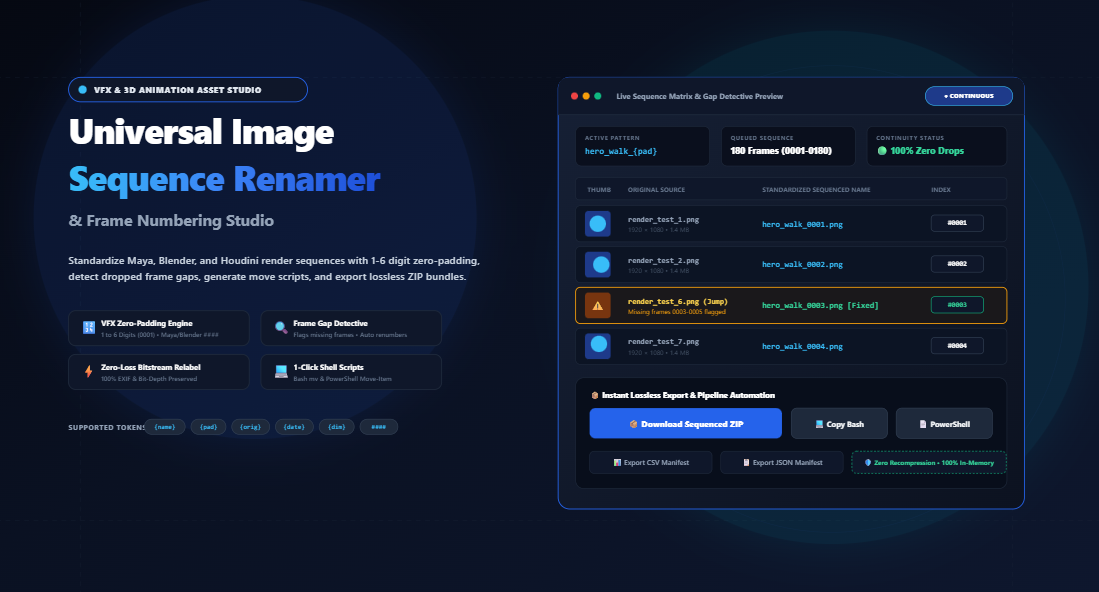
Mastering VFX Image Sequences: How to Standardize 3D Renders, Fix Frame Gaps, and Automate Zero-Padded Numbering in the Browser
Yet, every digital artist has encountered the catastrophic moment when an operating system or non-linear editor scrambles a rendered shot. Frames jump frantically across the timeline, playback glitches appear out of nowhere, and batch imports fail completely because frame shot_10.png sorted alphabetically before frame shot_2.png. Even worse, overnight render farm crashes frequently drop random frame strides (such as missing frames 0045 through 0048), causing compositing packages to halt midway through a deadline crunch.
Need to standardize your 3D render passes, correct dropped frame strides, or renumber hundreds of timelapse files right now? Use our free browser-based utility:
In this comprehensive technical guide, we explore the computational mechanics of image sequence collation, why zero-padding is mathematically mandatory, how automated gap detection preserves timeline continuity, and how browser-based in-memory binary relabeling provides instant, 100% lossless ZIP packaging without touching an external server.
1. The Alphabetical Collation Trap: Why Standard Sorting Scrambles Renders
To understand why file renaming is such a critical phase of the VFX and post-production workflow, one must look at how computer file systems and video editing suites parse filenames.
By default, operating systems (Windows NTFS, macOS APFS, and Linux ext4) and file-ingestion engines evaluate strings using lexicographical order (character-by-character ASCII comparison) rather than human natural order. Under pure lexicographical sorting, each character’s ASCII byte value determines its position. Because the character "1" (ASCII 49) precedes "2" (ASCII 50), any filename starting with "10" will sort immediately after "1" and far before "2".
| Frame Number | Unpadded Filename | Lexicographical / OS Sort | Standardized 4-Digit Zero-Padded | Correct Playback Order |
|---|---|---|---|---|
| Frame 1 | render_1.exr |
1. render_1.exr | render_0001.exr |
1. render_0001.exr |
| Frame 2 | render_2.exr |
5. render_2.exr (LATE!) | render_0002.exr |
2. render_0002.exr |
| Frame 10 | render_10.exr |
2. render_10.exr (TOO EARLY) | render_0010.exr |
10. render_0010.exr |
| Frame 11 | render_11.exr |
3. render_11.exr (TOO EARLY) | render_0011.exr |
11. render_0011.exr |
| Frame 100 | render_100.exr |
4. render_100.exr (ERRATIC) | render_0100.exr |
100. render_0100.exr |
Notice the chaos in the third column: the sequence plays frames 1, 10, 11, 100, and only then jumps back to frame 2! In an animation or compositing suite, this results in chaotic flicker, visual jumping, and broken motion blur interpolation.
The solution is zero-padding width calibration. By prepending leading zeros so that every frame index has an identical digit count (e.g., 0001, 0002... 0010... 0100), lexicographical sorting matches natural numerical sorting perfectly.
2. Industry Naming Conventions: Maya, Houdini, Blender, and Nuke Standards
Major production studios adhere to strict asset-naming protocols. When passing image sequences between different departments (modeling, lighting, fx simulation, compositing, and color grading), software parsers use pattern delimiters and hash notation:
- Hash / Pound Notation (
####): The de facto notation in Blender, SideFX Houdini, and Autodesk Maya. A template likeshot_020.####.exrexplicitly dictates that each hash represents one digit of zero-padded index (producingshot_020.0001.exrthroughshot_020.9999.exr). - VFX 1001 Start Frame Standard: In professional visual effects pipelines, sequences rarely begin at frame 0 or frame 1. Instead, they universally start at frame 1001. This convention provides safety handles for pre-roll camera momentum, negative frame offsets for character dynamics, and prevents accidental negative frame indices.
- Animation on Twos: Traditional 2D hand-drawn and stop-motion projects frequently animate “on twos” (each drawing held for two film frames at 24 fps). Here, the numbering increment step must be
2(producing frames0001, 0003, 0005...). - Delimiter Standardization: Delimiters matter. Periods (
.) are preferred in UNIX-based VFX environments (e.g.,comp_v01.0101.png), while underscores (_) are standard in web delivery and game development asset pipelines (e.g.,character_run_0101.png).
With the Image Sequence Renamer & Animation Frame Studio on RiazHub, you can toggle between these exact standards with a single click, supporting freeform formulas like {name}_{pad}, {name}.{pad}, or raw Maya-style #### hashes.
3. The Missing Frame Detective: Detecting Render Gaps & Stride Errors
One of the most persistent bottlenecks in distributed render farms (such as AWS Thinkbox Deadline, Tractor, or local network node clusters) is dropped frames. If a render node runs out of VRAM, encounters a texture timeout, or crashes silently, a hole is left in the numerical sequence:
Frame 0021.png –> OK
Frame 0022.png –> OK
Frame 0023.png –> OK
[MISSING 0024.png, 0025.png, 0026.png] <– CRASH / NETWORK PACKET LOSS Frame 0027.png –> OK
Frame 0028.png –> OK
When you attempt to import this folder into Adobe Premiere Pro or DaVinci Resolve as an image sequence, the importer will either stop importing at frame 0023 or display an unrecoverable “Media Offline” red flash for the missing duration.
Automated sequence renamers employ a Sequence Continuity & Stride Alignment Engine. By extracting the trailing numeric indices across the sorted list of files, the algorithm detects whenever $N_{i+1} – N_i > 1$. It immediately calculates:
// Gap Detection Mathematics
const missingCount = nextFrame - currentFrame - 1;
// Flags: "⚠️ Missing 3 frames between 0023 and 0027"
The artist is then presented with two intelligent choices:
- Close Gaps & Renumber Sequentially: Re-indexes all existing frames into an unbroken, smooth timeline (e.g., frame 0027 becomes 0024). This is ideal for stop-motion shots or timelapses where dropped camera clicks must not interrupt playback.
- Preserve Existing Frame Numbers: Retains the native frame numbers (keeping frame 0027 as 0027) but standardizes the zero-padding width, alerting the compositor to re-render only the missing frames.
4. Why In-Memory Relabeling Beats Traditional Online Converters
Most web-based image renamers force users to upload their files to a remote server. Beyond severe privacy and non-disclosure agreement (NDA) risks with client footage, remote processing is excruciatingly slow when handling 500+ high-resolution frames.
Even worse, many naive web utilities pass images through an HTML5 <canvas> element to rename them. Canvas re-encoding is catastrophic for visual fidelity:
- Lossy Recompression: PNGs and JPEGs are re-quantized, introducing compression artifacts.
- Bit-Depth Clamping: High-dynamic-range 16-bit or 32-bit float renders (such as TIFFs or OpenEXRs) are clamped down to 8-bit standard RGB.
- Metadata Stripping: Critical camera EXIF metadata, lens focal length tags, color profiles (ACEScg, Rec.709), and render timecodes are permanently erased.
The Universal Image Sequence Renamer on RiazHub uses pure in-browser JavaScript File and Blob pointers. The original binary bitstream is left completely untouched. The tool constructs a custom in-memory PKZIP archive using streaming array buffers, wrapping your original bitstreams directly under new sequential filenames in milliseconds.
5. Local Automation: Generating Shell Move Scripts for Terabyte Sequences
What if your image sequence is 80 gigabytes in size? Downloading an 80 GB ZIP file through a web browser—even locally—can consume system memory and time.
For heavy VFX and feature film production workflows, our tool includes a 1-click Shell Automation Generator. Instead of moving binary files through browser memory, it generates lightweight, instant command-line scripts tailored for your operating system:
Bash Shell Script (macOS / Linux / Terminal)
#!/bin/bash
# Generated via RiazHub Image Sequence Renamer
mv "render_01.png" "shot_010_0001.png"
mv "render_02.png" "shot_010_0002.png"
mv "render_03.png" "shot_010_0003.png"
PowerShell Move Script (Windows)
# PowerShell Image Sequence Renamer - RiazHub.com
Rename-Item -LiteralPath "render_01.png" -NewName "shot_010_0001.png"
Rename-Item -LiteralPath "render_02.png" -NewName "shot_010_0002.png"
Rename-Item -LiteralPath "render_03.png" -NewName "shot_010_0003.png"
Simply paste the generated script into your source folder’s terminal, and thousands of multi-gigabyte files are renamed instantaneously on your local drive with zero disk duplication!
6. Step-by-Step Practical Workflow: How to Renumber Sequences in Seconds
- Ingest Your Frames: Navigate to the Image Sequence Renamer & Animation Frame Studio. Drag and drop your image sequence (or click “Ingest Folder” to load an entire directory at once).
- Select a Preset or Build a Pattern: Click a quick preset (such as VFX & 3D Render or Timelapse Set), or use the token chips to construct a customized pattern like
{name}_{pad}.{ext}. - Calibrate Padding & Start Index: Set your padding width (e.g., 4 digits for
0001) and define your start index (1or1001). - Verify with the Flipbook Player: Use the built-in mini flipbook scrubber to playback your sequence at 24 or 30 FPS right inside the browser to ensure motion fluidity and confirm that no frames are out of order.
- Export Lossless ZIP or Copy Script: Click “Download Sequenced ZIP” for immediate packaging, or click “Copy Bash / PowerShell Script” to rename the files directly on your workstation.
7. Frequently Asked Questions (FAQs)
Does this tool upload my 3D renders or client timelapses to a server?
No. The tool runs 100% locally inside your web browser. All file ingestion, natural-sort array traversal, pattern string formatting, and ZIP archive generation execute in your device’s memory. Zero bytes are ever transmitted over the network.
Can I use this tool with non-image files like EXR, TIFF, or RAW?
Yes. Because the engine uses binary File relabeling, it works with all raster formats, including .exr, .tiff, .tif, .png, .jpg, .webp, .avif, .bmp, and .gif.
What is the difference between Natural Sort and Alphanumeric Sort?
Standard alphanumeric sort treats numbers as characters, placing frame_10 before frame_2. Natural sort treats multi-digit numbers as integer values, ensuring frame_2 correctly precedes frame_10.
Can I export a sequence manifest for production asset management?
Yes. The studio provides 1-click exports for both CSV and JSON manifests, logging original filenames, new standardized filenames, frame indices, byte sizes, and native pixel dimensions for easy import into ShotGrid, ftrack, or custom studio asset trackers.
Experience seamless sequence formatting, zero-loss ZIP export, and instant gap detection on RiazHub:
Universal Image Sequence Renamer & Frame Studio
Standardize 3D renders, timelapse sets, and stop-motion animations with VFX-grade zero-padding, gap detection, shell scripts, and zero-recompression lossless ZIP export.
| Thumb | Original Name | New Sequenced Name | Index | Dimensions / Size | Status | Order |
|---|---|---|---|---|---|---|
|
🎞️
No image frames ingested yet
Drag and drop a folder or click "Load Demo Sample Frames" to begin previewing. |
||||||
In VFX compositing (Nuke, After Effects, DaVinci Resolve) and 3D rendering (Blender, Maya, Houdini, Cinema 4D), operating systems and render managers sort files alphanumerically. Without standardized zero-padding, frame shot_10.png is sorted before shot_2.png (e.g., 1, 10, 11... 2, 20...), completely scrambling your animation playback.
Using a 4-digit zero-padding format (e.g., 0001, 0002... 0010) ensures that every image sequence loads seamlessly as a continuous video clip in non-linear video editors.
Render crashes and timelapse camera drops often leave missing frames in a sequence (e.g., frames 0024 through 0026 are absent). Video editing suites will either freeze or reject the entire image sequence when encountering a gap.
This tool analyzes the embedded numeric strings in your original filenames and flags every missing frame stride. Enabling "Renumber Sequentially to Close Gaps" seamlessly re-indexes the continuous frames from your desired start index, guaranteeing playback without render glitches.
Unlike online tools that upload your imagery to a server or re-encode them through an HTML5 canvas (which strips bit-depth and compresses pixels), this studio operates 100% inside your web browser using native JavaScript File and Blob pointers.
Your raw binary files are repacked directly into a standard ZIP container under their new sequential filenames with 0% pixel recompression, 100% color fidelity, and fully preserved EXIF/camera metadata.