
The Definitive Guide to Image-to-ASCII Art & Text-Matrix Synthesis: Photometric Optics, Monospace Geometry, and Modern Web Terminal Art
Long before bitmap monitors, high-DPI Retina screens, and GPU-accelerated rendering pipelines existed, early computer engineers were already figuring out ingenious ways to display visual graphics. Using electromechanical 1960s Teletypewriters, impact line printers, and phosphor monochrome cathode-ray tubes (CRTs), programmers devised character-density mappings that could turn complex grayscale photographs into text files.
Today, ASCII art has evolved from a primitive hardware workaround into an enduring digital aesthetic. From aesthetic GitHub README headers and command-line splash banners to retro cyberpunk web interfaces and source-code Easter eggs, text-based visual synthesis remains one of the most distinctive art forms in computer science.
In this comprehensive guide, we will explore the computational mechanics of modern ASCII synthesis: the optical physics of ITU-R BT.709 perceived luminance, the geometric solution to monospace glyph aspect ratio distortion, character density ramp calibration, and how you can synthesize 24-bit TrueColor ASCII art instantly in your browser using the Universal Image to ASCII Art & Text-Matrix Studio on RiazHub.
⚡ Try the In-Browser ASCII Synthesizer Now
Convert any photo, portrait, logo, or icon into detailed ASCII art, retro Matrix glyphs, colored HTML code, and vector SVG files right inside your browser with 100% privacy.
1. The History and Evolution of ASCII Art
ASCII (American Standard Code for Information Interchange) was formally published in 1963 as a 7-bit character encoding system containing 128 specified codes—ranging from control characters like carriage returns to 95 printable symbols, punctuation marks, digits, and letters.
Early mainframe operators quickly realized that different characters occupied varying proportions of ink when printed onto paper by an impact hammer:
- Sparse glyphs such as periods (
.), commas (,), and colons (:) left large amounts of white paper exposed, functioning as highlights (light tones). - Dense uppercase characters such as
@,#,%, andMcovered substantial surface area, functioning as shadows (dark tones).
Throughout the 1970s and 1980s, Bulletin Board Systems (BBS) and Usenet newsgroups popularized ANSI and ASCII art as the standard medium for software release banners, underground digital art zines, and text games (Roguelikes). Modern web applications have revived this tradition, using automated synthesis engines like the RiazHub Image to ASCII Art Studio to produce high-resolution vector and HTML text matrices.
2. The Photometric Luminance Math: Why Average RGB Fails
The most common rookie mistake in building an image-to-ASCII converter is computing pixel brightness using a simple arithmetic average of RGB channels:
// ❌ INACCURATE: Simple Arithmetic Mean (Flattens Human Perceptual Depth)
Luminance = (Red + Green + Blue) / 3;
While this formula is mathematically simple, it produces visually washed-out portraits with distorted shadows and flat contrast. The reason lies in the biological physiology of human vision. Human retinal cone cells contain photopigments that are disproportionately sensitive to middle wavelengths (green spectrum, ~555 nm) and significantly less sensitive to short blue wavelengths.
To produce realistic grayscale tonal gradations, modern graphics processing utilizes the international ITU-R BT.709 perceived luminance standard:
// ✅ OPTICALLY ACCURATE: ITU-R BT.709 Human Optical Luminance Formula
Y = (0.2126 × Red) + (0.7152 × Green) + (0.0722 × Blue);
| Color Channel | BT.709 Weighting | Human Retinal Sensitivity | Impact on ASCII Tonal Contrast |
|---|---|---|---|
| Green (G) | 71.52% (0.7152) | Peak sensitivity (M & L cones) | Governs facial highlights, skin midtones, and contour sharpness |
| Red (R) | 21.26% (0.2126) | Moderate sensitivity | Maintains warmth and shadow gradients in photographic portraits |
| Blue (B) | 7.22% (0.0722) | Lowest sensitivity (S cones) | Prevents dark navy/blue backgrounds from appearing unnaturally bright |
When you run an image through the RiazHub ASCII Art Synthesizer, every individual pixel downsampled from your upload is normalized through this exact BT.709 photometric formula before being modulated by our contrast-enhancement curve.
3. The Monospace Aspect Ratio Dilemma: The 1:2 Vertical Squish
In standard digital raster images, pixels are perfectly square with a 1:1 aspect ratio. However, standard monospace typographic glyphs (such as those in Courier New, Consolas, Monaco, or Fira Code) are not square. Monospace character bounding boxes are rectangular—typically twice as tall as they are wide (~1:2 ratio, or 0.50 width-to-height).
If an image of 100×100 pixels is mapped 1:1 onto 100 columns by 100 rows of text characters, the resulting ASCII image will be stretched vertically by roughly 200%. Circles will distort into elongated ovals, and human faces will appear alien and stretched.
The Mathematical Squish Compensator
To preserve geometric circularity and facial proportions, our synthesis engine calculates downsampled row dimensions using a vertical squish compensation factor:
// Aspect Ratio Squish Formulation:
Target_Columns = UserSelectedColumns; // e.g. 100
Squish_Ratio   = 0.50;               // Compensates for non-square monospace font cell
Target_Rows    = Round((Original_Height / Original_Width) * Target_Columns * Squish_Ratio);
Depending on the specific monospace font family deployed on your system or web page, the ideal squish factor typically ranges between 0.45 and 0.55. In the RiazHub Text-Matrix Studio, visitors can fine-tune this squish ratio dynamically from 0.40 to 0.70 using a live slider.
4. Character Density Ramp Architectures
A character density ramp is an ordered sequence of glyphs sorted strictly from darkest apparent visual coverage to lightest (whitespace). Selecting the proper density ramp dramatically changes the aesthetic character of the final output:
1. Standard Detailed 70-Character Ramp
This is the classic full-spectrum typographical ramp providing smooth, gradual tonal steps ideal for photorealistic portraits, pet photos, and landscape captures:
$@B%8&WM#*oahkbdpqwmZO0QLCJUYXzcvunxrjft/\|()1{}[]?-_+~<>i!lI;:,"^`'.
2. Unicode Shading Blocks Ramp
Utilizes modern Unicode block element symbols (U+2588 to U+2591). This produces high-density textural shading resembling vintage Game Boy or MS-DOS VGA dithering:
█▓▒░
3. Minimalist 10-Character Ramp
Best suited for GitHub README.md markdown documentation, code comment banners, and compact text blocks where high contrast is favored over delicate nuance:
@%#*+=-:.
4. Binary / Matrix Cyberpunk Ramp
Employs pure machine code numerals (1 and 0) paired with whitespace, creating an authentic terminal hacker aesthetic:
10
5. Multi-Color Rendering Pipelines
While classic ASCII art was strictly monochrome, modern web standards allow vibrant color formatting through multiple pipelines supported by the RiazHub Image to ASCII Art Studio:
- True 24-bit sRGB Full-Color: Each individual ASCII character receives an inline RGB style tag (
<span style="color: rgb(r,g,b)">) or is drawn on an HTML5 canvas with the exact sampled color of the source pixel. - Terminal Matrix Fluorescent Green: Renders characters in phosphorescent green (
#00FF66) over an ultra-dark navy background (#0F172A), mimicking vintage DEC VT100 and IBM 3270 terminals. - Retro Amber CRT: Replicates 1980s amber phosphor computer displays (
#FFB000), renowned for reducing eye strain during late-night coding sessions. - Monochrome Negative Mode: Inverts the character ramp to render crisp dark ink on white backgrounds for paper printing or light-themed documentation.
🎨 Ready to Convert Your Own Images?
Test the 70-character detailed ramp, Matrix Green terminal mode, or 24-bit TrueColor web exporter with our interactive split-screen comparison slider.
6. Multi-Format Exporting: TXT, HTML, PNG, SVG, and ZIP
A great utility tool must integrate cleanly into developer and designer workflows. The Image to ASCII Art & Text-Matrix Studio on RiazHub provides four dedicated export avenues:
- Raw Plaintext (.txt): A clean, unstyled ASCII text buffer ready for copying directly into README files, IRC channels, terminal banners, or code header comments.
- Colored HTML (<pre>) Snippet: A pre-formatted, self-contained HTML block equipped with monospace inline styles and color spans, ready to embed on WordPress posts or static web pages.
- High-Resolution Raster PNG: Synthesizes a high-DPI raster image stamped with crisp monospace typography on an isolated background canvas, perfect for social media sharing and wallpaper backgrounds.
- Scalable Vector SVG: Generates clean XML vector files with crisp vector text glyphs that scale infinitely without pixelation.
- Lossless Batch ZIP Archive: Packages all four formats (.txt, .html, .png, and .svg) into a single downloadable ZIP file with one click, assembled 100% in-browser without server upload.
7. Step-by-Step Guide: Generating ASCII Art on RiazHub
Generating studio-grade ASCII art with RiazHub takes only seconds:
- Open the Studio: Navigate to the Universal Image to ASCII Art & Text-Matrix Studio.
- Upload Your Image: Drag and drop any JPG, PNG, WEBP, AVIF, or SVG file into the dropzone, paste directly from your clipboard using
Ctrl+V, or click “Sample Portrait” for an instant demo. - Select Your Character Ramp: Choose from Detailed (70 chars), Blocks (█▓), Minimal (10 chars), Binary Matrix (01), or enter a custom character sequence.
- Tune Dimensions & Contrast: Adjust the column slider (40 to 240 characters) and aspect ratio compensation slider until your graphic matches the target dimensions.
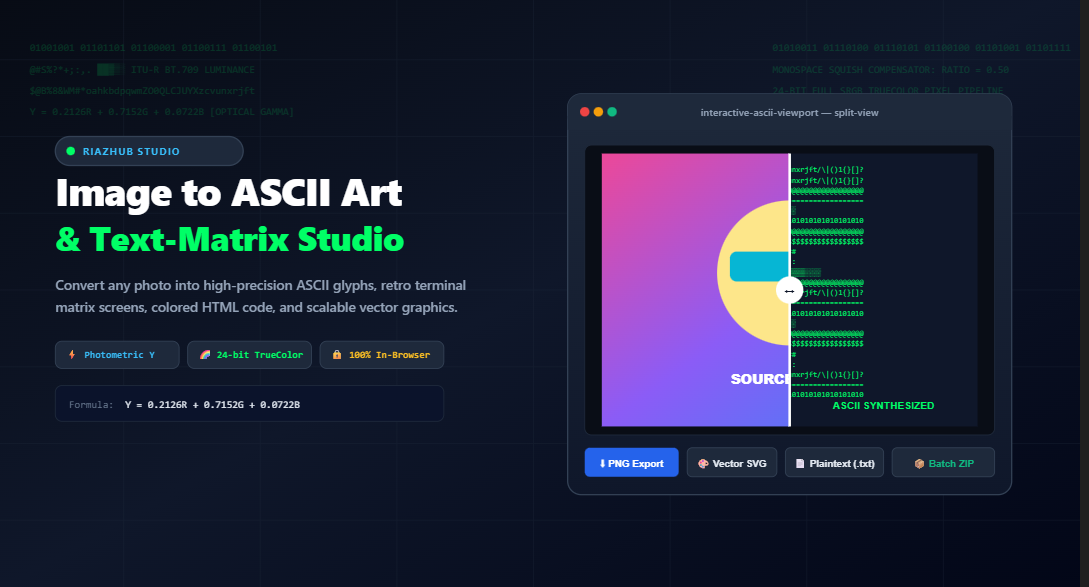
- Inspect with Split-Screen: Switch to the “↔️ Split Before/After” tab and drag the vertical slider to compare your source image against the synthesized ASCII matrix in real time.
- Export or Copy: Click “Download PNG”, “Download Plaintext”, or “Package as ZIP” to save your artwork immediately.
8. Frequently Asked Questions (FAQ)
▼
getImageData) and JavaScript. No photos, scans, logos, or generated text files are ever transmitted or saved to our servers.▼
▼
<pre> snippet directly into your website’s Custom HTML block.▼
🚀 Transform Your Photos into ASCII Art Today
Experience the ultimate combination of retro computing nostalgia and modern photometric precision on RiazHub.
Universal Image to ASCII Art & Text-Matrix Studio
Transform any photo, logo, or diagram into high-definition ASCII text art, retro terminal glyphs, colored HTML code, and high-resolution vector artwork with client-side photometric luminance precision.
1. Source Image Client-Side Safe
2. Character Matrix Calibration
📚 Monospace Typography, Photometric Luminance & ASCII History
. and :) to dense uppercase structures (such as @, #, and M)—to approximate grayscale tone values across physical paper printouts and phosphorescent CRT screens.
(R + G + B) / 3) creates distorted tonal gradations because the human visual system is far more sensitive to green wavelengths than red or blue. This studio implements the internationally standardized ITU-R BT.709 perceived luminance formula:
Y = 0.2126 × R + 0.7152 × G + 0.0722 × B
By assigning 71.5% weighting to green, 21.3% to red, and 7.2% to blue, our synthesis engine accurately replicates human optical perception, delivering natural shadow depth and smooth highlight transitions across photographic portraits.
Our synthesis engine calculates downsample dimensions using a vertical squish ratio:
Rows = Round((Height / Width) × Columns × SquishRatio)
Adjusting this ratio (default
0.50) perfectly compensates for differences across fonts like Consolas, Courier New, and Fira Code, preserving exact geometric circularity.
getImageData(), luminance normalization, contrast modulation, and file synthesis (PNG, TXT, SVG, and ZIP) are executed entirely inside your web browser using HTML5 Canvas and native JavaScript. Zero images, personal documents, or generated graphics are ever uploaded or transmitted to any remote server.